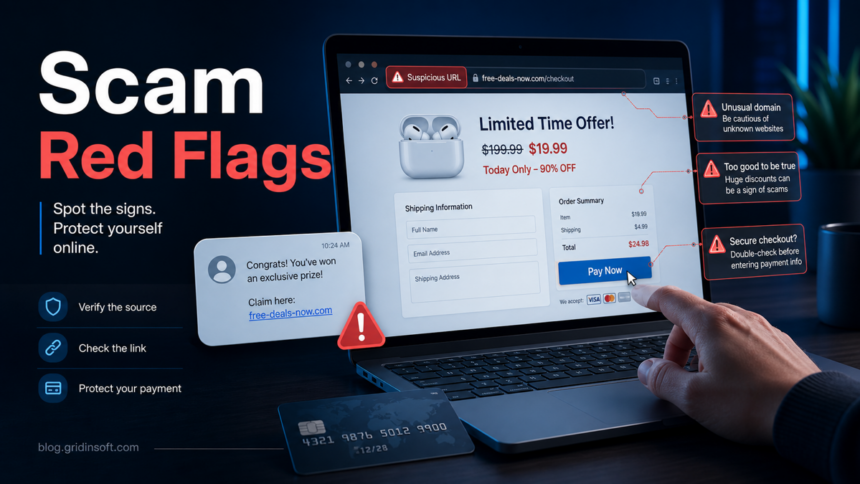
Most online scams leave the same warning signs: a message or website creates urgency, promises a prize or huge discount, asks for payment in an unusual way, hides who is behind it, or pushes you to click before you can verify the source. If a deal, job, support alert, crypto offer, or account warning makes you feel rushed, stop and check the link, sender, payment method, and contact details before entering passwords or card data. When the suspicious part is the page itself, use our scam website checklist before you pay or sign in; when a one-dollar trial can become a recurring charge, compare it with the Scavenger.ai subscription-trap warning.
Streaming pages are a common place to see several of these red flags at once; our free movie streaming site scams guide breaks down fake Play buttons, card checks, and cleanup steps.
12 Signs of Online Scams
Use this list when you are not sure whether a message, website, ad, or offer is safe. A single red flag is enough to pause; several together usually mean you are looking at a scam.
A fake government compensation email is a good example: our Internet Fraudsters Arrested scam breakdown shows how surprise money, authority pressure, private contacts, and bogus fees appear in one message.
| Red flag | What it usually means |
|---|---|
| Huge discount, prize, refund, compensation, job, or investment return | The offer is designed to override normal caution. Real companies rarely need a countdown, secret winner notice, or guaranteed profit claim. |
| Pressure to act now | Scammers want you to pay, click, or share data before you ask someone else or check the official site. |
| Payment by crypto, gift card, wire, payment app, or prepaid code | These methods are hard to reverse and are a classic scam signal, especially when the seller refuses normal card or platform payment. |
| Unexpected account, delivery, tax, support, or antivirus warning | The message may be impersonating a known brand to steal logins, remote-access permission, or money. |
| Link does not match the claimed company | Shortened URLs, look-alike domains, misspellings, and random subdomains are common in phishing and fake-store pages. |
| Only positive reviews or fake social buttons | The site may be a template with copied reviews and non-working social proof. |
| No real address, company registration, refund policy, or support channel | The operator may be disposable and impossible to contact after payment. |
| Request for passwords, one-time codes, seed phrases, SSN, or ID photos | Legitimate support teams should not ask for passwords, wallet recovery phrases, or MFA codes. |
| Download or browser extension required to claim something | The scam may switch from fraud to malware, adware, credential theft, or remote-access abuse. A fake DocuSign Legal Department Document email, for example, uses a signature request to push an ISO and disguised executable. |
| Remote-access app requested by support | Fake support scams use remote access to show false problems, steal data, or pressure payment. |
| Crypto wallet connection requested for a giveaway or airdrop | Wallet-drainer pages can use malicious contracts to steal funds after you approve a transaction. |
| The story changes when you hesitate | Extra fees, verification steps, taxes, upgrades, or threats often appear after the first payment or form submission. |
How to Check a Suspicious Website or Message
- Do not use the link in the message. Open a new tab and type the official domain yourself, or use a saved bookmark.
- Compare the domain carefully. Look for extra words, misspellings, strange country domains, or a domain that has nothing to do with the brand.
- Search the exact domain and offer text. Add words such as scam, complaint, refund, or review.
- Check the page with a reputation tool. Gridinsoft’s website reputation checker can help you inspect suspicious domains before you enter data.
- Verify payment and contact details. Do not trust a shop, job recruiter, support agent, or crypto platform that cannot provide normal support channels and legal business details.
- Ask what happens if you wait. A real company will usually let you check. A scammer will escalate pressure.
Fake Online Stores
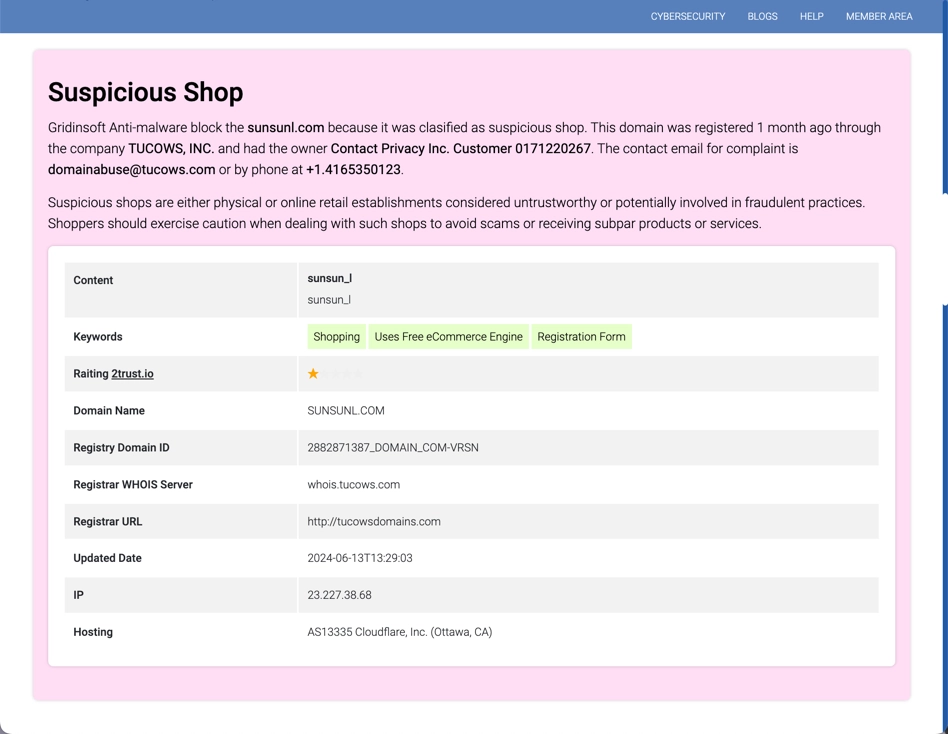
Fake online stores are one of the easiest online scams to recognize once you know the pattern. The site offers popular products at unrealistic prices, uses copied product photos, shows a countdown timer, and pushes checkout before you can verify the seller. In the worst case, nothing ships. In a softer version, the buyer receives a cheap counterfeit or unrelated item.
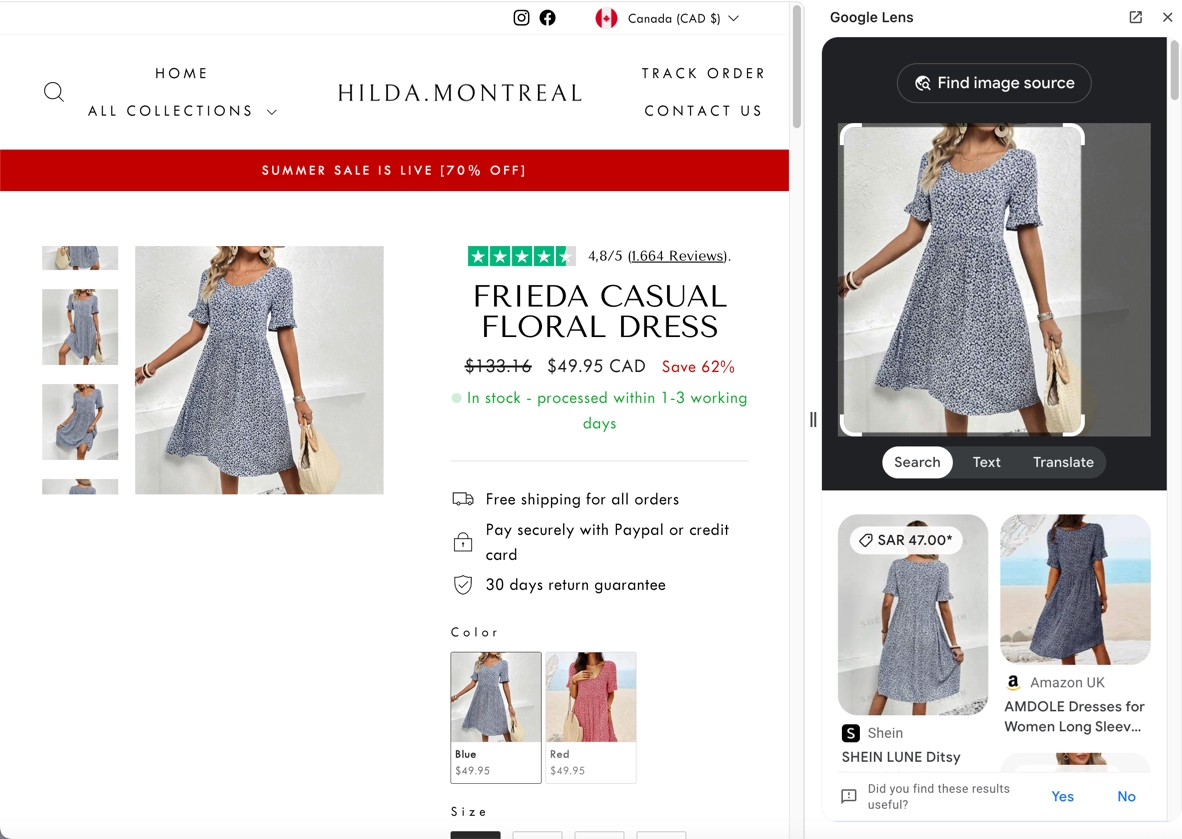
Common fake-shop signs include discounts of 50-95%, countdowns that reset after refresh, vague About Us pages, copied reviews, missing company details, and social-media buttons that do not lead to real profiles. The same pressure-and-discount tactic also appears in social-media recharge scams, including fake cheap TikTok Coins pages.
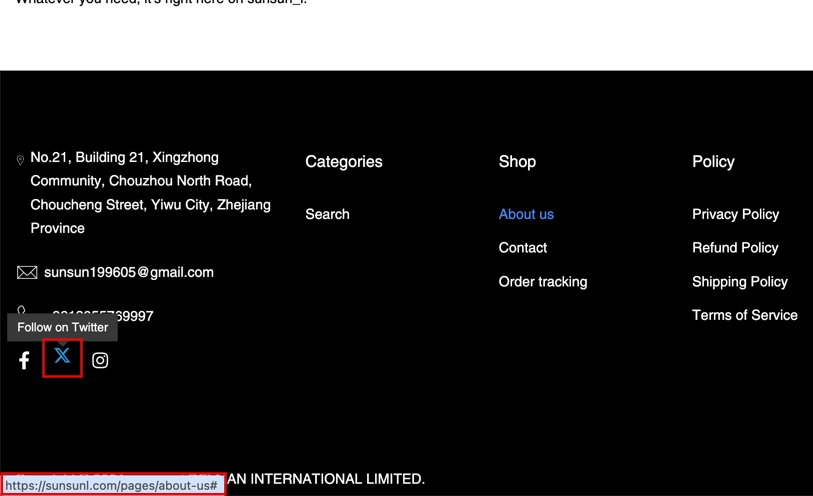
If you already paid a fake store, contact your bank or card issuer quickly, save screenshots of the order page and transaction, block or replace the card if needed, and watch for follow-up phishing. If you entered a password you use elsewhere, change it on every reused account.
Phishing and Account Scams
Phishing scams imitate a bank, Microsoft, Apple, Amazon, PayPal, delivery company, social network, or employer to steal passwords and one-time codes. The page may look professional, and modern phishing messages do not always contain obvious spelling mistakes. Use our phishing scam prevention checklist when a message asks you to click, scan, call, download, or verify an account before you can check the real source. For a faster red-flag view, use the phishing scam signs checklist. CISA also warns that phishing can arrive through email, text, direct message, social media, or phone calls [3].
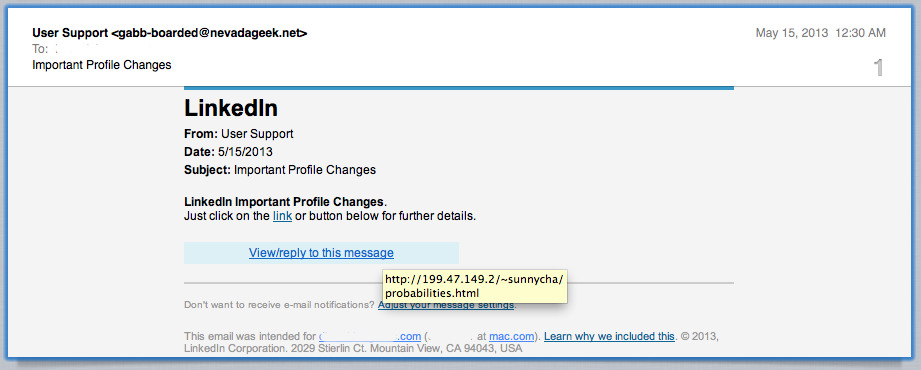
Do not enter a password from a link in an unexpected message. Go to the official site directly, check recent login activity, change the password if you entered it, enable two-factor authentication, and remove suspicious sessions. If a phishing page asked you to download a file or install a browser extension, run a security scan as well.
Scammers also reuse breach headlines to create fake lookup pages. If a page claims it can check an adult-platform leak, see our OnlyFans leak checker scam guide before entering an email or downloading any viewer.
A current example is the network of AI subscription sites using genuine Google sign-in: authentic authentication can coexist with an unverified seller. Check the merchant separately before paying, and do not mistake disconnecting Google for canceling a subscription.
Crypto, Investment, and Recovery Scams
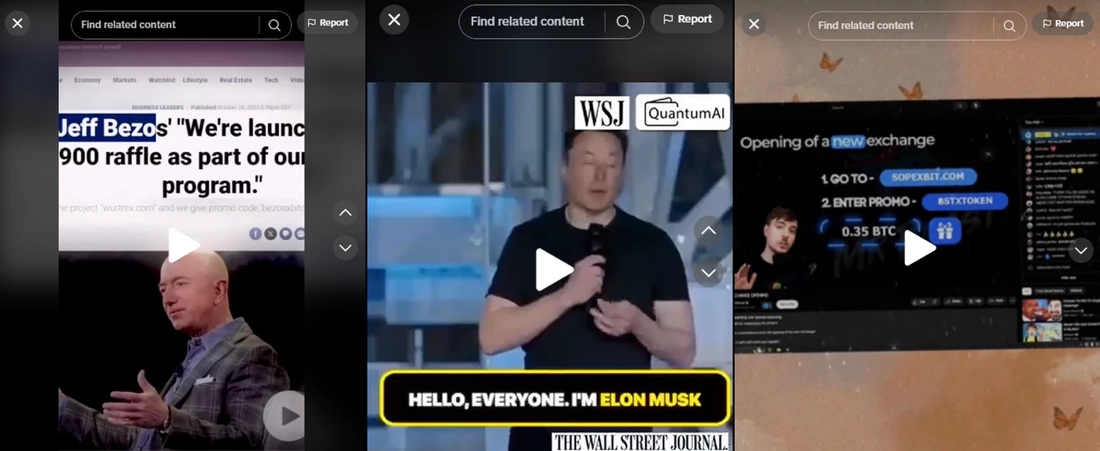
Crypto scams usually promise fast profit, celebrity-backed giveaways, airdrops, trading bots, wallet recovery, or guaranteed returns. Some pages ask you to deposit a small amount before withdrawal; others ask you to connect a wallet and approve a transaction. In wallet-drainer scams, that approval can be the dangerous step.
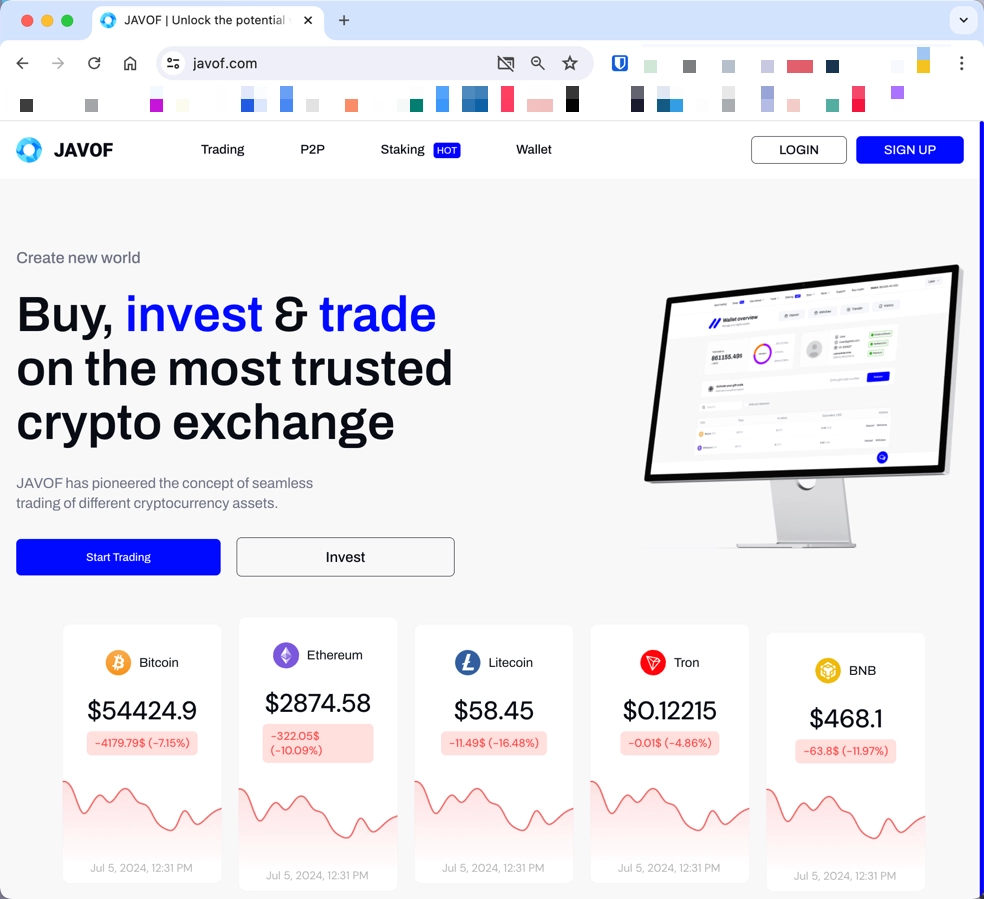 Fake website
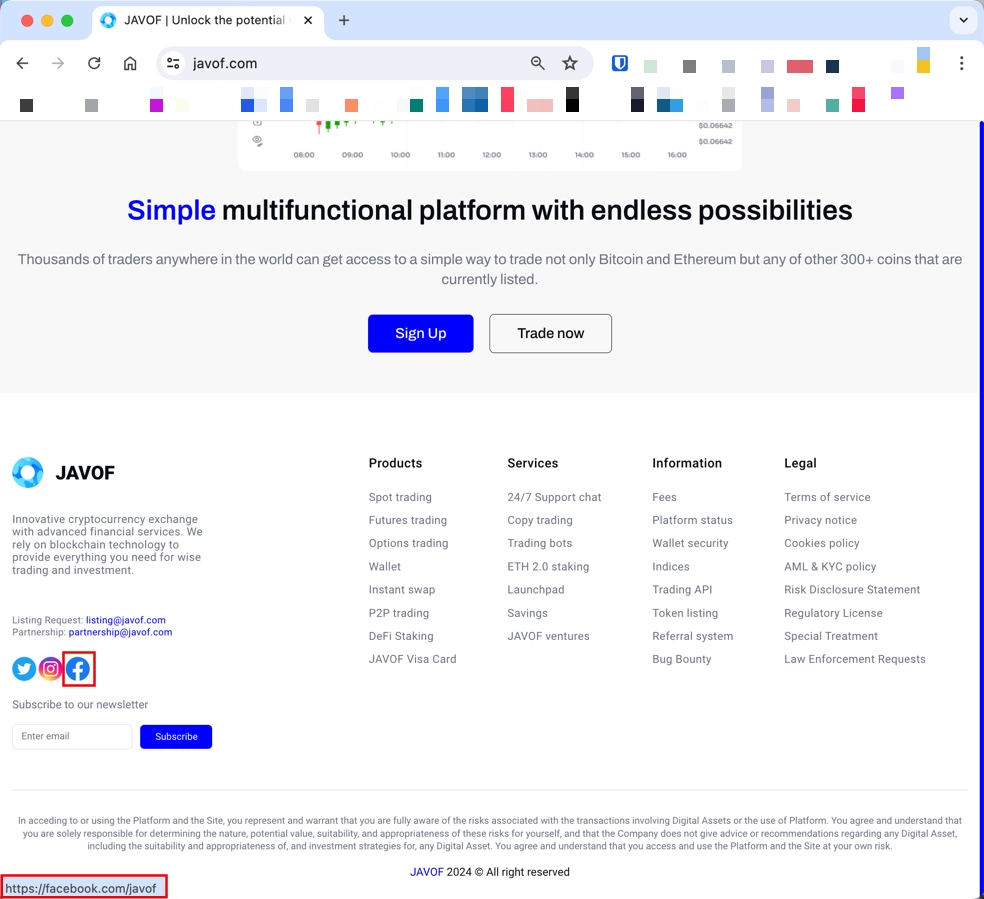 Social Media buttons on the fake website
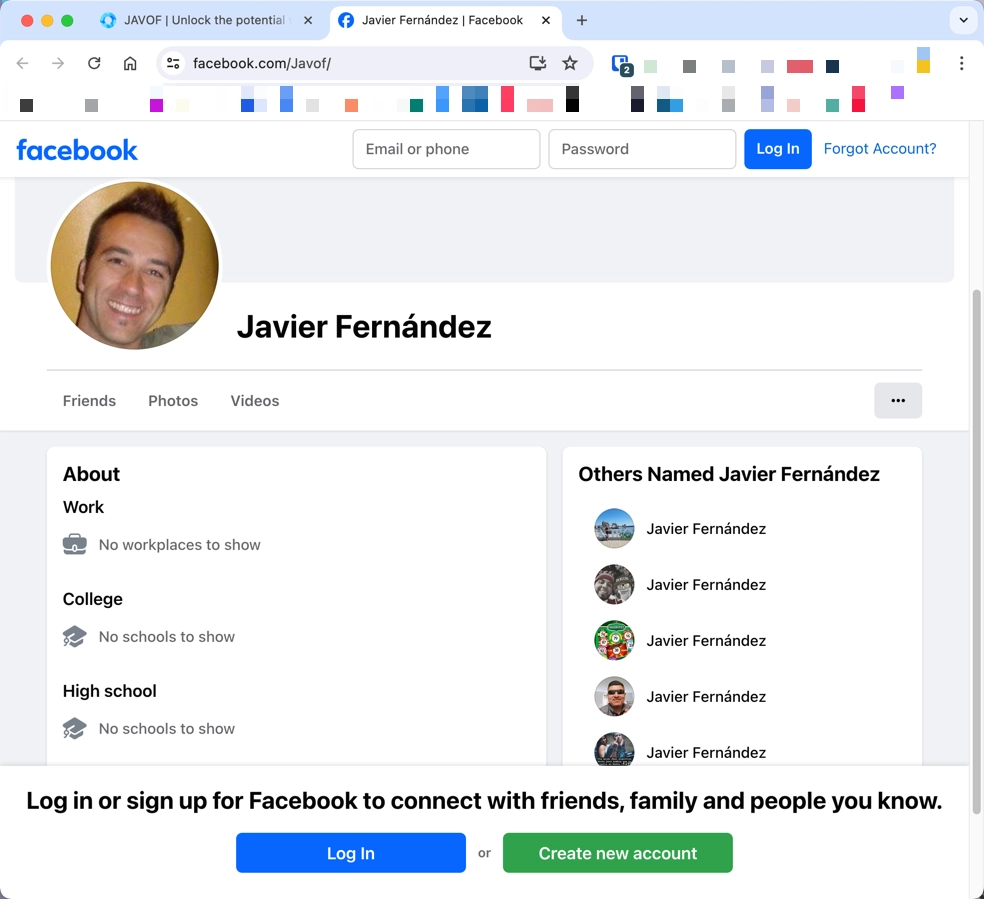 An average guy, that has no idea that the link to their profile is on a fraudulent site
The strongest warning sign is a payment or wallet action that you cannot reverse. If someone says you must pay a tax, unlock fee, verification fee, recovery fee, or upgrade fee before receiving money, assume the platform is hostile until proven otherwise. For stolen-crypto follow-up, use the safer steps in our cryptocurrency recovery scams guide.
Fake Job and Task Scams
Fake job scams target people looking for remote work, quick side income, or flexible online tasks. The scammer may offer a simple task platform, a recruiter chat, a work-from-home form, or a training portal. Early steps may look harmless, but the flow often ends with a fee, a crypto deposit, a request for identity documents, or a fake withdrawal problem.
Legitimate employers do not ask new hires to pay for document processing, upgrade a task level with personal funds, or move the conversation to a private crypto-payment flow. Be careful with any recruiter who avoids a company email address, refuses a normal interview process, or asks for SSN, ITIN, passport photos, or bank details before a verified offer.
If you sent identity documents, treat it as an identity-theft risk, not only a job scam. Save the conversation, report the account on the platform, contact the relevant bank or service, and monitor for new-account fraud.
What to Do If You Clicked, Paid, or Entered Data
- Stop communicating with the scammer. Do not pay a second fee to fix the first problem.
- Save evidence. Keep screenshots, URLs, emails, transaction IDs, wallet addresses, phone numbers, and chat handles.
- Contact the payment provider quickly. Banks, card issuers, payment apps, and exchanges may have narrow windows for blocking or disputing a transaction.
- Change exposed passwords. Start with email, banking, payment, social, and cloud accounts. Do not reuse the old password.
- If the scam started with a suspicious browser page, follow our what to do after clicking a phishing link guide before testing the link again.
- Revoke sessions and add 2FA. Check account login activity and remove devices you do not recognize.
- Scan the device if a file, extension, or remote-access app was involved. This is especially important after fake support, fake antivirus, fake job, and phishing-download incidents.
- Report the scam. In the U.S., FTC ReportFraud and the FBI IC3 are useful reporting paths for fraud and internet crime [2] [4].
For a current reward-page case, see BoxGifted.com, where a new domain and a high-value gift card promise create a strong scam-risk pattern.
FAQ
What is the most common sign of an online scam?
The most common sign is pressure: the message says you must act now, pay now, verify now, or claim a reward before it disappears. FTC guidance groups urgency, impersonation, prizes or problems, and unusual payment methods among core scam signs [1].
Can a website be a scam if it uses HTTPS?
Yes. HTTPS only means the connection is encrypted. It does not prove the seller, recruiter, support page, or crypto platform is legitimate. Always check the domain, company details, payment method, and reputation.
Should I trust a message if it comes from a known brand name?
No. Sender names, caller ID, display names, logos, and copied page designs can be faked. Visit the official site directly instead of using the link in the message.
Is bad grammar still a reliable scam sign?
Bad grammar is still suspicious, but it is no longer enough. AI-written phishing and polished templates can look clean, so check the link, request, payment method, and pressure tactics too.
When should I run a malware scan after a scam?
Run a scan if you downloaded a file, installed an extension, allowed remote access, clicked a fake antivirus alert, or noticed browser redirects, pop-ups, unknown apps, or suspicious login activity after the scam.
Scam guides by theme
Scams change names quickly, but the patterns repeat: fake invoices, fake support, fake account locks, fake refunds, fake stores, and fake crypto or messenger offers.
- Fake antivirus and support: McAfee pop-ups, McAfee scam email, McAfee subscription payment failed, fake virus alerts, fake Norton invoice refund scam
- Microsoft scams: Microsoft account locked, Microsoft security warning scam, Microsoft email scam
- Shopping and payment: Amazon scams, Amazon phishing email, PayPal scams, spam email risks
- Messenger and SMS: Telegram scams, fake Interac SMS scam, spam text messages
- Extortion emails: professional hacker email scam, we hacked your system email scam, correct password email scam
References
- Federal Trade Commission. “How To Avoid a Scam.” FTC Consumer Advice, July 2023, accessed June 1, 2026. https://consumer.ftc.gov/articles/how-avoid-scam
- Federal Trade Commission. “What To Do if You Were Scammed.” FTC Consumer Advice, accessed June 1, 2026. https://consumer.ftc.gov/articles/what-do-if-you-were-scammed
- Cybersecurity and Infrastructure Security Agency. “Avoiding Social Engineering and Phishing Attacks.” CISA, accessed June 1, 2026. https://www.cisa.gov/news-events/news/avoiding-social-engineering-and-phishing-attacks
- Federal Bureau of Investigation. “Internet Crime Complaint Center (IC3).” FBI, accessed June 1, 2026. https://www.ic3.gov/