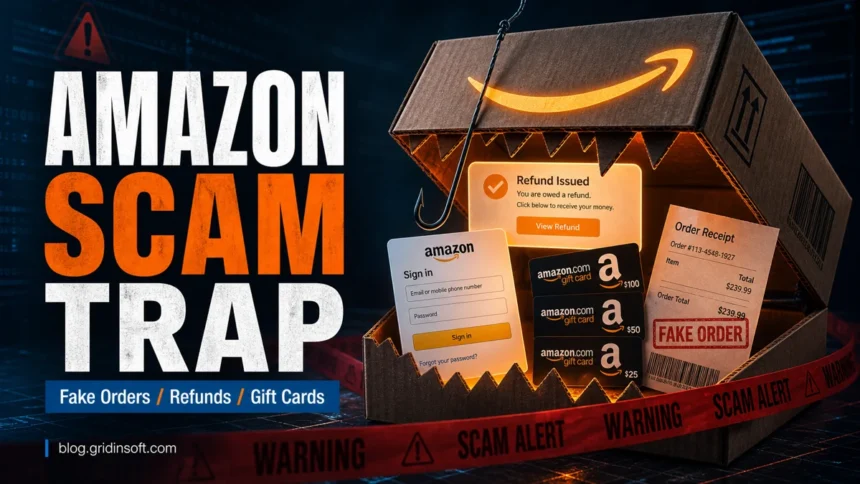
Amazon scams usually start with a message, call, ad, or fake page that pretends something urgent happened to your order, refund, Prime membership, gift card balance, delivery, or account security. Do not use the link, phone number, QR code, or attachment from the message. Open Amazon from the app or by typing the address yourself, then check Your Orders, Message Center, Prime membership, payment methods, and account alerts there.
How do I avoid Amazon scams?
- Verify orders, refunds, recalls, Prime renewals, and account alerts only inside Amazon directly.
- Do not call phone numbers from suspicious Amazon emails, texts, pop-ups, or ads.
- Never pay an Amazon problem with gift cards, crypto, wire transfer, remote-access apps, or off-platform payment links.
- Do not share one-time passwords, security codes, gift card claim codes, or full card details with a caller.
- If you clicked, paid, installed remote access, or typed a password, use the recovery steps below before you keep shopping.
Common Amazon scams
| Scam | What it wants | Safe check |
| Fake order confirmation | Panic login, phone call, or remote access | Open Your Orders in Amazon directly |
| Refund or recall text | Amazon login, card details, or personal data | Check the order, recall, and message inside the app |
| Prime renewal warning | Password, card data, or fake support call | Review membership from your account page |
| Gift card request | Irreversible payment through claim codes | Stop; Amazon will not fix account issues this way |
| Fake Amazon support call | Remote access, bank transfer, or security codes | Hang up and use Amazon Help from the app/site |
| Fake Amazon deal site | Card theft, counterfeit goods, or malware | Shop through Amazon or the trusted brand site |
| Unexpected package or QR code | Fake review abuse, phishing, or a malicious QR link | Do not scan unknown QR codes; report the package through Amazon |
The pattern is the same even when the story changes: a scammer creates pressure, sends you away from the real Amazon app or website, and asks for information or payment that Amazon would not need in that channel.
Warning signs of an Amazon scam
- The message says you must act now to cancel a charge, claim a refund, unlock an account, or prevent a Prime renewal.
- The order number, refund, recall, or account alert does not appear inside your Amazon account.
- The sender address, link preview, or landing page is not a real Amazon domain, or it uses a look-alike spelling.
- The caller asks you to install AnyDesk, TeamViewer, Chrome Remote Desktop, or another remote-access tool.
- You are asked for a one-time password, gift card claim code, full card number, bank transfer, crypto payment, or payment outside Amazon.
- A text or email uses a QR code, shortened link, attachment, or fake invoice to move you away from the normal Amazon flow.
- A social media ad or search result sends you to a store that looks like Amazon but uses a different checkout or domain.
Which Amazon scam are you seeing?
Fake order or expensive purchase alert
This scam claims someone bought an iPhone, laptop, gift card, or other expensive item on your account. The message usually pushes you to call a support number or click to cancel. Do not call it. Open Amazon directly, check Your Orders and Archived Orders, then check your card statement from the bank or card issuer.
Refund or product recall text
Refund texts often say a seller was closed, a product failed inspection, or an item was recalled and you can get money back without returning anything. Treat that as suspicious unless the same issue appears inside Amazon directly. If there is no matching order, message, or recall notice in your account, delete the text.
Prime renewal or account locked warning
These messages work because Prime renewals and account security warnings feel routine. Check the membership and security page yourself instead of using the message link. If the page asks you to re-enter card data after a suspicious link, close it and navigate manually.
Gift card and refund overpayment requests
Amazon gift cards are for shopping, not for fixing an account, reversing a charge, helping support, paying taxes, or sending a refund back. If someone asks for the claim code on the back of a card, it is a scam. Keep the card, receipt, and screenshots, then contact the card issuer or Amazon gift card support quickly.
Fake support call or remote-access session
A fake support agent may say your account is hacked, your bank is unsafe, or your device must be checked. The dangerous moment is when they ask to see your screen, install remote access, open banking pages, or move money to a “safe” account. Hang up, disconnect remote access, and continue from a different clean device.
Brushing, fake package, or QR code in a package
If you receive an item you did not order, first ask family members and check whether it was a gift. Do not scan an unknown QR code or visit a printed link to “claim” support, a warranty, or a reward. Record the tracking ID and report the package from Amazon directly.
What to do if you clicked an Amazon scam
- If you only opened the page: close it, do not enter anything, and avoid downloading files from the page.
- If you typed your Amazon password: change the password from Amazon directly, enable two-step verification, and sign out of unknown sessions.
- If you reused that password elsewhere: change it on email, banking, PayPal, marketplace, and password-manager accounts too.
- If you entered card details: contact the card issuer, ask about replacement and charge monitoring, then remove suspicious payment methods from Amazon.
- If you shared a one-time code: change your password immediately and review account security, orders, addresses, archived orders, gift card balance, and linked devices.
- If you bought or shared gift cards: keep receipts and card numbers, contact the gift card issuer fast, and report the fraud.
- If a caller accessed your computer: disconnect from the internet, uninstall remote-access tools, scan the device, and change passwords from a separate trusted device.
- If you downloaded a file: do not open it again; scan the file or device with a trusted security tool before continuing.
If the scam involved a suspicious link or downloaded file, you can check the URL with the Gridinsoft URL scanner and scan the device before using Amazon, email, or banking again.
How to report an Amazon scam
- Use Amazon’s official reporting form or forward suspicious Amazon-looking emails to [email protected].
- Forward scam texts to 7726 or use your phone’s report-junk option, then delete the message.
- Report money loss, gift card fraud, or identity-theft risk to the FTC at ReportFraud.ftc.gov.
- If you lost payment card data, call the bank or card issuer before waiting for Amazon support.
A fresh exact-domain example is BoxGifted.com, which uses an Amazon Rewards Program-style 0 gift card lure outside Amazon-owned pages.
FAQ
Does Amazon send refund text messages?
Amazon may send some notifications, but a refund or recall text should still be checked inside the Amazon app or website. Do not use the link from the text to sign in or claim money.
Can Amazon ask for gift cards to fix an account problem?
No. Gift cards are a common scam payment method. Do not send gift card claim codes to anyone who says they can fix an Amazon order, refund, account lock, support case, tax issue, or bank problem.
What should I do if a fake Amazon caller accessed my computer?
End the session, disconnect the device, remove the remote-access tool, scan for malware, change passwords from another device, and contact your bank if financial pages or card details were exposed.
Is an Amazon order confirmation fake if I do not recognize the item?
Not always, but you should verify it without the message link. Open Amazon directly and check Your Orders, Archived Orders, addresses, payment methods, and household accounts.
References
- Amazon Web Services, Report Suspicious Emails, accessed June 7, 2026.
- FTC Consumer Advice, Scammy texts offering refunds for Amazon purchases, July 24, 2025, accessed June 7, 2026.
- FTC Consumer Advice, Avoiding and Reporting Gift Card Scams, accessed June 7, 2026.
Related scam guides