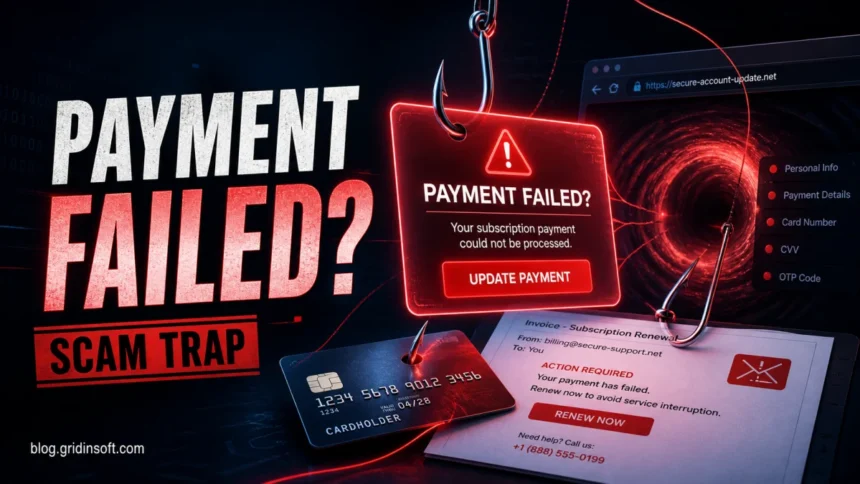
The McAfee Subscription Payment Failed message is usually a scam when it appears as a browser pop-up, push notification, unexpected email, banner ad, or invoice with a phone number. Do not click the “Update payment” button, do not call the number in the message, and do not enter card details from that link. If you really use McAfee, open McAfee’s official website or app yourself and check the subscription from your account.
This scam works because a payment problem feels urgent and routine at the same time. Victims search for it after seeing a red warning, a renewal invoice, a Chrome notification, or an email saying a card was declined. The right response depends on where you saw it and whether you clicked anything.
Is the McAfee Subscription Payment Failed alert real?
Treat it as fake unless you verified it from your McAfee account, not from the message. McAfee’s own scam-awareness guidance says suspicious McAfee-branded emails can be reported to [email protected], and it warns that McAfee will not require you to call a phone number from an email or text message.[1]
| Where you saw it | What it usually means |
|---|---|
| Browser pop-up or website banner | A rogue ad, compromised page, fake scan page, or notification-permission abuse. Close the tab and remove suspicious site notifications. |
| Email invoice or renewal notice | A phishing, refund, or fake support scam. Do not call the listed number or open attached files. |
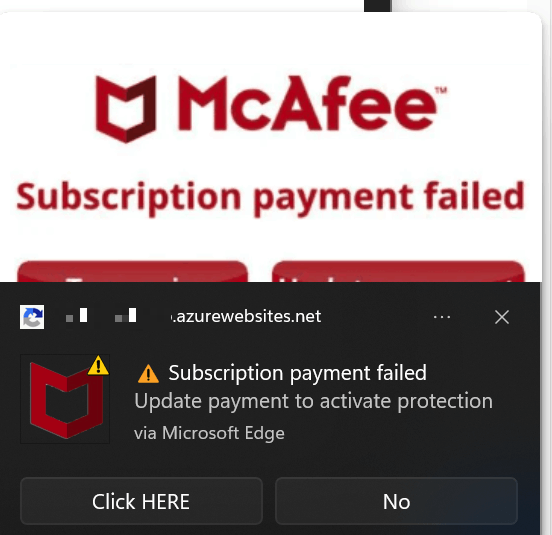
| Windows notification from Chrome/Edge | A website was allowed to send notifications. It is not proof that McAfee is installed or that the PC is infected. |
| Message inside your real McAfee account | Possibly legitimate. Verify by typing the McAfee address yourself or using the official app, not by following message links. |
What the scam tries to make you do
Most versions push one of four outcomes:
- Enter card details on a cloned payment form or a page that looks like a renewal portal.
- Call fake support so the scammer can request remote access, a refund “verification,” or a payment reversal code.
- Install unwanted software after the page claims your protection is off or your computer is infected.
- Allow browser notifications so the same fake payment and virus alerts keep returning even after you close the page.
The broader scam economy has grown sharply. In 2025, FTC testimony reported 3 million fraud reports and $15.9 billion in reported consumer losses, with imposter scams remaining the most frequently reported fraud type.[2] The FBI’s 2025 IC3 report also recorded more than one million complaints and losses exceeding $20 billion across internet crime reports.[3] A fake antivirus billing alert fits that pattern: trusted brand, urgent action, payment friction, and a fast path to money or credentials.
Email version: invoice, refund, or failed renewal
The email version often says your subscription renewed, failed, expired, or generated a large charge. Some messages include a PDF invoice or a phone number for “billing support.” Others say the payment failed and ask you to update card details before protection stops.
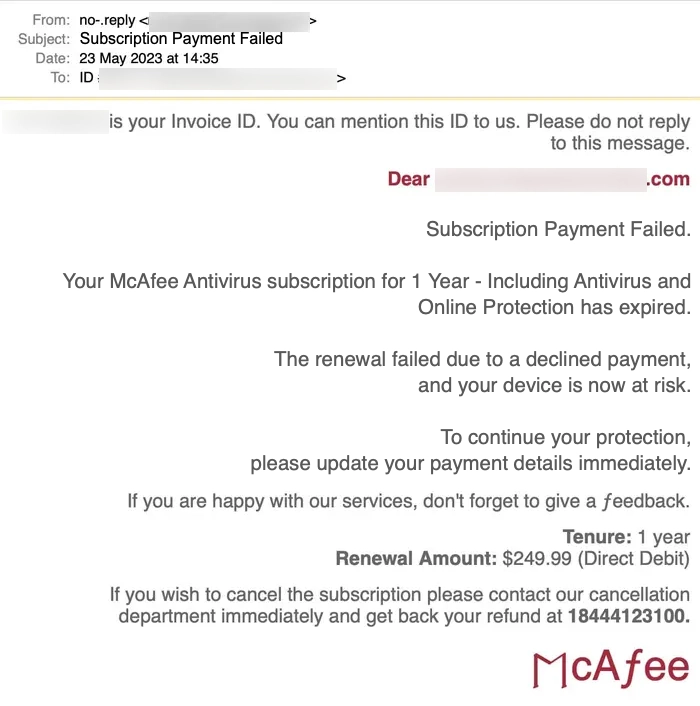
If the message is an email, use our focused McAfee scam email guide for sender-domain checks and examples. For this page, the practical rule is simple: do not use the sender’s phone number, link, QR code, or attachment. Open the real account separately, search your bank statement yourself, and report the suspicious email if it impersonates McAfee.
Unnamed antivirus payment declined emails
Some current lures avoid a brand name and use generic billing pressure such as Your Antivirus Payment Was Declined, Payment Failed (3/3), Update Billing, or Secure My Account Now. Fake account IDs, reference IDs, “privacy protection” badges, and repeated final-attempt wording are pressure cues, not proof that an antivirus subscription exists.
If the email names Norton instead of McAfee, use the Norton Subscription Payment Has Failed scam guide. If you already followed a billing link, the safer recovery flow is the same as for other phishing links: close the page, do not submit more data, check the vendor account from a clean path, and contact the card issuer if payment details were entered.
Pop-up version: why it keeps coming back
If the alert appears in the lower corner of the screen or inside Chrome, Edge, Firefox, or Safari, it is often caused by site notifications. At some point, a page may have asked to “Allow” notifications before showing a video, file, or fake scan. After that, the site can send alerts that look like system warnings.
- Close the scam tab. Do not press “Update payment,” “Renew,” “Scan,” “Continue,” or “Allow.”
- Remove suspicious notifications. In Chrome or Edge, open browser settings, search for
Notifications, and remove unknown sites from the allowed list. - Clear recent site data for the suspicious domain if alerts keep returning.
- Check extensions. Remove extensions you did not install intentionally, especially coupon, search, PDF, video, or “security” add-ons.
- Scan the device if the pop-up opened a download, installed software, changed your search engine, or keeps returning after notification cleanup.
For a deeper browser-by-browser cleanup flow, use the McAfee pop-ups removal guide. If the alert looks more like a fake virus scan than a billing notice, our fake virus alert guide explains the same scareware pattern.
What to do if you clicked it
Clicking once is not the same as losing money, but it does change what you should check next.
- You only opened the page: close it, do not allow notifications, and clear that site’s data.
- You entered a password: change the McAfee account password from the real site, and change any reused passwords.
- You entered card details: call the card issuer using the number on the card, ask about blocking or replacing the card, and watch for small test charges.
- You called the phone number: assume it was a tech support scam. If you gave remote access, disconnect the device from the internet and scan from a trusted environment.
- You installed a file: uninstall unknown apps, check browser extensions and startup entries, then run a full security scan.
After uninstalling the suspicious app or deleting the visible threat, use Gridinsoft Anti-Malware to check hidden files, startup entries, scheduled tasks, bundled apps, browser changes, and other persistence points that can restore malware.
Download Anti-MalwareHow to verify a real McAfee billing issue safely
A real billing problem should be checked from a clean path, not from the warning. Type the official McAfee address yourself, use a bookmark you already trust, or open the official app. Then check subscriptions, payment status, renewal date, and support options from inside the account.
Do not rely on a sender display name, logo, countdown timer, or “secure” padlock alone. Scammers can copy brand visuals, use HTTPS on fake domains, and buy ads for pages that look close enough when someone is worried. If the email says you owe money but your account and bank statement show nothing, it is almost certainly a lure.
Search intent: what victims are really asking
People who search for this alert usually do not want a generic definition. They want to know which branch applies to them:
- “I do not use McAfee. Why did I get this?”
- “Is this payment failed email real?”
- “I clicked update payment. Am I infected?”
- “How do I stop McAfee payment failed Chrome notifications?”
- “I entered my card. Can scammers charge me?”
- “Why does this pop-up come back after I close it?”
The answer is different for each case, so the safest order is: verify the account separately, remove notification permissions, protect payment methods if details were shared, and scan only when a download, extension, remote-access session, or persistent browser change happened.
FAQ
What if the email says Your Antivirus Payment Was Declined?
Treat it as the same payment-declined phishing pattern, especially if the message says Payment Failed (3/3), shows fake reference numbers, or pushes Update Billing and Secure My Account Now buttons. Open the antivirus account yourself instead of using the email button.
Is McAfee Subscription Payment Failed always fake?
As a browser pop-up, push notification, unsolicited email, or ad, it should be treated as fake. A real billing issue should be visible when you sign in to the official McAfee account through a path you opened yourself.
Can this pop-up appear if I never had McAfee?
Yes. The scam is shown to anyone the ad or notification network reaches. It does not prove that McAfee is installed, that you have a subscription, or that your card was charged.
Why do McAfee payment failed notifications keep appearing in Chrome?
Usually because a website has notification permission. Remove unknown sites from the browser notification allow list, clear the suspicious site’s data, and check extensions if alerts continue.
Should I call the number in the email or invoice?
No. Fake billing and refund scams often use phone numbers to move victims into remote-access or payment-verification traps. Use support contacts from the official site only.
Do I need to scan my computer?
Scan if you downloaded a file, installed an extension, allowed remote access, see browser changes, or cannot stop the alerts after removing notification permissions. If you only viewed the message and closed it, focus first on browser cleanup and account verification.
References
- McAfee. “How to recognize McAfee scam emails and fake popups.” McAfee Customer Scam Awareness, accessed June 7, 2026. https://www.mcafee.com/en-us/cyber-scam/customer-scam-awareness.html
- Federal Trade Commission. “Prepared Statement of the Federal Trade Commission: The Rising Scam Economy.” FTC testimony before the Joint Economic Committee, March 2026, accessed June 7, 2026. https://search.ftc.gov/system/files/ftc_gov/pdf/ftc-testimony-jec-hearing-on-the-rising-scam-economy.pdf
- Federal Bureau of Investigation. “2025 Internet Crime Report.” Internet Crime Complaint Center, 2026, accessed June 7, 2026. https://www.fbi.gov/file-repository/2025_ic3report.pdf