A Crypto.com phishing email can claim a new bank account was added or demand urgent identity verification. Do not use its button or continue with a follow-up caller. Open the Crypto.com app independently and check whether the claimed change actually happened. In its July 31, 2026 warning, Crypto.com described targeted industry-wide phishing attempts; that dated case is context for this guide, not evidence of a newly confirmed campaign today.
If you enabled an Anti-Phishing Code and the message does not contain it, do not use the email button, reply, or continue with a caller. Open the Crypto.com app independently, check account activity and trusted devices, verify the communication channel through Crypto.com Verify, and contact support only through the in-app chat or chat.crypto.com.
What Crypto.com confirmed
Crypto.com’s July 31, 2026 warning gives three useful boundaries. The company says its security communications do not start with an unsolicited phone call, it does not ask users to transfer funds for protection, and legitimate app or exchange emails include the user’s Anti-Phishing Code when that feature is enabled.
The warning does not announce a Crypto.com breach, a SendGrid compromise, or a confirmed victim count. Public users have speculated about how convincing messages reached inboxes, but sender appearance, email authentication results, and a familiar brand name do not establish the source of the campaign. Treat the missing code and the action requested by the message as practical signals; the cited warning does not establish the status of an investigation today.
Is [email protected] a Genuine Sender?
A displayed address such as [email protected] is not enough to authenticate the email. Do not treat this guide as a whitelist or blacklist for that address. Use Crypto.com’s own channel check without following the message’s link:
- Open the official Crypto.com website independently and navigate to Crypto.com Verify.
- Select Email, enter the actual sender address from the message details, and choose Verify.
- If the channel is unrecognized or the result leaves doubt, stop and contact support through the app. Crypto.com’s Help Center documents this procedure.
An official-channel result is not proof that the entire message, its links, or the requested action are safe. Confirm account changes in the app and check your Anti-Phishing Code when enabled. Do not send a password, one-time code, recovery phrase, or transfer to someone who contacted you.
What If You Did Not Request an Email or Code?
Do not approve a sign-in or share a code you did not request, even if your Anti-Phishing Code is present. Check activity in the app; an unsolicited email alone does not prove an attacker logged in. If you have no account, do not create one through the message to investigate. Report the email as phishing and use independently opened official support if it contains personal details or claims an account in your name.
How the fake bank-account email looks
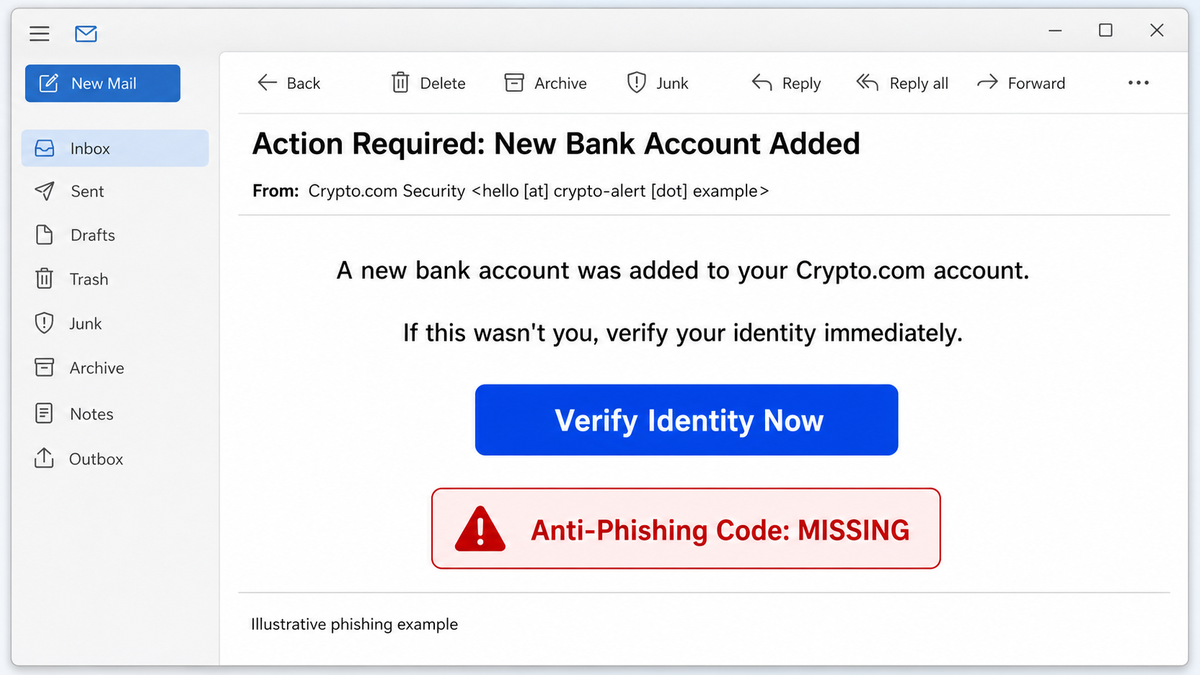
The bank-account lure in the reported case is designed to create an account emergency. It may say that a bank account was added, a login came from an unfamiliar location, or identity verification is required. The message then offers a convenient button, while a caller may add pressure and ask the recipient to open the email, share a verification code, move funds, or follow a recovery process.
Illustrative email wording
Subject: Action Required: New Bank Account Added
From: Crypto.com Security <hello [at] crypto-alert [dot] example>
Body: A new bank account was added to your Crypto.com account. If this was not you, verify your identity immediately.
Button: Verify Identity Now
Warning clue: your enabled Anti-Phishing Code is missing.
This example intentionally uses a non-live sender. A real phishing message can use different wording, sender text, domains, or phone numbers. Do not use one screenshot as a complete blocklist.
Decide what to do by exposure stage
| What happened | Risk and next action |
|---|---|
| You only opened the email | Opening the message alone is not evidence that the Crypto.com account or device was compromised. Do not load the link, report the message, and verify activity in the official app. |
| You clicked but entered nothing | Close the page. Do not return to inspect it. Check the browser download list and permissions, then use the official app to review account activity. |
| You entered a password, passcode, verification code, or recovery information | Contact Crypto.com through the official app immediately, end unknown sessions, change exposed credentials from a trusted device, and secure the connected email account. |
| You approved a sign-in, device, withdrawal address, or transaction | Treat it as account compromise. Ask official support to restrict the account, record the approval or transaction, and revoke any access the app allows you to revoke. |
| You installed an app, file, extension, or remote-support tool | Disconnect the affected device, preserve the filename and source, and perform a malware and remote-access check before using it for password changes. |
| You transferred cryptocurrency or money | Contact Crypto.com and any sending bank or exchange immediately. Preserve wallet addresses and transaction hashes, file a fraud report, and do not pay a “recovery agent.” |
Check a Crypto.com message without using its link
- Stop the conversation. Do not click the email button, reply, call a number from the message, or keep a caller on the line while checking the account.
- Open the app independently. Use the installed Crypto.com app or type the known official address yourself. Review recent activity, security settings, trusted devices, withdrawals, and any account changes.
- Look for your Anti-Phishing Code. Crypto.com says all App and Exchange emails include the code once it is enabled. A missing code is a strong warning. A present code is not permission to ignore an unexpected request; verify the action in the app.
- Verify the channel. Use Crypto.com Verify from a fresh browser or the official app path. Check the actual sender information, not only the display name shown in the inbox.
- Use official support. Start support through the app or type
chat.crypto.comyourself. Do not accept a support route supplied by the suspicious email or caller.
The broader phishing-email checklist explains display-name tricks, urgency, links, and header checks. If you already followed the link, use the clicked-phishing-link decision tree to separate a page visit from credentials, downloads, permissions, and account exposure.
Why the follow-up call is another warning
A caller can make the email feel confirmed, but the two contacts may be parts of the same scam. Crypto.com’s July 31 warning says it will never call users about security issues or ask them to transfer funds. Hang up if the caller asks for a password, one-time code, seed phrase, screen sharing, remote access, a “safe” wallet, or a transfer to protect the account.
Crypto.com also documents an iOS Live In-App Call Warning. When a call claims to be from Crypto.com, the app can display a banner showing that the company is not calling. Use that as one layer, not as a reason to continue an unexpected security call. The safest route is still to end the call and start a new support session through the official app.
The same independent-verification rule applies to patient portals: a familiar logo does not authenticate the message. If an email promises new lab results or a Medicare kit, use the MyChart phishing response for password, download, and card exposure.
Recover after credentials, software, or funds were exposed
- Secure the Crypto.com account through official support. Report the exact time, sender, claimed account change, link, and any approval or transfer.
- Secure the connected email account. Change its password from a trusted device, end unknown sessions, review forwarding rules and recovery methods, and enable strong multifactor authentication.
- Change reused passwords. Start with financial accounts and exchanges. Do not make the replacement password on a device that may have remote-access malware.
- Check the device if anything ran. Review downloads, extensions, installed apps, accessibility permissions, remote-support tools, startup entries, and security alerts. A page visit alone does not require malware claims, but an executed file or installed tool changes the response.
- Preserve transaction evidence. Save transaction hashes, receiving addresses, network, asset, amount, screenshots, and support case numbers. Crypto transfers may be irreversible, but fast reporting can still help an exchange or investigators trace or freeze funds.
- Avoid recovery scams. No stranger can guarantee the return of stolen crypto for an upfront fee, wallet connection, seed phrase, or “verification” payment.
If a suspicious file, extension, or remote-support tool was installed, scan the device before trusting it with replacement credentials. Gridinsoft Anti-Malware can check for malicious downloads, browser changes, startup entries, and remote-access components that an account-only reset would not remove.
If the page or email made you download an invoice, coupon, tracking app, browser extension, or support tool, scan the PC before opening it again or logging into sensitive accounts.
Scan the device after a suspicious downloadFor the larger pattern, Cryptocurrency Scams in 2026 separates exchange impersonation, wallet drainers, fake investments, recovery fraud, and phone pressure.
FAQ
Does a familiar Crypto.com sender prove the email is real?
No. Check the actual channel with Crypto.com Verify, confirm the requested action in the official app, and look for your Anti-Phishing Code if it is enabled. Do not rely on the display name or inbox badge alone.
Can opening the email compromise my Crypto.com account?
The cited warning does not establish account compromise from opening the message alone. Risk increases when a recipient follows the link, enters information, approves an action, installs software, or transfers funds.
Will Crypto.com call about suspicious account activity?
Crypto.com’s July 31 warning says it will not call users about security issues or ask them to transfer funds. End the call and contact support independently through the official app.
References
- Crypto.com. “We Are Seeing an Increase in Targeted Industry-Wide Phishing Attacks.” Official r/Crypto_com announcement, July 31, 2026. July 31, 2026 security warning.
- Crypto.com Help Center. “Crypto.com Verify.” Crypto.com, June 23, 2025, accessed October 20, 2026. official channel-verification guidance.
- Crypto.com Help Center. “All About: Anti-Phishing on Crypto.com App.” Crypto.com, updated July 2026, accessed July 31, 2026. Anti-Phishing Code behavior and setup.
- Crypto.com. “Instantly Spot Impersonation Scams With the Live In-App Call Warning Feature.” Crypto.com Product News, accessed July 31, 2026. in-app call verification guidance.