This page is for fake Microsoft emails and phishing messages. If you are actually blocked while signing in to Outlook, OneDrive, Xbox, Skype, or account.microsoft.com, use the separate Microsoft account locked recovery guide. If you received an “unusual sign-in” or security-code message from [email protected] or [email protected], read this page first, then use the focused Microsoft unusual sign-in email guide for sender-specific checks. If the “lock” appears as a browser pop-up with a phone number, treat it as a support scam.
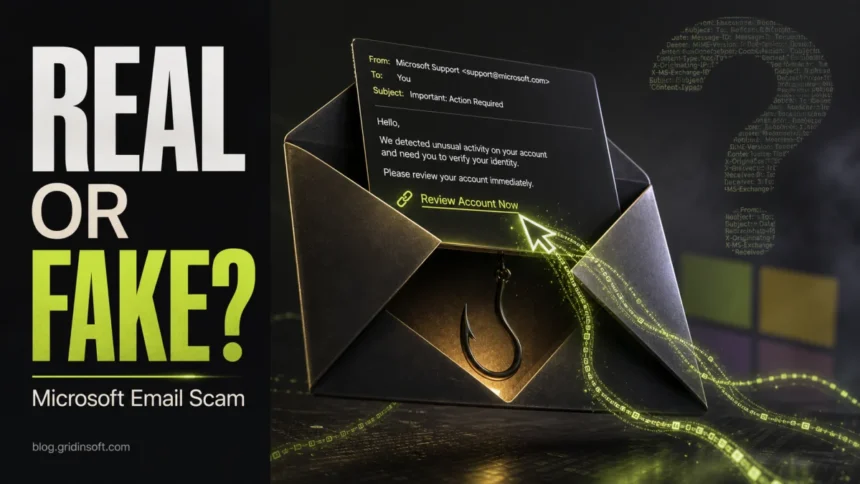
A Microsoft email scam is a phishing message that pretends to come from Microsoft, Outlook, Microsoft 365, OneDrive, Teams, Azure, or the Microsoft account team. The email may say your account is locked, storage is full, a subscription failed, a password will expire, or unusual sign-in activity was detected. The goal is to make you click a link, enter your password, approve a sign-in, or download malware.
How can I tell if an email from Microsoft is genuine?
- Do not click the email link first. Open
account.microsoft.com, Outlook, or Microsoft 365 directly. - Check whether the alert also appears inside your real Microsoft account security page.
- Be suspicious of urgent password, payment, mailbox, or “verify now” messages.
- Inspect the destination link, not just the sender name. Scammers can spoof display names.
- If you entered your password, change it immediately and review recent sign-ins.
Real Microsoft email or scam? The 2026 rule
Do not decide from the visible sender alone. A known Microsoft domain is a useful clue, but the final test is whether the same alert appears after you open the official Microsoft account, Outlook, OneDrive, or Microsoft 365 page yourself. In 2026, public reports also showed abuse of a real Microsoft notification sender, so “the address looks official” is not enough when the message pushes links, QR codes, attachments, payment, or urgent verification.
| What you see | What it may mean | Safe action |
@accountprotection.microsoft.com |
Often used for Microsoft account security notices | Open account.microsoft.com directly and compare recent activity |
[email protected] |
Can be a real Microsoft notification sender, but has been abused in reported spam | Do not follow embedded links; verify from your account or admin portal |
| Microsoft display name with a non-Microsoft link | Likely spoofing or brand impersonation | Report phishing and do not enter credentials |
| QR code, HTML attachment, ZIP file, or “run this command” | Credential theft or malware delivery risk | Close it, scan downloads, and secure the account if you interacted |
What is a Microsoft email scam?
Microsoft email scams abuse a trusted brand. Attackers know that many people use Outlook, Hotmail, OneDrive, Teams, Xbox, Microsoft 365, and Windows accounts every day. A fake Microsoft message can therefore trigger panic quickly, especially when it claims that files, email, payments, or account access are at risk.
| Email theme | What the scam wants | Safe check |
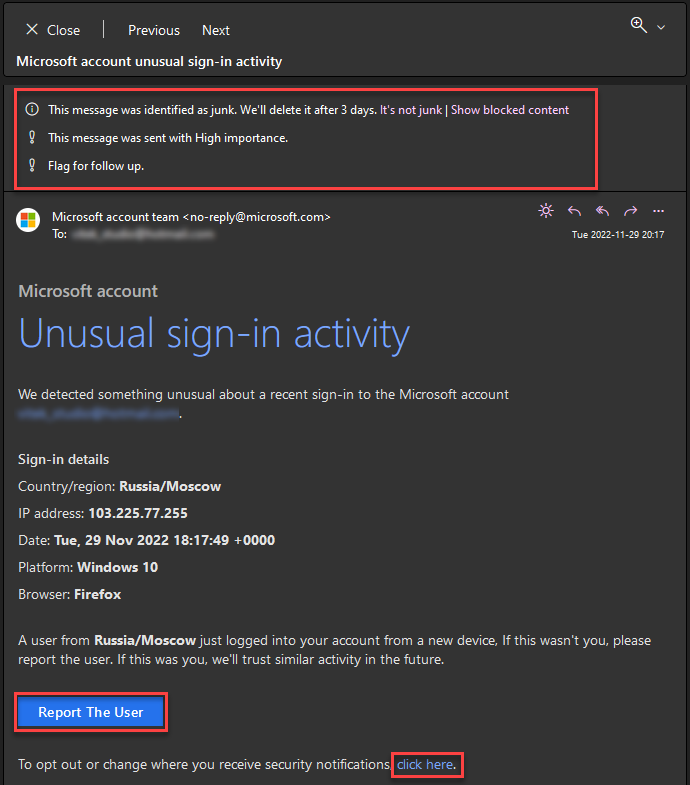
| Unusual sign-in activity | Microsoft password and MFA approval | Open Microsoft account security activity directly |
| Password expires today | Credential capture | Check account settings from the official site |
| Mailbox storage full | Outlook or Microsoft 365 login | Open Outlook directly, not through the email link |
| Invoice or subscription failed | Card details or login | Check Microsoft billing from your account |
| Shared OneDrive document | Password theft or malware download | Confirm with the sender through another channel |
Signs of a fake Microsoft email
- The email creates urgency: “last warning”, “account will be closed”, “action required today”.
- The link points to a non-Microsoft domain, a shortened link, or a login page with a strange address. If it uses Microsoft’s shortener, check the exact aka.ms host and reveal its final destination before trusting the message.
- The message asks for a password, code, payment card, or remote-access session.
- The greeting is generic or the account details do not match your real Microsoft account.
- The attachment is unexpected, especially ZIP, HTML, ISO, IMG, OneNote, Office macro, or executable content.
- The message uses a QR code, “secure document” button, or copied Microsoft-style layout to hide the real destination.
- The email claims to be from Microsoft but asks you to reply to a different address.
Can a real Microsoft-looking email still be dangerous?
Yes. Some scams abuse legitimate cloud services, document-sharing workflows, calendar invites, or notification systems to make the message look more believable. That is why the safest test is context and destination: open the official Microsoft service yourself and verify the alert there. Do not trust a message only because the design looks correct or the sender name says “Microsoft”.
One current variant says “SharePoint Document Added To Your Workspace” and names Document_INV86545.pdf, but its button leads to a GitHub Pages login rather than a Microsoft tenant. The exact domain and post-click recovery branches matter more than the copied SharePoint styling.
What to do if you clicked a Microsoft phishing email
- If you only opened the email: delete it or report it as phishing. Opening a plain email is usually not the main danger.
- If you clicked the link: close the page and do not enter credentials. Check the URL and scan the device if anything downloaded.
- If you entered your password: change it from
account.microsoft.comon a clean tab or device. - If you approved MFA: revoke sessions, change password, review sign-in activity, and reset MFA methods.
- If you opened an attachment: disconnect from sensitive accounts and run a full malware scan.
- If you entered payment details: contact your bank or card issuer quickly.
How to check your Microsoft account safely
Type the official Microsoft account address manually or use a saved bookmark. Review recent sign-ins, connected devices, security info, forwarding rules in Outlook, app passwords, recovery email, and phone number. If anything is unfamiliar, sign out of all sessions and update credentials.
For business Microsoft 365 accounts, tell your administrator. A compromised account can be used for internal phishing, invoice fraud, SharePoint link abuse, and mailbox forwarding.
Can Microsoft phishing emails install malware?
Yes. Some emails push fake invoices, shared documents, Microsoft 365 voicemail or account-expiry notices, or security tools that download malware. Others use links to fake CAPTCHA or “fix this error” pages that tell the victim to run a command. If you downloaded anything from a suspicious Microsoft-themed email, run a full scan.
After uninstalling the suspicious app or deleting the visible threat, use Gridinsoft Anti-Malware to check hidden files, startup entries, scheduled tasks, bundled apps, browser changes, and other persistence points that can restore malware.
Download Anti-MalwareFAQ
Does Microsoft send security emails?
Yes, Microsoft can send account security notices. But you should verify important alerts by opening your Microsoft account directly, not by clicking links in the email.
Is an email from microsoft.com always safe?
Not automatically. Sender names can be spoofed, and legitimate services can be abused. Always check the destination link and verify the alert inside your account.
Is the msonlineservicesteam Microsoft sender real?
The msonlineservicesteam sender can be tied to real Microsoft notifications, but do not trust the sender alone. If the message contains unexpected links or asks you to act urgently, open Microsoft directly and verify the alert there.
What should I do if I gave my Microsoft password to a fake page?
Change the password immediately, enable or reset MFA, review recent sign-ins, remove unknown sessions, and check Outlook forwarding rules and connected apps.
Where can I report Microsoft phishing?
Use the phishing report option in Outlook or forward suspicious messages according to Microsoft’s current reporting instructions. Also report financial fraud to your bank or card issuer if payment details were entered.
References
- Microsoft Support. “Can I trust email from the Microsoft account team?” Microsoft, accessed June 7, 2026. https://support.microsoft.com/en-US/accounts-billing/security/can-i-trust-email-from-the-microsoft-account-team
- Microsoft Learn. “How to determine if an email from Microsoft support is genuine.” Microsoft, last updated March 25, 2026; accessed June 7, 2026. https://learn.microsoft.com/en-us/troubleshoot/azure/general/email-domains-support-agent
- Zack Whittaker. “Scammers are abusing an internal Microsoft account to send spam links.” TechCrunch, May 21, 2026; accessed June 7, 2026. https://techcrunch.com/2026/05/21/scammers-are-abusing-an-internal-microsoft-account-to-send-spam/