

A fake Norton invoice scam is a callback-refund scam. The email or PDF pretends that Norton, NortonLifeLock, LifeLock, or Norton 360 renewed a subscription and charged your card. The safest answer is simple: do not call the phone number in the invoice, do not reply, and check your bank or Norton account directly from a browser you opened yourself.
If you already called, treat the call as the risky part of the scam. Hang up, disconnect the device if remote-access software was installed, call your bank from the number on your card, and change important passwords from a clean device.
Quick check: real charge or fake invoice?
| What you see | What it usually means |
|---|---|
| Large Norton renewal amount you do not recognize | Likely scare bait. Check your card or bank portal before doing anything else. |
| PDF says to call support to cancel or refund | High-risk sign of a refund scam. Real billing disputes do not need a phone number hidden in a random attachment. |
| Sender is Gmail, Outlook, a random domain, or a display-name trick | Do not trust the PDF branding. Sender mismatch is stronger evidence than a polished invoice design. |
| No matching transaction in your bank, card, PayPal, or Norton account | Delete and report the message. Do not call just to “confirm.” |
What this fake Norton invoice sample shows
The real example below uses a familiar pattern: a renewal invoice, a high dollar amount, a short deadline, and a phone number that pretends to be billing support. The PDF itself is the lure. The attacker wants you to move from email into a phone call, where they can pressure you to install remote-access software, reveal banking details, or send money back in a fake refund story.
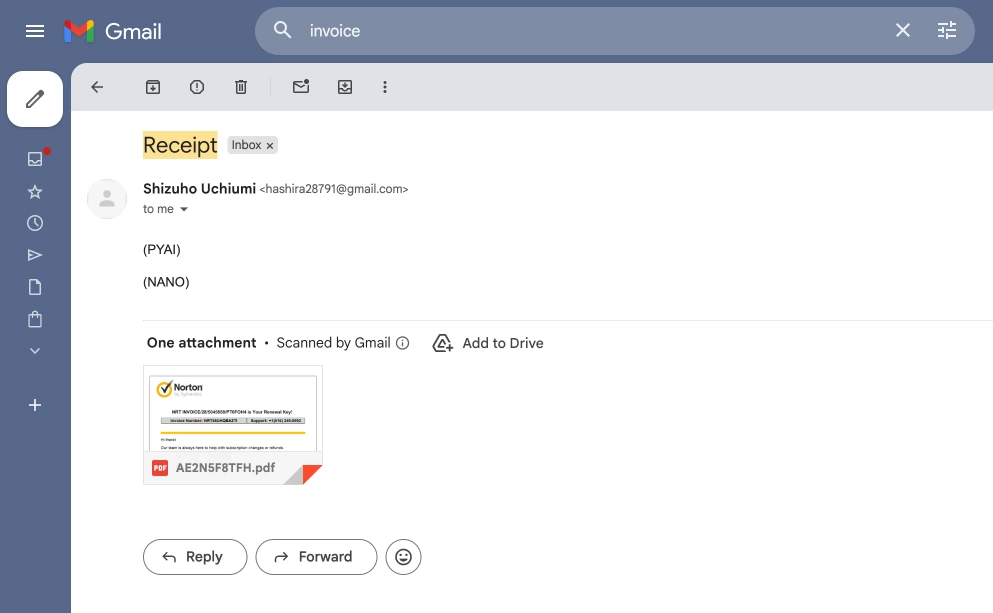
In this sample, the brand name is used as borrowed trust. The warning signs are not hidden: the message relies on surprise, a big charge, a cancellation deadline, and a phone-first resolution path.
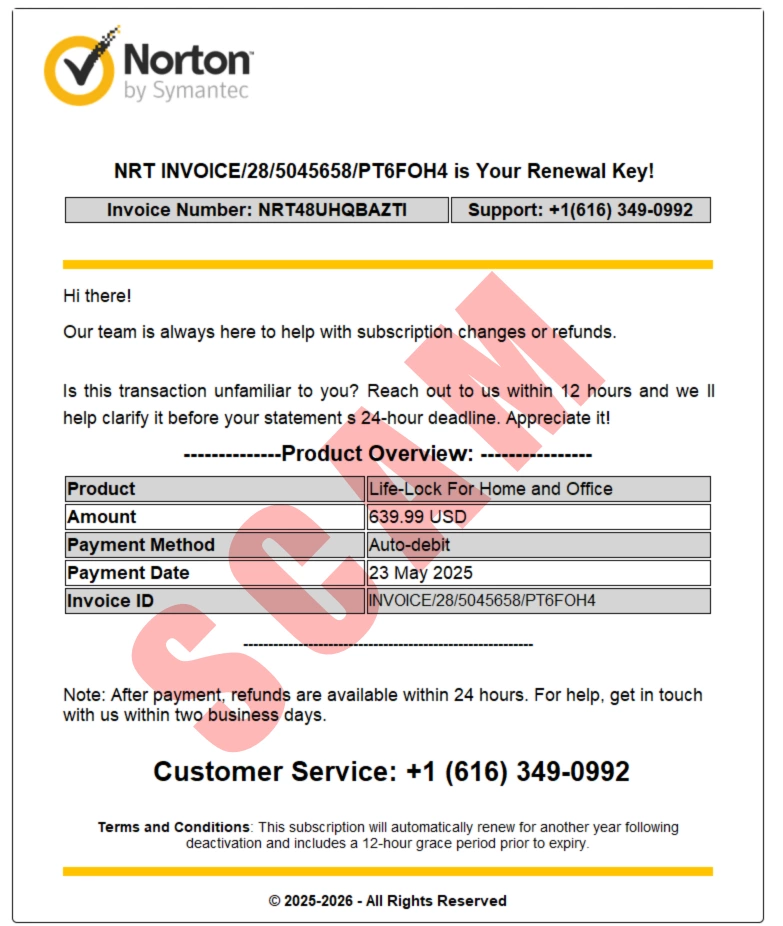
Red flags in the PDF
| Invoice detail | Why it matters |
|---|---|
| “Norton by Symantec” or inconsistent brand wording | Scam templates often mix older and newer brand names to look familiar. |
| Large charge, often hundreds of dollars | The number is chosen to create panic before you verify anything. |
| “Auto-debit” or “statement cutoff” language | The email wants you to believe money is already moving. |
| 12-hour or 24-hour cancellation deadline | Artificial urgency reduces careful checking. |
| Phone number as the only refund path | This is the conversion point. The scammer needs the call to control the next steps. |
| No real order history or matching bank/card charge | A legitimate renewal should be visible through your payment provider or official account portal. |
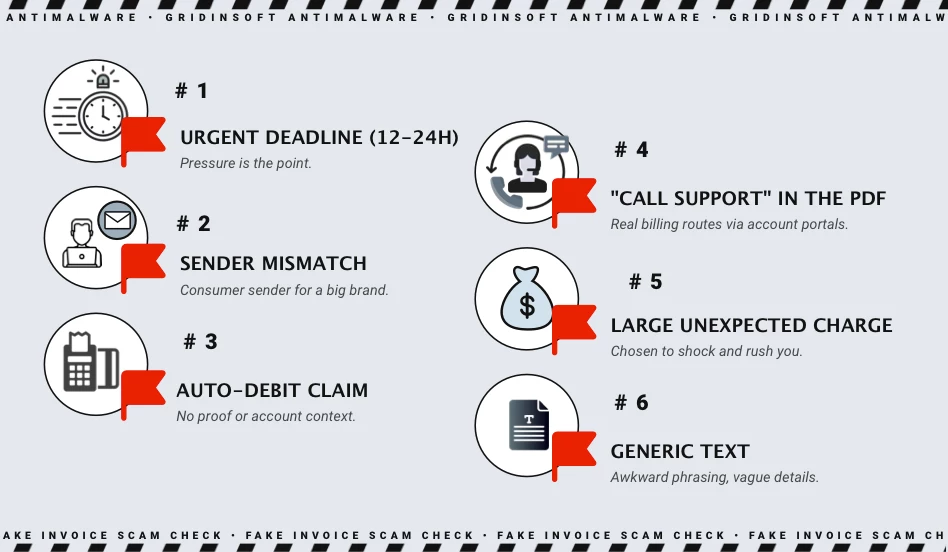
How the Norton refund trap works
Most fake Norton invoice campaigns follow the same sequence. First, the email creates a billing problem. Then it provides the attacker-controlled solution: call this number to cancel, dispute, or refund. Once the victim calls, the scammer can change the story in real time.
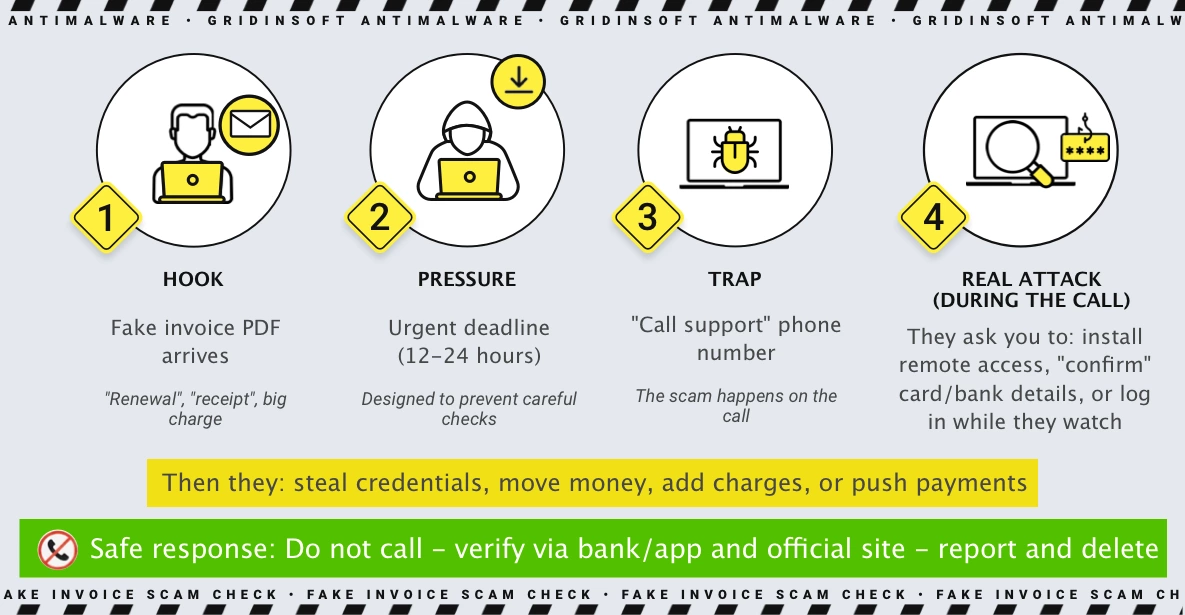
- Hook: a PDF invoice claims a Norton renewal or LifeLock charge.
- Pressure: the invoice says cancellation must happen quickly.
- Channel switch: the victim is pushed to call a number in the PDF.
- Control: the caller is asked to install AnyDesk, TeamViewer, UltraViewer, or another remote-access tool, or to open banking screens.
- Monetization: the scammer asks for card details, gift cards, crypto, wire transfers, cash pickup, or an “over-refund” repayment.
What to do before calling anyone
- Do not call numbers in the email, PDF, calendar invite, or message body.
- Open your bank, card, PayPal, Apple, Google, or Norton account directly. Type the address yourself or use the official app.
- Search your transactions for the exact amount and date. If there is no matching charge, the invoice is almost certainly bait.
- Check the sender domain. Norton publishes legitimate email domains and asks users to forward suspicious messages as attachments to
[email protected]. - Report the email as phishing or spam in your mail client, then delete it.
For a broader version of this pattern, see our Norton scam email guide. If the fake charge came through a real PayPal invoice or money request, use the PayPal invoice scam guide before responding.
If you called the fake Norton number
What matters now is what happened during the call. Use the checklist below and act fast.
| What happened | What to do now |
|---|---|
| You only called, then hung up | Block the number, report the email, and watch for follow-up calls or messages. |
| You gave card, bank, or identity details | Call your bank/card issuer immediately, request fraud controls, and monitor statements. |
| You installed remote-access software | Disconnect from the internet, uninstall the tool, revoke unattended-access settings, then scan the device. |
| The scammer saw your email, password manager, documents, or bank portal | Change email and banking passwords from another device, enable two-factor authentication, and review account recovery settings. |
| You sent money, gift cards, crypto, wire transfer, or cash | Contact the payment provider and local law enforcement quickly. Also file reports with FTC and IC3 if you are in the US. |
If you opened the PDF but did not call, the biggest risk is usually social engineering, not the attachment by itself. Still, if you downloaded anything, enabled macros, installed a tool, or allowed remote access, run a full security scan and review browser extensions, startup apps, and recently installed programs. Gridinsoft Anti-Malware can help check for unwanted remote-access tools, suspicious startup entries, and browser changes after a scam interaction.
How to report and verify safely
Use official channels only. Do not use phone numbers or links from the suspicious invoice.
- Forward the suspicious Norton email as an attachment to
[email protected]. - Report financial fraud to your bank or card issuer first, because chargeback and account-lock timing matters.
- In the United States, report fraud to the FTC and cybercrime losses to the FBI IC3.
- If the email came through a workplace inbox, send it to your IT/security team without editing the original headers.
FAQ
Is a Norton invoice email always fake?
No. Norton can send legitimate renewal and billing messages, but an unexpected PDF invoice with a call-to-cancel number should be treated as suspicious until you verify it through your payment account or Norton account directly.
Should I open the PDF invoice?
If you have not opened it yet, do not. You usually do not need the attachment to decide what to do. Check your bank and official account portal instead. If you already opened it but did not call, reply, download software, or enter details, focus on reporting and deleting the message.
Why do scammers use Norton and LifeLock names?
They are recognizable security and identity-protection brands, so the names create instant concern. The scam depends on borrowed trust plus a frightening renewal amount.
What if there is a real charge on my card?
Do not use the invoice phone number. Contact your card issuer or bank from the number on the card, and check your Norton account from the official website or app.
References
- Norton Support. “Verify that an email you receive from Norton is legitimate.” Gen Digital, last modified April 18, 2025; accessed June 11, 2026. https://support.norton.com/sp/en/us/home/current/solutions/v71088498
- Norton Support. “Report a spam or scam email to Norton.” Gen Digital, last modified April 24, 2025; accessed June 11, 2026. https://support.norton.com/sp/en/us/home/current/solutions/v138341527
- Federal Trade Commission. “ReportFraud.ftc.gov.” FTC, accessed June 11, 2026. https://reportfraud.ftc.gov/
- Federal Bureau of Investigation. “Internet Crime Complaint Center (IC3).” FBI, accessed June 11, 2026. https://www.ic3.gov/


Làm sao để hủy nó vậy bạn