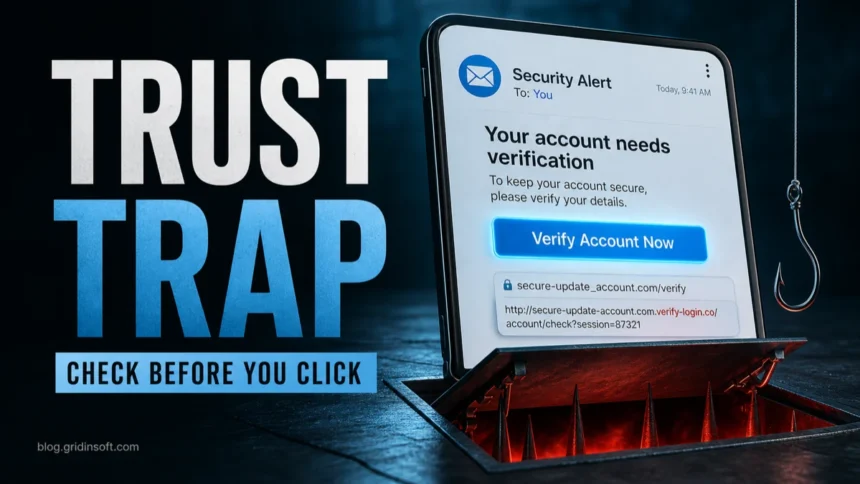
Phishing scams work by making a message feel trustworthy or urgent enough that you click, scan, call, download, or enter data before you verify it. Treat a message as suspicious when it asks for passwords, one-time codes, payment details, identity documents, remote access, file downloads, or account verification from a link or phone number you did not independently open.
The safer habit is simple: leave the message, open the real website or app yourself, compare the sender, domain, request, and timing, then decide. This page is the broad prevention checklist. Use the linked Gridinsoft guides below when you need email examples, QR-code details, or recovery steps after clicking.
Five-second phishing check
- Did I expect this message, file, payment, or login request?
- Is it asking for a password, code, card, document, download, or remote access?
- Does the sender domain, link destination, and phone number match the real organization?
- Can I verify it inside the official app, bookmark, account dashboard, or a phone number from the official site?
- What bad thing happens if I wait ten minutes and check first? If the answer is only pressure, stop.
Why phishing is harder to spot now
Modern phishing is not limited to badly written email. It can arrive through SMS, social media, Messenger, Teams, QR codes, calendar invites, fake ads, shared documents, voicemail notices, and polished login pages. APWG reported that phishing attacks rose 13.8% from Q4 2025 to Q1 2026, reaching 971,181 attacks in the first quarter of 2026.[1]
That is why old tests such as “look for spelling mistakes” or “check for HTTPS” are not enough. A scam can use clean grammar, a lock icon, familiar design, and even a message that appears to fit your recent activity. The useful question is not “does this look professional?” It is “why is this message asking me to act through this link, file, QR code, or phone number right now?”
How to recognize a phishing scam
| Signal | What it usually means |
|---|---|
| Urgent account warning | The scammer wants you to react before checking the real account. Microsoft also lists urgency, threats, and mismatched domains as common phishing signs.[2] |
| Unexpected login link | The page may be a fake portal. Open the service from a bookmark or typed address instead. |
| One-time code request | No legitimate support agent needs your MFA, 2FA, recovery, or verification code. |
| QR code in an unexpected message | The code may bypass email link previews and send your phone to a fake login or payment page. |
| Attachment you did not request | Invoices, resumes, voicemail files, HTML pages, ZIP archives, and shared-document notices are common lures. |
| Payment or bank-detail change | Verify by a known channel before sending money, changing bank details, or paying a fee. |
| Pressure to keep it secret | Secrecy is a social-engineering tactic, especially in job, investment, gift-card, and business-email scams. |
How to avoid phishing scams
- Do not use the message link for sensitive actions. Open a new tab and type the official domain, use a saved bookmark, or open the real app. FTC guidance makes this same distinction: if a message asks you to click a link or open an attachment, verify before acting.[3]
- Let your password manager help. A password manager usually will not autofill credentials on a lookalike domain. If autofill fails on a login page you reached from a message, pause.
- Protect one-time codes. MFA helps, but only if you do not approve prompts or share codes for logins you did not start.
- Check the real domain, not the logo. Look for misspellings, extra words, strange subdomains, newly registered domains, and links that hide behind buttons or shorteners.
- Verify payment changes out of band. For invoices, payroll, marketplace deals, rent, crypto, wire transfers, or gift cards, use a known contact method before paying.
- Keep browser and security warnings enabled. Do not bypass Safe Browsing, SmartScreen, email warnings, or antivirus alerts just because a page says you must continue.
- Scan suspicious links and files before opening them. Use the Gridinsoft URL scanner for unknown links and run a security scan if a phishing page downloaded a file or extension.
Common phishing examples
- Account locked or unusual sign-in: a message says your Microsoft, Google, Apple, PayPal, bank, or social account will be closed unless you verify immediately.
- Delivery or toll text: a small payment or address correction link leads to a fake card form.
- Fake invoice or shared document: the file or login page steals credentials, installs malware, or starts a business-email compromise flow.
- QR phishing: a QR code in an email, PDF, poster, parking meter, or package notice sends your phone to a fake portal.
- Fake support alert: a page or message tells you to call a number, install remote access, or pay for urgent cleanup.
- Job, task, crypto, or giveaway lure: the message promises money, work, coins, prizes, or refunds, then asks for a fee, wallet connection, identity document, or account login.
Use the right Gridinsoft phishing guide
- For email headers, sender checks, and inbox examples, use How to Spot a Phishing Email.
- For a quick red-flag checklist with account-locked, fake-link, and QR-code examples, use Phishing Scam Signs to Check.
- If you already opened a link or entered data, follow Clicked a Phishing Link? What to Do Now.
- For fake QR-code payments and login pages, see QR Code Phishing.
- For text-message phishing, delivery texts, and bank-alert SMS, see Spam Text Messages.
- For the difference between fake identity and fake message content, see Phishing vs Spoofing.
If you clicked, downloaded, or entered data
| What happened | First move |
|---|---|
| You only opened the page | Close it, do not enter anything, and check the real account from a typed address. |
| You entered a password | Change it from the official site, sign out of other sessions, and turn on MFA or passkeys. |
| You shared a one-time code | Assume the account may be exposed. Review sign-in activity and reset recovery methods. |
| You downloaded or opened a file | Disconnect if suspicious activity starts, scan the device, and remove unknown extensions or startup entries. |
| You entered payment or identity data | Contact the bank, card issuer, payment service, or identity-protection path quickly and save evidence. |
After uninstalling the suspicious app or deleting the visible threat, use Gridinsoft Anti-Malware to check hidden files, startup entries, scheduled tasks, bundled apps, browser changes, and other persistence points that can restore malware.
Download Anti-MalwareFAQ
Can a phishing message look professional?
Yes. Modern phishing can use clean grammar, copied branding, real-looking login pages, and personalized details. Judge the request, link, domain, payment path, and timing, not only the design.
Does HTTPS mean a login page is safe?
No. HTTPS only means the connection is encrypted. A phishing site can use HTTPS while still stealing your password, one-time code, card number, or identity data.
Is hovering over a link enough?
Hovering can reveal a suspicious destination on desktop, but it is not enough for high-risk actions. For passwords, money, files, account recovery, or security alerts, open the real service yourself.
Can MFA be phished?
Yes. Attackers can trick people into sharing one-time codes, approving prompts, or logging in through a fake page that captures a session. MFA helps most when you only approve logins you started.
Should I report phishing?
Yes. Use your email or messaging platform’s report option, report impersonation to the real company, and report fraud through the relevant consumer or cybercrime channel in your country.
References
- Anti-Phishing Working Group. “Phishing Activity Trends Report, 1st Quarter 2026.” APWG, May 21, 2026, accessed June 7, 2026. https://antiphishing.org/trendreports
- Microsoft Support. “Protect yourself from phishing.” Microsoft, accessed June 7, 2026. https://support.microsoft.com/en-us/security/protect-yourself-from-phishing
- Federal Trade Commission. “How To Recognize and Avoid Phishing Scams.” FTC Consumer Advice, accessed June 7, 2026. https://consumer.ftc.gov/articles/how-recognize-and-avoid-phishing-scams