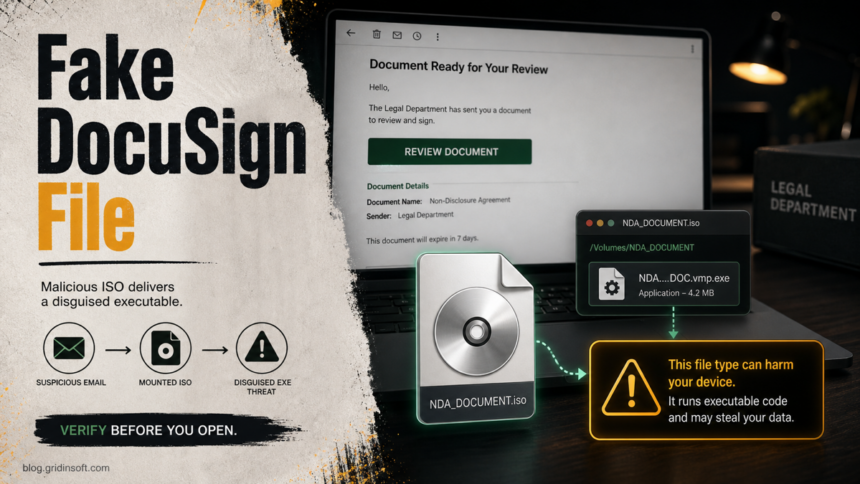
The “DocuSign Legal Department Document” email is a malspam lure, not a normal signature request. The risky version uses the subject Supply Chain Regulatory Filing ID#SCR-392847, pushes a Review Document button, and leads to an ISO file named NDA_Agreement_X7K9P2Q4R8V3M5N1Z6.iso. If you mounted that ISO and ran NDA_Agreement_X7K9P2Q4R8V3M5N1Z6.DOC.vmp.exe, treat the Windows PC as exposed and scan it before signing back into email, banking, work, or password-manager accounts.
DocuSign is a legitimate e-signature service, but this email abuses the brand and legal-department language to make a file download feel routine. A real envelope should be verified through DocuSign directly, not through an unexpected attachment, ISO image, or button in a message you were not expecting. DocuSign says suspicious DocuSign-themed emails should be forwarded as an attachment to [email protected] and then deleted [1].
Quick checks for this DocuSign email virus
- Subject:
Supply Chain Regulatory Filing ID#SCR-392847. - Fake claim: DocuSign Legal Department sent a document that must be reviewed or signed within three days.
- Dangerous file chain: ISO image
NDA_Agreement_X7K9P2Q4R8V3M5N1Z6.isocontainingNDA_Agreement_X7K9P2Q4R8V3M5N1Z6.DOC.vmp.exe. - Most important clue:
.DOCappears in the filename, but the real executable extension is.exe. - If opened: disconnect from sensitive accounts, preserve the file path, run a full malware scan, and change passwords from a clean device.
Example
The exact layout can change from one mailbox to another, but this lure usually tries to make the message look like a routine legal-signature request. The important words to notice are the legal-department sender name, the regulatory filing subject, the short deadline, the Review Document button, and the ISO attachment.
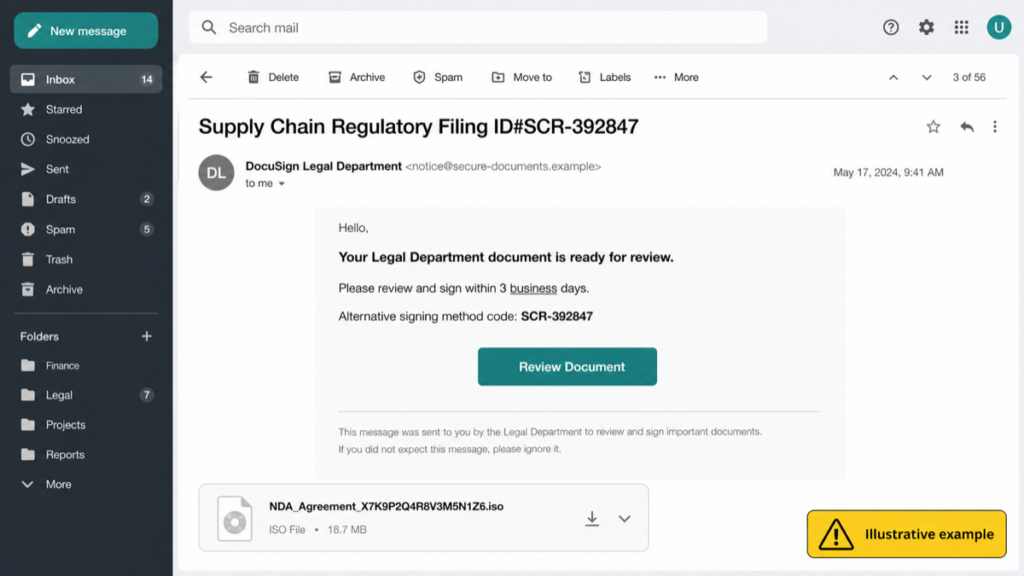
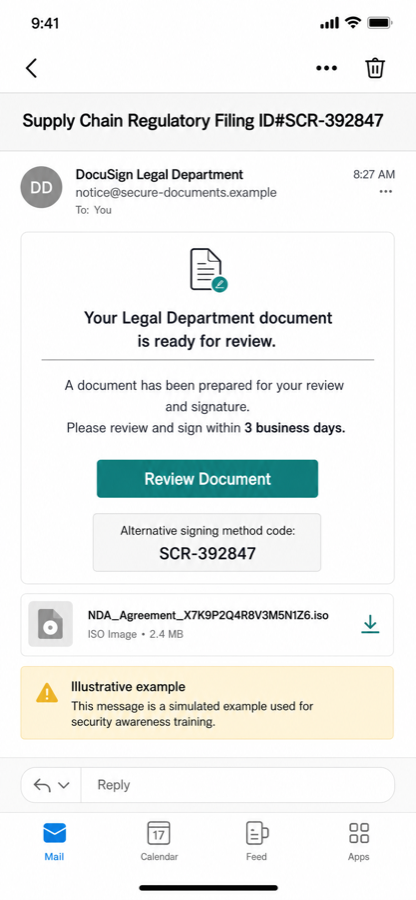
Example:
From: DocuSign Legal Department <[email protected]>
Subject: Supply Chain Regulatory Filing ID#SCR-392847

Hello,

Your Legal Department document is ready for review.
Please review and sign within 3 business days.

Alternative signing method code: SCR-392847

Review Document

Attachment: NDA_Agreement_X7K9P2Q4R8V3M5N1Z6.iso
Do not treat the wording as a whitelist or blacklist. Attackers can change the sender, deadline, and file name. The safer rule is broader: a signature request that pushes a disk image, archive, executable, or unexpected login page should be verified outside the email before you click or open anything.
What is the DocuSign Legal Department Document email virus?
It is a fake signature-request email that tries to move the reader from a trusted business workflow into running a Windows program. The message claims that a legal department document is waiting for electronic signature and may include an “Alternative signing method” code to look more convincing. That detail does not make the message safe. In this campaign, the dangerous part is not simply reading the email; the risk starts when the recipient follows the button or instructions and opens the delivered file.
The ISO format matters because Windows can mount disk images and show their contents like a drive. Microsoft documents that the Mount-DiskImage command mounts an ISO or virtual disk image so it appears as a normal disk [3]. Attackers abuse that familiarity: the victim sees a document-like filename inside the mounted image, but the final .exe extension means it is a program.
| What you see | How to judge it |
|---|---|
| Unexpected DocuSign Legal Department message | Verify through DocuSign directly. Do not trust the button in the email. |
| Urgent legal or compliance deadline | Pressure language is a common social-engineering sign, especially when you did not expect the document. |
.iso download |
Legitimate signing requests normally do not require mounting a disk image. |
.DOC.vmp.exe filename |
The visible “DOC” text is camouflage. The executable extension is the part Windows runs. |
How to verify a DocuSign request safely
Do not click the message button first. If the email is real, you should be able to confirm it without trusting the suspicious message path.
- Go to DocuSign manually. Type the official DocuSign address into the browser or use your saved bookmark.
- Check your account or envelope list. If the request is legitimate, it should appear in the normal DocuSign workflow for the account that received it.
- Use official reporting. Forward a suspicious DocuSign-themed email as an attachment to
[email protected], then delete the original message [1]. - Inspect links before any action. DocuSign notes that legitimate signing links use DocuSign domains such as
docusign.net, including regional subdomains, and that users should access documents directly when in doubt [2]. - Ask the supposed sender out-of-band. Use a known phone number, existing ticket, or separate email thread. Do not reply to the suspicious message.
If you only read the email
Reading the email by itself does not normally infect Windows. The safer response is still to avoid interacting with the message, report it through your mail provider or security team, and delete it. If you clicked the button but did not download or run anything, check the browser history for the destination, close the tab, and reset any password you entered on a page opened from that link.
If you entered an email, Microsoft 365, Google Workspace, banking, or DocuSign password on a page reached from the message, treat that as credential theft even if no file ran. Change the password from a clean device, revoke active sessions, review forwarding rules, check connected apps, and enable MFA. Our broader online scam warning-sign guide covers the same pressure-and-trust pattern in other brands.
If you opened the ISO or ran the EXE
Mounting the ISO is a warning sign, but running the executable inside it is the serious event. The payload can vary: a stealer, remote-access trojan, loader, ransomware component, or another malware family may be delivered later. Work from the assumption that credentials and browser sessions may be at risk until the system is checked.
- Disconnect sensitive sessions. Close email, banking, crypto wallets, business portals, password managers, and browser-sync accounts on the affected PC.
- Preserve the evidence. Note the sender, subject, download URL if visible, the ISO name, the EXE name, and the folder or drive letter where it appeared.
- Eject the mounted ISO. In File Explorer, right-click the virtual drive and choose Eject. Do not run anything else from it.
- Run a full security scan. Scan the whole system, not just the downloaded file. If the alert returns after reboot or a new process appears from
%TEMP%,%LOCALAPPDATA%, Startup, Task Scheduler, or the browser profile, assume persistence is still present. - Change passwords from a clean device. Start with email, work SSO, banking, cloud storage, password manager, DocuSign, and any account where the same password was reused.
- Revoke sessions and connected apps. Password changes do not always kill stolen cookies or OAuth tokens. Use each service’s “sign out everywhere,” session, and connected-app controls.
- Watch for follow-up abuse. Check sent mail, inbox rules, MFA prompts, password reset messages, and new admin users in business accounts.
A phishing download can leave more than the visible file. A loader may add a scheduled task, startup entry, browser extension, or hidden copy before the first alert appears. After you quarantine or delete the ISO/EXE, run Gridinsoft Anti-Malware as a full-system check for hidden files, startup entries, scheduled tasks, browser changes, and other persistence that a manual file deletion can miss.
If the page or email made you download an invoice, coupon, tracking app, browser extension, or support tool, scan the PC before opening it again or logging into sensitive accounts.
Scan after this DocuSign emailWhat not to do
- Do not restore the EXE from quarantine because the filename looks like a document.
- Do not upload company legal files into random “document viewer” or “online scanner” pages reached from the email.
- Do not reply to the sender with verification details, invoice numbers, or internal contact names.
- Do not keep using the same browser session for sensitive accounts if the executable already ran.
- Do not assume DocuSign is compromised. The safer assumption is brand impersonation until your organization or DocuSign confirms otherwise.
How to prevent the next DocuSign-themed attack
DocuSign lures work because signature requests are common and time-sensitive. Make the verification path routine before the next urgent email arrives.
- Open DocuSign requests from the official site, app, or existing account workflow when possible.
- Train users to pause on disk images, archives, and executable attachments in “document” emails.
- Show file extensions in Windows so
.DOC.vmp.execannot hide behind the document-looking middle text. - Block or warn on unexpected ISO, IMG, executable, script, and archive attachments at the mail gateway where possible.
- Keep a phishing-reporting route that employees actually know: security mailbox, mail-client report button, or helpdesk ticket.
- Review related risks in our infostealer response guide if the file ran before you changed passwords.
If your DocuSign-style message did not deliver an ISO or executable but instead asked you to sign in for an invoice, use our Outstanding Invoice email scam checklist for the webmail credential-theft version.
FAQ
Is the DocuSign Legal Department Document email real?
The campaign described here is not a real DocuSign request. It uses DocuSign branding and legal-department wording to push a malicious ISO and executable file.
Can reading the email infect my computer?
Reading the message alone is not the main infection path. The danger is clicking through, downloading the ISO, mounting it, and running the executable inside.
What if I clicked the button but did not run the file?
Close the page, do not download anything else, and check whether you entered credentials. If you typed a password, change it from a clean device and revoke active sessions.
Why is an ISO file suspicious in a signature request?
A normal e-signature workflow should not require a disk image. Attackers use ISO files because Windows can mount them like drives, making the executable inside look like part of a document package.
Should I report the email to DocuSign?
Yes. Forward the suspicious email as an attachment to DocuSign’s reporting address and delete the original message. Also notify your company’s security or IT team if it arrived at a work mailbox.
References
- DocuSign. “What should I do if I receive a suspicious email?” DocuSign Support Center, accessed June 17, 2026. https://support.docusign.com/s/articles/What-Should-I-Do-if-I-Receive-a-Suspicious-Email
- DocuSign. “How to Identify & Prevent Phishing Attacks.” DocuSign Blog, accessed June 17, 2026. https://www.docusign.com/blog/tools-to-protect-your-data-phishing
- Microsoft Learn. “Mount-DiskImage (Storage).” Microsoft, accessed June 17, 2026. https://learn.microsoft.com/en-us/powershell/module/storage/mount-diskimage
Newer legal-document campaigns can go beyond fake signature portals. Blackpoint’s Avalon/CrownX report shows how a protected archive, ISO image, and shortcut can become a ransomware chain; see our Avalon CrownX legal-document warning for the current IoCs and cleanup sequence.
A current variation uses password-manager policy notices: see the LastPass and Bitwarden phishing email indicators before opening any DocuSign-themed download.