If you see an OnlyFans leak site, viewer, page, or checker, do not enter your email, username, password, card details, or download a “database viewer.” The public May 2026 panic around a claimed 340 million-record OnlyFans leak is not the same thing as a confirmed platform breach. The safer assumption is that criminals are using the story to collect emails, push phishing pages, blackmail victims, and spread infostealers through fake checker tools.
This guide explains what is known, why leak-checker sites are risky, and what to do if you already typed information into one or opened a file that claimed to check the leak.
OnlyFans leak sites, viewers, and pages: safe answer
Search results for OnlyFans leaks often mix real news, creator-content piracy, fake checkers, malware downloads, and privacy panic. Use the table below to decide what the search result is really asking you to do.
| Search or page claim | Safe response |
|---|---|
| OnlyFans leak site or leak page | Do not log in, pay, upload an email, or download a viewer. These pages may be phishing, extortion, malware, or illegal content-sharing bait. |
| OnlyFans viewer or database viewer | Treat any viewer download as suspicious. A viewer, archive, extension, or script can be an infostealer lure. |
| Was OnlyFans hacked? | Separate platform-breach claims from account compromise. Public May 2026 reporting did not confirm a direct OnlyFans platform breach, but phishing and profiling risk is real. |
| OnlyFans hacked account | Secure email first, change reused passwords, enable 2FA, revoke sessions, and contact OnlyFans support through the official site. |
| OnlyFans mega leak | Do not use panic-checker links from social posts. Verify through reputable reporting and protect accounts as if phishing will follow. |
| Leak checker says it found you | Do not pay or download proof. Save screenshots and URLs, then secure email, password manager, and payment-related accounts. |
What happened with the alleged OnlyFans leak?
Reports in late May 2026 described a forum seller claiming access to hundreds of millions of OnlyFans records. Cybernews reported that OnlyFans called the reports false and that the sample evidence was limited; the same reporting emphasized phishing and profiling risk if emails from older leaks or public sources are matched to adult-platform accounts [1]. IBTimes also covered the claim as a disputed or misleading breach narrative, noting that follow-up reporting described the data as a compilation rather than proof of a direct OnlyFans hack [2].
That distinction matters. Even when a mega-leak claim is exaggerated, it can still hurt users because attackers can exploit the fear around it. A fake checker only needs one useful input: your email, username, reused password, payment clue, browser session, or willingness to run a downloaded file.
Why fake leak checkers are the real risk
A page that says “check if your OnlyFans account was leaked” may look helpful, but it is usually asking for exactly the data an attacker wants to validate. The common scam patterns are:
- Email harvesting: the site records emails or usernames and uses them for phishing, spam, or account-takeover attempts.
- Password reuse attacks: a checker may ask for a password “to verify ownership,” then test it against email, social, crypto, cloud, and subscription accounts.
- Blackmail lures: scammers claim they found your profile or private content and demand payment to “delete” it.
- Malware downloads: “viewer,” “database,” “decryption,” or “checker” files can install an infostealer. BleepingComputer previously documented fake OnlyFans checker tooling used as a Lumma stealer lure [3].
What a fake leak checker can look like
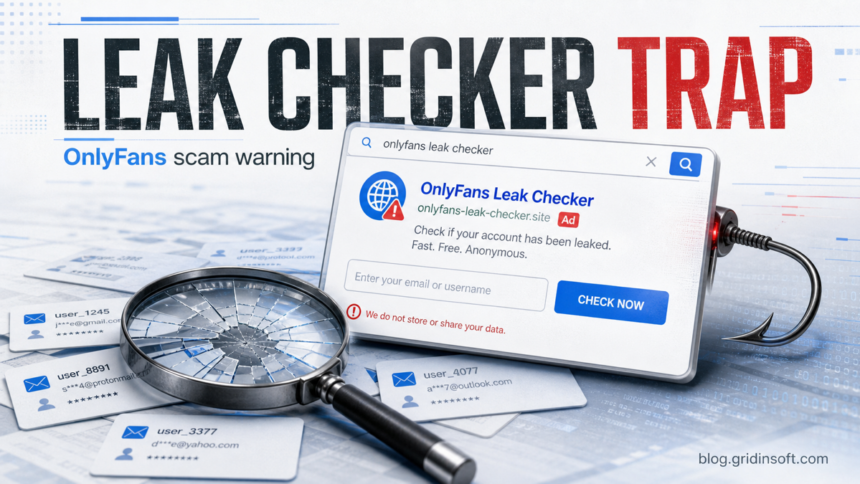
Real scam pages vary, but the pattern is usually simple: a breach headline, a “free anonymous check,” an email or username field, and then pressure to download a viewer, pay for removal, or “verify” an account. The example below is a safe mock-up, not a real website.

Three realistic scenarios
- You entered an email but no password. The main risk is targeted phishing. Change reused passwords, secure the email account, and treat any follow-up “proof,” “delete your data,” or “open the report” message as suspicious.
- You entered a reused password. Assume credential stuffing. Change that password everywhere it was reused, start with email and payment-related accounts, enable two-factor authentication, and revoke active sessions.
- You opened a checker file or archive. Treat the machine as potentially exposed to an infostealer. Disconnect from sensitive logins, scan the system, review startup items and browser extensions, then change passwords from a clean device.
If you entered your email or username
Entering an email does not automatically mean your account is compromised, but it does make targeted phishing easier. Take these steps in order:
- Do not return to the checker. Close it and avoid any follow-up “results,” downloads, Telegram links, or payment pages.
- Secure your email first. Change the email password if it was reused anywhere, enable two-factor authentication, and review recovery email, phone, forwarding rules, and recent sign-ins.
- Change reused passwords. Give OnlyFans, email, social media, banking, and cloud accounts unique passwords. Start with accounts that share the same email.
- Check known breach exposure safely. Use established breach-checking services rather than random leak-checker clones. Have I Been Pwned’s Pwned Passwords service explains a k-anonymity model for checking password exposure without sending the full password [5].
- Watch for blackmail messages. Save evidence, do not pay, and do not click “proof” links. Most panic emails rely on fear, not real access.
If you downloaded a checker, archive, or viewer
Treat any downloaded OnlyFans leak checker as suspicious, especially if it was an .exe, password-protected archive, script, browser extension, or “database viewer.” Disconnect from risky activity, do not log in to sensitive accounts from the same machine, and scan the system before changing passwords on that device.
- Delete the downloaded file and empty the browser download history only after noting its name and source URL for your own record.
- Check browser extensions, startup apps, scheduled tasks, and recently installed programs for unknown entries.
- Run a full security scan. Gridinsoft Anti-Malware can help detect infostealers, droppers, suspicious startup entries, and unwanted browser changes tied to fake download lures.
- After cleanup, change passwords from a known-clean device and revoke active sessions on email, social, cloud, and payment accounts.
After uninstalling the suspicious app or deleting the visible threat, use Gridinsoft Anti-Malware to check hidden files, startup entries, scheduled tasks, bundled apps, browser changes, and other persistence points that can restore malware.
Download Anti-MalwareSigns an OnlyFans leak checker is a scam
- It promises “full leak access,” “private database lookup,” or “creator/fan verification.”
- It asks for an OnlyFans password, email password, 2FA code, card details, or crypto payment.
- It requires a download to view results.
- It uses a newly registered domain, URL shortener, Telegram bot, Discord invite, or file-sharing link.
- It says you must act in minutes or pay to remove your data.
- It copies news headlines but gives no verifiable source, no privacy policy, and no company identity.
A safer response plan
Start from the accounts that could unlock everything else. Secure email, then password manager, then OnlyFans and social accounts. If you reused a password, assume credential stuffing is more realistic than a single-site breach. The FTC’s phishing guidance warns that scammers use emails and texts to steal passwords, account numbers, and other personal information, then use that access against other accounts [4].
If a message claims to have private content, do not negotiate in the same thread. Preserve screenshots, headers, usernames, wallet addresses, and URLs, then report the account or message through the platform where it arrived. If threats involve intimate images or coercion, contact local law enforcement or an appropriate cybercrime reporting channel instead of paying.
FAQ
Was OnlyFans really hacked in May 2026?
Public reporting did not confirm a new OnlyFans platform breach. The strongest safe conclusion is that the claim created a real phishing and profiling risk, even if the advertised “mega leak” was exaggerated or compiled from older data.
Can I check whether my OnlyFans account was leaked?
Do not use random OnlyFans-specific leak checkers. If you need to check exposure, use established breach-notification services for your email or passwords and never provide your OnlyFans password to a third-party page.
What if I only entered my email?
Change any reused passwords, secure your email account, enable two-factor authentication, and watch for targeted phishing or blackmail attempts. Entering an email alone is not proof of compromise, but it can make scam messages more convincing.
Should I scan my PC?
Yes, if you downloaded a checker, opened an archive, installed an extension, ran a script, or followed a fake CAPTCHA-style instruction. A scan is also sensible if accounts start showing unknown logins after the download.
References
- Vilius Petkauskas. “OnlyFans mega leak reveals 340M user records, hackers claim.” Cybernews, published May 25, 2026, updated May 28, 2026. https://cybernews.com/security/onlyfans-mega-data-leak-hackers-claim/
- Brian Yalung. “Hackers Allegedly Selling Massive OnlyFans User Database For £56K — But Experts Say There’s A Twist.” International Business Times UK, May 25, 2026. https://www.ibtimes.co.uk/onlyfans-data-leak-hoax-1798709
- Bill Toulas. “Hacker trap: Fake OnlyFans tool backstabs cybercriminals, steals passwords.” BleepingComputer, September 5, 2024. https://www.bleepingcomputer.com/news/security/hacker-trap-fake-onlyfans-tool-backstabs-cybercriminals-steals-passwords/
- Federal Trade Commission. “How To Recognize and Avoid Phishing Scams.” Consumer Advice, accessed June 1, 2026. https://consumer.ftc.gov/articles/how-recognize-avoid-phishing-scams
- Have I Been Pwned. “Pwned Passwords.” Have I Been Pwned, accessed June 1, 2026. https://haveibeenpwned.com/Passwords