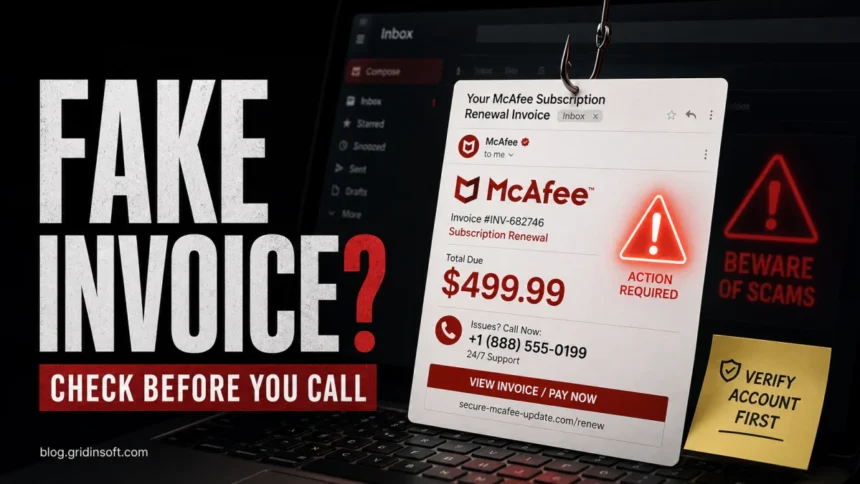
A McAfee scam email can be fake even when it uses a familiar McAfee name, invoice layout, or urgent renewal warning. If the message tells you to call a phone number, open an invoice PDF, click a cancellation link, or pay to stop a charge, treat it as suspicious. For sender checks, [email protected] can appear in legitimate McAfee marketing or identity-monitoring messages, but the sender alone is not proof. Check the full address, links, account page, and your real payment history before you click or call.
Is [email protected] real or fake?
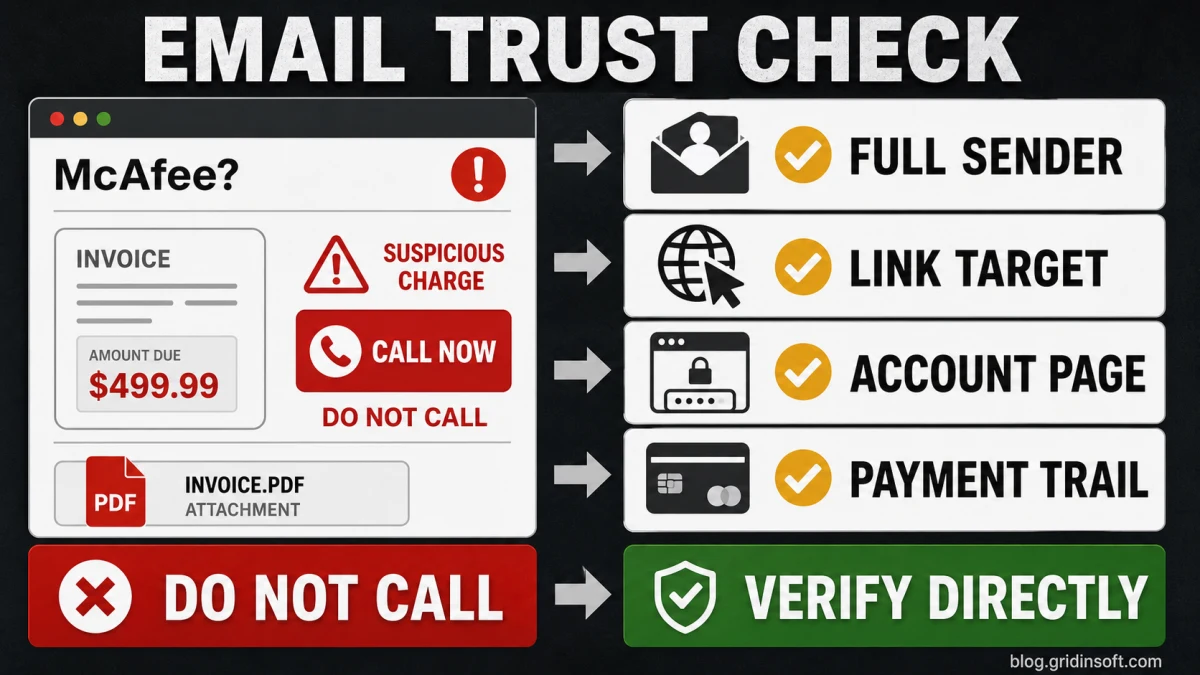
[email protected]is not automatically a scam. McAfee documents this sender for some customer communications, but attackers can spoof display names and can send lookalike messages from unrelated domains.- A phone number in a renewal, refund, or cancellation email is the biggest warning sign. Do not call it. Open McAfee.com yourself and check your account from there.
- A fake invoice does not prove you were charged. Check your card or bank statement directly. If there is no matching charge, do not engage with the email.
- If you called, paid, shared card details, installed remote-access software, or opened an attachment, use the recovery steps below and run a full malware scan.
| Email clue | What it usually means |
[email protected] |
Can be a legitimate McAfee sender, but still verify links and your account directly. |
| Unexpected invoice or renewal charge | Common refund-scam lure. Check your bank/card statement before reacting. |
| Phone number to cancel or refund | High-risk scam sign. The call can lead to remote-access fraud or fake refunds. |
| PDF invoice or receipt attachment | Open only if you expected it and verified the sender. Attachments can hide malicious links or social-engineering instructions. |
| Link to login, renew, cancel, or get support | Hover or long-press to inspect it, but the safer move is to type McAfee.com manually. |
Why this page was not a Top 5 result yet
The page was indexable and already showing near the first page, but it was too thin for the current search intent. Google is rewarding pages that answer the exact sender question, show invoice/refund examples, warn against phone-number traps, and explain what to do after a click, call, payment, or remote-access session. A short generic “real or fake” answer is not enough because many searchers are comparing specific senders such as [email protected], [email protected], and [email protected].
There is also a cluster boundary problem. The McAfee Subscription Payment Failed scam guide should own failed-payment pop-up and payment-warning intent, while How to Stop McAfee Pop-ups should own browser notification and fake alert removal. This article should own email sender, invoice, renewal, refund, and call-center fraud intent.
McAfee sender addresses: what to check
Do not judge an email by the visible sender name. Open the message details and inspect the full address. McAfee lists several customer-service and marketing senders, including addresses like [email protected], [email protected], [email protected], and [email protected]. That helps you rule out obvious fakes, but it does not make every message safe.
Use this rule: a familiar McAfee sender can make a message worth checking, not worth trusting. Real verification still happens through your account, the destination URL, and your payment history. If the message mixes a real-looking sender with a phone number, PDF invoice, unexpected charge, or pressure to act today, handle it as suspicious.
How the McAfee invoice scam works
Most McAfee invoice scams are refund or tech-support scams. The email says your subscription renewed, your trial converted to a paid plan, your payment failed, or a large invoice is attached. The amount is often high enough to scare you into acting, such as $249, $399, or $499.
- The email creates urgency with a renewal, invoice, refund, or cancellation deadline.
- It points you to a phone number, “support” link, or attached invoice.
- If you call, the operator may ask you to install remote-access software, open your bank account, or “verify” a refund.
- If you click, the page may ask for McAfee credentials, card details, email login, or payment information.
- If you open an attachment, it may contain links, instructions, or malware disguised as a receipt.
Red flags in fake McAfee emails
- A phone number is presented as the only way to cancel, renew, or get a refund.
- The message says you must act today to avoid a large charge.
- The sender display name says McAfee, but the actual address is Gmail, Outlook, a random domain, or a misspelled lookalike.
- The email includes an invoice PDF you did not request.
- The link text looks official, but the real URL points away from
mcafee.com. - The greeting is generic, such as “Dear user” or “Hello customer,” and the account details do not match you.
- The email asks for card data, password, one-time code, remote access, gift cards, crypto, or a wire transfer.
- You do not use McAfee, or the account/charge does not appear when you check directly.
What to do if you got a McAfee scam email
- Do not call the number in the email. If you need McAfee support, start from the official website or your existing account.
- Do not open attachments from unexpected invoice emails. If you already opened one, do not follow its links or instructions.
- Check your McAfee account directly. Type the website address yourself instead of using links in the email.
- Check your bank or card statement directly. A fake invoice is not the same as a real charge.
- Mark the email as phishing or spam. You can also forward McAfee-branded suspicious emails to McAfee’s reporting address.
- Change passwords if you entered McAfee, email, banking, or payment credentials after clicking the message.
- Scan your computer if you opened an attachment, downloaded a file, installed a remote-support app, or the browser started showing pop-ups afterward.
If you called the number or gave remote access
End the call and disconnect the computer from the internet if the caller still has access. Uninstall any remote-access tools they told you to install, such as screen-sharing or “support” apps you do not normally use. Then scan the computer before using it for banking, email, or password changes.
If you shared card details, called your bank from the number on the back of the card, not from the email. If you approved a payment, gift card purchase, wire transfer, crypto transfer, or “refund verification,” report it immediately. If you typed passwords while someone was connected to the computer, change those passwords from a different trusted device.
A fake McAfee email is often only social engineering, but attachments, fake support tools, and browser notification spam can leave unwanted software behind. Run a full scan after removing suspicious apps.
What not to do
- Do not call a cancellation or refund number from the email.
- Do not let a caller connect to your computer.
- Do not read one-time codes to anyone on the phone.
- Do not pay with gift cards, crypto, wire transfer, or payment apps to “fix” a McAfee charge.
- Do not assume a message is safe just because it contains real McAfee links mixed with other links.
- Do not keep troubleshooting on the same computer if a stranger had remote access.
FAQ
Is [email protected] a legitimate McAfee email address?
It can be legitimate, but it is not enough by itself. Check the full sender, link targets, your McAfee account, and your payment statement. A message from a familiar sender that asks you to call a phone number or open an unexpected invoice still deserves suspicion.
Can opening a McAfee scam email infect my computer?
Usually, simply viewing the email is not the main danger. The risk comes from clicking links, opening attachments, calling the number, entering credentials, installing remote-access software, or downloading files from the message.
What if I do not use McAfee?
That is a strong scam signal. Delete the message, report it as phishing, and do not call, click, or open attachments. If the email claims you were charged, verify through your bank or card statement directly.
Where should I report a fake McAfee email?
Use your email provider’s phishing report button. McAfee accepts suspicious McAfee-branded emails at its published scam reporting address, and the FTC accepts fraud reports from consumers who lost money or shared data.
References
- McAfee Support. “Spot and report fake McAfee emails.” McAfee, accessed June 11, 2026. https://mcafee.com/support/s/article/000002097?language=en_US
- McAfee. “How to recognize McAfee scam emails and fake popups.” McAfee, accessed June 11, 2026. https://www.mcafee.com/en-us/cyber-scam/customer-scam-awareness.html
- Federal Trade Commission. “How To Recognize and Avoid Phishing Scams.” Consumer Advice, accessed June 11, 2026. https://consumer.ftc.gov/articles/how-recognize-avoid-phishing-scams