

A PayPal invoice scam can arrive through PayPal’s real invoice or money request system, which is why it feels more convincing than an ordinary phishing email. The danger is usually the note inside the invoice: a fake support number, a claim that a charge must be canceled, a crypto wallet request, or pressure to share a PayPal code. Do not call the number in the invoice, PDF, or email. Open PayPal yourself, check Activity separately from unpaid invoices and requests, and use only the support paths shown inside the official app or website.
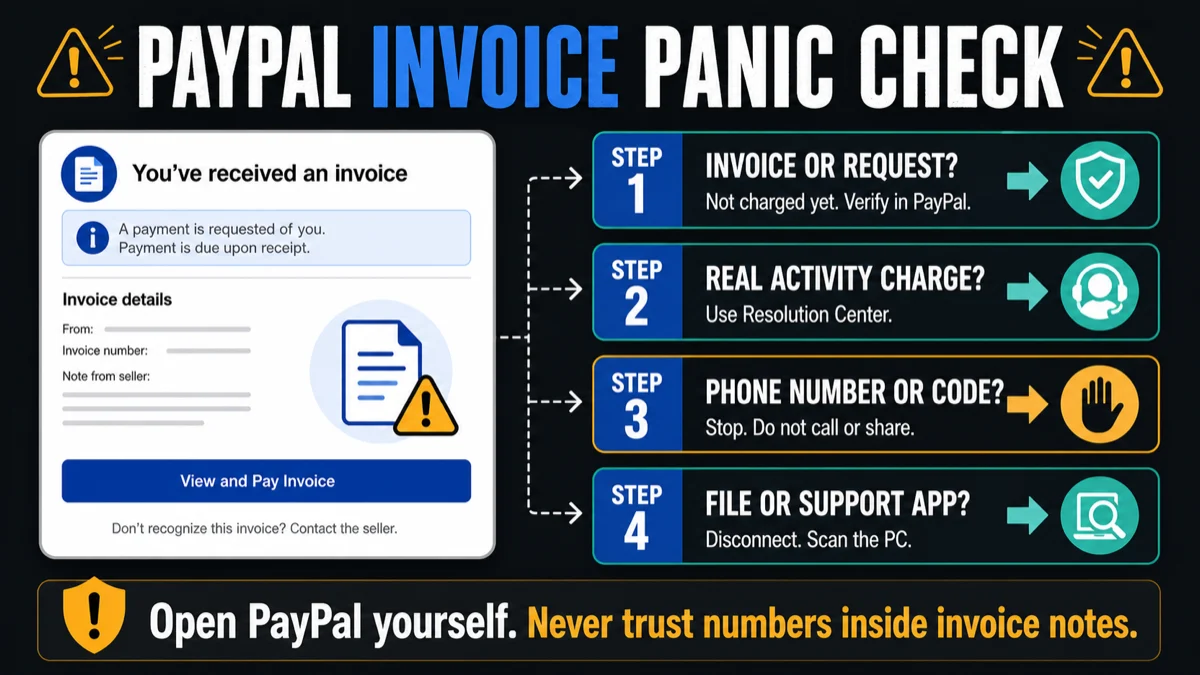
If a PayPal invoice or money request scares you, do this first:
- Do not call any phone number written in the invoice note, PDF, or email body.
- If a caller from a private, unknown, or spoofed number asks for a PayPal 2FA or verification code, hang up.
- Do not click the email button to “cancel”, “dispute”, or “view details” from a suspicious message.
- Open the PayPal app or type paypal.com yourself.
- Check Activity for a completed payment. An unpaid invoice or request is not proof that money already left.
- If it is only an invoice or money request you did not expect, report or cancel it from inside PayPal.
- If a real payment left the account, report unauthorized activity through PayPal’s Resolution Center and contact your bank or card issuer if needed.
Why PayPal Invoice Scams Look Real
Scammers know that ordinary phishing emails often land in spam. Invoice and money request abuse is more convincing because the notification can come from a legitimate PayPal workflow. PayPal warns that these scams may ask you to call a phone number, open a suspicious URL, or send money to a crypto wallet. The safe rule is simple: a real PayPal notification can still contain scam text if that text was typed by the person who sent the invoice.
This is also why victims search for phrases like “PayPal email from [email protected] scam”, “PayPal invoice with phone number”, “PayPal billing department invoice”, and “PayPal money request scam”. They are not only asking whether PayPal exists; they are asking whether the charge actually happened and whether the phone number is safe to call.
Invoice, Money Request, Or Real Charge?
| What you see | What it usually means |
| Unpaid invoice or money request | Someone is asking you to pay. It is not proof that money already left your account. |
| Alarmist note with a phone number | The number is part of the scam. The caller will try to steal details, codes, money, or remote access. |
| Charge-alert email without an invoice | Use the focused PayPal charge email guide, then verify inside PayPal Activity instead of calling the email number. |
| Real completed payment in Activity | Report it through the Resolution Center if you did not authorize it, then review cards, bank accounts, and email security. |
| Nothing visible in PayPal | Do not interact with the message. Forward suspicious email to PayPal phishing reporting and delete it. |
Common PayPal Scams In 2026
| Scam | How it works |
| Invoice callback scam | A fake invoice says to call support to cancel a large charge. |
| Money request scam | A request pressures you to pay for something you never bought. |
| Fake charge-alert email | The email claims your account was charged and pushes you to call or click; the dedicated charge-email checklist covers that exact variant. |
| Refund or overpayment scam | A caller asks for remote access or says a refund mistake must be fixed. |
| Fake subscription or brand invoice | The note mentions Norton, Geek Squad, Coinbase, Bitcoin, or another brand to make the charge feel specific. |
| Account takeover phishing | A fake page or operator asks for your password, one-time code, or security answers. |
| Private-number 2FA code call | A caller claims PayPal spotted a suspicious purchase, may mention a travel or Booking.com charge, then triggers a real verification code and asks you to read it aloud. |
Private-Number PayPal Calls Asking For A 2FA Code
In this version, the scam does not begin with an invoice note. The caller says PayPal blocked or flagged a suspicious purchase, often adds a believable detail such as your name, phone number, or a travel-related charge, and then tries to make a PayPal security code arrive on your phone. The moment the caller asks you to read that code back, treat the call as account-takeover fraud.
- Private or hidden caller ID is a warning sign, not proof. Caller ID can also be spoofed, so a displayed PayPal name is not enough.
- No support agent needs your one-time code. A PayPal validation or 2FA code is meant to prove that you are signing in, changing a setting, or approving a security step.
- Do not stay on the line to “verify” the story. Hang up, open PayPal yourself, and check Activity, Security, Message Center, and the Resolution Center.
- If the code was shared, act as if the password is exposed. Change the PayPal password, sign out of other sessions, review linked cards and bank accounts, and secure the email account tied to PayPal.
When It Is A Charge Email, Not An Invoice
If the message only arrived as a PayPal charge alert or “Unauthorized Transaction” email and pushes a phone number, use the focused PayPal Unauthorized Transaction email scam checklist. This page is for invoices, money requests, fake support numbers inside invoice notes, and calls asking for PayPal codes.
The split matters because an invoice scam may appear inside PayPal as an unpaid request, while a charge-alert email may not appear in PayPal at all. In both cases, the safe move is the same: open PayPal yourself, check Activity, and never trust a phone number supplied by the suspicious message.
Questions This Page Answers
Most victims are not looking for a generic definition of PayPal phishing. They are trying to decide whether to pay, call, dispute, or clean up after a mistake:
- “Is this PayPal invoice real?” It can be a real PayPal-generated invoice and still be a scam request.
- “Did PayPal already charge me?” An invoice or request is not the same as a completed payment. Check Activity.
- “Should I call the number in the invoice?” No. Numbers in invoice notes, PDFs, and suspicious emails are untrusted.
- “What if I clicked the PayPal email?” If you did not enter data, close it. If you entered a password or code, secure the account immediately.
- “What if I called fake PayPal support?” Hang up, remove any remote-access software, change passwords from a clean device, and contact your bank if financial data was exposed.
- “What if a PayPal caller asks for my code?” Hang up. A caller does not need a PayPal 2FA, validation, or security code to help you.
What To Do If You Clicked, Paid, Or Called
If you clicked a link but did not enter information, close the page and open PayPal directly to verify the account. If you entered your password, change it immediately, sign out of other sessions, enable MFA, and secure the email account tied to PayPal. If you gave a one-time code to a caller, assume the account may be compromised and review payments, linked cards, bank accounts, automatic payments, and account settings.
If you paid a scam invoice or money request, open a dispute if available and contact PayPal through the official app or website. If the money came from a card or bank account, contact that financial institution too. Time matters: the sooner you report fraud, the better the chance of limiting losses.
If you called the fake support number or installed a remote-access app, disconnect the session, uninstall the app, restart the device, and change PayPal, email, and banking passwords from a clean device. Then scan Windows if the caller had you download a tool, open a script, install an extension, or share the screen while logged in to financial accounts. For a broader recovery checklist, see what to do after getting scammed.
A fake PayPal support call can leave more than a bad payment behind. Remote-support tools, browser extensions, downloaded “refund” utilities, scheduled tasks, and startup entries can keep running after the call ends. Gridinsoft Anti-Malware is useful at this point because it checks for malicious files, unwanted apps, browser changes, startup items, scheduled tasks, and other persistence that a manual password reset will not remove.
If the page or email made you download an invoice, coupon, tracking app, browser extension, or support tool, scan the PC before opening it again or logging into sensitive accounts.
Scan after a fake PayPal support callHow To Avoid PayPal Scams
- Use PayPal Activity to confirm completed payments; do not rely on invoice text.
- Do not call numbers placed in invoice notes, money requests, PDFs, or suspicious emails.
- Never share your PayPal password, one-time code, card details, banking login, or remote access with a caller.
- Treat private-number calls, hidden caller ID, and caller-ID names as untrusted until you verify from inside PayPal yourself.
- Be extra careful with invoices that mention crypto, Norton, Geek Squad, Coinbase, gift cards, refund mistakes, or urgent cancellation windows.
- Forward suspicious PayPal emails to PayPal’s phishing reporting address when appropriate, then delete them.
- Warn relatives if they are likely to panic over a large invoice; callback scams work because they create urgency.
FAQ
Can a PayPal scam invoice come from a real PayPal email address?
Yes. A scammer can abuse PayPal’s invoice or money request features so the notification looks legitimate. The scam usually lives in the invoice note, fake support number, crypto-wallet request, or pressure to pay.
Does a PayPal invoice mean I was already charged?
No. An invoice or money request is a request for payment. Check PayPal Activity for completed payments before assuming money left your account.
Should I call the phone number in a PayPal invoice?
No. Open PayPal directly and use official support channels. A number placed inside an invoice note, PDF, or suspicious email should be treated as untrusted.
What if I gave someone my PayPal code?
Change your password, sign out of other sessions, reset MFA if needed, review payments and linked accounts, and secure the email address connected to PayPal. If a caller triggered the code, do not call back or continue the conversation; use PayPal’s official app or website only.
What if I paid a fake PayPal invoice?
Report the payment through PayPal if a dispute option is available, contact your bank or card issuer, save screenshots, and avoid follow-up calls from anyone claiming they can recover the money for a fee.
Why is there a separate PayPal charge email guide?
A charge-alert email without a PayPal invoice is a narrower phishing pattern. This page explains invoices, money requests, fake support numbers, and 2FA-code calls; the separate charge email guide handles email-only “unauthorized transaction” alerts.
References
- PayPal. “What are invoice scams and money request scams on PayPal?” PayPal Help Center, accessed June 19, 2026. PayPal Help Center.
- PayPal. “Report Fraud & Unauthorized Activity.” PayPal Security Center, accessed June 19, 2026. PayPal Security Center.
- PayPal. “How to identify fake messages.” PayPal Security Center, accessed June 19, 2026. PayPal fake-message guidance.

I agree of the part from