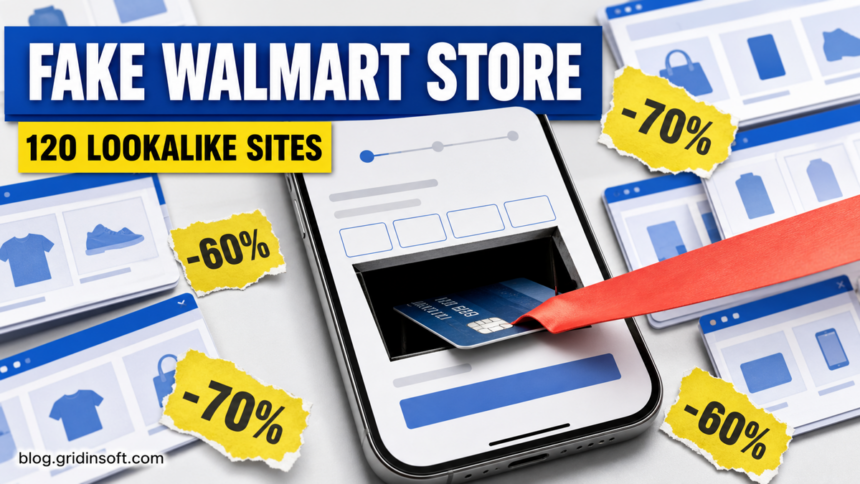
A network of more than 120 fake Walmart stores is using familiar retail colors, copied product pages, and discounts of up to 70% to lead shoppers to a payment form. The sites are not connected to Walmart. Their checkout asks for the full card number, expiry date, CVV, and cardholder name, so anyone who submitted those fields should treat the card as compromised and contact the issuer now.
Malwarebytes published the network on July 29, 2026, after finding near-identical mobile storefronts on unrelated .shop domains. The report does not establish a Walmart systems breach, a confirmed victim count, or malware delivery from simply opening a page. The verified risk is a cloned shopping flow designed to collect payment-card data.
Who needs to act
| What happened | Risk and next decision |
|---|---|
| You only opened a page and did not enter or submit information | Close it, save the domain for reporting, and do not return through the same ad or link. A visit alone is not evidence that your card was stolen. |
| You typed card details but are unsure whether the form was submitted | Assume the page could capture the fields before the final button. Lock the card in the issuer’s app and call the number on the back of the card. |
| You submitted the checkout form | Ask the issuer whether the card should be cancelled and replaced. Monitor for small test charges as well as larger purchases. |
| You also created an account or reused a password | Change that password anywhere it was reused, starting with email and financial accounts. Use the official site or app, not a link from the suspicious page. |
How the cloned store network works
The pages borrow Walmart’s visual familiarity without using Walmart’s real domain. On a phone, the address bar occupies little space while the page fills the screen with a blue retail header, product tiles, a cart, and familiar checkout steps. That makes the site feel like an ordinary mobile store before a shopper has checked who actually owns it.
The network is more than a single copied homepage. The primary report found the same WordPress/WooCommerce template, product catalog, prices, and images repeated across the domains. Operators changed fabricated US business addresses and phone numbers, but the underlying store remained almost identical. Premium liquor advertised at 40%-70% off supplies the urgency: a shopper is pushed to finish payment before questioning why an unrelated domain can offer the same inventory at implausible prices.
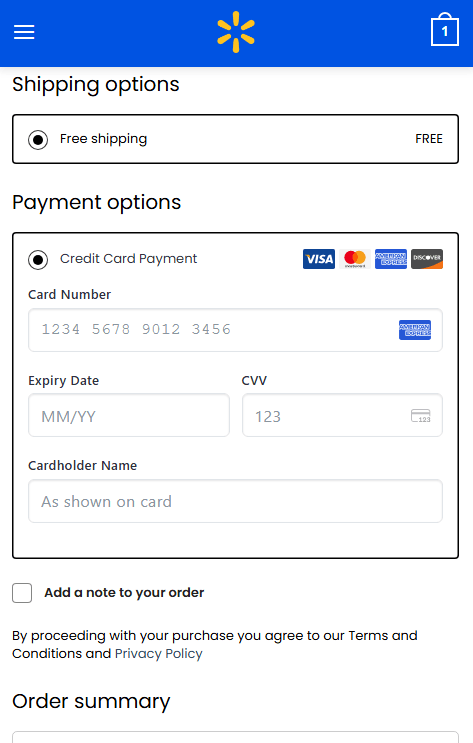
The payment form is the decisive boundary. A fake store can look polished, use HTTPS, and show card-network icons while still sending information to an unknown operator. A padlock only means the browser encrypted the connection to that domain; it does not prove that the domain belongs to Walmart or that a real merchant will fulfill the order.
Signs that a Walmart-looking store is fake
- The address is not Walmart’s official domain. A page may display Walmart colors and a familiar symbol while the address bar shows an unrelated name ending in
.shop. - Discounts are extreme across many products. Repeated 40%-70% cuts on premium brands are a persuasion device, not proof of a clearance event.
- Contact details do not match the domain. A fabricated local address or phone number can be swapped between clones. Verify the business independently rather than calling only the number printed on the page.
- The catalog looks duplicated. Identical images, product order, prices, policies, and wording across unrelated sites point to a template network.
- The checkout requests full payment data before trust is established. Stop when a newly discovered store wants the card number, expiry, CVV, and cardholder name without a verifiable merchant identity.
The older fake Walmart gift-card reward uses a different funnel: it starts with a promised reward and contact-data collection rather than a cloned merchandise catalog. The shared lesson is to verify the domain before trusting the brand shown inside the page. For a broader checklist, use the 12 signs of an online scam.
Example domains from the reported network
| Examples | How to use this list |
|---|---|
allgoodscenter[.]shopallneedsmarket[.]shopbroadbasket[.]shopcartandcrate[.]shop |
Do not visit to “test” the checkout. Block and report exact matches seen in browser, DNS, proxy, or payment evidence. |
dailycrate[.]shopgoodsdistrict[.]shopmarketwarehouse[.]shoptrustedgoods[.]shop |
The naming pattern is not a complete detection rule. New clones can use different words or top-level domains. |
Domains can go offline, change content, or be replaced. Before buying from an unfamiliar store, open the official retailer site independently and compare the address. The Gridinsoft Website Reputation Checker can add domain-age, blacklist, and content signals, but a clean result for a new domain is not a guarantee of legitimacy.
What to do if you entered card details
- Lock the card and contact the issuer immediately. Use the bank’s official app or the number printed on the physical card or statement. Explain that the full card number, expiry, CVV, and name were entered on an impersonation site.
- Ask about replacement. A temporary lock can stop immediate use, but exposed card details may remain useful later. Follow the issuer’s recommendation on cancellation and replacement.
- Review pending and posted transactions. Report unfamiliar charges, including small authorization tests. Keep checking after the first day rather than assuming silence means the data was not captured.
- Preserve evidence. Save the domain, approximate time, screenshots, confirmation page, email receipt, and the amount shown. Do not revisit the site to collect more evidence.
- Change reused credentials. If the site received an email/password combination used elsewhere, change it from a clean device and enable multifactor authentication where available.
- Report the scam. Report the domain through the browser and to the appropriate consumer-protection authority. If a charge appeared, follow the issuer’s dispute process.
If the incident expanded beyond the card—for example, you installed an app, allowed notifications, or downloaded a file—document that separately and scan the affected device. The online-scam recovery guide helps separate payment, account, identity, and device actions.
FAQ
Does HTTPS mean a Walmart-looking store is legitimate?
No. HTTPS encrypts traffic to the domain you opened. It does not prove that Walmart owns that domain or that the merchant shown on the page is real.
Does Walmart use unrelated .shop domains for clearance sales?
Do not assume it does because a page carries Walmart colors or products. Start at Walmart’s official site or app and navigate to the sale from there. If the offer exists only on an unrelated domain, do not enter payment data.
Do I need to replace my card if I only viewed the page?
Not because of a page view alone. The stronger replacement trigger is entering or submitting card details, seeing an unauthorized charge, or receiving issuer advice based on the exposure.
References
- Stefan Dasic. “We Found 120 Fake Walmart Stores Trying to Steal Your Credit Card.” Malwarebytes, July 29, 2026. primary network research.
- Walmart Inc. “Fraud Alerts.” Walmart Corporate, accessed July 29, 2026. official fraud guidance.
- Federal Trade Commission. “Lost or Stolen Credit, ATM, and Debit Cards.” FTC Consumer Advice, accessed July 29, 2026. card-loss and reporting guidance.