

The “I am a professional hacker” email is a sextortion scam. The sender claims they hacked your operating system, watched you through your webcam, recorded adult-site activity, and will send the video to your contacts unless you pay in Bitcoin. In most cases, there is no video, no live access to your computer, and no professional hacker behind the message.
If you want the broader version of this checklist, read our updated guide on how to tell a sextortion scam from a real threat.
| Scam name | “I am a professional hacker” email scam |
| Type | Sextortion email, Bitcoin blackmail, phishing, social engineering |
| Common claim | The sender says they hacked your device, recorded your webcam, and copied your contacts. |
| Usual demand | A Bitcoin payment within 48-72 hours, often $500-$2,000. |
| Best first action | Do not pay, do not reply, save the email if you want to report it, then change reused passwords. |
Is the Professional Hacker Email Real?
Usually no. This message is normally a mass-sent scare email. Scammers send the same script to thousands of people and hope a few recipients panic because the email mentions adult content, a webcam recording, an old password, or a spoofed sender address.
Take it seriously as a scam attempt, but do not treat the claims as proof that your webcam was hacked. The useful response is calm and practical: do not pay, do not reply, secure your accounts, and scan your device if the email includes a file, link, QR code, or other suspicious prompt.
Why This Email Feels Convincing
Most versions use a script close to this:
I am a professional hacker and have successfully managed to hack your operating system. Currently I have gained full access to your account. I have made a video compilation from your webcam. Transfer Bitcoin within 50 hours or I will send it to all your contacts.
The email works because it mixes fear, embarrassment, urgency, and technical language. It may claim the malware is “driver-based,” that it refreshes signatures every few hours, or that the sender receives a notification when you open the message. These details are there to sound advanced, not because they prove anything.
If your message specifically starts with “I am a hacker who has access to your operating system,” “I hacked your operating system,” or “LAST WARNING !!!”, use our Hacker Who Has Access To Your Operating System email scam checklist for the exact variant.
Common Signs It Is a Scam
- The message starts with “I am a professional hacker,” “I hacked your operating system,” or “I have full access to your account.”
- It threatens to send a webcam video or browser history to your family, friends, or coworkers.
- It demands Bitcoin or another cryptocurrency and gives a short deadline.
- It tells you not to contact anyone, not to reply, and not to tell the police.
- It uses generic wording and does not prove access to your actual files or recent activity.
- It may look like it came from your own email address because the sender field was spoofed.
- It may include an old password from a data breach to make the threat feel real.
What If the Email Shows One of Your Passwords?
A real password in the email does not mean the sender hacked your computer. It usually means your email/password pair appeared in an old data breach and was resold in bulk. Scammers automatically insert leaked passwords into sextortion templates because it increases panic.
If the password is old and no longer used, the immediate risk is low. If you still use it anywhere, change it everywhere immediately. Start with email, banking, cloud storage, social media, work accounts, gaming accounts, and any account that can reset other passwords.
What If the Email Came From Your Own Address?
If the message looks like it came from your own inbox, compare spoofing and account-takeover signs in our guide for when a scammer has your email address before assuming the mailbox is hacked.
That is usually email spoofing. The visible “From” address can be forged, just like a caller ID can be faked. It does not automatically mean the attacker logged into your mailbox.
Still, check your email account security:
- Change the mailbox password if it was reused or weak.
- Enable two-factor authentication.
- Review recent sign-ins and active sessions.
- Check forwarding rules, filters, recovery email, and recovery phone.
- Remove unknown app passwords or third-party mail access.
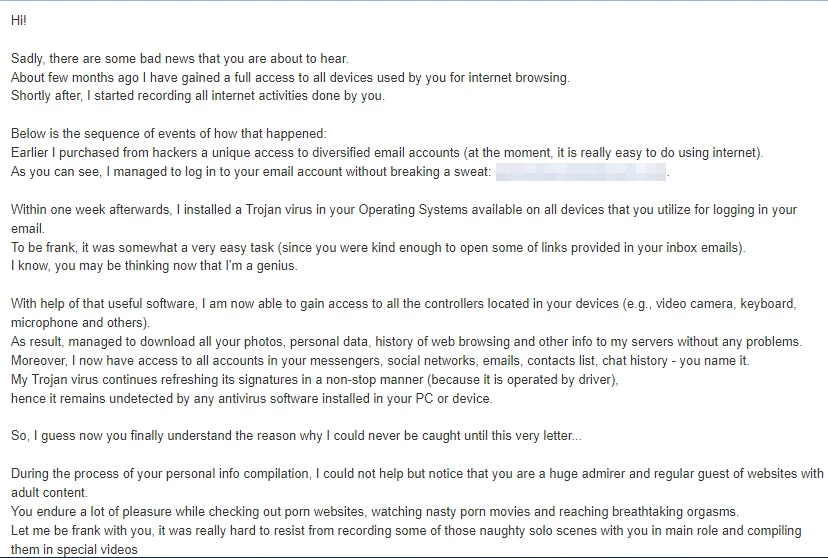
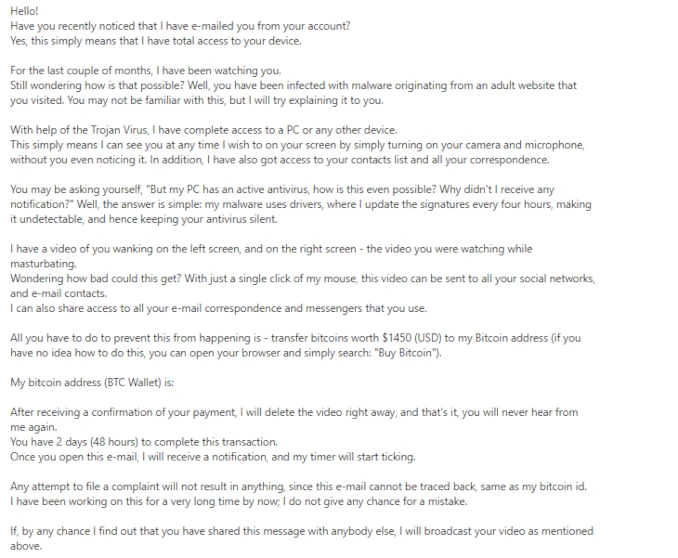
Real Example of the Scam Email
Here is the kind of message users report. Notice how it relies on pressure, shame, Bitcoin, and vague technical claims rather than real proof.
What to Do If You Receive This Email
- Do not pay. Payment does not delete anything and may mark you as a person willing to pay.
- Do not reply. Replying confirms that your inbox is active and may bring more threats.
- Do not click links or open attachments. Most versions are plain text, but some campaigns add malicious links or files.
- Save a copy if you want to report it. Keep the message headers, Bitcoin address, sender address, and date.
- Mark it as spam or phishing. This helps your mail provider filter similar messages.
- Change reused passwords. Focus on accounts that used the password shown in the email.
- Run a security scan. This is especially important if you clicked anything, downloaded a file, or recently installed suspicious software.
After uninstalling the suspicious app or deleting the visible threat, use Gridinsoft Anti-Malware to check hidden files, startup entries, scheduled tasks, bundled apps, browser changes, and other persistence points that can restore malware.
Download Anti-MalwareIf You Already Paid or Replied
If you paid, do not send more money. Scammers often ask for a second payment once they know the threat worked. Save the wallet address, transaction ID, email headers, and any conversation, then report the incident.
If you replied, stop communicating. Do not negotiate, do not explain, and do not send personal information. Change important passwords and enable two-factor authentication on email and financial accounts.
Where to Report It
In the United States, report sextortion and online blackmail attempts to the FBI Internet Crime Complaint Center at IC3.gov. You can also report fraud to the FTC at ReportFraud.ftc.gov. If you are outside the U.S., use your national cybercrime reporting center or local police non-emergency reporting channel.
If the message targets a child, includes real intimate images, or the sender has actual private material, treat it as urgent sextortion and contact law enforcement immediately. The FBI has dedicated sextortion guidance and reporting resources for victims and families.
How to Protect Yourself Afterward
- Use unique passwords for every important account.
- Enable two-factor authentication on email first, then banking, cloud, and social accounts.
- Review mailbox forwarding rules and connected apps.
- Keep Windows, browsers, and security software updated.
- Cover your webcam if it helps you feel safer, but do not rely on that instead of account security.
- Be careful with cracked software, fake updates, browser extensions, and unexpected attachments.
FAQ
Is “I am a professional hacker” a real hack?
Usually no. It is a mass sextortion scam. The sender rarely has webcam footage or device access. They rely on fear, shame, leaked passwords, and Bitcoin pressure.
Why did the hacker know my password?
The password most likely came from an old data breach. Change that password anywhere it is still used and stop reusing passwords across accounts.
Should I pay the Bitcoin ransom?
No. Paying does not guarantee anything and may lead to more demands. Save evidence and report the message instead.
Can they really send a video to my contacts?
In the typical email version, no real video exists. If the sender shows actual private media or specific recent evidence, preserve the evidence and contact law enforcement immediately.
Do I need to reinstall Windows?
Usually no. If you did not click links, open attachments, or install software from the email, focus on account security. If you did interact with anything suspicious, run a full scan and review startup items and browser extensions.
What if the email says the countdown started when I opened it?
Ignore the countdown. It is a pressure tactic. Some emails can contain tracking pixels, but that does not prove device access or webcam recording.
Bottom Line
The “I am a professional hacker” email is designed to make you panic before you think. Do not pay, do not reply, secure any reused passwords, and report the message if you want to preserve evidence. If the email includes a real password, the password reuse is the real issue. If it includes real private material, escalate to law enforcement immediately.
Related scam guides
Related: For a general checklist, see how to spot a phishing email, or analyze a suspicious message with GridinSoft Email Checker.

The thing this article doesn’t mention about this scam is that sometimes it includes a password that the victim has actually used in the past, and also it may be sent from the victim’s e-mail address to itself, which can make the threat look more real and serious (which is the reason why I myself googled about it, honestly)
Same as Wonchi said, email comes from one’s email address and includes a password that has been used in the past. Tricky for sure but still scam.
Same scam e-mail over here: the scammer stated an old password and it was sent from a @hotmail.com e-mail address.
Indeed felt quite scary in the beginning, but after some google searches, things started to calm down.
Especially this article really made me calm down, thanks.
Nevertheless I changed practically all my passwords into more complicated ones.
But how can I report the scammer? Does hotmail.com have an option for this?