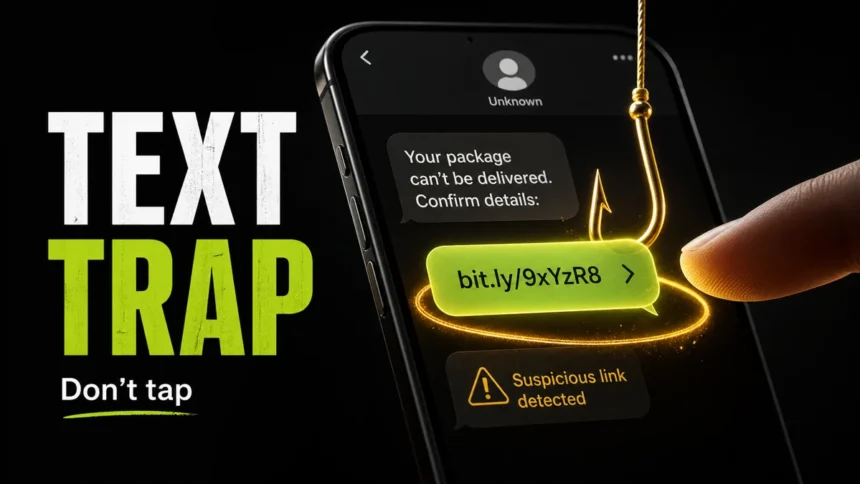
Spam text messages are unwanted SMS, MMS, RCS, or messaging-app messages that try to make you click, reply, pay, call, or share private information. Many of them are smishing attacks, which means phishing through text messages. If you need the side-by-side channel comparison, use our phishing vs smishing vs vishing guide. If a text claims there is a delivery problem, unpaid toll, bank alert, job offer, refund, prize, or “wrong number” conversation, treat it as suspicious until you verify it outside the message.
Fast safety check
- Do not tap links, scan QR codes, call numbers, or reply from the message.
- Open the real app or website yourself if the alert might be legitimate.
- Never share one-time codes, card numbers, account passwords, or Social Security details by text.
- Report the text in your messaging app or forward SMS spam to 7726 where supported.
- If you clicked, paid, or entered data, secure the affected account immediately.
Why spam text messages still work
Text scams work because people notice phone notifications quickly and scammers write messages that feel urgent. The FTC reported that people lost $470 million to text scams in 2024, more than five times the 2020 amount. The most common 2024 themes were fake package delivery problems, phony job opportunities, fake fraud alerts, unpaid toll notices, and “wrong number” conversations that turn into investment scams [1].
The hard part is that modern spam texts do not always look sloppy. A message can include your name, a real brand, a familiar city, or a convincing tracking-style number. That does not prove the sender is real. Scammers can register look-alike domains, use URL shorteners, spoof sender names, rotate phone numbers, and copy the tone of real customer-service alerts.
Common spam text message examples
| Text you receive | What the scammer wants |
|---|---|
| “Your package cannot be delivered. Confirm address.” | A small card payment, address details, login credentials, or identity data. |
| “You have an unpaid toll balance. Pay today to avoid penalties.” | Credit card details, driver information, or personal data for identity theft. |
| “PST balance updated. Check your file securely at tran-int.ca/[redacted-token].” | A phishing page that may collect payment, account, or identity details while the unique token tracks which recipient opened the link. |
| “Did you authorize this bank transaction? Reply YES or NO.” | A live phone conversation with a fake fraud department, followed by account takeover or money transfer pressure. |
| “Easy remote job. Complete simple tasks and withdraw earnings.” | Deposits, “upgrade” payments, crypto transfers, or identity documents. |
| “Hi, is this Anna? Sorry, wrong number.” | A longer conversation that may become romance, investment, or crypto fraud. |
| “Your account will be locked. Verify now.” | Passwords, one-time codes, recovery details, or a malicious app download. |
| “Your T-Mobile reward points expire today. Redeem them now.” | A fake loyalty login, card fee, or one-time code request that lets the scammer take over the account or payment method. |
A fresh balance-alert variation may use vague wording such as “PST balance updated” and a short domain like tran-int.ca/[redacted-token]. Do not publish or forward the full personal token. Treat newly registered domains, redirects to a different domain, and generic “file” or balance language as smishing signals. Verify any real transit, tax, toll, or account-balance claim through the official app or a typed website.
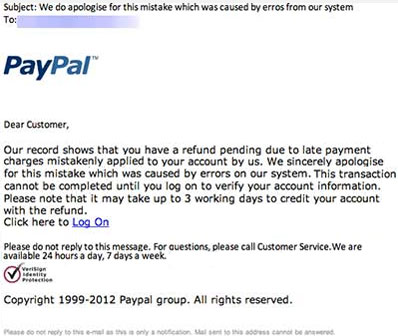
Reward-points smishing is a current version of the same trick. The FTC warns that texts about expiring points may use a familiar loyalty brand, a short deadline, and a link that asks for login details, card information, or a small “shipping” or “processing” fee [4]. If the message names T-Mobile or another carrier, do not use the link in the text. Open the official carrier app or type the real website yourself, then forward the suspicious message to 7726 if your carrier supports spam reporting.
The September 17 investigation of T-Mobile points phishing across 81 domains shows how this lure changes its messages and addresses. It also separates fake expiry claims from the real Visa rewards program.
DMV texts about an overdue traffic ticket
An unexpected text that claims an unpaid traffic ticket will suspend your licence, registration, or driving privileges needs independent verification. The FTC warns that these messages may add a short deadline, extra fees, or threats of prosecution to pressure you into paying [5]. A state name, case number, official-looking logo, or payment QR code does not authenticate the sender.
- Verify outside the message. Do not use its link, QR code, callback number, or reply instructions. Open your state DMV or relevant court website independently, or call a number from an official document. Notification rules differ between states; the message alone cannot establish whether you owe a fine.
- If you only opened the page, close it and follow the clicked-link checklist below. A click alone does not prove malware infection.
- If you submitted card details, contact your bank through its official app or the number on your card. For a password or one-time code, secure the real account and revoke unfamiliar sessions.
- If you shared a licence image or Social Security number, preserve the message and follow the identity-theft response steps; contact the issuing agency through a verified channel.
Report the text in your messaging app or forward it to 7726 where supported. Keep evidence if money or identity data was involved, then block the sender.
Red flags in SMS phishing messages
- The message creates urgency. It says you must pay, verify, reply, or update details right now.
- The sender asks for sensitive data. A real company should not ask for your password, card number, Social Security number, or one-time code by text.
- The link is not the real domain. Watch for extra words, hyphens, random letters, country-code domains, URL shorteners, or a brand name placed in a subdomain.
- The message asks you to keep the conversation inside the text. Scammers prefer that you do not open the official app or call the real company.
- The request does not match your real activity. A delivery fee, toll charge, bank purchase, or job offer that appears out of nowhere should be verified independently.
- The sender wants a reply. Even “STOP” can confirm that your number is active when the sender is not a legitimate service.
If the text contains a domain you are unsure about, do not open it directly on your phone. Copy only the domain and check it with the Gridinsoft Online Virus Scanner, or search the brand’s official site yourself. The same domain tricks appear in email phishing, so this phishing red flags checklist can help with both inboxes.
What victims usually need first
People who search for spam text messages are often trying to answer one of four urgent questions: “Is this message real?”, “Should I reply?”, “What happens if I clicked?”, or “How do I make these stop?” The safest order is simple: verify the claim outside the text, preserve evidence if money or identity data was involved, report the message, and then block or filter future messages.
If your main goal is reducing the number of messages, use our separate guide on how to stop spam texts on iPhone and Android. This page focuses on recognizing SMS phishing and choosing the right response before a scam becomes an account, card, or malware problem.
What to do if you clicked a spam text
- If you only opened the page: close it. Do not enter information, download files, approve notifications, or install apps from the page.
- If you entered a password: go to the real website or app, change the password, remove unknown sessions, and change the same password anywhere else you reused it.
- If you entered a card or bank detail: contact the bank using the number on the card or the official app. Ask about freezing, replacing, or monitoring the card.
- If you shared a one-time code: treat the account as compromised. Change the password, reset recovery methods, and check recent login activity.
- If you downloaded an app or file: uninstall it if possible and scan the affected device. If the phone now shows pop-ups, unknown apps, battery drain, redirects, or permission prompts, use this guide to check whether your phone may have a virus.
- If you paid a scammer: save screenshots, transaction IDs, phone numbers, links, and chat history. Contact the payment provider quickly and report the fraud.
Should you reply STOP?
Reply STOP only when the sender is a legitimate company or service you recognize, such as an appointment reminder, delivery notification, store loyalty program, or subscription you signed up for. Do not reply STOP to a random delivery fee, toll notice, bank alert, prize, job offer, crypto pitch, or wrong-number message. With scam messages, any reply can confirm that your number is active and monitored.
Named voter-outreach messages are a useful edge case: if you received “This is OurBallot…” and are unsure whether to answer Y or N, use the OurBallot text message check to separate unwanted outreach from a spoofed follow-up.
What changed on iPhone in 2026
Apple’s newer spam handling matters because some iPhone users will now see suspicious messages filtered before they reach the main inbox. Apple says that in Messages with iOS 26, on-device spam detection can move messages to a Spam folder, and messages marked as spam cannot be replied to or clicked until moved back to the inbox [2]. That helps reduce accidental taps, but it does not replace judgment: a restored message can still contain a scam link.
How to report spam text messages
Reporting helps carriers, messaging apps, and regulators identify larger campaigns. The FTC recommends three practical reporting paths: forward unwanted SMS to 7726 where supported, report the message in the app, and report fraud to the FTC at ReportFraud.ftc.gov [3]. After reporting, delete the message unless you need it as evidence for your bank, employer, carrier, or law enforcement.
FAQ
What is smishing?
Smishing is SMS phishing. A scammer sends a text message that impersonates a trusted organization or person and tries to make you click a link, reply, call, pay, download an app, or reveal sensitive information.
Can a spam text hack my phone by itself?
A normal text message usually cannot hack your phone just by appearing in your inbox. The bigger risk starts when you tap a link, install an app, approve permissions, enter credentials, or share a verification code.
Why am I getting spam texts from different numbers?
Scammers rotate numbers, use messaging gateways, spoof senders, and reuse phone-number lists from breaches, public forms, data brokers, and previous scam campaigns. Blocking one number helps only with repeats from that sender.
Should I call the number in a suspicious text?
No. If the text might involve your bank, delivery company, toll agency, employer, Apple, Google, Amazon, PayPal, or another real service, open the official app or use a phone number from the real website, not the text.
Is it safe to screenshot a spam text?
Yes. Screenshots are useful evidence if you paid, entered data, or need to report the scam. Avoid tapping the link while taking the screenshot, and do not post personal details publicly.
Is a T-Mobile reward points text real?
Treat it as suspicious until you verify it outside the text. Do not tap the reward link, enter a one-time code, or pay a small fee to claim points. Open the official T-Mobile app or website yourself, check whether any reward exists there, then report the message through your phone or by forwarding it to 7726 where supported.
Is a “PST balance updated” text real?
Treat it as suspicious if the link points to an unfamiliar short domain such as tran-int.ca/[redacted-token], especially when the message does not name a service you use. Do not tap the link or share the personal token publicly. Verify the claim through the official organization, report the text, and scan the device only if the page led you to install an app or file.
References
- Federal Trade Commission, Division of Consumer Response and Operations Staff. “Top text scams of 2024.” FTC Data Spotlight, April 14, 2025, accessed June 7, 2026. https://www.ftc.gov/news-events/data-visualizations/data-spotlight/2025/04/top-text-scams-2024
- Apple Support. “View and recover spam messages on your iPhone.” Apple, published April 6, 2026, accessed June 7, 2026. https://support.apple.com/en-us/124159
- Federal Trade Commission. “How to Recognize and Report Spam Text Messages.” FTC Consumer Advice, accessed June 7, 2026. https://consumer.ftc.gov/articles/how-recognize-report-spam-text-messages
- Federal Trade Commission. “Got a text about expiring reward points? Look closer.” FTC Consumer Advice, April 2026, accessed June 29, 2026. https://consumer.ftc.gov/consumer-alerts/2026/04/got-text-about-expiring-reward-points-look-closer
- Federal Trade Commission, Bureau of Consumer Protection. “A text about an overdue traffic ticket? It’s probably a scam.” FTC Consumer Advice, July 21, 2025; accessed October 15, 2026. https://consumer.ftc.gov/consumer-alerts/2025/07/text-about-overdue-traffic-ticket-probably-scam