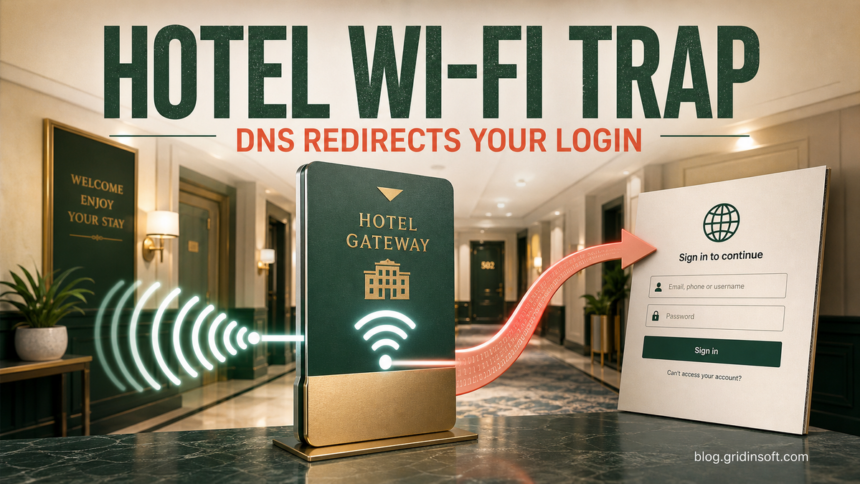
Hotel Wi-Fi can lead to a fake Microsoft 365 login or a malicious update. If you ran a file or pasted a command offered by the network, disconnect the device and use a separate trusted device for account recovery. Merely joining the network does not establish that malware ran.
ReliaQuest has identified a widespread campaign in which attackers compromise Wi-Fi gateways at hotels, conference centers, and other captive-portal venues, then poison DNS responses to redirect travelers toward fake Microsoft 365 sign-in pages. The activity has been ongoing since at least June 2026 and was observed in multiple U.S. cities, India, and Saudi Arabia.
The practical warning is narrower than “public Wi-Fi is unsafe.” A traveler can join the venue’s real network and still be exposed because the gateway itself has been altered. ReliaQuest recommends an always-on, full-tunnel VPN for the DNS interception path; a browser padlock or manually configured public DNS server alone does not prove the route is safe.
July 31 update: CaptiveCrunch adds malware delivery
Updated September 8, 2026, to incorporate Microsoft’s July 31 findings. Microsoft attributes CaptiveCrunch to Storm-2945, a Midnight Blizzard sub-cluster, and reports activity since May. Its investigation into the initial captive-portal compromise remains open.
CornFlake is a Windows RAT that can install as %APPDATA%\svchost32\svchost32.exe, with service name svchost32 and display name Cloud Sync Service. Services, Run keys, scheduled tasks and a watchdog provide redundant persistence. ChocoShell runs in memory through PowerShell and steals browser passwords, cookies and Microsoft 365 tokens. Microsoft also found Android APK installation instructions; these are indications of targeting, not a confirmed Android infection count.
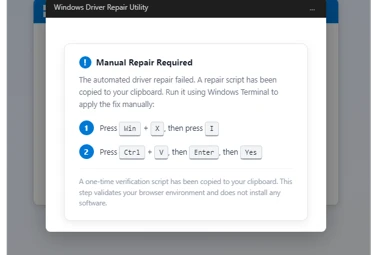
The important distinction is what you did after the prompt. A fake update window does not document a successful operating-system update. Equally, the familiar service name alone cannot identify every malicious process: correlate its file path, signature, creation time and activity. Do not delete the legitimate Windows svchost.exe just because the names resemble one another.
How the hotel Wi-Fi redirect works
ReliaQuest assesses with low-to-medium confidence that attackers gained administrative access through exposed management interfaces, weak or reused credentials, or unpatched gateway software. Once inside, they changed the resolver and routing behavior for every guest using that gateway.

- The gateway is compromised. The attacker gains control of a captive-portal appliance that manages guest DNS and routing.
- DNS answers are forged. Requests for legitimate services can be answered with attacker-controlled infrastructure.
- A lookalike login appears. ReliaQuest observed Microsoft-themed domains and pages rather than a compromise of Microsoft’s own cloud.
- Credentials or authorization are captured. Some cases used a fake sign-in form; a limited number paired the redirect with Microsoft device-code authentication.
- The account becomes the target. A valid attacker-initiated device-code approval can issue a token even when the user completes normal MFA.
Domains and artifacts to check
| Indicator | Why it matters |
|---|---|
m365-owa[.]com |
Attacker-controlled Microsoft impersonation domain reported by ReliaQuest. |
owa-ms365[.]com |
Lookalike Outlook/Microsoft 365 domain used in the same campaign. |
ms365-device[.]com |
Domain consistent with the campaign’s device-code lure. |
ms365-live[.]com |
Additional Microsoft-themed domain on related infrastructure. |
38.146.28[.]75 |
Observed forged DNS response and proxy infrastructure. |
Unexpected wpad.dat or PAC file |
About one-third of observed cases also attempted Web Proxy Auto-Discovery abuse; success was not confirmed. |
An indicator match is a reason to investigate, not proof that every device on the network lost an account. Correlate it with the venue, connection time, VPN state, browser history, Microsoft Entra sign-ins, device-code events, proxy activity, and newly created sessions.
Why 8.8.8.8 and MFA may not be enough
A plain DNS request aimed at 8.8.8.8 still crosses the compromised gateway. The gateway can forge a response before the request reaches Google. ReliaQuest says strict encrypted DNS with plaintext fallback disabled can prevent that forgery, while opportunistic encryption may fall back to the exposed path.
MFA remains important, but it does not rescue an authorization that the user is tricked into approving. In the reported device-code path, the user can authenticate on a legitimate Microsoft page while unknowingly authorizing the attacker’s waiting session. Our device-code phishing guide explains why the displayed code and the initiating device must be verified before approval.
Choose the response for what happened
- You only connected, or saw a repair/update prompt. Close it without following its instructions, leave the network, and record the venue and time. Check whether anything downloaded. Connection alone is not a reason to declare an infection or reset every account.
- A file downloaded, but you did not run it. Do not open it to find out what it does. Keep a security-tool detection quarantined; otherwise remove the unused download after your IT team has collected any evidence it needs. Recheck whether you also entered a password or approved a code.
- You ran a file or pasted a command. Disconnect the affected device, stop using it for sign-ins, and contact IT if it is managed. Preserve the prompt, filename and time without rerunning it. Have the system assessed for persistence and companion payloads; confirmed remote access may require rebuilding from trusted media.
- You entered credentials or approved a Microsoft device code. Use a separate trusted device and connection. Reset exposed or reused passwords, revoke sessions, and ask the administrator to investigate device-code sign-ins, application grants and registered devices. Review account activity as described below. Download-only and account-exposure states can occur together.
- You installed an Android APK. Disconnect the phone and report the app name and installation time. Review recently installed apps, accessibility access and device-administrator permissions; remove the suspicious app and revoke permissions it obtained. Use official Android security updates and Play Protect. If removal fails or suspicious activity persists, get device support; recover accounts from another trusted device.
For Windows where a file or command ran, removing one visible payload may leave a service, scheduled task or other component able to return. On an unmanaged PC, run a full Gridinsoft Anti-Malware scan, remove detections and check again after reboot if activity returns. Follow your organization’s response process on a managed device. A clean scan does not revoke stolen sessions or establish that no data was taken.
Account and network checks after an exposed login
- Leave the suspect network. Disable Wi-Fi and move to a trusted cellular hotspot, home connection, or corporate network.
- Tell your security team the venue and time. The gateway may expose many guests, and VPN, DNS, proxy, and identity logs need to be correlated.
- Revoke sessions and suspicious tokens. If credentials or authorization were exposed, reset the password from a trusted device, terminate active sessions, and review device-code authentication and OAuth grants. A password change alone may leave a token usable; administrators should also check application sessions and account changes.
- Inspect the mailbox and cloud account. Check forwarding rules, inbox rules, delegates, recovery methods, OneDrive and SharePoint access, unusual downloads, and new registered devices.
- Review Windows proxy state. Look for an unexpected PAC file, proxy server, DNS setting, network profile, or certificate. ReliaQuest observed WPAD attempts but did not confirm that they succeeded.
- Use a full-tunnel VPN on future public networks. It should carry DNS as well as browser and application traffic. A captive portal may require access before the tunnel can establish: keep that step minimal, never install a repair tool, and prefer cellular connectivity if you cannot establish the trusted tunnel. Split tunneling can leave local DNS exposed. A VPN cannot undo malware execution or an approved attacker session.
For the broader travel checklist, see how to use public Wi-Fi safely. The key distinction in this campaign is that confirming the venue’s real network name does not confirm the gateway’s DNS behavior.
FAQ
Does HTTPS stop hotel Wi-Fi DNS poisoning?
HTTPS prevents a gateway from silently impersonating a legitimate Microsoft hostname without a valid certificate. The observed campaign instead used lookalike domains, captive-portal expectations, proxy behavior, and device-code authorization. Do not bypass certificate warnings or assume a Microsoft-themed URL belongs to Microsoft.
Does a VPN protect against this campaign?
An established full-tunnel VPN with trusted DNS helps protect the network path. The portal step before it connects may remain exposed, and a VPN does not make an offered update safe. Prefer a private hotspot when a trustworthy tunnel cannot be established.
Should I scan the laptop for malware?
Yes if you ran the offered file or command, installed a suspicious component, or activity continues away from the venue. The campaign includes malware delivery as well as account phishing. A connected-only device needs exposure checks, not an automatic infection verdict; account recovery remains a separate task.
References
- ReliaQuest Threat Research. “DNS Poisoning Tactics Expand to Hospitality Wi-Fi.” ReliaQuest Threat Spotlight, published July 23, 2026, accessed September 8, 2026. ReliaQuest primary research report.
- Microsoft Threat Intelligence. “CaptiveCrunch: Midnight Blizzard targets travelers worldwide for malware delivery and credential theft.” Microsoft Security Blog, July 31, 2026; accessed September 8, 2026. CaptiveCrunch research and indicators.