The “We Hacked Your System” email is usually a mass sextortion scam, not proof that someone controls your webcam. The sender claims they installed malware, copied your data, recorded an intimate video, and will send it to your contacts unless you pay in Bitcoin or another cryptocurrency. In the common version, there is no video and no device access. Do not pay, do not reply, and do not let the deadline make decisions for you.
For a broader triage checklist, see our updated guide to sextortion email scams and real blackmail signs.
Fast verdict
- Threat type: sextortion email, crypto blackmail, phishing, social engineering.
- Fake claim: the sender says a Trojan gave them access to your screen, camera, microphone, contacts, and private files.
- Usual demand: cryptocurrency with a short deadline. The amount and timer vary by campaign.
- What counts as proof: a fresh screenshot, a real private file, current account access, or direct contact with people you know.
- Best first action: do not pay or reply. Preserve evidence, check passwords, and scan only if you clicked, opened, installed, or see real compromise signs.
Do Not Pay or Reply
Paying rarely ends the pressure. It can mark you as someone willing to send money and invite a second demand. Replying also confirms that your address is active. If the email contains only generic claims, a pasted password, a spoofed sender address, a Bitcoin wallet, and a countdown, treat it as pressure rather than evidence.
The useful response is calm triage: save the email, check whether any password in it is still in use, secure your email account, and decide whether there was any real interaction with a link, file, or installed program.
What This Email Usually Looks Like
The wording changes, but most versions follow the same script. The sender says they placed a Trojan on your device after you visited an adult website, then claims they can see your screen, camera, microphone, contacts, messenger accounts, and private files. They threaten to send a video to family, friends, or coworkers unless you pay quickly.
Some messages use a very specific number, such as 50 hours or a fixed dollar amount. Others use 24, 48, or 72 hours and different crypto wallets. Those details make the message feel personalized, but they are usually copied into many emails.
Example of the Scam Email
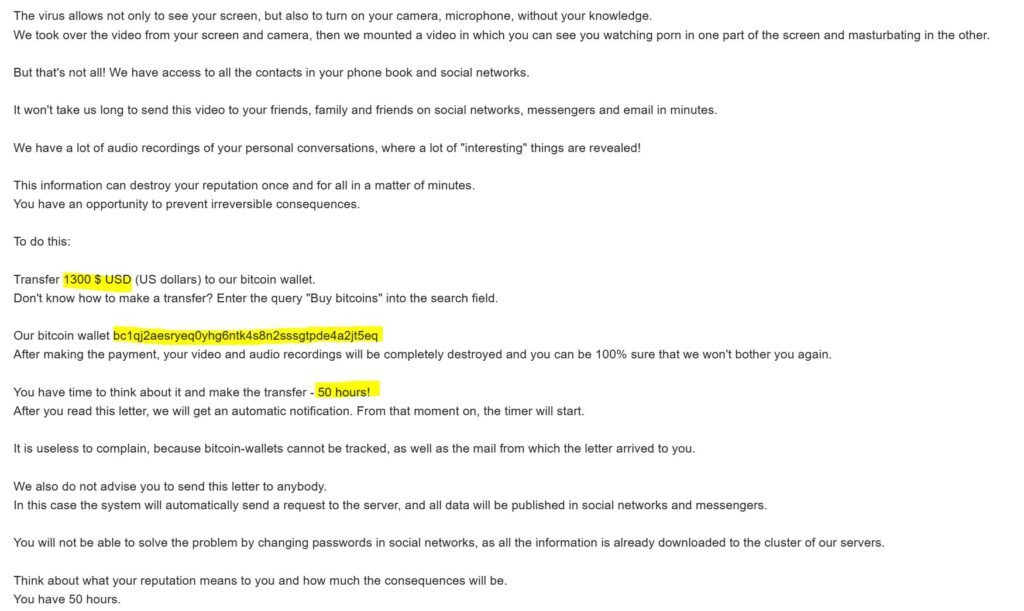
Typical scam wording:
Consider this message as your last warning. We hacked your system. We copied data from your device and recorded videos from your camera. Transfer money to our cryptocurrency address within the deadline or we will send the video to your contacts.
This is not reliable evidence. A real attacker normally does not need to describe imaginary malware in broad terms. They would be able to show current, specific proof: a recent screenshot, a file name, an account action, or a message sent from an account they actually control.
What Is Not Proof of a Hack
- An old password. It often comes from a previous data breach or a reused credential list.
- Your own email address in the From field. Sender names and addresses can be spoofed.
- A Bitcoin wallet and countdown. Those are payment pressure, not technical evidence.
- Claims about a “Trojan virus.” Generic malware language without a file name, device name, or fresh screenshot is weak evidence.
- A tracking-pixel threat. A pixel may show that an email was opened, but it does not give control of your computer.
What Would Make It More Serious?
Do not dismiss every case blindly. Treat the situation as more serious if the sender includes a fresh screenshot of your desktop, a real private file, a current password, a message sent from an account they truly control, or evidence that they contacted people you know.
There is also a different category: real financial sextortion. The FBI describes cases where criminals obtain or create explicit material, then demand money and threaten to release it. In those cases, saving evidence, blocking the offender, asking for help, and reporting quickly matter more than arguing with the attacker.
If the Email Shows Your Password
A password in the email is scary, but it usually means the password was exposed somewhere else. Do this instead of paying:
- Check whether that exact password is still used anywhere.
- Change it first on your email account and any account that can reset other passwords.
- Use a unique password for every account, preferably through a password manager.
- Turn on two-factor authentication for email, banking, social, cloud, work, and password-manager accounts.
- Review recent sign-ins, recovery email, recovery phone, forwarding rules, filters, and connected apps.
If It Looks Sent From Your Own Email
The visible sender can be spoofed. That alone does not prove the mailbox was hacked. Still, log in to your email provider directly, not through links in the message, and check recent activity, active sessions, forwarding rules, filters, app passwords, OAuth-connected apps, recovery options, and 2FA settings.
If you find unknown sign-ins, rules, or connected apps, change the password from a clean device, sign out other sessions, remove unknown access, and review important accounts that use that mailbox for password resets.
Five-Minute Safety Check
- Look for real proof. Generic threats, old passwords, and fake timers are common scam ingredients.
- Preserve evidence before deleting. Save the message, sender, date, wallet address, headers if available, and screenshots.
- Secure reused passwords. Change any password that appears in the email if it is still active anywhere.
- Check email-account security. Review sign-ins, forwarding rules, recovery details, and connected apps.
- Scan only when it fits the risk. A scan is useful if you clicked links, opened attachments, installed software, or saw real device/account symptoms.
If You Clicked a Link, Opened a File, or Installed Something
Now treat it as a possible phishing or malware incident, not just a bluff email.
- Disconnect from the internet if you suspect active malware or remote access.
- Do not enter passwords on pages opened from the email.
- Run a full antivirus scan and a second-opinion scan.
- Review browser extensions, downloads, startup apps, scheduled tasks, and recently installed programs.
- Change important passwords from a clean device after the suspicious device is checked.
- Watch for account alerts, new email rules, login prompts, unusual browser pop-ups, or security-tool detections.
After uninstalling the suspicious app or deleting the visible threat, use Gridinsoft Anti-Malware to check hidden files, startup entries, scheduled tasks, bundled apps, browser changes, and other persistence points that can restore malware.
Download Anti-MalwareIf You Already Paid
Do not send more money. A second payment does not guarantee silence or deletion; it often proves the scam worked. Save the transaction ID, wallet address, email headers, dates, and all messages. Report the incident to IC3, the FTC, or your local cybercrime reporting channel. If you used an exchange, wallet service, or payment app, contact its support quickly, but assume cryptocurrency recovery is uncertain.
Where to Report It
In the United States, report online blackmail and sextortion attempts to the FBI Internet Crime Complaint Center at IC3.gov. Fraud can also be reported to the FTC at ReportFraud.ftc.gov. If a minor is involved, if real intimate material exists, or if the sender is contacting friends or family, ask for help immediately and contact law enforcement.
This is not a rare problem. The FBI IC3 2025 report says it received more than 75,000 sextortion submissions in 2025, including more than 5,700 involving minors referred to NCMEC.
How to Reduce Future Risk
- Use unique passwords and a password manager.
- Enable two-factor authentication on your main email account first.
- Keep Windows, browsers, and security software updated.
- Remove unknown browser extensions and suspicious apps.
- Do not install cracks, fake updates, unknown video players, or files sent by strangers.
- Covering the webcam can help peace of mind, but password reuse and account security are usually the real issues in this scam.
FAQ
Is the “We Hacked Your System” email real?
Usually no. It is commonly a mass-sent sextortion email. The sender normally has no webcam recording, no contact list, and no full device access.
Why does the email know my password?
The password usually came from an old breach, leak, or reused credential list. Change it anywhere it is still used and enable two-factor authentication.
Can opening the email start a real countdown?
No real ransom timer starts because you opened the email. A tracking pixel may show that the message was viewed, but it does not prove device access.
Should I report the cryptocurrency wallet?
Yes, if you want to help investigators connect campaigns. Save the wallet address, transaction ID if you paid, headers, and screenshots before deleting the message.
Do I need to reinstall Windows?
Usually no. Reinstalling Windows is not necessary if you only received the email and did not click, open, install, or see real compromise signs. Scan first when there was interaction with a file or link.
What if the sender has a real image or contacted people I know?
Do not negotiate alone. Preserve evidence, block the offender where possible, ask a trusted person or professional for help, and report to law enforcement or the platform involved.
Bottom Line
The “We Hacked Your System” email works by mixing shame, technical-sounding claims, old leaked data, and a short payment deadline. Most versions are empty threats. Your best move is to preserve evidence, secure reused passwords, report when useful, and scan only when your interaction or symptoms justify it.
References
- Federal Trade Commission. “Scam emails demand Bitcoin, threaten blackmail.” Consumer Advice, April 29, 2020, accessed June 6, 2026. https://consumer.ftc.gov/consumer-alerts/2020/04/scam-emails-demand-bitcoin-threaten-blackmail
- Federal Bureau of Investigation. “Financially Motivated Sextortion.” FBI, accessed June 6, 2026. https://www.fbi.gov/how-we-can-help-you/scams-and-safety/common-frauds-and-scams/sextortion/financially-motivated-sextortion
- Federal Bureau of Investigation. “2025 IC3 Annual Report.” FBI Internet Crime Complaint Center, 2026, accessed June 6, 2026. https://www.fbi.gov/file-repository/2025_ic3report.pdf
Related scam guides
Related: For a general checklist, see how to spot a phishing email, or analyze a suspicious message with GridinSoft Email Checker.