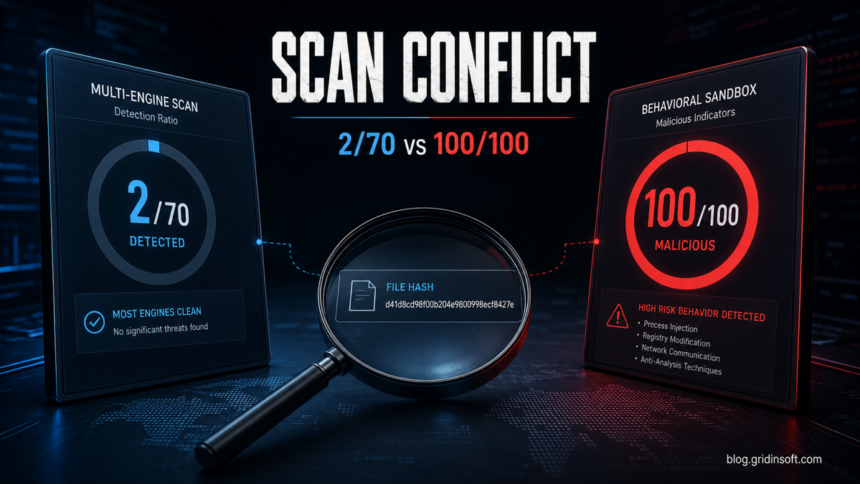
Do not treat either number as a final verdict by itself. If the sample is a private document, internal build, or customer file, read the VirusTotal private-file upload guide before sending the full file to any public scanner. A VirusTotal result such as 2/70 can be a false positive, especially when only obscure or generic engines detect the file, but a Hybrid Analysis 100/100 score means the sandbox saw behavior or rules that deserve a manual review before you run it.
If the file you are checking is VectorGatewa.exe, compare the sandbox result with the local symptoms in our VectorGatewa.exe cleanup guide; persistence and account abuse can outweigh one clean verdict.
If the file is a small developer-tool executable such as tin.exe, compare the path and signature with the Tin.exe safety check before restoring it from quarantine.
If the disputed result is a Microsoft Defender Trojan:MSIL/Heracles alert on a .NET game tool, developer build, or installer, verify source, signature, recurrence, and persistence before restoring it.
The safest decision is to compare the file source, signature, age, prevalence, detection names, and sandbox behavior.
If the disputed label is ESET ML/Augur, follow the ML/Augur alert decision guide to separate trusted update files from unknown executables.
If the flagged item is a tiny startup script rather than a normal EXE, use the same path/hash logic shown in our sdaCollector.vbs Possible Threat checklist. If you already executed the file, disconnect from risky accounts, check startup and browser changes, and run a full malware scan before assuming the low VirusTotal ratio was harmless.
Why the results disagree
VirusTotal is an aggregator. Its false-positive guidance says VirusTotal does not create its own verdict; it shows the output of participating antivirus and URL-scanning engines, so a vendor-specific false positive has to be fixed by the vendor that produced it [1]. VirusTotal file data can also include community votes, sandbox verdict fields, and other metadata, but the headline detection ratio is still only one signal [2].
Hybrid Analysis, powered by Falcon Sandbox, scores the sample from dynamic-analysis output. Its public API exposes fields such as threat_score, threat_level, verdict, antivirus detections, process activity, network connections, signatures, and MITRE ATT&CK mappings [3]. That means a file can have few static antivirus detections while a sandbox still flags suspicious behavior.
This disagreement is common with installers, game tools, peripheral drivers, packers, updaters, macro/script wrappers, and software that injects into other processes or modifies system settings. Some of that behavior can be legitimate. Some of it is also how malware persists, steals data, or evades analysis.
Use this decision checklist
For URL-only findings, read the object type before treating the score like an executable verdict. A saved Favorite or Internet Shortcut can be flagged because the destination is unsafe; the old bookmarks and URL shortcuts guide shows how to inspect those .url entries without opening the site.
Work through these checks one by one. A single safe-looking signal is not enough; the file is more trustworthy only when the source, signature, age, detection names, and behavior all make sense together.
Macro recorders are a good example of why source context matters. If the file is tinytask.exe, compare the official utility, mirror downloads, and bundled-copy warning signs in the TinyTask virus and false-positive safety guide before allowing a detection. A game recorder follows the same evidence rule: use the Medal safety and antivirus-alert guide when the disputed object is Medal.exe or a Medal Crashpad file.
Download source
- Safer: official vendor site, Microsoft Store, or a GitHub release from the real project.
- Warning: mirror sites, ad-driven download pages, cracked-software pages, Discord/Telegram links, or a domain that imitates the real vendor.
Website reputation
- Safer: the download domain looks consistent with the vendor and passes a domain check in the Gridinsoft Website Reputation Checker.
- Warning: the domain is newly created, has a poor reputation, redirects through unrelated hosts, or is already flagged as suspicious.
Digital signature
- Safer: the file has a valid signature from the expected publisher.
- Warning: the installer is unsigned, has a broken signature, or shows a publisher name that does not match the software.
File age
- Safer: the same hash has months of history and stable low detections.
- Warning: the hash is brand new, first seen today, or detections are increasing over time.
Detection names
- Safer: only one or two lower-confidence generic, AI, or heuristic names appear.
- Malwarebytes Malware.AI: if that is the exact label, compare the scan ratio with the file source and path using our Malware.AI false-positive guide before restoring it.
- Avast/AVG Win32:Evo-gen[Trj]: if that is the exact label, review the Win32:Evo-gen[Trj] false-positive checklist alongside the scan ratio.
- Bitdefender/Emsisoft Gen:Variant: if that is the exact label, use the Gen:Variant false-positive checklist to weigh source, path, signature, and vendor-submission evidence.
- Bitdefender Heur.BZC.PZQ.Boxter: if a PowerShell script or diagnostic file is flagged with this exact label, use the Heur.BZC.PZQ.Boxter triage guide before restoring, submitting, or excluding it.
- Warning: major vendors agree on trojan, stealer, loader, ransomware, or backdoor labels.
Sandbox behavior
- Safer: the sample writes to its own program folder and launches expected helper processes.
- Warning: the report shows process injection, credential-store access, Run-key persistence, suspicious PowerShell, or unknown domains.
Your need to run it
- Safer: you can verify with the developer or use a known clean alternative.
- Warning: the instructions tell you to disable protection, add exclusions, or run as admin without a clear reason.
If the exact one-engine label is Trojan.Malware.300983.susgen, use our SUSGEN VirusTotal triage guide before deciding whether to restore the file.
How to read the Hybrid Analysis details
Open the behavior, signatures, network, dropped files, and process tree sections rather than stopping at the 100/100 number. Focus on what the sample actually did:
- Network: unknown domains, newly registered hosts, direct IP connections, or traffic unrelated to the app are stronger warnings than normal update checks.
- Persistence: Run keys, scheduled tasks, services, or startup-folder writes are risky when the software has no reason to stay resident.
- Credential access: browser profile, password store, wallet, Telegram, Discord, Steam, or email-client access should be treated as serious.
- Anti-analysis behavior: VM checks, debugger checks, process hollowing, injection, or packed payload extraction make a false-positive explanation weaker.
- Context: peripheral and game software may use low-level hooks or drivers, but those actions still need to match the expected feature.
Gaming launchers and private-server tools are a common gray area for scan results. If the file is tied to an unofficial Fortnite emulator, use our Project Era safety checklist to weigh source, account, and persistence risk before trusting a low detection count.
When a false positive is plausible
A false positive is plausible when the file is from the real developer, the hash has been around for a while, the file is signed correctly, only one or two lower-confidence engines detect it, and the sandbox behaviors match the software category. For example, mouse, keyboard, RGB, controller, game-engine, and mod-manager utilities can look noisy because they install drivers, monitor input, or update configuration files.
For a concrete Defender example in this gray area, use the Trojan:Win32/Caynamer.A!ml restore-vs-remove checklist before adding a Microsoft Defender exclusion for a developer or game installer.
Even then, do not click through warnings blindly. Check the vendor’s support page or release notes, compare the SHA-256 hash with a trusted source when available, and ask the vendor to submit the file to the engines that detect it. If Microsoft Defender or Edge is the product reporting a false positive, Microsoft provides file-submission workflows for incorrectly classified files [4].
When to delete the file
Delete the file and do not run it when the sandbox shows credential access, script execution, unknown network callbacks, dropped executables, startup persistence, or process injection that the program does not need. Also stop if the installer came from a search ad, file-sharing site, cracked-software page, Discord message, or a domain that only imitates the official vendor.
If you already ran it, do not start by adding antivirus exclusions. Change important passwords from a clean device if accounts may be exposed, revoke active sessions for browsers and gaming/chat accounts, and then scan Windows before restoring files or logging back in.
After uninstalling the suspicious app or deleting the visible threat, use Gridinsoft Anti-Malware to check hidden files, startup entries, scheduled tasks, bundled apps, browser changes, and other persistence points that can restore malware.
Download Anti-MalwareHow Gridinsoft fits into the check
Use Gridinsoft tools at two different points in the decision. First, check the download page or vendor domain with the Gridinsoft Website Reputation Checker; a poor or suspicious domain makes a low VirusTotal ratio much less reassuring. Then use Gridinsoft Anti-Malware to scan the downloaded file, and run a full system scan if the file was executed or if the sandbox showed persistence, payload drops, or browser/account access.
You can also compare the result with related Gridinsoft guidance on reporting false positive detections safely, heuristic detections, and IDP.Generic-style alerts.
Driver packages are a common case where scan scores need context. If the file came from Windows Update, a vendor page, or a random mirror, compare it with our plug-and-play driver safety checklist before running the installer.
FAQ
Does 2/70 on VirusTotal mean the file is safe?
No. It often points toward a false positive, but it can also be a new or targeted file that has not been widely detected yet. Check the source, signature, file age, detection names, and behavior.
Does Hybrid Analysis 100/100 always mean malware?
No. It means the sandbox score is high enough to investigate. The important question is which behaviors caused the score and whether those behaviors make sense for that software.
Should I run the file if it came from the official site?
Only after you verify that the site is really official, the file is signed or otherwise traceable to the developer, and the sandbox behavior fits the product. Official-looking pages and supply-chain incidents can still deliver unsafe files.
What if I already installed it?
Uninstall the program if you no longer trust it, check startup items and browser changes, scan the PC, and change sensitive passwords from a clean device if the sandbox report showed credential or browser-profile access.
References
- VirusTotal. “I am experiencing a false positive, my file or site should not be detected.” VirusTotal Documentation, updated 2026, accessed May 28, 2026. https://docs.virustotal.com/docs/false-positive
- VirusTotal. “Files.” VirusTotal API Reference, accessed May 28, 2026. https://docs.virustotal.com/reference/files
- Hybrid Analysis. “Falcon Sandbox Public API v2.0.” Hybrid Analysis Documentation, accessed May 28, 2026. https://hybrid-analysis.com/docs/api/v2
- Microsoft Security Intelligence. “Submit a file for malware analysis.” Microsoft, accessed May 28, 2026. https://www.microsoft.com/en-us/wdsi/filesubmission