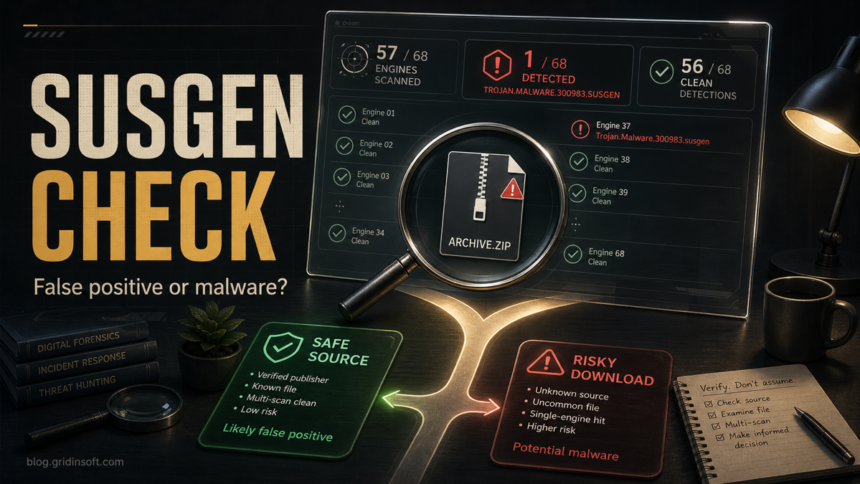
Trojan.Malware.300983.susgen is a heuristic detection label, not proof that your PC is infected. A known file from its official developer may be a false positive. If you already ran an unknown installer or crack, however, checking only the original file does not tell you what else it installed.
For that post-installation check, use Gridinsoft Anti-Malware to scan the Windows PC, review detections, and clean confirmed threats. You can start without manually inspecting every startup entry. If you have not run the file, keep it quarantined and use the source, signature, and hash checks below before deciding whether to restore it.
Use Gridinsoft Anti-Malware to check your Windows PC for threats the file may have installed. Review detected items and their locations before cleanup. A single VirusTotal label alone is not proof of infection.
Free 6-day full trial for eligible new users, including cleanup. Email activation; no credit card required.
Download Gridinsoft Anti-Malware for WindowsVirusTotal is useful because it shows how many partners flagged a file and which labels they used, but VirusTotal also says it aggregates vendor results rather than issuing its own malware verdict.[1] That means Trojan.Malware.300983.susgen should start a verification workflow, not a panic-driven removal routine.
What Trojan.Malware.300983.susgen Means
The name is not a precise malware family like a named ransomware or botnet. In public reports and developer issue trackers, it commonly appears as a generic heuristic label for Windows archives, installers, or portable executables that one scanner considers suspicious. A public SOPS project issue, for example, records MaxSecure detecting a Windows executable as Trojan.Malware.300983.susgen through VirusTotal while the project treated it as a likely false-positive report.[3]
Heuristic labels can be triggered by packers, uncommon build tools, unsigned binaries, compressed archives, low file prevalence, or code patterns that resemble malware. They can also be correct. The safest question is not “is this label always fake?” but “does the whole file context support restoring or running this file?”
When It Is Likely a False Positive
A Trojan.Malware.300983.susgen hit is more likely to be a false positive when most of these checks are true:
- Only one or two engines detect the file, while dozens show no detection.
- The file came from the official developer site, GitHub release, Microsoft Store, Steam, or another source you can verify independently.
- The file is signed by the expected publisher, and the signature is valid.
- The developer publishes checksums, and your hash matches the official release.
- VirusTotal comments, developer issues, or a later rescan show the same one-engine pattern being discussed as a false positive.
- The behavior or sandbox tab does not show persistence, credential theft, suspicious network traffic, dropped executables, or script launchers.
Do not rely on the green check marks as a guarantee that the file is harmless. VirusTotal explains that the checkmark only means a specific engine did not detect the file in that scan, not that the file is proven safe.[2]
When to Treat It as Real Risk
Quarantine or delete the file instead of restoring it when the context is weak or risky:
- The file came from a mirror, forum attachment, Telegram/Discord link, ad result, crack site, repack, keygen, trainer, or password-protected archive.
- Several reputable engines detect the file, even if their names differ.
- The file is unsigned, recently created, packed, or much larger/smaller than the expected official download.
- VirusTotal behavior shows command execution, startup persistence, browser credential access, suspicious child processes, or unexplained outbound traffic.
- You already ran the file and then noticed browser redirects, new startup items, security alerts, disabled protection, account alerts, or unknown processes.
How to Read the VirusTotal Result
- Check the detection ratio. A 1/68 result is a different decision than 18/68. One obscure or aggressive heuristic hit can be noise; a cluster of independent engines is stronger evidence.
- Read the engine names and labels. If only one vendor says susgen, do not translate that into a confirmed trojan family. If multiple engines name stealers, loaders, or droppers, treat the file as dangerous.
- Verify the source. Go back to the official project page manually. Avoid continuing from a search ad, mirror page, shortened URL, or social link.
- Compare the hash. If the developer publishes SHA256 or release checksums, compare them with your file. A mismatch is a stop sign.
- Check the signature and age. A valid signature from the expected publisher and an older, widely used release lowers risk. A brand-new unsigned file from a weak source raises it.
- Inspect behavior. VirusTotal reports can show detection details and file report elements, while behavior views can add execution context when available.[2] Persistence, credential access, suspicious PowerShell, or unexpected network activity matters more than the label text alone.
- Rescan later if the file is probably legitimate. False positives often disappear after vendors adjust signatures, but do not keep or run an unknown file just because you hope it is a mistake.
If You Already Ran the File
If you ran an untrusted file, avoid sensitive activity on that PC while checking it. A full system scan can look for installed threats that a report on the original download does not cover.
- Install Gridinsoft Anti-Malware and update its detection database. Eligible new users can request the trial in the app and activate it with the emailed code.
- Run a Full Scan and review the findings. Check the detected names, locations, and suggested actions before cleanup. Do not restore a quarantined item just to scan it again.
- Apply cleanup to confirmed threats. Quarantine or remove detected unwanted items. Keep Microsoft Defender enabled.
- Restart and verify. Check whether alerts, redirects, or unknown processes return. A clean scan does not guarantee that no compromise occurred. If symptoms persist, use the targeted checks below or contact support from the app.
If problems remain, inspect recent apps, startup items, scheduled tasks, and browser extensions. Delete the untrusted source download so you do not run it again. Secure exposed accounts from a clean device if you saw account or session warnings.
What Not to Do
- Do not allow or restore the file only because a Reddit comment says the label is “always” a false positive.
- Do not run a crack, trainer, or installer from an unofficial mirror just to test whether it behaves badly.
- Do not upload private company files, documents, or proprietary builds to public scanning services unless you understand the sharing implications.
- Do not install a random removal tool from a video or pop-up page that ranks for the detection name.
Related Gridinsoft Checks
For a broader one-engine-versus-sandbox conflict, see our guide to VirusTotal 2/70 but Hybrid Analysis 100/100. If you want the general concept, read what a heuristic virus detection means. For restoring a legitimate file, use safe false-positive reporting steps. If the alert is from Microsoft Defender rather than VirusTotal, start with Microsoft Defender detection names.
FAQ
Is Trojan.Malware.300983.susgen always malware?
No. It is a generic heuristic label and is often seen as a one-engine VirusTotal hit. The source, signature, hash, vendor count, and behavior decide whether the file is likely safe or risky.
Is one VirusTotal detection safe to ignore?
Not automatically. One detection on an official, signed, hash-matching file is often a false-positive pattern. One detection on a crack, unknown installer, passworded archive, or file that already ran should be treated as risk.
Why does MaxSecure detect Trojan.Malware.300983.susgen when other engines do not?
Different engines use different heuristics and thresholds. A single aggressive heuristic can flag unusual packing or build patterns, while other engines do not identify the file as malicious.
Should I restore the file from quarantine?
Restore only if you can verify the source, signature, and hash, and the behavior looks normal. If the file came from an unofficial source or already executed, keep it quarantined and scan the system first.
What if I already opened the file?
Delete the original download, run a full malware scan, review startup items and browser extensions, and change passwords from a clean device if the file came from a risky source or you noticed account/session warnings.
References
- VirusTotal. “I am experiencing a false positive, my file or site should not be detected.” VirusTotal Documentation, accessed June 14, 2026. https://docs.virustotal.com/docs/false-positive
- VirusTotal. “How it works” and “Reports.” VirusTotal Documentation, accessed June 14, 2026. https://docs.virustotal.com/docs/how-it-works
- papanito. “totalvirus detects Trojan.Malware.300983.susgen #1331.” GitHub getsops/sops issue, opened October 24, 2023, accessed June 14, 2026. https://github.com/getsops/sops/issues/1331