
TONResolver RAT is a JavaScript remote-access trojan delivered to hotel staff through fake Booking.com guest complaints and “photo” downloads. Reading or replying to the first email does not execute the malware. The critical transition is opening the disguised .lnk shortcut inside the downloaded ZIP: it launches PowerShell, installs a private Node.js runtime, starts TONResolver, and creates persistence. If that shortcut ran, isolate the PC from hotel systems, preserve the evidence, remove the payload and persistence, and recover exposed accounts from a clean device.
What to do now
- Only read or replied to the email: do not use its link. Report it, preserve it if your organization investigates phishing, and verify any guest complaint through the property platform or a known contact path.
- Downloaded the ZIP but opened nothing: leave the archive closed. Record its name and source, then let IT quarantine it or remove it and scan the endpoint.
- Opened the photo-like shortcut: disconnect Wi-Fi and Ethernet immediately. Treat the PC as compromised even if no window or error appeared.
- Saw PowerShell, a new Node.js folder, or a security alert: preserve the timeline, check persistence and second-stage activity, run full scans, and recover hotel, mailbox, browser, and shared accounts from a different clean device.
Did the guest-complaint email execute malware?
| What happened | Likely exposure and response |
|---|---|
| You read or replied to the first email. | No TONResolver execution from the observed chain. Stop the conversation, report the message, and verify the request independently. |
| You clicked the link or downloaded the ZIP but opened nothing. | The archive may be present, but the LNK has not knowingly run. Leave it closed, preserve or quarantine it, and scan the endpoint. |
| You opened the photo-like file inside the archive. | High risk: the file may be a shortcut that launched hidden PowerShell. Isolate the PC and start the full response workflow. |
| A private Node.js folder, Run entry, second-stage process, or recurring alert appeared. | Assume compromise until endpoint and account evidence shows otherwise. Remove persistence, investigate follow-on activity, and recover accounts from a clean device. |
What is TONResolver RAT?
TONResolver is a remote-access trojan observed in a 2026 phishing campaign against Booking.com partner accommodations. Trend Micro identifies the JavaScript payload as TrojanSpy.JS.TONRESOLVER.A. It gives an attacker a command-execution foothold and waits for instructions; it is not simply a fake webpage or an unwanted browser notification.
The name comes from the way the malware finds its command server. Instead of keeping one server address in the script, TONResolver asks a smart contract on The Open Network for the current destination. This dead drop resolver lets the operator replace a blocked server without rebuilding the payload. The RAT then uses encrypted WebSocket traffic and sends a keepalive about every 20 seconds while it waits for commands.
Normal Node.js, PowerShell, Booking.com, TON, or WebSocket activity does not prove infection. The stronger signal is the observed chain: a guest-complaint email, a photo-themed ZIP, a disguised LNK, hidden PowerShell, a new %USERPROFILE%\AppData\Local\Nodejs directory, an unfamiliar JavaScript payload, and a new Run entry created at the same time. For a broader explanation of the risk, see what a RAT can do after it reaches a PC.
What the fake guest complaint can look like
The campaign used urgent review requests and serious guest complaints. Some attacks began with a normal Gmail inquiry that contained no link. The attacker waited for a hotel employee to reply, then sent a second message with the malicious photo link. That conversational step makes the follow-up feel like an expected customer response.
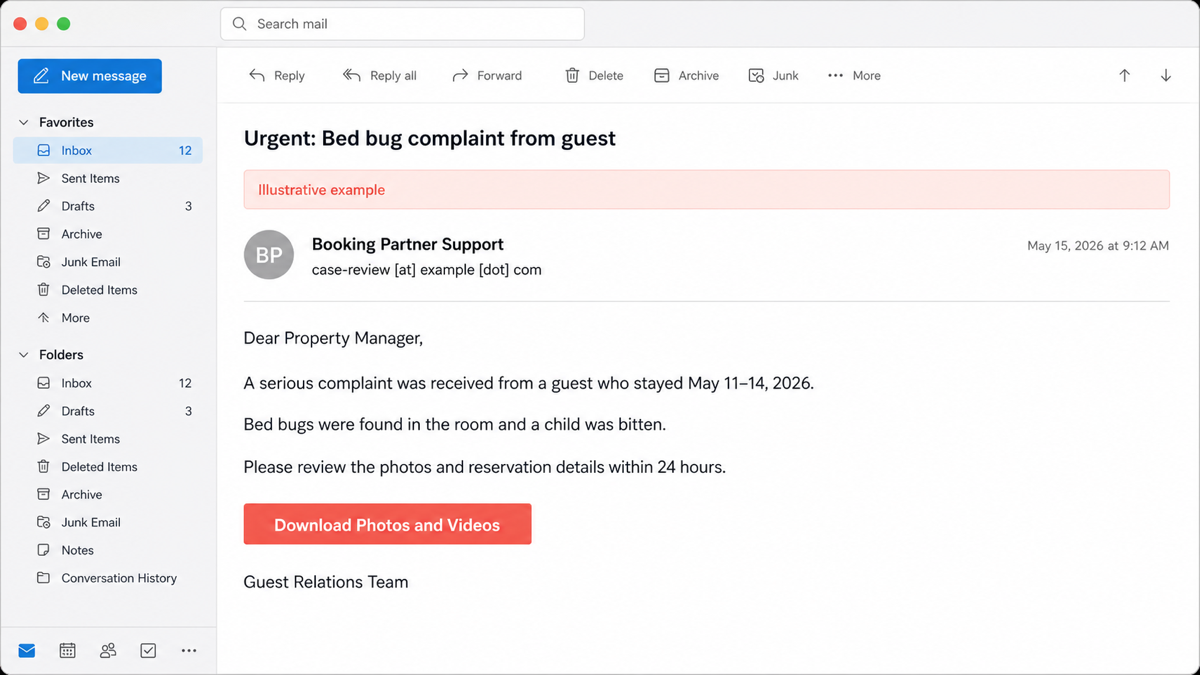
Example:
Subject: Urgent: Bed bug complaint from guest
Display name: Booking Partner Support
Sender: case-review [at] example [dot] com
Dear Property Manager,
A serious complaint was received from a guest who stayed May 11–14, 2026.
Bed bugs were found in the room and a child was bitten. Please review the photos and reservation details within 24 hours.
Button: Download Photos and Videos
Guest Relations Team
Real campaign wording, sender accounts, stay dates, complaint details, and download labels can change. Do not authenticate the message from its display name, emotional story, or the fact that someone already replied. Compare it with our broader checklist for spotting a phishing email, then verify the reservation or complaint inside the approved hotel system without using the message link.
How the photo download installs TONResolver
- The attacker creates a believable work task. A guest asks about availability or alleges a serious room problem. The second message presents photos or video as evidence.
- The link downloads a ZIP archive. Looking at an email or saving an archive is not the same as running its contents. The risk rises when a user opens a file inside it.
- A shortcut is disguised as a photo. The archive contains a Windows LNK made to look like an image. Opening that shortcut executes instructions rather than displaying a normal PNG or JPEG.
- PowerShell retrieves and starts another script. The LNK reconstructs a destination, downloads a PowerShell script to
%TEMP%, and runs it with its window hidden. - The script deploys Node.js and TONResolver. It creates
%USERPROFILE%\AppData\Local\Nodejs, downloads an official Node.js package if needed, decrypts a JavaScript payload, and launches that payload with the privatenode.exe. - The RAT creates persistence. It uses
HKCU\Software\Microsoft\Windows\CurrentVersion\Runso the malicious Node.js command can return when the user signs in. - The RAT resolves its command server and waits. TONResolver obtains the current destination through a TON smart contract, opens an encrypted WebSocket connection, and stays in a keepalive loop for attacker commands.
If you only downloaded the ZIP and never opened a file inside it, the observed chain did not reach the execution step. Keep the archive closed and follow the cautious branch in our guide to ZIP and RAR malware risk. If you opened the LNK, assume the chain may have completed even if the archive appeared to contain only photos.
Does TONResolver steal browser passwords?
Trend Micro separates the RAT from the next observed payload. TONResolver provides remote command execution and a persistent foothold; it does not immediately steal files or credentials in the analyzed first stage. In an observed follow-on event, a separate executable launched from the infected Node.js process and accessed Chrome and Edge profile data while interacting with C:\Windows\System32\lsass.exe. That behavior raised concern about password, cookie, history, autofill, and session theft.
This distinction matters for incident response. Finding TONResolver is enough to isolate the endpoint, but it does not prove which accounts were stolen. Conversely, deleting the visible JavaScript or Node.js directory does not prove the attacker never deployed the second stage. Use process, file, authentication, browser, mailbox, and endpoint logs to establish what happened after the LNK ran.
Contain the affected hotel PC first
- Disconnect the endpoint from networks. Remove Ethernet and Wi-Fi access. Do not use the PC for reservations, payment portals, email, shared drives, remote support, or password changes.
- Notify the incident owner. A hotel workstation may connect to property-management, booking, payment, identity, and customer-data systems. Coordinate containment rather than quietly deleting one file.
- Preserve the phishing evidence. Record the subject, sender and reply-to, received time, message headers, clicked link, ZIP name, LNK name, browser download time, user account, and security alerts. Do not upload unredacted guest or reservation data to a public scanner.
- Preserve the endpoint timeline. Capture relevant PowerShell, process, autorun, scheduled-task, service, browser, endpoint-protection, and authentication records before cleanup removes context.
- Scope connected systems. Check whether the same message reached other staff and whether the affected identity accessed another workstation, mailbox, booking account, or remote-management tool after execution.
CISA’s joint phishing guidance recommends isolating an affected workstation, auditing account access, and re-provisioning suspected or confirmed compromised accounts after phishing leads to malware or credential exposure. A business incident may require professional forensics, legal review, insurer notification, or breach-response steps beyond home-PC cleanup.
Remove TONResolver and check what remains
- Use endpoint protection before manual deletion. Run the organization’s updated full or offline scan while the endpoint remains contained. Quarantine identified payloads and preserve detection names, paths, and times for the incident record.
- Check the suspicious Node.js location. Review
%USERPROFILE%\AppData\Local\Nodejsfor a folder and files created at the execution time. Do not delete a legitimate developer installation elsewhere merely because it usesnode.exe. - Inspect user Run persistence. Review
HKCU\Software\Microsoft\Windows\CurrentVersion\Runfor an unfamiliar entry that launches the private Node.js path or a JavaScript file. Export or record the value before removal when evidence retention matters. - Check other restart points. Look for new scheduled tasks, Startup items, services, WMI persistence, browser extensions, remote-access tools, local users, exclusions, or scripts created after the LNK ran.
- Hunt for the second stage. Review child processes and files launched by the private
node.exe, especially executables written under the user’s Temp folder and access to Chrome, Edge, credential, or authentication data. - Run a second cleanup scan. After the manual checks, run Gridinsoft Anti-Malware to look for detections, hidden files, startup entries, scheduled tasks, bundled apps, browser changes, and persistence left after the visible archive or script is gone. Remove confirmed findings, reboot when the incident owner allows it, and scan again.
- Escalate when trust cannot be restored. Reimage the PC from known-good media if alerts return, unknown administrator or remote tools appear, business credentials were exposed, logs are incomplete, or the endpoint’s integrity cannot be established.
Deleting the LNK, ZIP, or Node.js directory addresses only visible artifacts. A command-capable RAT may have created a task, service, browser change, secondary executable, or account foothold before removal. A clean scan is useful evidence, but it cannot recover a stolen password or prove that no session was copied.
If the page or email made you download an invoice, coupon, tracking app, browser extension, or support tool, scan the PC before opening it again or logging into sensitive accounts.
Scan after opening the photo shortcutRecover hotel and business accounts from a clean device
- Email: reset the affected mailbox credential, revoke active sessions and app passwords, confirm MFA methods, and inspect forwarding, inbox, OAuth, and delegated-access rules.
- Booking and property systems: rotate the employee’s credential, invalidate active sessions, review reservations and customer messages, and verify that recovery email, phone, payout, and payment settings did not change.
- Browser accounts: assume saved passwords, cookies, autofill, history, and active sessions could be at risk if the second stage ran. Rotate high-value passwords and revoke sessions in priority order.
- Shared secrets: replace credentials for shared drives, payment portals, remote access, vendors, Wi-Fi administration, and other systems the employee could reach.
- Customer communications: look for fraudulent payment requests, reservation messages, or complaint replies sent from trusted hotel channels after the incident.
Make these changes from a known-clean device, not from the endpoint being investigated. The Windows post-malware security audit provides a wider reconnect checklist for startup, accounts, browser data, network settings, and recovery decisions.
Reduce the chance of another guest-complaint infection
- Show full file extensions and block or quarantine script and shortcut types delivered through unmanaged download workflows.
- Route unexpected guest evidence, archives, and external download links to a controlled review process rather than a reservations workstation.
- Use least-privilege accounts and separate general email from payment, booking administration, and remote support.
- Log PowerShell, process creation, autoruns, endpoint detections, browser extensions, and unusual Node.js execution from user profile folders.
- Alert on a private
node.exelaunching JavaScript fromAppData, creating Run persistence, or contacting TON-related services when that activity is outside the organization’s baseline. - Train staff that a link arriving after a normal first email is not automatically safe. Verify the business task and file type before opening it.
Booking.com-themed attacks use more than one delivery chain. Our separate review of Booking.com traveler scams and fake-CAPTCHA malware targeting hotel staff covers a different workflow and should not be confused with the TONResolver photo-LNK campaign.
A different hotel-inbox lure references Trip.com, asks about an evening meal or half-board upgrade, and makes Booking Confirmation.JPEGr download a local JavaScript file. If that filename or request appeared, use the Trip.com Booking Confirmation email recovery guide instead of applying TONResolver-specific indicators.
FAQ
Can replying to the first guest email install TONResolver?
No. Replying may tell the attacker that the mailbox is monitored and prompt the malicious follow-up, but the observed infection requires the user to download the ZIP and execute the disguised LNK. Stop the conversation and verify the request through an approved channel.
I downloaded the ZIP but did not open the photo. Is the PC infected?
The observed chain starts executing when the shortcut inside the archive is opened. Keep the ZIP closed, quarantine or remove it, and scan the PC. If you previewed or opened a file and are unsure whether Windows executed it, use the higher-risk branch.
Is every Node.js process in AppData malicious?
No. Developers and legitimate applications can use Node.js. Investigate the exact path, signer and source, creation time, parent process, JavaScript argument, Run entry, network activity, and relationship to the guest-complaint download.
Does blocking the current TONResolver server remove the RAT?
No. The smart-contract resolver lets the operator change the destination, and blocking one server does not remove local payloads or persistence. Contain and clean the endpoint, then investigate account and second-stage exposure.
Should a hotel restore the PC after scans are clean?
Reconnect only when the incident owner has reviewed persistence, secondary payloads, identities, sessions, and affected business systems. Reimage the endpoint when evidence is incomplete or trust cannot be restored.
References
- Sato, Yuya. “TONResolver RAT Abuses TON Blockchain to Target Japan’s Hotel Industry.” TrendAI Research, Trend Micro, June 29, 2026; accessed July 28, 2026. https://www.trendmicro.com/en_us/research/26/f/tonresolver.html
- Cybersecurity and Infrastructure Security Agency, National Security Agency, Federal Bureau of Investigation, and Multi-State Information Sharing and Analysis Center. “Phishing Guidance: Stopping the Attack Cycle at Phase One.” October 2023; accessed July 28, 2026. https://www.cisa.gov/sites/default/files/2023-10/Phishing%20Guidance%20-%20Stopping%20the%20Attack%20Cycle%20at%20Phase%20One_508c.pdf