


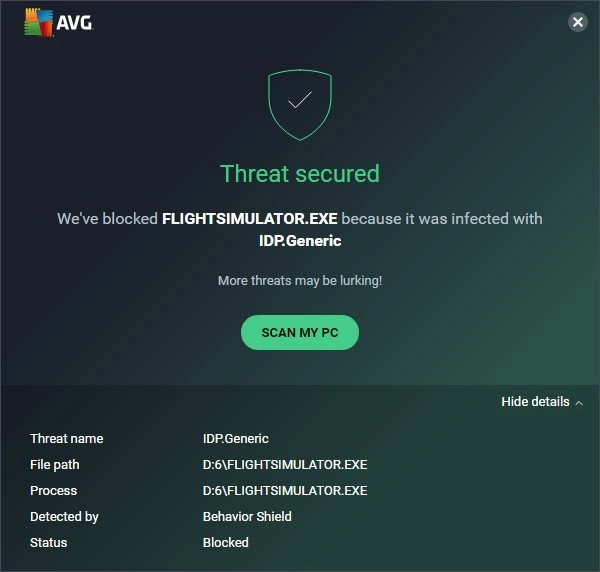
IDP.Generic is a heuristic alert used by Avast and AVG, not the name of one specific virus. It can be a false positive in games, launchers, updaters, and developer tools, or a warning about malicious behavior. The label alone does not establish that passwords, cookies, wallets, or other identity data were accessed. Treat IDP.Generic and variants such as IDP.HEUR.26 as a verify-before-restoring decision: check the source, path, signature, and a second scan. If the file is unsigned, came from a crack or unofficial download, sits in Temp, AppData, or Startup, or keeps returning after quarantine, remove it and scan the system before adding an exception.
First Steps for IDP.Generic
Use the alert context before deciding whether to allow the file. Keep the file quarantined while you update Avast or AVG and record the alert time, affected path, and detection component. Check the source and available signature/hash details; a secondary scan is supporting evidence, not confirmation that a runtime alert was false. Do not restore the file just to inspect it. If the alert says IDP.HEUR.26, follow the same path; the suffix changes the heuristic label, not the restore-or-remove decision.
If the alert names Google Antigravity’s language server, use the Antigravity language_server.exe hash and restore guide to compare the current official build before allowing it. If the same kind of generic alert comes from Malwarebytes, compare it with our Malware.AI false-positive guide before restoring or excluding the file. If the alert says Gen:Variant, use the source, path, signature, and scanner-consensus checks before allowing it.
- Signed app from Steam, Epic, Microsoft Store, or the vendor’s site: update definitions, rescan, check the digital signature, and report a false positive if only one product detects it.
- Unknown EXE from a crack, keygen, email attachment, Discord link, or fake download page: do not restore it. Quarantine or delete the file, run a full system scan, and change exposed passwords if it executed.
- Alert returns after reboot or after quarantine: compare timestamps, status, and affected paths. An old notification is not evidence of active persistence. A newly recreated file warrants a full scan and targeted checks of startup entries, browser profiles, scheduled tasks, and recently installed programs.
What Does IDP.Generic Detection Actually Mean?
IDP.Generic is a generic alert associated with behavioral protection in Avast/AVG. Use the event details to identify what was blocked; the name is not a record of which files were read or what data left the PC. Read the label as:
- IDP: commonly expanded as Identity Protection; this wording alone does not demonstrate access to credentials or sessions
- Generic: a non-specific classification, not the identity of one malware family or payload
If separate evidence confirms an infostealer executed, the investigation may need to cover sensitive locations such as:
- Web browser profile folders (where passwords, cookies, and session data are stored)
- Gaming platform directories (Steam, Epic, etc.)
- Communication apps (Discord, Telegram)
- Cryptocurrency wallet locations
- System credential storage areas
Spyware and infostealer malware can target these locations, while legitimate software also uses some of them. To distinguish those cases, examine the exact executable and observed activity rather than treating the location or detection name as a verdict.
What if the Alert Says IDP.HEUR.26?
IDP.HEUR.26 is a related Avast/AVG heuristic label, not proof of one named virus. A signed file from a known game, updater, or vendor app can still be a false positive, while an unsigned file from a crack, fake installer, email attachment, Discord link, or random AppData/Temp path should be treated as unsafe until a second scan and source check support restoring it.
When Is IDP.Generic a False Alarm?
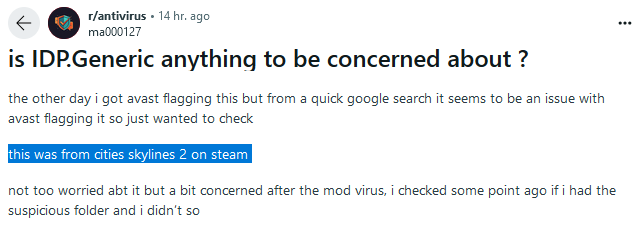
Published user reports describe IDP.Generic alerts in games and custom software. Reports establish that an alert occurred; they do not establish a false-positive rate or prove that another version, modded copy, or download is safe.
Games Named in IDP.Generic Reports
Older first-hand reports name the following games from Steam or Xbox Game Pass. Treat them as examples to investigate, not a list of files to allow:
- Cities Skylines 2 – A user reported a Norton IDP.Generic alert after launching the game
- Valheim – Named in a 2022 AVG user report about Steam games
- Empyrion: Galactic Survival – Named in the same user report; its proposed save-file explanation was not an independently verified cause
- Demon’s Tilt – A 2020 Game Pass user reported an alert after closing the game
Other Software Context to Check
- Development IDEs (Visual Studio, VS Code) – When accessing project files
- Communication tools (Discord, Telegram) – During cache/login operations
- Backup software – When accessing personal data for backup
- Game launchers (Epic Games Launcher, Battle.net) – During update processes
- Other Avast/AVG heuristic labels – If the alert says
IDP.HEUR.26, treat it as the same false-positive vs malware decision path. If it says Win32:Evo-gen[Trj], use the exact-label false-positive checklist before restoring the file. - Browser extensions – Particularly password managers and security tools
Primary Causes of False Positives
When investigating a possible false positive, check these factors rather than assuming a cause from the label:
- Digital signature changes – Following updates or certificate renewals, antivirus products may not recognize the program’s new signature
- Outdated antivirus definitions – Confirm the last successful definition update and network access
- Legitimate data access – Games and applications that legitimately need to access profile directories for normal functionality
- Behavioral detection – A running application can trigger an alert even when a static scan of its file is clean
- Vendor review – Ask the antivirus vendor to review the exact detected build rather than assume every popular application is already known to it
Avast documents automatic virus-definition updates for its free antivirus as well as its paid product. A paid Software Updater feature for third-party apps is a different function; it is not evidence that free antivirus receives delayed signatures.2
When IDP.Generic Indicates Real Malware
A generic alert can also accompany real malware. The following are examples of threats to investigate if execution and other evidence support them, not payloads identified by the IDP.Generic label:
- Information stealers like Lumma Stealer, RedLine, and Raccoon Stealer
- Banking trojans that attempt to harvest financial credentials
- Credential harvesters targeting passwords and authentication tokens
- Cryptocurrency wallet stealers designed to extract private keys
- Keyloggers and surveillance tools
Common Infection Vectors
When checking how a suspicious file reached the PC, investigate sources such as:
- Fake software cracks and keygens – Illicit software offering “free” versions of commercial applications
- Phishing campaigns – Particularly those involving fake human verification pages
- Malicious browser extensions – Appearing to offer useful functionality while stealing data
- Compromised downloads – Legitimate software downloaded from unofficial sources
- Malvertising – Deceptive ads leading to malware downloads
Whether the file only downloaded, was blocked at launch, or actually executed changes the response. Keep the alert and execution timeline; the detection label alone cannot establish how a file arrived or what it did.
How to Determine If Your IDP.Generic Detection Is Real or False
When facing an IDP.Generic alert, follow this systematic approach to determine whether you’re dealing with an actual threat or a false positive:
Step 1: Context Analysis
- Timing: Did the alert appear immediately after installing or updating legitimate software?
- File location: Is the flagged file in a standard program installation directory or in a suspicious location?
- Recent actions: Have you recently downloaded files from questionable sources or clicked on suspicious links?
- Program recognition: Is the flagged executable a known application or game from a reputable developer?
Step 2: File Verification
- Check the file location first. Be more skeptical of files in
Downloads,Temp,%APPDATA%, startup folders, or random-looking directories than files inside a normal vendor folder underProgram Files. - If the file is already accessible without restoring quarantine, check Properties → Digital Signatures without opening the executable. Otherwise use the quarantine record and vendor-provided hash/version details. Do not restore a blocked file merely to view Properties; submit it for vendor review from quarantine where supported.2
- Check an existing hash report or, for a non-sensitive file you are authorized to share, use the Gridinsoft Online Virus Scanner or a multi-engine service such as VirusTotal. Do not upload private documents or proprietary builds to a public scanning service; arrange an authorized private submission with the vendor instead.1
- Compare the file hash, version, and installer source with the official vendor download when possible.
- Search the exact file name plus
IDP.Generic,IDP.HEUR.26, or the exact alert text and the publisher name. A broad same-day wave among users of the same legitimate app often points to a false positive; isolated reports around cracks or repacked installers point the other way.
Step 3: Conduct a Secondary Scan
A Gridinsoft Anti-Malware Full Scan can check for detected threats and related components, especially if the file ran. A clean result is one piece of evidence: scanning a stored file and observing its runtime behavior test different things. Keep quarantine while the antivirus vendor reviews an unexplained behavioral alert.
For thorough system verification:
- Download and install Gridinsoft Anti-Malware, then update its detection database
- Run a Full Scan to check for detected threats and unwanted components
- Review detailed scan results that explain detection reasons
- Review the detections, apply cleanup to unwanted items, and restart if requested
How to Address IDP.Generic Detections
For Confirmed False Positives
- Update Avast/AVG and rescan before whitelisting. Many IDP.Generic false positives disappear after a definition update.
- Add an exception only after verification. Avast and AVG both support scan exclusions, but exclusions should be limited to the exact file or folder you have verified, not a broad Downloads or user-profile directory.23
- Reinstall from the official source if there is any doubt. Remove repacked installers, mod loaders, cracks, and third-party mirrors from the decision.
- Report the false positive to the antivirus vendor. In Avast Quarantine, select the file, open More options, and choose Send for analysis → False positive. Include the program name, publisher, version, and relevant alert details. Share private files only through an authorized private process.4
- Keep the original quarantine entry while the vendor reviews the exact file and you verify its provenance. A clean second scan alone does not confirm a false positive. Restoring first and checking later is the risky order.
For Genuine Malware Detections
If secondary scans confirm a real threat:
- Remove the malware immediately – Use GridinSoft Anti-Malware’s removal capabilities to eliminate the threat
- Conduct a full system scan – Check for additional infections or components
- Protect exposed accounts – If evidence shows an infostealer ran or account misuse occurred, change affected passwords and revoke sessions from a clean device; the label alone does not prove theft
- Enable two-factor authentication – Add this security layer to sensitive accounts
- Monitor accounts – Watch for unauthorized activities in financial and personal accounts
How to Prevent Future IDP.Generic Issues
Implement these preventative measures to reduce both actual infections and false positive interruptions:
- Use reputable software sources – Download programs only from official websites or legitimate stores
- Keep operating system and applications updated – Security patches address vulnerabilities that malware exploits
- Keep behavioral protection enabled – Update definitions and request vendor review instead of lowering heuristics to suppress an alert
- Investigate before taking action – Research alerts before immediately removing flagged files
- Implement a secondary security solution – Use on-demand scanners like GridinSoft Anti-Malware for verification
- Be cautious with browser extensions – Install only necessary extensions from verified sources
- Use strong, unique passwords – Prevent credential theft impact with distinct passwords for each service
FAQ
Is IDP.Generic a virus?
IDP.Generic is a detection label, not the name of one specific virus. It signals suspicious activity but does not by itself prove access to identity data. A signed file from a trusted app may be a false positive, while an unsigned file from a crack, fake installer, or suspicious link should be treated as malware until proven otherwise.
Can I safely ignore IDP.Generic warnings for games from Steam or Epic?
Do not ignore the alert blindly, but a game or launcher installed from Steam, Epic Games Store, Xbox, or the publisher’s own site is more likely to be a false positive than a random downloaded executable. Update the antivirus, verify the exact build and available signature details without restoring quarantine, and request vendor review if the alert remains. A clean second scan alone is not enough to allow it.
Why does IDP.Generic appear after updating my antivirus software?
Antivirus updates can change heuristic rules and make previously accepted behavior look suspicious. If the alert appears immediately after a definition update and only one scanner detects the file, wait for the next update or report the file as a false positive. If multiple scanners agree or the file is from an unsafe source, remove it.
Should I add the file to Avast or AVG exceptions?
Add an exception only after you confirm the file is legitimate. Limit the exception to the exact verified file or vendor folder, and avoid broad exclusions such as the whole Downloads folder, AppData, or browser profile directories.
What does IDP.HEUR.26 mean?
IDP.HEUR.26 is an Avast/AVG heuristic-style alert that should be checked the same way as IDP.Generic. Do not restore it only because the name looks generic: verify the file source, path, signature, and second-opinion scan first.
What data is targeted when IDP.Generic is real malware?
If separate evidence identifies an executed infostealer, possible targets include saved passwords, cookies, session tokens, wallet files, gaming accounts, and messaging data. IDP.Generic alone does not establish which data, if any, was accessed. Scan the system after suspicious execution and recover affected accounts from a clean device when exposure is supported.
Related: If a file shows only one or two VirusTotal detections but a sandbox assigns a high threat score, use our VirusTotal vs Hybrid Analysis conflict checklist before restoring or running it.
References
- VirusTotal. “Files.” VirusTotal Documentation, accessed June 1, 2026. https://docs.virustotal.com/docs/file
- Avast Support. “Avast Premium Security and Avast Antivirus for Windows – FAQs.” Sections on definitions, Software Updater, quarantine, and exclusions. Accessed October 1, 2026. Avast Antivirus features and quarantine
- AVG Support. “How to exclude items from scans in AVG Antivirus.” AVG, accessed June 1, 2026. https://support.avg.com/SupportArticleView?l=en&urlName=avg-antivirus-scan-exclusions
- Avast Support. “Quarantine – Getting Started.” Submission to Avast Threat Labs. Accessed October 1, 2026. https://support.avast.com/en-ph/article/21/
Also, don’t miss out on the 6-day free trial option that provides all the functionality of the paid version for you to test. No card required – type in your email address and receive the code right away!


I appreciate the thoroughness of your explanation. Great work!