
A heuristic virus alert means your security software saw malware-like behavior, not necessarily a known virus family. Treat the file as unsafe until you check where it came from, whether it is digitally signed, what path was flagged, and whether the same alert returns after quarantine. Many heuristic detections are real early warnings, but clean admin tools, game mods, drivers, scripts, and newly compiled apps can also trigger false positives.
If you just saw a heuristic alert
- Do not restore or run the file yet. Leave it quarantined while you collect the detection name, file path, source, hash, and date.
- High-risk signs: cracked software, unknown installer, script in Downloads or Temp, disabled security settings, persistence task, or suspicious network activity.
- Possible false positive signs: official vendor download, valid signature, matching hash, clean recent vendor release notes, and no suspicious behavior in a second-opinion scan.
- Best next step: update security intelligence, run a full scan, and submit the file to the vendor if you have strong evidence it is clean.
- ESET ML/Augur example: use the ML/Augur false-positive and restore checklist before allowing a quarantined update file.
Detection Summary
| What it means | A suspicious-behavior or machine-learning detection, not a separate malware family by itself. |
| Common labels | Heur, Generic, Suspicious, Behavior, ML, or suffixes such as !ml in some Defender detections. |
| First action | Keep the file quarantined, update definitions, run a full scan, and check the source/path before restoring anything. |
| False-positive risk | Moderate: legitimate low-level tools, drivers, game utilities, scripts, and fresh builds can look suspicious. |
| Removal priority | High if the file came from piracy, an unknown email, fake update, browser redirect, cracked game, or unexpected startup entry. |
What Exactly Is a “Heuristic Virus”?
Here’s where things get interesting: there’s technically no such thing as a “heuristic virus.” The term “heuristic virus” is actually cybersecurity slang that users created to describe malware caught by heuristic detection systems. It’s like calling someone a “radar speeder” – the radar didn’t make them speed, it just caught them doing it.
When your antivirus software flags something as a heuristic detection, it’s essentially saying: “I don’t have this exact threat in my database, but it’s acting like malware I’ve seen before.” This method is crucial for catching brand-new viruses, sophisticated variants, and zero-day exploits that haven’t made it into traditional virus definition databases yet.
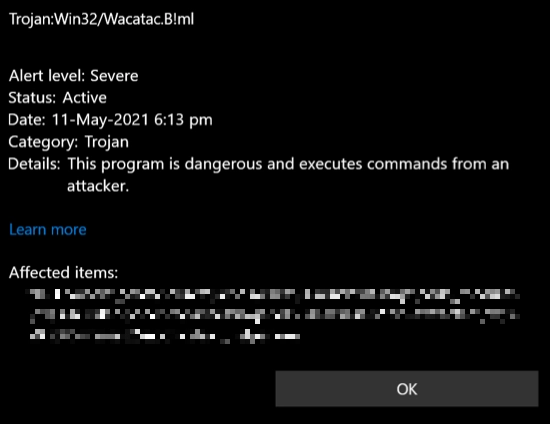
Think of it this way: if traditional antivirus detection is like having a bouncer with a list of banned troublemakers, heuristic detection is like having a bouncer who can spot trouble even when the troublemaker isn’t on the list. They might notice someone acting suspiciously, trying to sneak around, or exhibiting behaviors that scream “I’m up to no good.”
The Detective Work: How Heuristic Detection Actually Works
Heuristic detection operates like a digital forensics expert, using adaptive antivirus protection systems that make educated guesses based on behavioral evidence. Unlike signature-based detection, which is like matching fingerprints to a criminal database, heuristic analysis is more like profiling – it looks for patterns that suggest criminal intent.
The system tracks red flags that would make any security professional nervous: unusual network connections that shouldn’t exist, files being modified in suspicious ways, programs trying to hide their activities, or software attempting to disable security features. It’s the digital equivalent of noticing someone wearing a trench coat in summer, carrying bolt cutters, and lurking around your neighborhood at 3 AM.
The beauty of this approach is its flexibility. Traditional methods need to know exactly what they’re looking for, but heuristic systems can adapt and evolve. The longer they run, the smarter they become – like a security guard who gets better at spotting trouble after years on the job. Unfortunately, this learning process is resource-intensive and sometimes results in false alarms that need manual verification.
Modern antivirus companies use automation, cloud intelligence, and machine learning to speed up this process. That improves coverage for new threats, but it also means context matters: a detection name alone is not enough to decide whether a file is malware or a false positive.
The Three Pillars of Heuristic Analysis
Dynamic Scanning: The Digital Interrogation Room
Dynamic scanning is like putting a suspect in an interrogation room and watching how they behave. The system executes suspicious files in a controlled environment called a “sandbox” – essentially a digital prison where malware can’t escape or cause real damage.
Here’s where it gets interesting: modern malware isn’t stupid. Many sophisticated threats have developed anti-analysis features that work like criminal counter-surveillance. When they detect they’re being watched in a virtual environment, they go dormant, pretending to be innocent programs. Ironically, this behavior itself becomes a red flag – legitimate software doesn’t usually care if it’s running in a virtual machine.
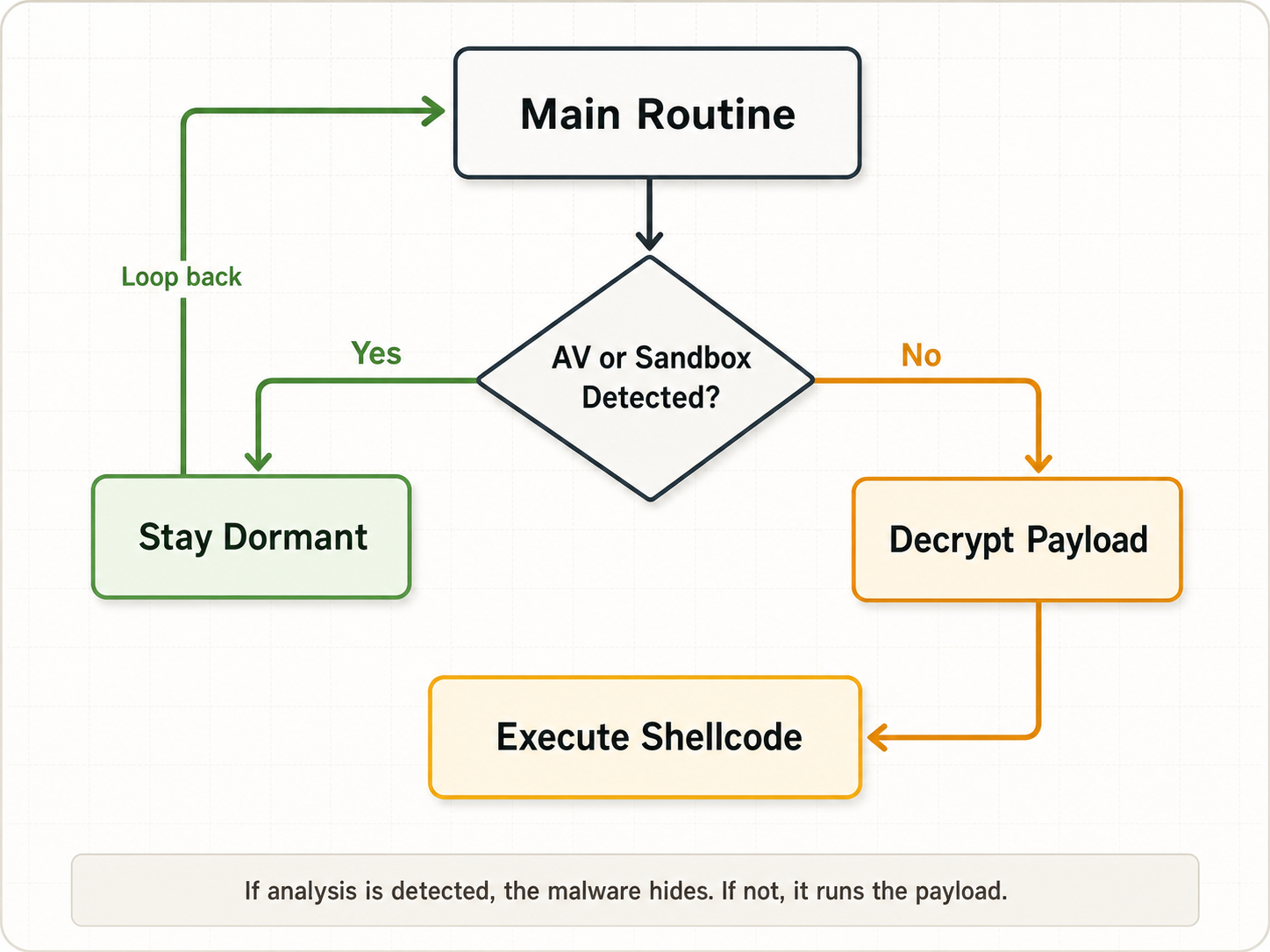
It’s an ongoing cat-and-mouse game between security researchers and cybercriminals, with each side constantly adapting to counter the other’s tactics.
File Analysis: Reading Between the Lines of Code
File analysis is like being a literary critic, but instead of analyzing poetry, you’re examining malicious code. Security systems dissect files to understand their structure, purpose, and intentions by examining code patterns, imported libraries, and function calls.
For example, why would a simple calculator app need permission to access your webcam, modify system files, or create hidden network connections? These inconsistencies between a program’s stated purpose and its actual capabilities are major red flags that heuristic systems are trained to catch.
The analysis also includes comparing suspicious files to known malware samples. It’s like forensic handwriting analysis – even if the exact document is new, similar writing patterns can reveal the author’s identity.
Multi-Criteria Analysis: The Cybersecurity Credit Score
Multi-criteria analysis (MCA) works like a credit scoring system for software. Instead of evaluating financial reliability, it assesses malicious potential by weighing multiple risk factors simultaneously.
Each suspicious behavior gets assigned points: network connections to known bad servers might score 20 points, attempts to modify system files could add 15 points, and trying to disable antivirus software might contribute another 25 points. When the total score exceeds a predetermined threshold, the file gets flagged as malicious.
This approach is more nuanced than simple yes/no decisions. A file might exhibit one or two mildly suspicious behaviors without being malicious, but the combination of multiple red flags creates a pattern that’s hard to ignore.
Real-World Detective Story: Catching Trojan:Win32/Acll
Let me walk you through a recent case that perfectly illustrates how heuristic detection works. We recently analyzed Trojan:Win32/Acll, a Python-based stealer that traditional signature detection might miss because of its programming language and obfuscation techniques.
The first red flag was this command sequence:
schtasks /create /f /RU "%USERNAME%" /tr "%ProgramData%WinTrackerSPWinTrackerSP.exe" /tn "WinTrackerSP HR" /sc HOURLY /rl HIGHEST
C:\Windows\System32\wuapihost.exe -Embedding
Translation: “Run this program every hour with the highest possible privileges and load additional applications.” That’s like someone asking for keys to your house, your car, and permission to invite friends over whenever they want.
The second smoking gun was the malware’s data collection behavior, targeting these specific folders:
C:\Program Files\Common Files\SSL\cert.pem
C:\Users\user\AppData\Local\Coinomi\Coinomi\wallets
C:\Users\user\AppData\Roaming\Electrum\wallets
C:\Users\user\AppData\Roaming\Ethereum\keystore
C:\Users\user\AppData\Roaming\Exodus\exodus.wallet
C:\Users\user\AppData\Local\Google\Chrome\User Data
C:\Users\user\AppData\Local\Microsoft\Edge\User Data
This is the digital equivalent of a burglar carrying a shopping list that includes “jewelry box, safe combination, bank statements, and cryptocurrency wallets.” The behavior pattern screams “information stealer” to any heuristic system worth its salt.
Spotting Heuristic Detections in the Wild
Heuristic detections have their own naming conventions that make them relatively easy to identify. They often include cryptic names, behavioral descriptions, or the telltale “!ML” suffix that indicates machine learning involvement.
Here are some common examples you might encounter:
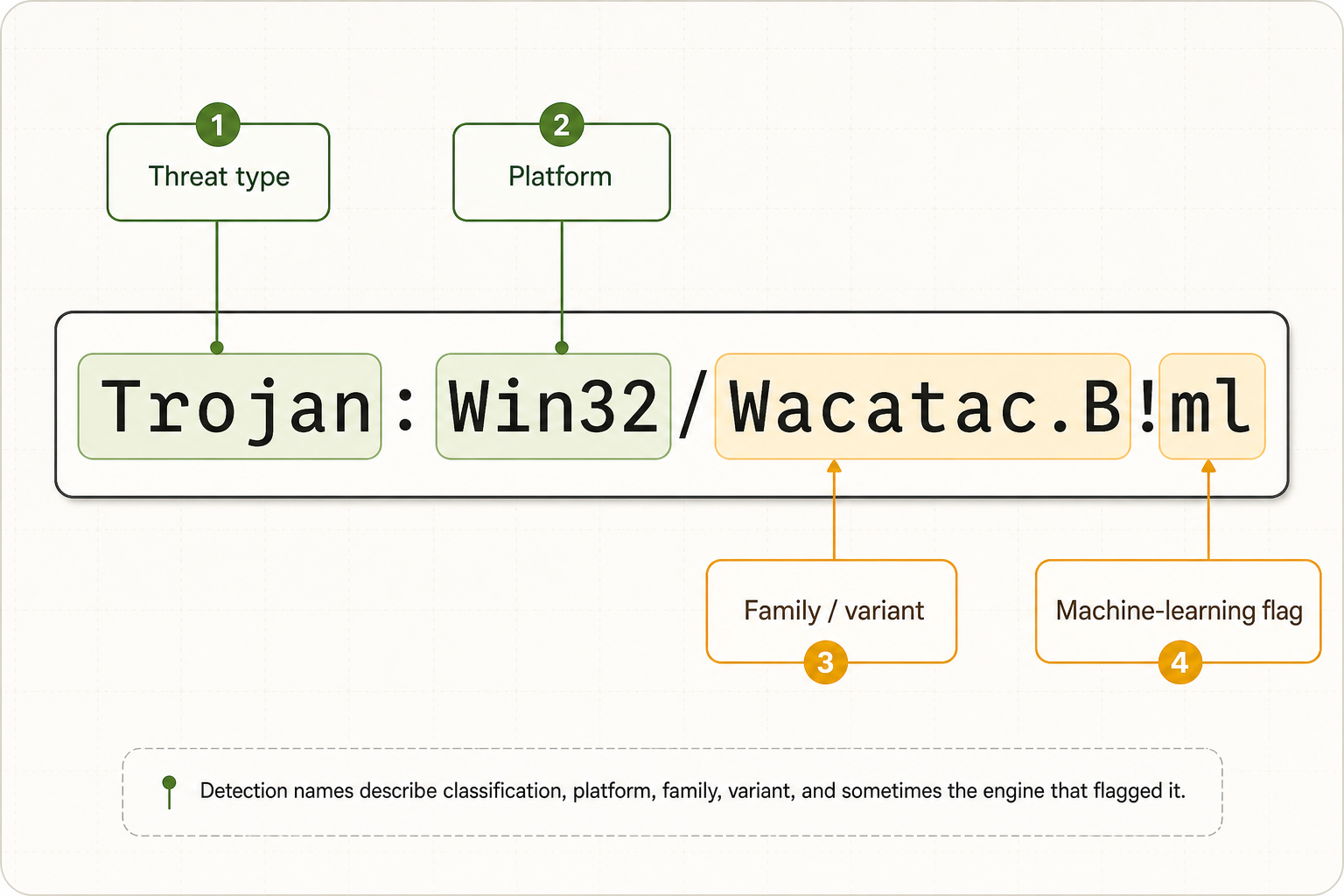
Trojan:Script/Wacatac.B!ml – This detection typically indicates spyware or stealer malware with extended persistence capabilities and suspicious networking behavior. The “!ml” suffix shows it was caught by machine learning algorithms.
IDP.Generic – Standing for “Identity Protection” and “Generic,” this catch-all detection flags potentially harmful files that don’t fit into specific malware categories. It’s like a security system saying “something’s not right here, but I can’t put my finger on exactly what.”
Malware.Win32.Heur.cc – This is a perfect example of generic heuristic naming. The “Heur” clearly indicates heuristic detection, and the generic suffix suggests it could be almost any type of malicious program.
Trojan:Win32/Acll – This detection combines behavioral analysis with programming language recognition, specifically flagging Python-based spyware.
VirTool:Win32/DefenderTamperingRestore – Microsoft Defender uses this specific detection for software that attempts to interfere with Windows security features. It’s behavioral detection at its most specific.
All these detections, despite targeting different malware types, share the common thread of being identified through behavioral analysis rather than exact signature matching.
The AI Revolution in Malware Detection
The integration of artificial intelligence into heuristic detection has been a game-changer for cybersecurity. Traditional heuristic systems rely on predetermined rules and patterns, but AI can identify subtle correlations that human programmers might miss.
Modern AI-powered detection systems notice things that would escape human analysis: minute code similarities, unusual timing patterns in network communications, or subtle behavioral combinations that indicate malicious intent. It’s like having a detective with superhuman pattern recognition abilities.
The “!ml” suffix you see in many modern detections stands for “machine learning,” indicating that artificial intelligence played a role in identifying the threat. While these AI-assisted detections still produce false positives, the accuracy rate has improved significantly compared to traditional heuristic methods.
Advanced antivirus companies are increasingly incorporating AI into their products, creating hybrid systems that combine human expertise with machine learning capabilities. This trend represents a significant evolution in cybersecurity, making it possible to catch threats that would otherwise remain undetected.
The False Positive Problem: When Good Software Gets Accused
The biggest challenge with heuristic detection is the false positive problem – legitimate software getting flagged as malicious. It’s like an overzealous security guard who tackles everyone who looks suspicious, including innocent visitors.
False positives occur because heuristic systems make educated guesses from behavior. Legitimate software can look suspicious when it packs code, injects into other processes, accesses credentials, installs a driver, modifies startup entries, or uses scripting engines.
If you encounter a heuristic detection on software you trust, research the exact detection name, verify the source, check the digital signature, and submit the file to the vendor for analysis. Avoid permanent exclusions unless you fully trust the file and understand why it was flagged.
For Avast or AVG alerts that show the exact label Win32:Evo-gen[Trj], check the source, signature, path, and multi-engine consensus before deciding whether to restore the file.
For the recurring VirusTotal label Trojan.Malware.300983.susgen, see the separate SUSGEN false-positive triage checklist before treating a one-engine result as confirmed malware.
If the exact alert is Malwarebytes Malware.AI, use the Malware.AI false-positive decision guide to decide whether a game file, signed app, temporary installer, or recurring alert should be restored, reported, or removed.
Heuristic Virus: False Positive or Real Threat?
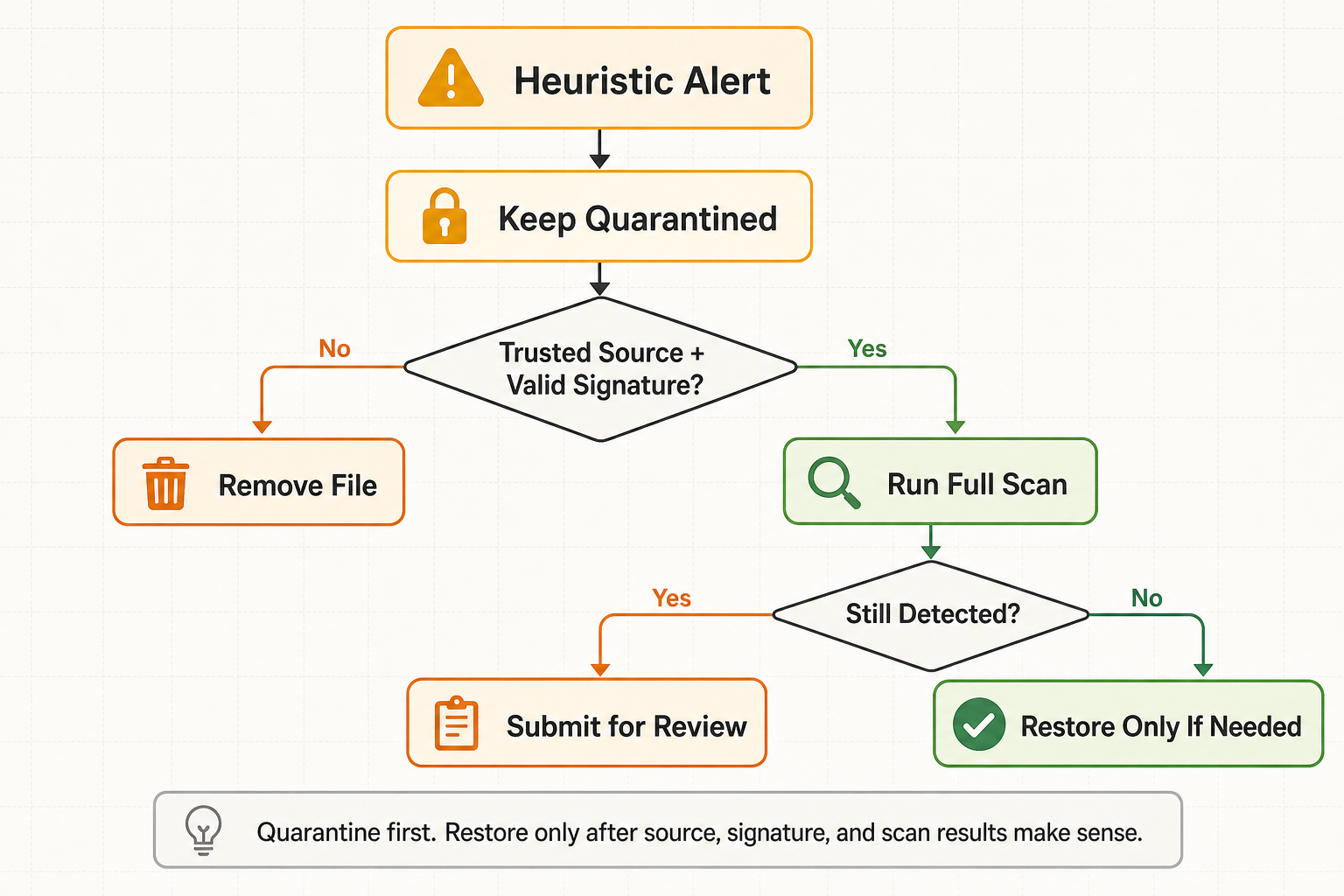
The fastest way to triage a heuristic virus alert is to compare the file’s source, path, signature, and behavior. A trusted file can still be compromised, and an unknown file can sometimes be clean, so avoid one-click restore decisions.
| Clue | What it usually means |
|---|---|
| Downloaded from a crack, keygen, fake update, Discord link, or unknown mirror | Treat as high risk and remove it. |
| Located in Temp, AppData, Startup, browser cache, or a random folder name | Likely unwanted or malicious, especially if it returns after quarantine. |
| Official vendor download with a valid digital signature and matching hash | Possible false positive; submit it for review before restoring. |
| Detection appears only after extracting an archive or mounting an ISO | Scan the extracted files and avoid running installers until the source is verified. |
| Security tool reports blocked outbound traffic or a scheduled task | Assume active behavior and scan the whole system. |
Removing Heuristic-Detected Malware
- Leave the file quarantined. Do not restore it just to “test” whether the alert was right.
- Update your antivirus definitions and run a full scan. Fresh intelligence often clarifies new heuristic detections.
- Check the file path and source. Downloads from cracks, fake updates, random archives, and email attachments should be removed, not trusted.
- Scan with a second-opinion tool. Gridinsoft Anti-Malware can help find hidden folders, startup entries, bundled payloads, and related files after the first alert.
- Remove persistence. Check Startup apps, scheduled tasks, browser extensions, and recently installed programs if the same alert keeps returning.
- Submit likely false positives. If the file is from an official vendor, signed, and still flagged, submit it to the security vendor instead of permanently excluding it.
- Change passwords from a clean device if the suspicious file ran before quarantine or the alert mentions stealer-like behavior.
Heuristic alerts can point to one file or to a larger infection chain. Scan all drives to catch hidden folders, startup entries, and bundled payloads.
The Future of Behavioral Threat Detection
Heuristic detection continues evolving as cybercriminals develop more sophisticated evasion techniques. The future lies in advanced AI systems that can understand context, recognize subtle behavioral patterns, and adapt to new threat landscapes in real-time.
Cloud-based heuristic analysis is becoming more prevalent, allowing security systems to leverage global threat intelligence and collective learning from millions of endpoints. This approach enables faster adaptation to new threats and more accurate detection with fewer false positives.
The integration of behavioral analysis with other security technologies – including network monitoring, endpoint detection and response (EDR), and threat intelligence feeds – creates comprehensive security ecosystems that can catch threats at multiple stages of the attack lifecycle.
The Bottom Line
A heuristic virus alert is useful because it can catch suspicious files before a clean signature exists, but it is not a final verdict by itself. The safe response is to quarantine first, inspect the source and behavior, scan the system, and only restore or submit the file when the evidence points to a false positive.
This balance is why heuristic detection remains important: it helps stop new and modified malware, but it requires careful triage so legitimate software is not removed without reason.
FAQ
Is heuristic detection better than traditional antivirus scanning?
Heuristic detection isn’t better or worse – it’s complementary. Traditional signature-based detection is highly accurate for known threats, while heuristic analysis catches new and unknown malware. The best security approach combines both methods, like having both a database of known criminals and trained officers who can spot suspicious behavior.
Why do I keep getting false positive alerts from heuristic detection?
False positives occur because heuristic systems make educated guesses based on behavioral patterns. Legitimate software sometimes exhibits behaviors that coincidentally match malicious patterns. System utilities, debugging tools, and certain games can trigger alerts because they perform low-level operations that malware also uses.
Should I trust heuristic detections or ignore them as false positives?
Never automatically ignore heuristic detections, but don’t panic either. Research the specific detection name, consider the source of the flagged file, and verify through multiple security tools if possible. When in doubt, submit the file to your antivirus vendor for professional analysis.
Can malware evade heuristic detection completely?
Sophisticated malware can use various evasion techniques, but complete evasion is difficult. Modern heuristic systems are designed to detect evasion attempts themselves – if malware tries too hard to hide, that behavior becomes suspicious. It’s an ongoing arms race between security researchers and cybercriminals.
What’s the difference between heuristic detection and AI detection?
Traditional heuristic detection uses predetermined rules and patterns programmed by humans. AI detection uses machine learning to identify patterns that humans might miss. Modern systems often combine both approaches, with AI enhancing traditional heuristic analysis for better accuracy.
Why do heuristic detection names look so confusing?
Heuristic detection names often appear cryptic because they describe behavioral patterns rather than specific malware families. Names like “Generic.Malware.Heur.cc” or “Trojan:Win32/Wacatac.B!ml” indicate the detection method, general threat category, and sometimes the analysis engine that identified it.
Can I disable heuristic detection to avoid false positives?
While most antivirus software allows you to adjust heuristic sensitivity or disable it entirely, this isn’t recommended. Heuristic detection provides crucial protection against zero-day threats and new malware variants. Instead of disabling it, consider using security software with better false positive management.
How accurate is modern heuristic detection compared to older systems?
Modern heuristic detection is generally better than older rule-only systems, but accuracy varies by engine, file type, settings, and threat campaign. Treat the alert as a serious signal, then use the file source, path, signature, behavior, and vendor review process to separate malware from a false positive.
Example detection: Trojan:Win32/Agent is a generic Microsoft Defender label where heuristic context matters: the file path, source, and behavior decide whether the alert points to active malware or a blocked download.
Related: If a file shows only one or two VirusTotal detections but a sandbox assigns a high threat score, use our VirusTotal vs Hybrid Analysis conflict checklist before restoring or running it.
References
- Microsoft Learn. “How Microsoft names malware.” Microsoft, accessed June 6, 2026. https://learn.microsoft.com/en-us/unified-secops/malware-naming
- Microsoft Learn. “Submit files for analysis by Microsoft.” Microsoft, accessed June 6, 2026. https://learn.microsoft.com/en-us/unified-secops-platform/submission-guide
- NIST. “Guide to Malware Incident Prevention and Handling for Desktops and Laptops.” NIST SP 800-83 Rev. 1, July 2013, accessed June 6, 2026. https://csrc.nist.gov/pubs/sp/800/83/r1/final
For a current exact example of a generic heuristic alert, see our Win32:Malware-gen and Other:Malware-gen decision guide, which covers false-positive checks, cmd.exe process IDs, and cleanup when the alert repeats.