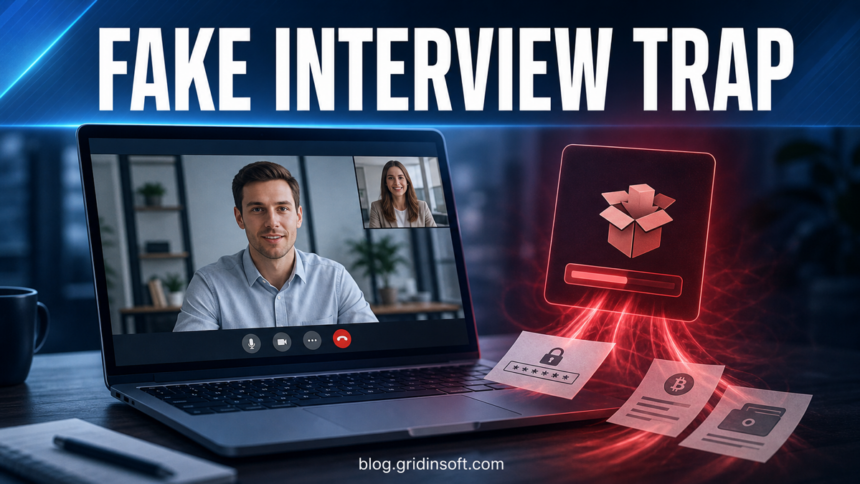
Fake job interview and developer-tool malware is a real cleanup problem, not just a scam warning. If you downloaded an interview app, copied a developer-tool install command, cloned a coding-test repository, pasted a shell command, or opened a “camera fix” during a recruiter call, treat the computer as potentially exposed until you verify it. Disconnect it, stop signing in from that device, scan it, and rotate important passwords from a clean device.
The same cleanup order applies to game-download infections such as VectorGatewa.exe: isolate the PC, remove persistence, then rotate passwords from a clean device.
If you are still deciding whether the recruiter or offer is real, compare the message against this hiring scam red flags checklist before installing anything else.
The strongest current campaigns mix ordinary hiring pressure with malware delivery. Microsoft describes Contagious Interview as a fake recruiting workflow that persuades developers to run packages or commands during technical assessments [1]. Doctor Web also documented JobStealer campaigns where fake online interview apps for macOS and Windows are used to steal browser data, passwords, session files, and crypto-wallet data [2].
For developers, the dangerous step may be a copied installer command, a fake AI coding-tool page, a package script, an IDE trust prompt, or repository automation that runs before the source code looks suspicious. Treat the setup workflow as part of the file you are reviewing.
A newer branch uses fake Zoom or Zoom Workspace meeting pages as the interview or customer-call step. Current Zoom-themed attacks have used fake update prompts, script downloaders, and remote-access installers such as ScreenConnect/ConnectWise Control, so a meeting page that suddenly asks for an update should be treated as an incident, not as normal conferencing friction [5]. Zoom’s own update path is the signed-in desktop app’s Check for Updates menu or the official Download Center, not a random meeting page download [6].
What fake interview malware looks like
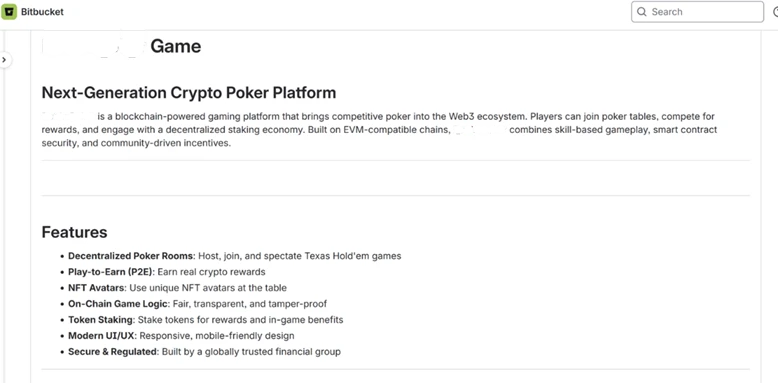
The lure usually feels more polished than an obvious spam message. A fake recruiter may use a realistic company page, a cloned hiring site, a video meeting portal, a GitHub or Bitbucket repository, a private chat channel, or a “verification” page that says your camera, browser, Cloudflare check, or development environment needs a quick fix.
- You are asked to install a custom meeting app instead of using a known vendor from its official site.
- The interview page asks you to paste a command into Terminal, PowerShell, Command Prompt, or a browser console.
- A coding task includes a ready-made project with unusual install scripts, hidden dependencies, or IDE task files.
- The recruiter rushes you, says the task must be done during the call, or discourages checking the company domain.
- The app asks for your OS password, wallet access, browser permissions, seed phrase, MFA code, or account recovery data.
Android Indeed variant: If a recruiter sends an APK called “Indeed Interview” or “MyInterview,” use the fake Indeed interview app response guide to check VPN and Accessibility access before securing accounts.
Fake developer tool or coding-test variant
In this version, the lure is a CLI utility, AI coding assistant, package installer, or take-home repository rather than a meeting app. Search ads, cloned documentation, and recruiter messages may point to a page that looks like a real developer tool but changes the install command or hides execution inside project automation. A real Google Antigravity component can also trigger a heuristic alert, so use the Antigravity language-server verification guide to separate the current official hash from a fake installer. If you are checking a suspicious tool page, compare it with the broader Google Search malvertising cleanup guide and the fake Claude Code malware case.
- Install command mismatch: a copied command fetches code from an unknown domain, paste service, CDN, or fresh GitHub account instead of the official project domain.
- Git hooks: check
.git/hooks/,.githooks/, and.husky/for files such aspre-commit,pre-push, andpost-checkout. Unexpectedcurl,wget, PowerShell,cmd,bash, base64, or remote download URLs are red flags. - IDE tasks: review
.vscode/tasks.json, workspace trust prompts, build tasks, launch profiles, and extension recommendations before opening the folder in a desktop IDE. - Package scripts: read
package.json, lockfile changes,preinstall,postinstall, setup scripts, and binary downloads before runningnpm install,pip install,brew, or similar commands from a stranger.
If you only need to review code, use a browser view, a disposable virtual machine, or an isolated account with no wallets, SSH keys, cloud tokens, package-publishing tokens, password manager session, or personal browser profile.
Fake Codex ad or copied Terminal command
September 7, 2026: a sponsored result and a Google Sites address do not authenticate a Codex installer. Cato CTRL documented fake Codex pages that presented a legitimate-looking npm string before decoding a hidden URL and fetching a script into zsh; its current indicators include quill-flint[.]com. Cato reports strong AMOS delivery-framework overlap, which does not identify what ran on your particular Mac [7].
An echo statement only prints text: displaying an OpenAI package name does not verify the command that follows. Base64 is an encoding, not a signature or safety check. The execution boundary is the remote script being passed to the shell. Open OpenAI’s official Codex CLI documentation independently and compare the complete installation source [8]. Official instructions also use command-line installation, so the presence of curl alone is not a malware verdict. This warning concerns the impersonating page and substituted command, not the genuine Codex app or CLI.
- Saw the ad only: skip it and reach the vendor through its official site. Seeing an ad does not execute its payload.
- Opened the page: close it, inspect any downloads and permissions you granted, and remove unwanted site notifications. Escalate if you also submitted credentials, installed something, or ran a command.
- Copied but did not run it: replace the clipboard contents with harmless text and close the unused Terminal prompt without submitting it. Save the command as plain text for reporting; never paste it into a shell to inspect it. If you already pasted it and are unsure whether it executed, follow the next branch.
- Ran it: disconnect the Mac, preserve the command, domain and approximate time, and use a clean device for account recovery. Run an updated macOS-compatible security scan; review recent files, Login Items, browser extensions and unexpected LaunchAgents or LaunchDaemons. Record unfamiliar entries and have their executable paths checked before removal. Contact your security team for a work device; if execution cannot be reconstructed, consider a clean macOS reinstall after preserving evidence.
- Found account or persistence symptoms: revoke sessions and rotate exposed email, password-manager, developer, cloud/API and SSH credentials from a clean device. Review wallet and financial access if it was present on the Mac. Returning startup activity warrants further investigation; a clean scan does not revoke stolen sessions or recover a leaked wallet seed.
Fake Zoom or Zoom Workspace update variant
In this version, the recruiter, customer, or project manager sends a meeting link and the page pretends that Zoom Workplace needs an urgent update. The download may use a name such as zoom-workspace-v6026.vsb, ZoomUpdateInstaller.bat, Session.ClientSetup.exe, or another meeting-themed script or installer. Treat the file as suspicious even when the page design looks close to Zoom.
- Wrong domain: the meeting or update page is not on an official Zoom domain, or it hides behind a short link, fresh domain, or customer-portal lookalike.
- Forced update: the call page blocks the interview until you download a file, run a script, or approve an installer.
- Remote-access aftermath: ScreenConnect, ConnectWise Control, AnyDesk, RustDesk, or another support tool appears after the update. Use the dedicated ScreenConnect Client scam cleanup guide if ScreenConnect is present.
- Pressure cue: the caller says the meeting is time-sensitive, the camera is broken, or the customer cannot continue unless the update runs immediately.
First steps if you downloaded or ran it
The same source-check rule applies outside job scams: fake software pages can copy a real product name and push a wrapper or terminal command. See the MKVToolNix fake download domain checklist for a narrow example of this pattern.
- Disconnect the device from the network. Turn off Wi-Fi or unplug Ethernet. Do not keep testing the file online to “see what happens.”
- Do not log in to important accounts from that computer. Use a phone or another trusted device for email, banking, cloud, crypto, work, and password-manager actions.
- Preserve the evidence. Save the recruiter profile URL, email address, meeting site, file name, download URL, repository URL, and time of the event. Do not rerun the installer.
- Freeze the project before running more Git or IDE commands. If the lure was a repository, do not commit, checkout branches, run package installs, or trust the workspace until hooks, tasks, and setup scripts have been reviewed in isolation.
- If a fake meeting update ran, look for remote access before reconnecting. Check Apps, Services, Task Manager, and installed programs for ScreenConnect/ConnectWise Control or any monitoring tool you did not approve.
- Run a full security scan. On Windows, use Gridinsoft Anti-Malware obtained from its official site; on a Mac, use a macOS-compatible security tool from its official vendor. Scan downloads, temporary folders, startup locations, browser profiles, and recently created files.
- Check whether anything gained persistence. Look for new startup apps, scheduled tasks, services, browser extensions, developer tool tasks, remote access tools, and scripts under user profile folders.
- Rotate credentials from a clean device. Start with email, password manager, banking, crypto exchanges, cloud storage, Microsoft/Google/Apple accounts, Steam/Discord/Telegram, GitHub, npm, PyPI, SSH keys, API tokens, and work SSO.
- Revoke active sessions and tokens. Password changes are not enough if stolen cookies or OAuth tokens remain valid. Use each service’s security page to sign out other sessions and remove unknown devices.
If the suspicious download came from a fake coding test, also review source-code accounts and CI/CD secrets. Some campaigns target developers specifically because their machines hold repository access, cloud keys, package-publishing tokens, and wallet extensions. Sophos reported fake-company and fake-repository tactics tied to NICKEL ALLEY, including ClickFix-style prompts that make a candidate run a local command [3]. If commit hashes changed after the incident, use the malware Git rewrite recovery guide before trusting or rebuilding from the affected branch.
On Windows, recurring activity after quarantine can mean a scheduled task, service, browser change, or bundled loader remains. Check those persistence points with a full scan before trusting the PC again.
If the process path is wrong, the name imitates a Windows component, or high CPU started after an unknown installer, scan for hidden miners, services, startup entries, and bundled components.
Scan for hidden startup and remote-access leftoversWhat to inspect on Windows
On Windows, check the common places where a fake interview app may leave launch points or helpers. You do not need to delete random system files; focus on items created around the interview time and items with publisher, path, or name mismatches.
- Downloads and temp folders: suspicious installers, archives, scripts, or unpacked project folders.
- Startup apps: Settings > Apps > Startup and Task Manager > Startup apps.
- Scheduled tasks: new tasks that launch from AppData, Temp, Downloads, or an interview-project folder.
- Services: recently added services with generic names or unsigned executables.
- Browser extensions: unknown Chrome, Edge, Brave, or Firefox extensions, especially wallet or proxy-related ones.
- Remote access tools: AnyDesk, RustDesk, RDP helpers, VPN profiles, SSH tunnels,
ScreenConnect Client Service,ScreenConnect.WindowsClient.exe, or any support tool you did not install intentionally.
If you cloned a repository, do not open it again in an IDE until it has been reviewed. Some malicious projects rely on IDE trust prompts or task configuration. A separate Cursor git.exe flaw on Windows shows that even opening a project can trigger a repository-local executable. Microsoft also noted Visual Studio Code task workflows as one route attackers used to execute a payload after a victim opened and trusted a repository [1].
Accounts to protect first
Infostealers often value active sessions more than passwords. A stolen browser cookie can let an attacker bypass a fresh password until the session is revoked. Prioritize accounts in this order:
- Email and password manager: control of either account can reset many others.
- Financial and crypto accounts: exchanges, wallet extensions, seed phrase backups, bank portals, and payment apps.
- Developer accounts: GitHub, GitLab, Bitbucket, npm, PyPI, cloud consoles, package-publishing tokens, API keys, SSH keys, signing keys, and CI/CD secrets.
- Work accounts: SSO, VPN, Microsoft 365, Google Workspace, Slack, CRM, payroll, and support dashboards.
- Messaging and gaming accounts: Discord, Telegram, Steam, and other accounts that can be used for follow-up scams.
For Microsoft accounts, use the same cleanup discipline as after any malware-assisted account takeover: recover from a clean device, review sign-in activity, remove unknown devices, update recovery data, and enable stronger MFA. Gridinsoft has a separate guide for Microsoft account recovery after malware.
When a clean reinstall is safer
A clean reinstall is not always necessary, but it is reasonable when the fake interview app ran with administrator rights, installed a driver, added remote access, changed security settings, or touched work/developer secrets. It is also safer when you cannot tell what executed, the scan finds a stealer/backdoor, or the device stores crypto-wallet material.
Before reinstalling, back up only personal documents you can inspect. Avoid copying executables, scripts, browser profiles, IDE project folders, cracked tools, unknown archives, or AppData folders. If you need a clean Windows USB after a suspected compromise, follow the safer approach in Gridinsoft’s clean Windows install USB guide.
How to avoid the next fake interview trap
- Join interviews through known meeting products from official domains only.
- Update Zoom Workplace from the app’s profile menu or Zoom’s Download Center; do not trust an update file served by a meeting page.
- Refuse any interview step that asks you to paste commands into Terminal, PowerShell, Command Prompt, or a browser console.
- Run coding tests in a disposable virtual machine with no personal sessions, wallets, SSH keys, cloud tokens, or password manager login.
- Use a separate browser profile for job hunting and keep wallet extensions out of it.
- Verify the recruiter through the company’s real domain, not only LinkedIn, Telegram, Discord, WhatsApp, or a fresh job portal.
- Be wary of “camera fix,” “Cloudflare check,” “audio driver,” or “environment patch” instructions during a call.
If the lure involved an employer or contractor workflow, report it to the platform where the recruiter contacted you and to the company being impersonated. Businesses should also watch for remote-hiring abuse and unusual session activity. The FBI warns that North Korean IT-worker operations have used fake identities, remote access, code theft, and credential/session abuse in business environments [4].
Another current social-engineering path to watch is Nimbus RAT delivered through Teams vishing and Quick Assist, where a fake helpdesk contact uses remote assistance instead of a fake hiring app.
Related workplace-app warning: fake software downloads do not always look broken. A fake Slack download malware case showed how a real-looking app install can hide remote desktop access in the background.
FAQ
Can a fake interview app steal passwords immediately?
Yes. Many stealers try to collect browser cookies, saved passwords, autofill data, wallet-extension files, and session tokens soon after execution. That is why you should disconnect the device and change passwords from a clean device.
I only downloaded the app but did not open it. Am I safe?
Usually the risk is lower if the file was never opened, but still scan the file and the Downloads folder. If the site also made you paste a command, run a package install, open a project, trust an IDE workspace, switch branches, commit, or grant browser permissions, treat it as a possible execution event.
Should I contact the recruiter again?
No. Preserve the messages and URLs, then report the account to the job platform or the company being impersonated. Do not click more links or send identity documents to prove anything.
Do I need to replace my computer?
Usually no. A full scan, credential rotation, token revocation, and sometimes a clean OS reinstall are enough. Replace hardware only if a qualified incident responder finds firmware-level compromise, which is uncommon for this kind of lure.
Related cleanup: fake interview and chat-app lures may also drop loaders that hide behind trusted program names. If you found ProtonVPN.exe with nethost.dll, follow this DLL side-loading cleanup checklist.
If the lure arrives by email rather than a job chat, compare it with the DesckVB RAT malspam chain, where a trusted redirect led to a ZIP and script loader.
A newer example uses a different delivery detail: OTTERCOOKIE hiding payload fragments in SVG flag files, assembled only when the developer starts the repository.
References
- Microsoft Defender Experts and Microsoft Defender Security Research Team. “Contagious Interview: Malware delivered through fake developer job interviews.” Microsoft Security Blog, March 11, 2026, accessed May 29, 2026. https://www.microsoft.com/en-us/security/blog/2026/03/11/contagious-interview-malware-delivered-through-fake-developer-job-interviews/
- Doctor Web. “Instead of a job – stolen data and money. Trojan stealer targeting macOS and Windows users conceals itself in fake online interview apps.” Doctor Web News, May 7, 2026, accessed May 29, 2026. https://news.drweb.com/show/?i=15253&lng=en
- Sophos Counter Threat Unit Research Team. “NICKEL ALLEY strategy: Fake it ’til you make it.” Sophos, March 23, 2026, accessed May 29, 2026. https://www.sophos.com/en-us/blog/nickel-alley-strategy-fake-it-til-you-make-it
- Federal Bureau of Investigation. “North Korean IT Workers Conducting Data Extortion.” Internet Crime Complaint Center (IC3), January 23, 2025, accessed June 24, 2026. https://www.ic3.gov/PSA/2025/PSA250123
- Cofense Phishing Defense Center. “Click, Install, Compromised: The New Wave of Zoom-Themed Attacks.” Cofense, accessed June 24, 2026. https://cofense.com/blog/click-install-compromised-the-new-wave-of-zoom-themed-attacks
- Zoom Support. “Updating Zoom to the latest version.” Zoom Support, accessed June 24, 2026. https://support.zoom.com/hc/en/article?id=zm_kb&sysparm_article=KB0060716
- Jakub Osmani and Guy Waizel. “Cato CTRL Insights: When Trust Becomes the Payload in a Fake Codex ClickFix Campaign.” Cato Networks, August 24, 2026, accessed September 7, 2026. catonetworks.com
- OpenAI. “Codex CLI.” ChatGPT Learn, accessed September 7, 2026. learn.chatgpt.com