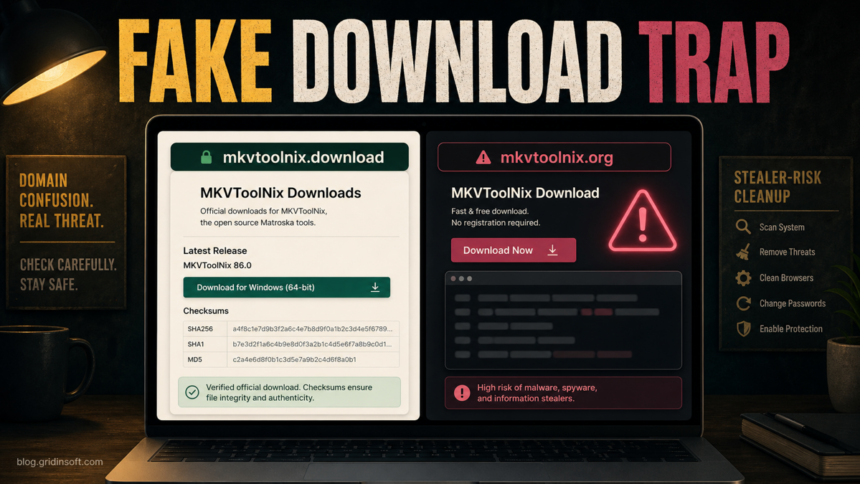
If you searched for mkvtoolnix.org virus, the important distinction is this: MKVToolNix is a legitimate open-source Matroska toolset, but the official project download domain is mkvtoolnix.download, not mkvtoolnix.org. Do not install files or paste terminal commands from a lookalike MKVToolNix site. If you already ran an installer or command from that domain, treat the event as a possible fake-download compromise and check the device before logging back into important accounts.
The risk is not the real MKVToolNix project. The risk is a page that copies the name, offers a convenient download, asks for terminal commands, or pushes wrappers that can install adware, steal browser data, or add persistence. A safe response is to verify the source first, remove anything you installed from the wrong domain, scan the system, and rotate exposed passwords from a clean device.
Is Mkvtoolnix.org Safe?
For current Windows downloads, the MKVToolNix community points users to the official mkvtoolnix.download downloads page and the Microsoft Store. The same support discussion warns that other Windows binary sources are unofficial and names mkvtoolnix.org as a malicious distributor. That makes this a domain-trust problem: the software name is real, but the source can be wrong.
Use this rule before downloading anything: if the page is not mkvtoolnix.download, the Microsoft Store, your Linux distribution repository, or another trusted package repository you intentionally use, do not run the file. A fake site can still show the correct product name, copied screenshots, version numbers, and polished text.
Red Flags on a Fake MKVToolNix Download Page
- The domain is mkvtoolnix.org or another lookalike, while the official project uses mkvtoolnix.download.
- The page asks you to copy a terminal, PowerShell, curl, or shell command instead of offering normal official packages.
- The download is a DMG, PKG, EXE, script, archive, or browser extension that you did not expect for your platform.
- The page uses urgency, “fast and free” wording, fake ratings, or claims that the official site is slow or blocked.
- The file name does not match the package name, architecture, or checksum listed by the official project.
- Your browser, antivirus, or SmartScreen warns about the file, but the site tells you to ignore the warning.
If You Only Visited the Site
If you only opened the fake page and did not download, install, allow notifications, paste commands, or enter passwords, close the tab and clear the download from your browser history if it started automatically. Also check the browser notification list and remove permissions for unfamiliar sites if a prompt appeared.
You can paste the suspicious domain into the Gridinsoft Website Reputation Checker before opening it again. If the site is unavailable, newly registered, or already flagged by security vendors, avoid interacting with it and use the official source instead.
If You Downloaded or Ran a File on Windows
- Disconnect from suspicious browser sessions and stop using the downloaded file. Do not run it again “to see what happens.”
- Open Downloads, Desktop, Temp, and the browser download shelf. Remove the file only after noting its name and path for your scan results.
- Check Settings > Apps for new apps installed at the same time. Uninstall only entries you can confidently connect to the fake download.
- Review startup entries in Task Manager and Task Scheduler for unknown items created after the download.
- Check your browsers for new extensions, search-engine changes, notification permissions, and proxy settings.
- Scan the downloaded file with the Gridinsoft Online Virus Scanner, then run a full local malware scan if the file was opened.
A fake download may remove the visible installer after it runs while leaving a scheduled task, startup entry, browser extension, or credential-stealing component behind. If the file launched, Windows showed a security warning, or new browser/account activity appeared afterward, run a full Gridinsoft Anti-Malware scan, remove detected items, reboot, and scan again if symptoms return.
If the page or email made you download an invoice, coupon, tracking app, browser extension, or support tool, scan the PC before opening it again or logging into sensitive accounts.
Scan downloaded files and WindowsIf You Ran a Command or Installer on macOS
Some fake software pages target macOS users with terminal paste commands because the command can download and run a script faster than a normal installer warning. If you pasted a command or opened a DMG/PKG from the wrong MKVToolNix domain, assume browser passwords, session cookies, cryptocurrency wallets, and developer tokens may be exposed until proven otherwise.
- Disconnect from sensitive accounts and change important passwords from another clean device.
- Revoke active sessions for email, Apple ID, Google, Microsoft, Steam, Discord, GitHub, and financial accounts you used on the Mac.
- Check System Settings > General > Login Items for unknown items.
- Inspect
~/Library/LaunchAgents,/Library/LaunchAgents, and/Library/LaunchDaemonsfor files created around the time of the command. - Remove unknown browser extensions and reset suspicious browser notification permissions.
- If you are not sure what the command did, preserve the command text and seek platform-specific malware cleanup help before deleting every artifact.
How to Get the Real MKVToolNix Safely
Use the official mkvtoolnix.download downloads page, the Microsoft Store entry, or your operating system’s trusted package manager. For Windows files, compare the checksum shown by the official project with the file you downloaded. On Linux, prefer distribution repositories or the official repository instructions. On macOS, use the official macOS package link from the project page.
Do not search for “MKVToolNix download” and click the first ad-like result. Search results can mix the official project, mirrors, software portals, old forum threads, and lookalike domains. Type the official domain manually or follow a trusted bookmark once you verify it.
When to Change Passwords
Change passwords from a clean device if you entered credentials on the fake site, ran a terminal command, opened a suspicious installer, or saw new account alerts afterward. Start with email, password manager, Apple ID, Microsoft, Google, browser sync, banking, crypto, Steam, Discord, and work accounts. Rotate passwords before logging back in from the affected machine.
If you only downloaded the file but did not open it, the priority is scanning and deleting the file. Password rotation becomes more urgent when code actually ran or when browser/session theft is plausible.
Related Gridinsoft Guides
- Fake job interview malware cleanup explains the same kind of fake-app download risk on Windows and macOS.
- TikTok PowerShell stealer campaigns show why copy-paste terminal instructions from a random page are dangerous.
- Can MP4 files have viruses? helps separate media-file risk from unsafe media-tool downloads.
- Infostealer cleanup after a download covers account recovery order after a suspected stealer run.
FAQ
Is MKVToolNix a virus?
No. MKVToolNix is a legitimate open-source toolset for Matroska files. The warning here is about fake or unofficial download sources, especially mkvtoolnix.org, not about the real project.
What is the official MKVToolNix website?
The official project download site is mkvtoolnix.download. For Windows, the project community also points users to the Microsoft Store as an official source.
Should I run a command from mkvtoolnix.org?
No. Do not paste terminal, shell, curl, PowerShell, or installer commands from a lookalike download page. If you already did, treat it as code execution from an untrusted source and follow the cleanup steps above.
I downloaded a file but did not open it. Am I infected?
A downloaded file normally cannot infect the system until it is opened, executed, extracted with an exploit path, or allowed by another vulnerable app. Delete or quarantine the file after scanning it, then use the official download source.
Why does Google show both domains?
Search results can include official pages, mirrors, software portals, forums, and suspicious lookalike domains. For software downloads, the domain and package source matter more than the product name shown in the title.
References
- Moritz Bunkus. “MKVToolNix Downloads – Matroska tools for Linux/Unix and Windows.” MKVToolNix, accessed June 13, 2026. https://mkvtoolnix.download/downloads.html
- MKVToolNix community and help forum. “Virustotal alerts.” MKVToolNix community, accessed June 13, 2026. https://help.mkvtoolnix.download/t/virustotal-alerts/1276