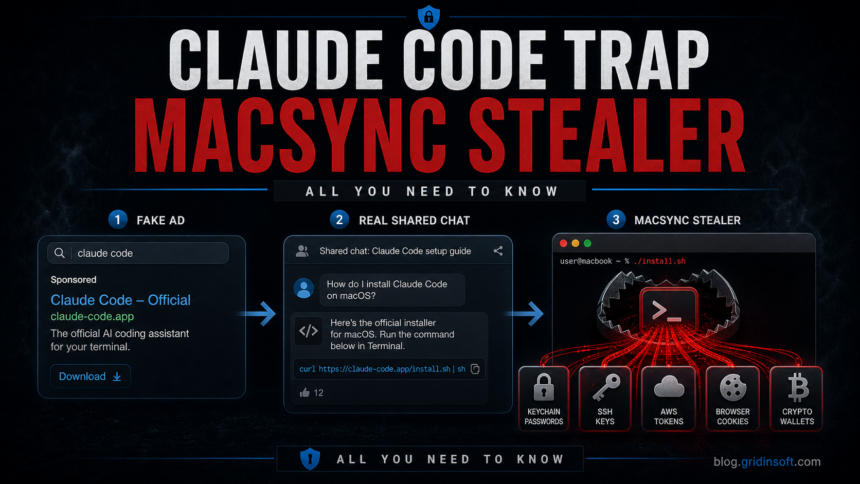
A fresh MacSync Stealer campaign is abusing developer interest in Claude Code through sponsored Google results and fake installation flows. Beelzebub Labs says the campaign impersonates Anthropic’s Claude Code CLI, sends victims to a Google Sites lure, and pushes a terminal command that delivers MacSync Stealer v1.1.2 with the campaign build tag claude1 [1].
The important twist is the user journey. The victim is not only sent to a random download page. The lure teaches the user to copy a command into Terminal, primes them to expect an admin-password prompt, and then uses an AppleScript payload to display a fake System Preferences dialog. If the user enters the Mac login password, the stealer can unlock local secrets that a normal browser-download scam would not reach.
This fits a broader InstallFix/ClickFix pattern that has already targeted people searching for Claude Code and other AI tools. Bitdefender previously documented fake Claude Code install pages that used pasted terminal commands to deliver macOS stealers, showing that AI developer tooling is now a regular malvertising theme rather than a one-off lure [2].
Gridinsoft has seen the same trust-abuse pattern in related stories, including a fake Claude AI site pushing a Windows backdoor, a fake OpenAI Hugging Face repository delivering infostealer malware, and AI-themed Noodlophile Stealer campaigns. The platform changes, but the attacker workflow stays consistent: borrow a trusted AI brand, create a believable install moment, then turn the user’s own action into execution.
September 24 update: iCloud delivery and a persistent backdoor
A separate September 24 analysis by Kaspersky describes a newer MacSync chain, including a fake crypto-wallet app called Toria. This is a later delivery method, not evidence that the original Claude Code campaign used iCloud calendars [3].
In one sample, an already-running malicious app fetched a public iCloud calendar and passed its contents to a shell interpreter. Commands after the calendar’s DESCRIPTION field retrieved the next payload. The Apple-hosted address was a staging location inside the infection chain: the report does not show that previewing a calendar invitation alone infected a Mac.
The newer payload pairs a Swift infostealer with an Objective-C backdoor. Its persistence includes a Finder-like LaunchAgent, changes to ~/.zshrc, and Git hooks that invoke a repair script. That script can restore missing backdoor files from a backup, so deleting the original installer does not address every component.
For someone who ran a suspect installer, this adds a second response question: can the attacker still execute code after the initial theft? Preserve the installer name and incident time for investigation, and recover exposed accounts from another trusted device while the Mac is being assessed.
What Mac users should check after a fake install
Beelzebub’s analysis says MacSync targeted browser profiles, Firefox/Gecko data, more than 80 wallet extensions, more than 20 desktop wallets, macOS Keychains, iCloud Keychain local data, SSH keys, AWS credentials, Kubernetes configuration, Telegram Desktop sessions, Apple Notes data, shell history, and selected document/key files. It also described a second stage that replaces app.asar inside Ledger Live or Ledger Wallet to show a fake recovery flow and capture seed phrases [1].
That means the response should not stop at deleting a suspicious file. If a Claude Code install command was pasted into Terminal, check ~/.zsh_history, ~/.bash_history, recent Terminal sessions, login items, browser extension directories, ~/Library/Keychains/, ~/.ssh/, ~/.aws/, ~/.kube/, and any recently modified Ledger Live or wallet application files. A fake error message after the command is not proof that installation failed; it may be the cover screen shown after theft.
The credential priority is clear. Rotate developer and cloud access first: GitHub tokens, SSH keys, AWS access keys, Kubernetes contexts, package registry tokens, password-manager sessions, browser sync sessions, and any credentials stored in browsers. For crypto wallets, move funds to wallets created on a clean device if a seed phrase, wallet extension, Ledger Live app, or recovery prompt was exposed. Reinstalling the wallet app is not enough if the seed phrase was typed into a fake recovery flow.
If an exposed AWS key is automatically quarantined, credential recovery still needs an owner. A Unit 42 test of AWS key quarantine shows why selected permission denials do not replace revoking the leaked key and reviewing account activity. Its test used a public GitHub commit, a different exposure route from this stealer campaign.
The prevention rule is also concrete: official developer tools should not require copying an opaque one-line installer from a search ad into Terminal. Use vendor documentation reached from a manually typed domain, inspect shell scripts before execution, avoid sponsored results for security-sensitive installs, and treat any macOS password dialog that appears immediately after a pasted install command as a compromise signal until proven otherwise.
If a stealer copies an already authenticated browser login, removing the initial file is not enough. Review the response steps for Claude session theft and unexplained usage drain before signing in again on the same Mac.
A September investigation traced the same copied-command risk through malicious ads from the verified HBO Max Reddit account into PasteSwitch. Its related Alfred lure served a malicious installer to a Mac while redirecting a Windows test environment to the real vendor, showing why a benign-looking check from another device can be misleading.
Related context: newer macOS stealer lures now include SHub Reaper fake login flows, where the handoff from a browser page to a local action is the main warning sign.
References
- Beelzebub Labs, “MacSync Stealer: How a Google Ad Turned Install Claude Code into Full Mac Compromise,” May 2026. Analysis
- Bitdefender Labs, “Fake Claude Code Ads Deliver macOS Stealer Malware,” 2026. Research
- Sergey Puzan. “MacSync under the microscope: new delivery methods and a new payload.” Kaspersky Securelist, September 24, 2026; accessed October 5, 2026. securelist.com