
A fake developer coding test can look functional while its SVG flag files quietly store pieces of OTTERCOOKIE malware. Elastic Security Labs documented the REF9403 campaign after a developer received a supposed job opportunity through Slack. The repository ran as expected, but npm run dev also loaded serverValidation.js, reconstructed Base64 fragments hidden in assets/flags/*.svg, and executed them in memory [1].
The important distinction is that merely viewing one of the SVG images is not the observed trigger. The malicious chain starts when the target installs dependencies and launches the project. That makes this campaign more convincing than a broken sample: the coding exercise can work well enough to lower suspicion.
How OTTERCOOKIE hides inside SVG files
The repository contains ordinary country-flag images. In their source, HTML comments hold encoded payload fragments. The loader enumerates the SVG files, sorts them, extracts the comments, joins the fragments, decodes the result, and passes it to eval. An image preview therefore looks harmless even though a source or hex view exposes the concealed data.
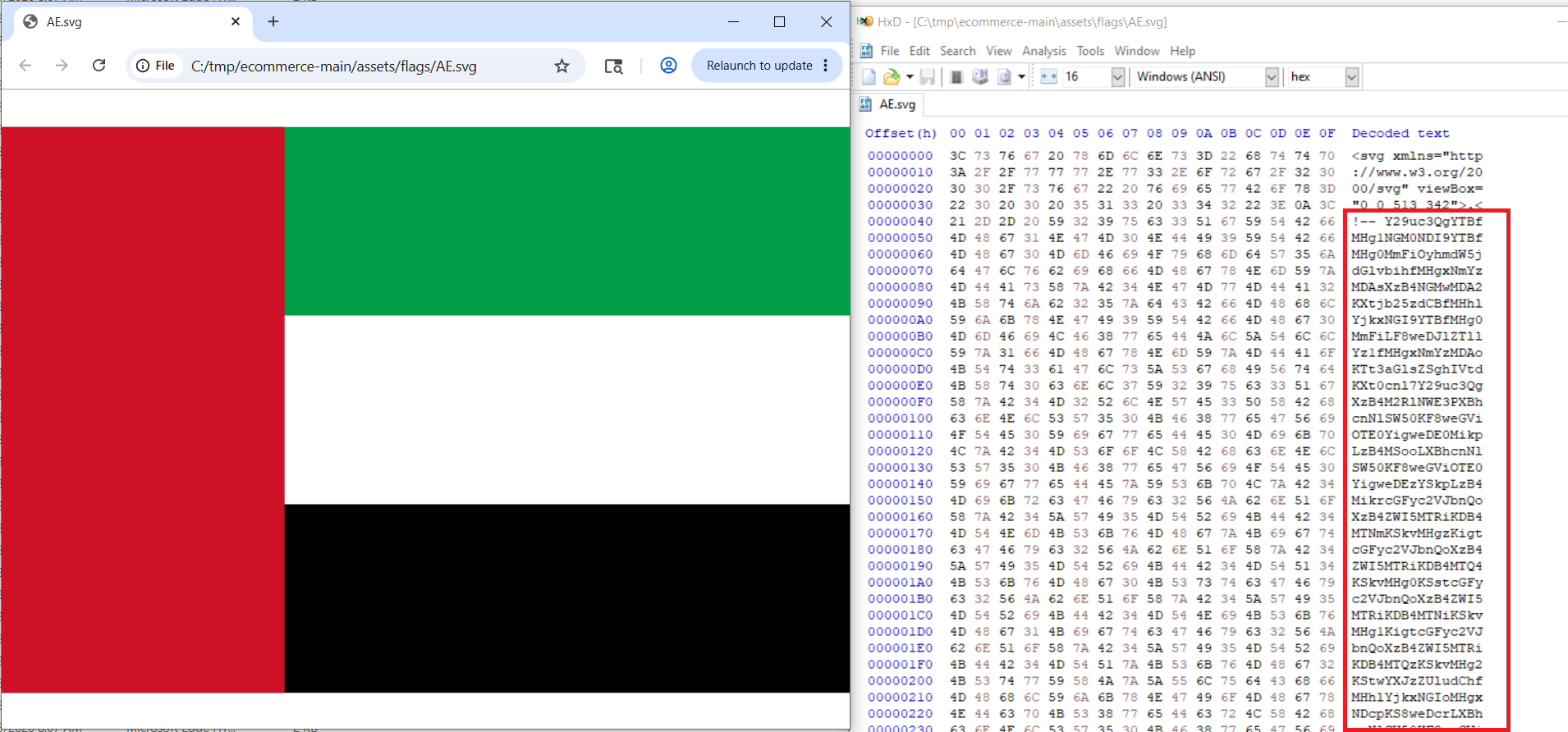
This is steganography used for delivery rather than a browser exploit. The attacker relies on a developer trusting a repository and running its startup command. Microsoft has separately described the broader Contagious Interview operation, where North Korean-linked actors pose as recruiters and send developers malicious projects or troubleshooting tasks [2].
What runs after npm run dev
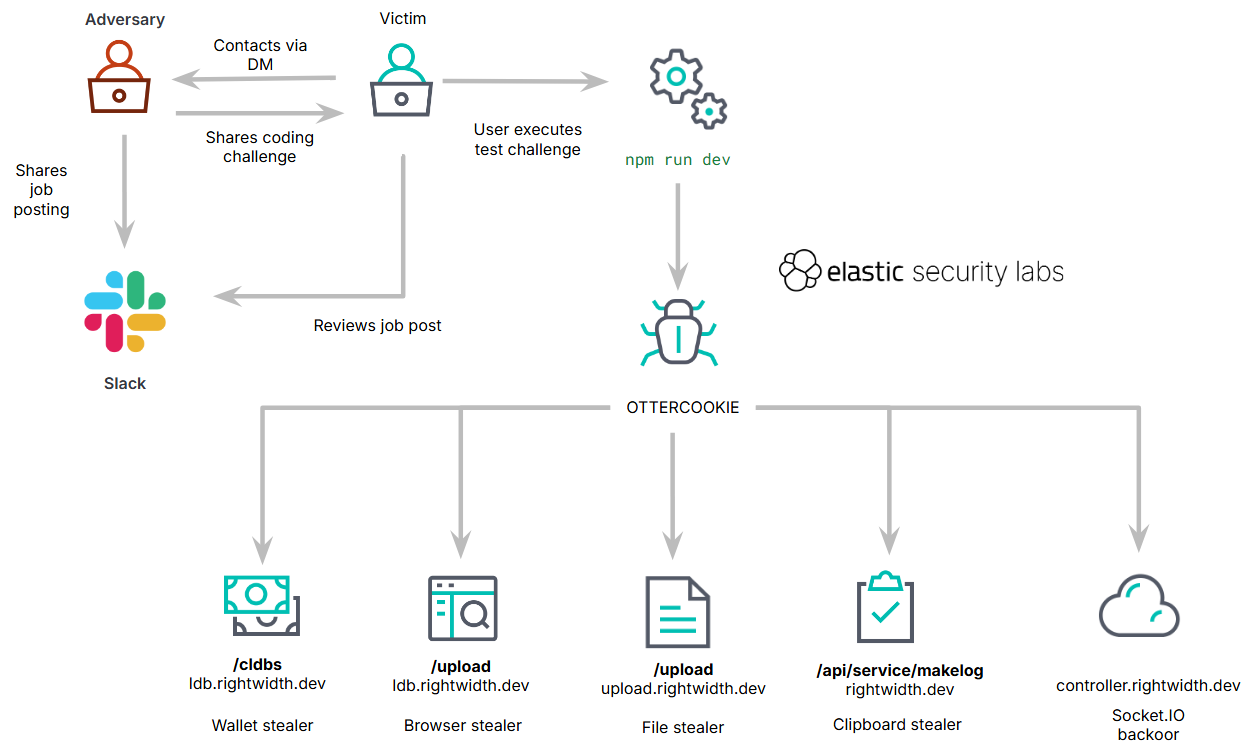
Elastic grouped the JavaScript into four capabilities. One steals browser credentials and extension databases associated with cryptocurrency wallets. Another searches for documents and secrets, including .env, .ssh, .aws, and .azure. A Socket.IO component provides remote-access functions, while a fourth module monitors the clipboard and can fetch a Windows payload.
The process may rename itself to npm-cache to blend into a development system. Observed infrastructure included rightwidth[.]dev and the ldb, upload, controller, and file subdomains. Windows downloads used service-like names such as hostService.exe, printSvc.exe, and dhcpSvc.exe. The reporting team could not recover those second-stage files from the unavailable server, so their exact function remains unconfirmed.
What to check after running a suspicious coding test
- Disconnect the system from the network. Do not keep testing the repository or contact its domains from the suspected host.
- Preserve the repository and logs. Record the recruiter account, repository URL, commit hash, terminal history, Node processes, PowerShell activity, and network connections before cleanup.
- Inspect startup code and SVG sources. Search for
serverValidation.js,assets/flags, long Base64 comments, dynamiceval,rightwidth.dev, and a process title ofnpm-cache. - Assume credentials and sessions are exposed. From a separate clean device, revoke browser sessions, rotate passwords and developer tokens, replace cloud keys, and review wallet activity. Our password-stealer response guide explains the order.
- Check the whole host. Security software may stop a visible Node or PowerShell process while missing a stolen session, an earlier RAT connection, or a second-stage executable. Scan for remaining artifacts and persistence, then use the broader fake job interview malware cleanup checklist.
If a token stealer ran here, logging back in can hand the attacker your new Discord session, email cookie, Steam token, or wallet access. Scan this Windows PC first, then reset passwords from a clean device.
Scan for stealer and backdoor leftoversIf high-value credentials, wallet material, signing keys, or production access were present, the safest recovery may be a clean Windows reinstall from trusted media. Scanning is useful for locating artifacts; it cannot reverse credential theft or prove that cloud and browser sessions were not copied.
How developers can reduce the risk
Open unfamiliar assignments in a disposable virtual machine without personal browser profiles, SSH agents, cloud CLIs, password managers, or wallet extensions. Review package.json scripts and server entry points before installing dependencies. A working interface is not evidence that the repository is safe, and an SVG file deserves source inspection when project code programmatically reads it.
The September 18 joint WaterPlum advisory puts fake recruitment into a wider context: at least 30,000 infected devices, with coding assignments and video-call troubleshooting used as execution pretexts. Those findings describe the broader operation, not the infection count for this SVG campaign.