The “Tax Summary” email virus is a malicious message that leads to a ZIP archive containing a VBScript file. Reading the email alone does not run the observed chain. Clicking View My Tax Summary can open a fake SharePoint-style page and trigger the ZIP download, but the highest infection risk begins when the .vbs file inside the archive is opened. If you ran that script, disconnect the Windows PC from sensitive networks, preserve the message for IT if it is a work device, and begin endpoint and account recovery.
Choose the branch that matches what happened
- You only read the email: report it as phishing, delete it, and do not reply or use its button. The observed script was not executed.
- You clicked the button: close the page and check the browser download history. A ZIP may have downloaded even if the page looked like a completed security check.
- You downloaded or opened the ZIP: do not open the
.vbsfile. Quarantine or remove the archive and script, then run an updated security scan. - You ran the VBS file: treat the computer as potentially compromised. Disconnect it, check for script-host activity and persistence, scan it, and change important passwords from a clean device.
| What happened | Risk and next action |
| Email opened, no link used | Low device risk from this observed chain. Report and delete the message. |
| Button clicked, no file intentionally opened | Check browser downloads and remove any unexpected ZIP without opening it. |
| ZIP opened, VBS not run | The archive itself does not prove execution. Remove it and scan the device. |
| VBS double-clicked or launched | High enough risk for isolation, endpoint review, a full scan, and clean-device account recovery. |
How to recognize the Tax Summary email
The observed subject is “Review Your Tax Summary to avoid getting overbilled.” The message presents a “Tax Support Specialist,” copies tax.com branding, and says a preliminary review of deductions, withholdings, and estimated payments is ready. Tax.com is being impersonated and is not connected to the campaign.
The main button says View My Tax Summary. A 48-hour expiry warning creates pressure to act before checking the sender or destination. A confidentiality footer and formal tax vocabulary add visual credibility, but neither proves that the message came from a tax professional.
After the click, the destination imitates a Microsoft SharePoint Download complete page. It also displays reassuring Microsoft Defender and Cloudflare Zero Trust wording. Those names do not authenticate the page: Microsoft, SharePoint, and Cloudflare are not connected to this lure. A real security label on a page is not evidence that the file was scanned, and a downloaded document should not require a Windows script to display tax information.
Example
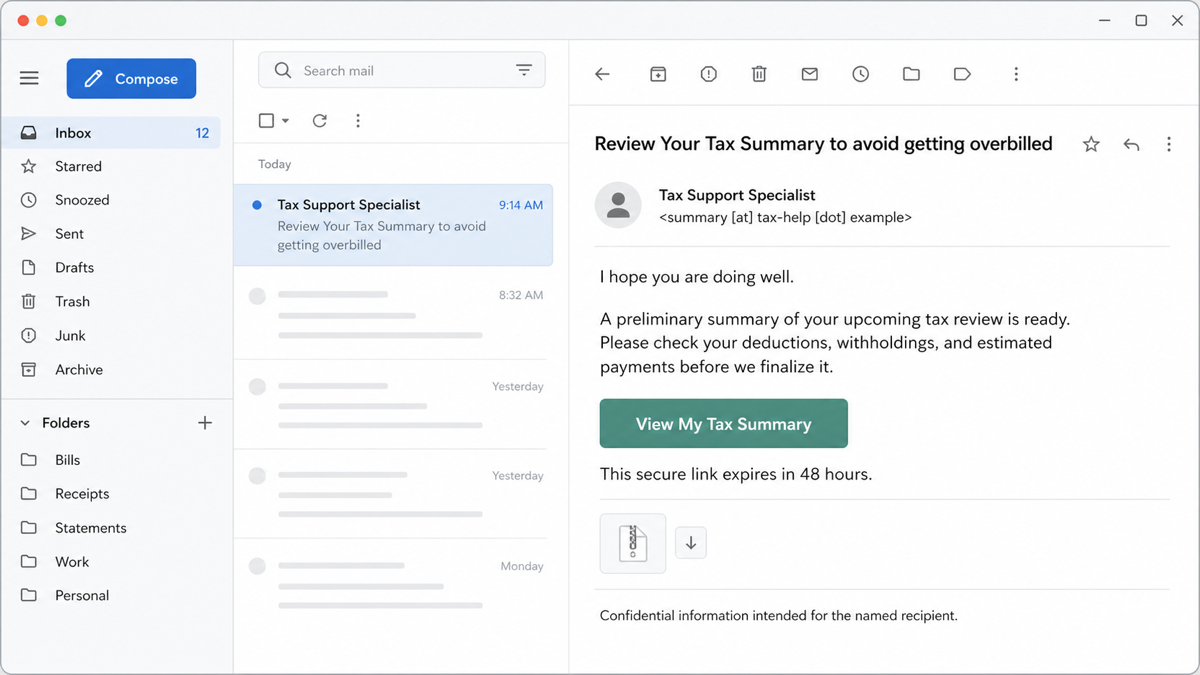
Subject: Review Your Tax Summary to avoid getting overbilled
Sender: Tax Support Specialist <summary [at] tax-help [dot] example>
I hope you are doing well.
A preliminary summary of your upcoming tax review is ready. Please check the deductions, withholdings, and estimated payments before the file is finalized.
[View My Tax Summary]
This secure link expires in 48 hours. Your personalized summary will appear in your system downloads.
Confidential information intended for the named recipient.
The awkward phrase “in your system downloads,” a deadline that discourages verification, and a document button that leads outside a known client portal are useful warning signs. Still, grammar alone is not a reliable test. Judge the full sender and reply-to addresses, the actual link destination, the unexpected download, and the requested action together. Our broader phishing email checklist explains those checks.
How the fake SharePoint, ZIP, and VBS chain works
- The email creates a plausible task. Reviewing deductions and payments sounds time-sensitive and financially important.
- The button sends the browser to an unrelated site. The page copies document-delivery language instead of using a verified tax or Microsoft 365 portal.
- The page triggers a ZIP download. The archive makes the next file look like part of a normal document package and may hide its full extension in Windows.
- The user opens the VBScript. Windows Script Host can execute
.vbsfiles throughwscript.exeorcscript.exe. Those Windows components are legitimate; the problem is the untrusted script they are asked to run. - The script retrieves or launches another stage. The observed VBS is malicious, but the final payload has not been identified publicly. Do not assume it is ransomware, a stealer, a keylogger, or a remote-access trojan without device-specific evidence.
A ZIP file is a container, not automatic proof of infection. The decisive transition is execution of the content inside it. The guide to BAT, CMD, VBS, JS, WSF, and PS1 file safety explains how Windows treats these script types, while our script-based malware overview covers how small loaders can fetch a second stage or create persistence.
What to do if you clicked or downloaded the ZIP
- Close the fake page. Do not use its back button, support link, or download again.
- Open the browser’s download history. Look for the download time and remove the unexpected archive without extracting or previewing its script.
- Show file extensions. In File Explorer, enable file-name extensions so a script cannot masquerade as a document with a misleading icon or double extension.
- Check
%USERPROFILE%\Downloads. Quarantine or remove the unexpected ZIP and any extracted.vbsfile. If this is a managed work PC, preserve the original message, headers, filename, and timestamps for IT before deleting evidence. - Run an updated scan. A download that was never opened is lower risk, but scanning helps catch an accidental launch or another file delivered at the same time.
Do not upload a confidential tax document to a public scanner. If the file came from the lure and contains private information or customer data, follow your organization’s incident-response process instead.
What to do if you ran the VBS file
- Disconnect the affected PC. Turn off Wi-Fi or unplug Ethernet. Do not continue using email, banking, payroll, cloud-storage, or administrator accounts on that device.
- Tell the incident owner. On a work computer, contact IT or security from another device. Do not power off immediately if your organization needs memory, process, or network evidence.
- Check recent script-host activity. In Task Manager and endpoint logs, look for
C:\Windows\System32\wscript.exeorC:\Windows\System32\cscript.exearound the time the file was opened. Their presence alone is not malicious; the parent process, script path, command line, and network activity provide context. - Review downloads and newly created files. Check
%USERPROFILE%\Downloads,%TEMP%, and the browser download list for files created at the same time. Do not manually execute unknown files to identify them. - Review persistence. Inspect Task Scheduler, startup apps, and
%APPDATA%\Microsoft\Windows\Start Menu\Programs\Startupfor new or unfamiliar entries. In a business environment, use endpoint telemetry instead of deleting evidence blindly. - Run a full scan. Use an updated security product, remove confirmed detections, reboot when instructed, and scan again if the alert or suspicious activity returns.
Deleting the visible ZIP and VBS does not remove a payload that the script already downloaded. It can also leave a scheduled task, startup item, bundled application, browser change, or other persistence behind. Run a full Gridinsoft Anti-Malware scan to check the system for those leftovers, then reboot and repeat the scan if symptoms return. A clean scan is useful evidence, but it cannot recover a stolen password or prove that no session was exposed.
If the page or email made you download an invoice, coupon, tracking app, browser extension, or support tool, scan the PC before opening it again or logging into sensitive accounts.
Scan after running the VBS fileRecover accounts from a clean device
If the VBS ran, use a different, trusted device for password and session changes. Start with the email account because it can reset tax, payroll, banking, cloud, and other accounts.
- Change the mailbox password and end other active sessions.
- Review forwarding rules, inbox rules, delegates, recovery addresses, app passwords, and recently authorized applications.
- Change passwords for tax, payroll, accounting, banking, and cloud accounts used on the affected PC.
- Enable phishing-resistant MFA where available and remove unfamiliar MFA methods or registered devices.
- Contact the relevant bank or tax authority through a bookmarked or independently typed official address if financial or identity information was entered.
- Monitor for password-reset messages, new payees, changed deposit details, and unusual sign-ins.
If you need to prioritize recovery after suspected credential theft, the password-stealer response guide explains why email, financial accounts, and active sessions should be handled before lower-impact logins.
How to prevent similar tax-document infections
- Open known tax, payroll, or accounting portals from a bookmark or manually typed address instead of an email button.
- Show file extensions in Windows and treat
.vbs,.js,.wsf,.cmd,.bat, and.ps1files as programs, not documents. - Block script attachments and risky archive contents at the email gateway where business workflows allow it.
- Use standard user accounts for daily work and restrict Windows Script Host or attack-surface-reduction rules only after testing legitimate administrative scripts.
- Keep Windows, browsers, email clients, and security tools updated.
- Train staff to verify unexpected document shares independently. A copied SharePoint page or “Defender scanned” label does not prove a download is safe.
If a message is a credential-only document share rather than a ZIP/VBS download, compare the separate SharePoint document email scam guide. It covers verifying the real tenant, revoking sessions, and reviewing Microsoft 365 account changes.
FAQ
Can opening the Tax Summary email infect my computer?
Reading the observed message alone does not execute the VBS chain. The risk rises when the button is clicked, the ZIP downloads, and the script inside is opened. Still report and delete the email because its sender and destination are malicious.
I clicked View My Tax Summary but did not open a file. What should I do?
Close the page, check the browser download history, and remove any unexpected ZIP without opening it. Run an updated scan. If this happened on a work device, preserve the message and tell IT so they can check the URL and endpoint logs.
Is wscript.exe malware?
No. wscript.exe is a legitimate Windows Script Host program. It becomes relevant when an untrusted .vbs file launches through it. Judge the script path, command line, parent process, timing, and resulting network or file activity.
Does deleting the VBS file remove the infection?
Not if the script already ran and downloaded another stage or created persistence. Isolate and scan the device, review startup and scheduled-task changes, and recover important accounts from a clean device.
References
- Microsoft Threat Intelligence and Microsoft Defender Security Research Team. “When tax season becomes cyberattack season: Phishing and malware campaigns using tax-related lures.” Microsoft Security Blog, March 19, 2026. Microsoft Security Blog.
- Federal Trade Commission. “That text or email about your ‘tax refund’ is a scam.” Consumer Advice, January 2026. FTC Consumer Advice.
- Microsoft. “wscript.” Microsoft Learn, updated May 22, 2023, accessed July 29, 2026. Microsoft Learn.