If your account was hacked, move recovery to a clean device and secure the email account that resets your other logins. Then change the affected password, sign out active sessions, remove unknown recovery methods and connected apps, and check sent messages and payment activity. If several accounts changed, the takeover returned after a reset, or 2FA was already enabled, investigate the shared browser or device and possible stolen sessions—not only the password. Do not keep recovering accounts on a computer that may still contain malware.
What to do in the first 10 minutes
- Switch to a trusted phone or computer. Stop using a device that ran an unknown download, browser command, extension, crack, or remote-support app.
- Secure your primary email first. It can reset most of your other accounts.
- Change the hacked account password. Use a new, unique password from the trusted device.
- Sign out other sessions. Also remove unknown recovery details, app passwords, connected apps, and login methods.
- Check what the attacker did. Review messages, purchases, payment methods, security events, and account settings.
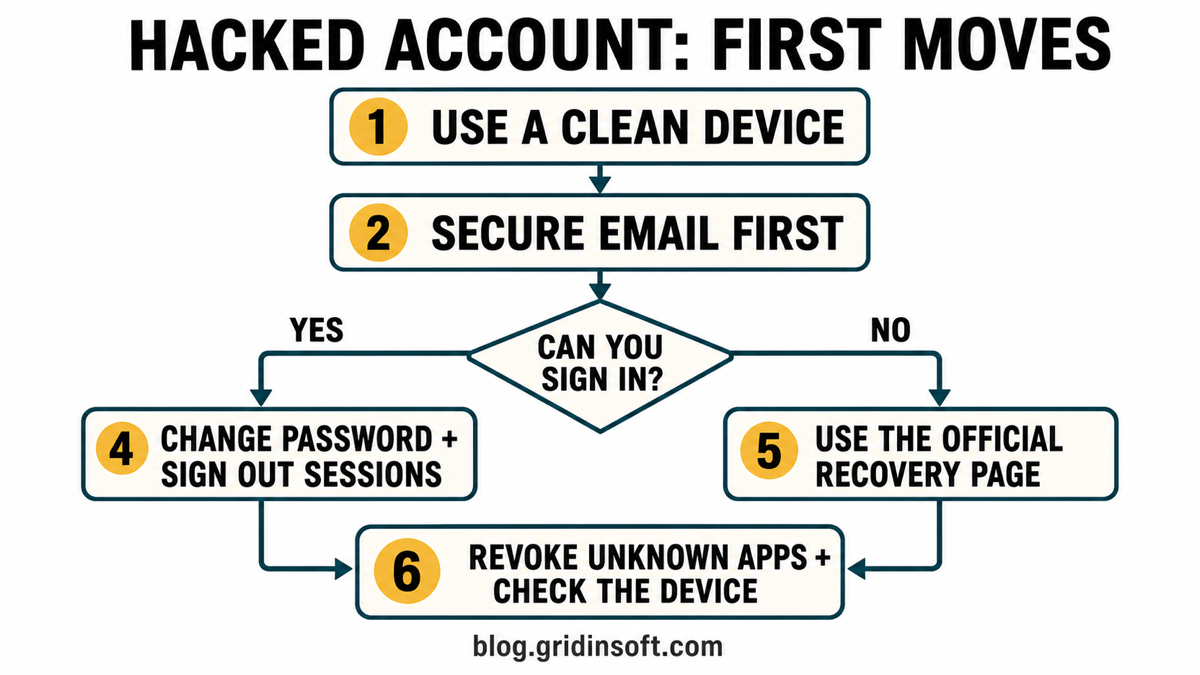
- You can still sign in: Change the password, sign out other sessions, and remove unknown recovery methods, apps, and login factors.
- You are locked out: Open the provider’s official recovery page from a bookmarked or manually typed address. Do not use links sent by a stranger.
- Several accounts changed: Secure email and the password manager first, then investigate password reuse, the shared browser profile, and the device.
- 2FA was already enabled: Revoke sessions and connected apps. Check for stolen cookies, OAuth access, added recovery methods, approved prompts, or malware without assuming one cause.
Secure the Email Account Before Everything Else
Email usually controls password resets for social networks, shopping, gaming, cloud storage, and financial services. The FTC and NCSC both put email checks near the center of hacked-account recovery because an attacker can use forwarding rules or reset messages to keep control of other accounts [1] [2].
- Change the email password from a clean device.
- Sign out other devices or sessions.
- Check the recovery email, recovery phone, aliases, and backup codes.
- Delete forwarding rules, filters, delegates, or automatic replies you did not create.
- Review app passwords and third-party connections.
- Check Sent, Deleted, Trash, and security-event history for activity you do not recognize.
If the takeover is specific to Outlook, Xbox, OneDrive, or another Microsoft service, use the deeper Microsoft account hacked recovery order for Recent activity, aliases, Outlook rules, and Microsoft-wide sessions.
If You Still Have Access
Do not stop after changing the password. A password reset may leave other sessions, app passwords, trusted devices, OAuth grants, recovery contacts, or forwarding rules in place. Use the account’s security dashboard and work through every control it offers:
- Create a unique password that has never been used on another account.
- Use Sign out everywhere, End all sessions, or the closest provider option.
- Remove devices and browser sessions you do not recognize.
- Remove unknown connected apps and website permissions.
- Replace attacker-added recovery email addresses, phone numbers, passkeys, app passwords, and MFA methods.
- Turn on 2FA again with an authenticator or passkey where available, and save fresh backup codes offline.
Some services do not invalidate every application session immediately. Watch new-login alerts and repeat the session review after the password change instead of treating one green confirmation screen as proof that access is clean.
If You Are Locked Out
Start at the service’s official help center or recovery page. Type the site address yourself, use a bookmark, or follow the provider link collected by a trusted government recovery guide. Do not search social media for a “recovery expert,” share one-time codes, install remote-access software, or pay someone who claims to know the attacker.
- Use a device and location you commonly used with the account when the provider asks for identity signals.
- Preserve security alerts, old usernames, billing receipts, prior passwords, and the approximate time of the takeover.
- Do not submit contradictory recovery forms repeatedly; follow the provider’s process and record case numbers.
- If the old account cannot be recovered, warn contacts from a new channel and remove the abandoned address from banking, shopping, and recovery settings elsewhere.
If a stranger contacts you after a Steam, Roblox, Epic, or Discord takeover, read the gaming account recovery scam guide before replying. Real stolen details do not prove that the person offering help is legitimate.
Why Was the Account Hacked Even With 2FA?
2FA still blocks many password-only attacks, but it does not make every existing session harmless. Microsoft documents that stolen sign-in tokens can let an attacker impersonate a user, and that malware or adversary-in-the-middle phishing can capture tokens or session cookies after authentication [3].
A takeover with 2FA enabled can involve several different paths:
- A stolen session cookie or token: the attacker reuses an already authenticated browser session.
- A malicious connected app: the user granted account access through an OAuth consent screen.
- An approved prompt: the user accepted an MFA request they did not initiate.
- Changed recovery details: the attacker added a phone, email, passkey, app password, or backup method.
- Phishing: a fake login proxied or captured the sign-in flow. If this began with a suspicious page, follow the clicked phishing link response.
- Malware: a stealer collected browser data, passwords, or active sessions from the device.
Do not conclude that malware is present from “2FA was on” alone. Revoke sessions and apps first, review the account history, and use the device evidence to decide whether a scan or reinstall is justified.
Work or school Microsoft 365: access returns after a password reset
A work or school account needs an IT handoff when access returns after a reset or an unfamiliar device or sign-in method appears. Personal Microsoft account recovery and an organization’s Microsoft Entra administration are different workflows.
In a September 2 report, Huntress described a Knight Office-linked incident in which stolen sessions were followed by an attacker-controlled Entra device registration and a Windows Hello for Business credential. The attacker then signed in using that new credential: revoking the old stolen tokens alone would leave another authentication route [4].
- Employee: use a trusted device, preserve the incident time and sign-in notices, and contact your known IT help desk outside the suspect mailbox. Report whether you entered a password, approved MFA, entered a device code, or ran a file. Do not delete enrolled corporate devices or run tenant-administration scripts yourself.
- Administrator: follow Microsoft’s compromised-account procedure to contain access and review sign-in and audit events. Investigate unauthorized device registrations and authentication methods, including Windows Hello credentials; remove confirmed attacker-added access, revoke sessions, and reset credentials as appropriate. Also review app consent, assigned roles, mailbox rules and forwarding before restoring access [5].
This is one observed persistence path, not evidence that every takeover breaks passkeys. Adversary-in-the-middle session theft and device-code phishing are different mechanisms; report the actual prompts rather than guessing the attack type. Scan an exposed device when warranted, but a malware scan cannot remove an attacker-added cloud credential.
What If Several Accounts Were Hacked?
Several takeovers usually point to a shared control or shared exposure. Start with the accounts that can unlock everything else:
- Primary email and its recovery email.
- Password manager and browser-saved-password account.
- Banking, payment, crypto, and shopping accounts.
- Cloud storage and work accounts.
- Social, messaging, and gaming accounts that can be used to scam contacts.
Check whether the same password was reused, whether every account was open in one browser profile, and whether the incident followed an unknown download, browser command, fake update, extension, or remote-support session. If Discord suddenly sent crypto, Nitro, game-test, or celebrity messages, use the Discord auto-DM takeover checklist for that branch.
Does the Computer Need a Malware Scan or Reinstall?
Scan the device when the takeover followed a suspicious installer, crack, mod, archive, browser extension, copied PowerShell or Terminal command, fake CAPTCHA, remote-support tool, or security alert. Repeated account access after password and session changes is another reason to inspect the shared device.
- Stop using the suspect device for password resets and financial logins.
- Remove the visible suspicious app or extension, but also check startup entries, scheduled tasks, browser policies, and recently installed programs.
- Run a full Gridinsoft Anti-Malware scan to look for malware, hidden files, persistence, bundled apps, and browser changes.
- Restart, scan again, and only then return to normal sign-ins.
If the incident began with a game, mod, launcher, or Discord download, follow the complete infostealer cleanup and account-recovery sequence. The password stealer guide explains why cookies and tokens matter as well as saved passwords.
A clean scan does not prove that no password or session was stolen. Account recovery and device cleanup are separate jobs. A clean Windows reinstall becomes reasonable when malware persists, security tools are disabled, unknown startup items return, or the device cannot be trusted; use the clean install USB after malware guide for that decision.
Check Messages, Payments, and Recovery Scammers
Review what happened while the attacker had access. Save screenshots or export activity before deleting evidence, but redact private data before sharing it with anyone.
- Warn contacts not to trust recent links, money requests, files, or verification codes sent from your account.
- Delete malicious posts or messages only after preserving the information needed for support or a fraud report.
- Review saved cards, subscriptions, marketplace orders, ad accounts, gift-card purchases, crypto withdrawals, and bank activity.
- Contact the bank or payment provider through the number on the card or its official app when money moved or card details changed.
- Report impersonation and unauthorized transactions to the platform and the appropriate local fraud authority.
Recovery scammers often approach victims who post publicly about a takeover. They may know the old username, changed email, or purchase history because that data was already stolen. Do not pay, share identity documents in private messages, disclose recovery codes, or let a stranger remote into the device.
After You Take Back Control
- Use a unique password for every important account; our strong-password guide explains why reuse turns one breach into many takeovers.
- Enable 2FA or passkeys and replace old backup codes.
- Keep recovery email addresses and phone numbers current.
- Turn on login, payment, and security-change alerts.
- Review sessions and connected apps again after 24 hours.
- Monitor bank statements, credit, and account notifications for follow-up abuse.
The final test is not “the password changed.” It is whether the attacker has lost every recovery path, session, app permission, payment route, and trusted device while you can still explain how the incident began.
FAQ
Is changing the password enough after an account is hacked?
No. Also sign out other sessions, remove unknown devices and apps, check recovery methods and forwarding rules, replace backup codes, and review activity. If the device may contain malware, recover the account from a clean device.
What should I do if several accounts were hacked at once?
Secure the primary email and password manager first, then financial and cloud accounts. Check password reuse, the shared browser profile, connected apps, and the device that accessed all of the accounts.
Does a hacked account with 2FA mean my computer has malware?
Not necessarily. Stolen sessions, malicious OAuth grants, approved prompts, changed recovery methods, and phishing can also explain the takeover. Use account history and device evidence before deciding malware is the cause.
Should I factory-reset the computer after an account takeover?
Not automatically. Scan and inspect the device when there was a suspicious download, extension, command, or repeated access. Reinstall when persistence remains, security tools were disabled, or the device cannot be trusted after cleanup.
References
- Federal Trade Commission. “How To Recover Your Hacked Email or Social Media Account.” Consumer Advice, August 2023; accessed July 26, 2026. consumer.ftc.gov
- UK National Cyber Security Centre. “Recovering a Hacked Account.” NCSC, reviewed August 24, 2022; accessed July 26, 2026. ncsc.gov.uk
- Microsoft. “Understanding Tokens in Microsoft Entra ID.” Microsoft Learn, updated May 1, 2025; accessed July 26, 2026. learn.microsoft.com
- Andrew Brandt, Andrea Hatcher, and Lindsey O’Donnell-Welch. “Inside Knight Office, a New M365 AiTM Phishing Kit.” Huntress, September 2, 2026; accessed October 5, 2026. huntress.com
- Microsoft. “Respond to a compromised cloud email account.” Microsoft Learn, accessed October 5, 2026. learn.microsoft.com