aka.ms is Microsoft’s short-link domain, but an aka.ms address should not be treated as automatic proof that the message around it is safe. Check that the hostname is exactly aka.ms, reveal or scan the final destination, and consider whether you expected the message, download, or account action. For an unsolicited security alert, the safest choice is often to skip the short link and type account.microsoft.com into the browser yourself.
Microsoft uses these compact links in support pages, product documentation, downloads, setup instructions, and account-security messages. The convenience comes with one tradeoff: the final address is hidden until the redirect is resolved.
What is aka.ms?
aka.ms is a Microsoft-operated redirection service. A link such as https://aka.ms/alca sends the browser to a longer destination without making the sender paste that full address into a document or text message.
Opening https://aka.ms/ without a path may lead to Microsoft’s restricted link-management interface rather than a normal public homepage. That behavior is not evidence of malware. The useful part is the complete link after the slash, because each alias can have a different destination.
Is aka.ms safe?
The exact aka.ms domain is legitimate and managed by Microsoft. However, safety still depends on three separate checks:
- Host: Is the hostname exactly
aka.ms? - Destination: Where does this specific alias redirect?
- Context: Did you request the account action, download, sign-in, or support message?
A genuine Microsoft help link can appear inside a misleading message. For example, a scammer could include a real help link next to a fake support phone number or ask you to reply with a verification code. Conversely, an unexpected Microsoft security text can be genuine because someone else tried to access your account. The link alone does not resolve that decision.
| Address or situation | What it means |
|---|---|
https://aka.ms/example |
The hostname is exactly aka.ms; inspect the destination and message context. |
https://aka.ms.example.com/example |
Not an aka.ms link. The real hostname is aka.ms.example.com, controlled by the owner of example.com. |
https://aka-ms.com/example |
A different domain. A hyphen is not interchangeable with the dot in aka.ms. |
| Text says “aka.ms” but the copied link shows another host | Visible link text can be misleading. Trust the full copied address, not the label. |
| A real aka.ms link asks for an unexpected sign-in or download | Do not continue on reputation alone. Verify the destination and initiate the action from the official Microsoft site instead. |
How to check an aka.ms short link
1. Copy the full link without opening it
On a computer, right-click the link and choose Copy link address. On a phone, press and hold it, then copy it. Paste the address into a plain-text note and examine the part between https:// and the next slash.
It should be exactly aka.ms. Watch for added words, swapped punctuation, lookalike letters, or an extra domain after it. Our guide to phishing warning signs explains why display text, sender names, and urgency are not reliable identity checks.
2. Prefer direct navigation for account alerts
If the message claims that your Microsoft account was accessed, do not needlessly test the message. Open a new tab and type account.microsoft.com or account.live.com yourself. Review recent activity there. This bypasses both a possible lookalike and uncertainty about the redirect.
The same rule applies to unexpected billing, password-reset, BitLocker, Microsoft 365, or support messages: start from the official account or product page. See the separate Microsoft email scam checklist for sender, login, attachment, and recovery clues.
3. Scan the complete URL and review the redirect
Paste the complete short link—not only the root domain—into a reputation or URL analysis service. The Gridinsoft Website Reputation Checker report for aka.ms provides the current domain-level baseline, while a check of the full alias can reveal the redirect chain and final host.
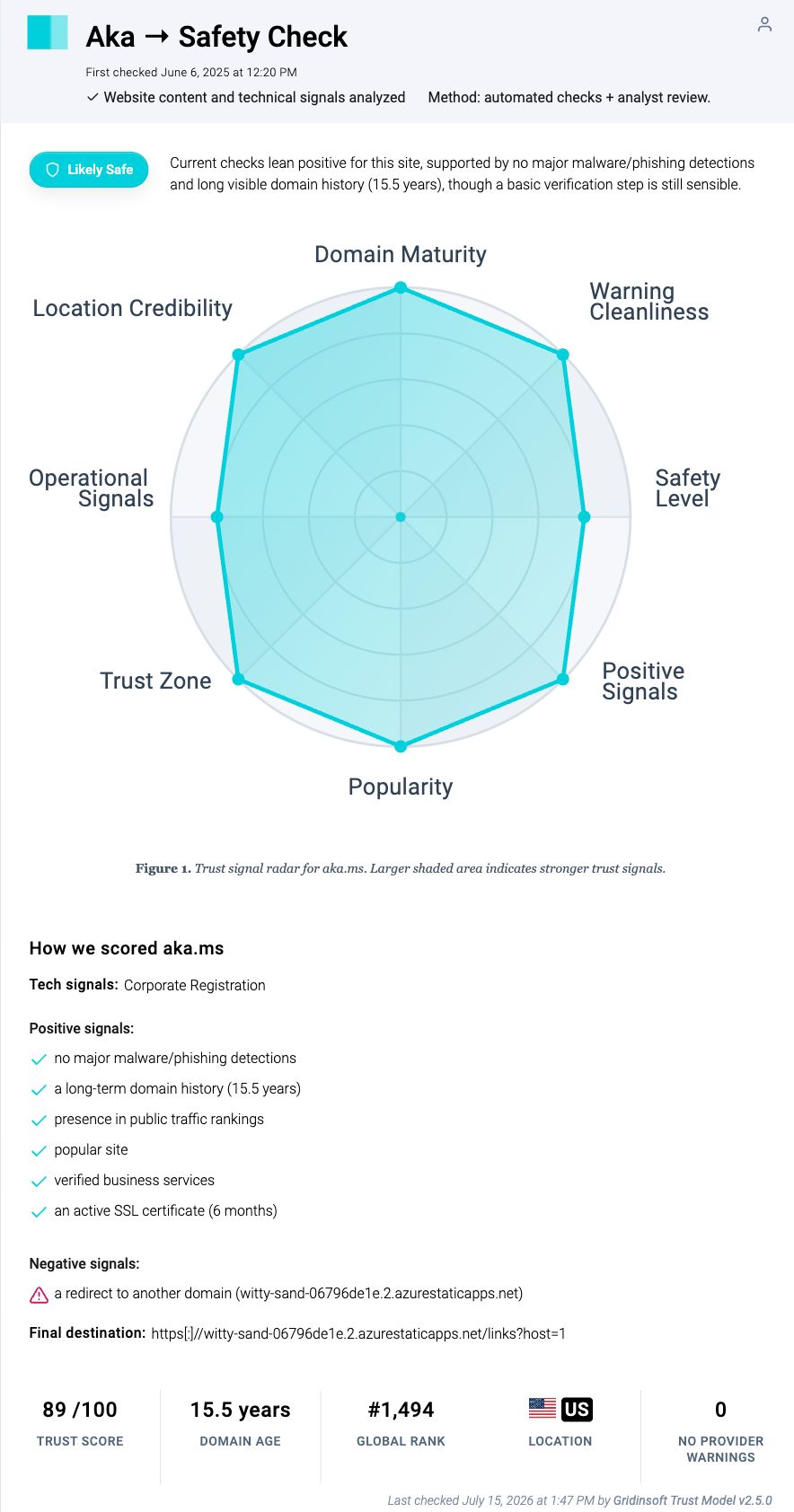
The July 15, 2026 Gridinsoft report rated the root domain 89/100 and showed zero warnings among 26 providers at that time. It also highlighted that the root page redirects to an Azure Static Apps host. That is a good example of why a positive domain baseline and destination inspection should be used together.
4. Resolve the redirect without saving a download
Technical users can ask curl to follow redirects, discard the response body, and print only the final URL. This still contacts the destination, so use a URL scanner first when privacy or tracking is a concern.
On Windows 10 or 11:
curl.exe -sS -o NUL -w "%{url_effective}\n" -L --max-redirs 10 "https://aka.ms/example"On macOS or Linux:
curl -sS -o /dev/null -w '%{url_effective}\n' -L --max-redirs 10 'https://aka.ms/example'Check the printed hostname before signing in or downloading anything. A legitimate Microsoft shortcut may lead to Microsoft-owned services, Azure-hosted pages, GitHub, an app store, or another vendor involved in a Microsoft product, so a non-microsoft.com destination is a reason to verify context—not automatic proof of abuse.
Are aka.ms links in Microsoft text messages genuine?
Microsoft’s current support guidance says genuine links in its account-security texts begin with aka.ms. It specifically lists aka.ms/alca for account activity and aka.ms/aadsmshelp for verification-code help.
Microsoft also warns that an unrequested verification code can mean that another person entered your account identifier, intentionally or accidentally. If you did not initiate the action, do not click simply because the short domain is real. Go directly to your Microsoft account, inspect recent activity, secure the account if needed, and never share a verification code.
Why did Malwarebytes Browser Guard block aka.ms?
On July 19, 2026, a Reddit user reported that Malwarebytes Browser Guard blocked the root aka.ms page with a Trojan warning while the user was checking a Visual C++ Redistributable download link. A commenter identifying as Malwarebytes staff said the block was associated with witty-sand-06796de1e.2.azurestaticapps.net, a component used by the root aka.ms page, and that the block would be removed after the next database update.
This appears to have been a transient component-level false positive, not evidence that every aka.ms alias was malicious. It also should not be used as a reason to bypass future warnings automatically. A block can refer to the short domain, one redirect destination, a page component, or a specific downloaded file.
If Browser Guard or another security tool still blocks an aka.ms link:
- Update the product’s detection database and browser extension.
- Copy the exact full alias and inspect it without allow-listing the whole domain.
- Find the same download or instruction from Microsoft Learn, Microsoft Support, or the relevant official product page.
- Check the final destination and any downloaded file separately.
- Submit a false-positive report to the security vendor when the official source and destination both check out.
What to do if you already clicked the link
| What happened | Recommended action |
|---|---|
| The page opened, but you did not download, sign in, or approve anything | Close it, verify the final hostname, and use direct navigation if the message was unexpected. A click alone is not proof that the device is infected. |
| A file downloaded, but you did not open it | Do not run it. Check its source, signature, and hash; quarantine or delete it if uncertain. Follow the downloaded-but-not-opened file guide. |
| You ran an installer, script, or executable | Disconnect from sensitive accounts, inspect the file’s signature, and run a full security scan. Gridinsoft Anti-Malware can check downloads, active threats, startup entries, scheduled tasks, and persistence. |
| You entered a password or verification code | Change the password from a clean, directly opened Microsoft account page, review recent activity, sign out other sessions, and enable stronger authentication. |
| You called a number or allowed remote access | Disconnect the remote session, uninstall unauthorized support software, check account and payment activity, and contact the relevant bank or service through an independently verified channel. |
FAQ
Can scammers create aka.ms links?
The shortener is managed by Microsoft rather than offered as a general public link-shortening service. Scammers can still imitate the text, use lookalike domains, place a genuine aka.ms help link inside a deceptive message, or direct the victim to a separate phone number or address. Check the exact host, destination, and requested action.
Does HTTPS mean an aka.ms link is safe?
HTTPS protects the connection to the hostname shown in the address. It does not prove that the surrounding message is honest, that the final destination is appropriate, or that a requested download should be run.
Why does aka.ms sometimes redirect to Azure?
Microsoft uses Azure infrastructure for parts of the link-management service and for many product resources. An Azure destination can be legitimate, but verify the specific host and context because Azure also hosts third-party applications.
Should I allow-list aka.ms after a false positive?
Do not allow-list the whole domain merely because one warning was corrected. Update the security tool, verify the exact alias and final destination, and use a narrow false-positive exception only when the source, redirect, and file are all confirmed.
References
- Microsoft. “Why is Microsoft texting me?” Microsoft Support, accessed July 19, 2026. support.microsoft.com.
- GoosePie2000 and jovan_popovic. “Aka.ms site blocked by MB Browser Guard.” Reddit r/techsupport, July 19, 2026; includes a response from a commenter identifying as Malwarebytes staff. reddit.com.