Business email compromise (BEC) is a payment and data-theft scam where an attacker abuses trust in a real business conversation. Many BEC attempts start with pretexting: a believable vendor, HR, executive, or IT-support story that makes the request feel routine. The message may come from a spoofed address, a look-alike domain, a hacked mailbox, or a chat channel that starts after an email. The goal is usually simple: make someone send a wire transfer, approve a vendor bank change, buy gift cards, share payroll or tax data, or open a file that gives the attacker more access.
Before you send money
- Do not trust a changed payment instruction by email alone. Call a known phone number from your own records, not a number in the new email thread.
- Verify the exact recipient name, account number, routing details, amount, and reason for the change. A small domain typo or a sudden “new bank account” request is enough to stop the payment.
- If money was already sent, call the sending bank immediately. Ask for a wire recall or fraud hold, then report the incident to IC3 and preserve the emails, headers, attachments, phone numbers, and transaction IDs.
If a payment thread includes a supposed SWIFT proof of payment, use the SWIFT Confirmation Copy email scam checklist before opening the attachment or approving new bank details.
| BEC signal | Why it matters |
| Vendor asks to change bank details | Attackers often hijack or closely imitate vendor conversations to redirect real invoices. |
| Executive asks for urgent gift cards or a secret transfer | Pressure and secrecy are common signs of CEO fraud or whaling phishing. |
| Real-estate closing instructions change near the deadline | Homebuyers are targeted when a large wire is expected and everyone is busy. |
| Email moves you to SMS, WhatsApp, or a virtual meeting | The attacker may be trying to escape corporate mail filters and audit trails. |
| Attachment, portal, or remote-support prompt appears. For a technical example, see the Payment to Bank Details DOCX altChunk analysis. | The BEC attempt may also be trying to steal credentials, sessions, or device access. |
What is business email compromise?
Business email compromise is a targeted social-engineering attack against people who can move money, approve payments, access business data, or influence someone who can. Unlike noisy spam, a BEC email is written to look normal: it may match an existing invoice thread, copy a vendor’s wording, use a nearly identical domain, or arrive from a mailbox that was actually compromised.
The FBI describes BEC as one of the most financially damaging online crimes because it exploits routine business trust: invoices, payment approvals, real-estate closing funds, payroll changes, tax forms, and executive requests. The latest IC3 reporting also defines BEC as a scam that can involve compromised email accounts plus other communication channels such as phone numbers and virtual meeting applications.
The practical rule is simple: BEC is not just “a suspicious email.” It is an attacker stepping into a relationship that already feels trustworthy, then changing one important action at the exact moment the victim expects to act.
Why BEC is hard to spot
BEC works because the request is close to something the victim was already expecting. A real invoice is due, a closing date is near, a manager is traveling, or a vendor has an open ticket. The attacker does not need a perfect story; they only need to change one payment detail or create enough urgency for the victim to skip verification.
That is why “the email looked normal” is not proof that the request was safe. In strong BEC attempts, the amount, timing, signature, and conversation history can all look familiar.
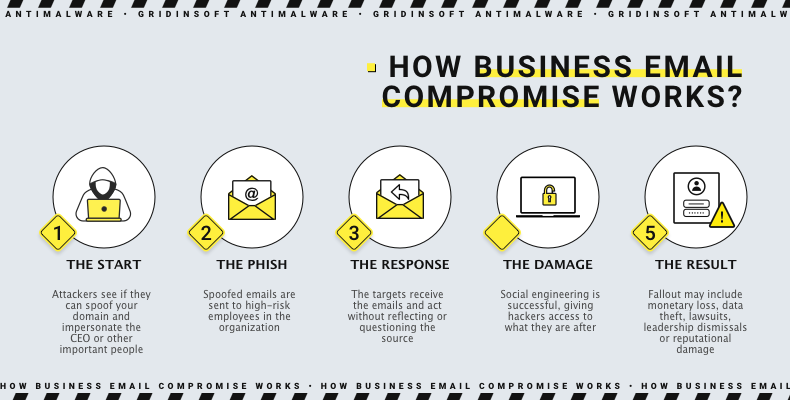
How a BEC attack works
- Reconnaissance. The attacker studies invoices, job roles, executive names, property closings, public social media, or leaked credentials.
- Trust entry. They spoof a sender, register a look-alike domain, compromise a mailbox, steal a session token, or impersonate a known person in a meeting or chat.
- Conversation control. They reply inside a real thread, delete messages, add urgency, or move the discussion to a less monitored channel.
- Payment or data request. The attacker asks for a wire transfer, ACH change, payroll update, gift cards, W-2 data, document-portal login, or confidential file.
- Cover and delay. They claim the payment is pending, ask for another fee, or delete messages so the real account owner does not see the fraud immediately.
Common BEC examples
Vendor bank-detail change
A supplier or contractor appears to send a normal invoice but says their bank account changed. The message may be sent from a look-alike address or from the real mailbox after compromise. This is dangerous because the invoice, amount, product names, and timing may all be correct.
What to do: verify the change through a known contact and a known number. Do not use the phone number, signature, QR code, or payment portal supplied in the changed email.
CEO fraud and gift-card requests
In CEO fraud, a message appears to come from an executive, owner, manager, or finance lead. It may request a secret wire transfer, urgent gift cards, employee tax data, or a purchase that bypasses normal approval.
What to do: refuse secrecy, use a second approver, and verify outside email. A real executive should accept a callback or internal approval workflow for money movement.
Payroll and HR data theft
Some BEC attacks are not after a wire transfer. The attacker may ask HR to change direct-deposit information, send W-2 data, share employee lists, or approve a fake benefits document. This can lead to identity theft, payroll diversion, and follow-on phishing against staff.
What to do: treat payroll changes as high-risk. Require portal login with MFA, callback verification, and a waiting period for new direct-deposit details.
A payslip notice can also be the entry point for mailbox theft rather than a direct-deposit change. If staff receive a generic payroll message, compare it with the Your Payslip Is Available email scam checks before anyone signs in through the email link.
Legal, payroll, and tax-audit document lures can create the same account-theft path. If an unexpected shared file claims to contain a payroll or tax audit report, use the Legal Payroll & Tax Audit shared document email scam checklist before anyone opens the button or submits a work password.
Real-estate wire fraud
Real-estate wire fraud is a high-pressure BEC scenario. The scammer may know the property address, closing date, agent names, loan details, or expected amount because one mailbox in the chain was compromised or closely impersonated. The email then tells the buyer, seller, or business partner to use new wire instructions, often with a reason that discourages phone verification.
What to do before sending closing funds: call the title company, closing attorney, escrow officer, or agent using a phone number you already verified. Confirm the recipient name, account number, routing number, amount, and deadline out of band before any wire transfer.
Dual-channel BEC: email plus SMS, WhatsApp, or meetings
A growing warning sign is a BEC email that quickly moves the conversation to SMS, WhatsApp, Teams, Zoom, or another channel. That does not automatically mean the request is fake, but it removes the conversation from normal email protections, retention rules, and security review. The attacker may use email only as the first lure, then finish the fraud somewhere your company cannot inspect.
What to do: if a payment request moves channels, move verification to a trusted channel of your own choice. Call a known number, use the internal ticketing or purchasing system, and document the approval.
If money was already sent
Do not wait for the attacker to reply or “fix” the transfer. In many cases the money is moved through mule accounts quickly, so the first minutes matter.
| Step | Action |
| 1. Call the sending bank | Ask for a wire recall, fraud hold, or urgent escalation to the receiving institution. |
| 2. Alert the real partner | Call the vendor, title company, customer, or executive through a known number. |
| 3. Preserve evidence | Save emails, full headers, attachments, domains, phone numbers, payment instructions, and transaction IDs. |
| 4. Report the incident | File with IC3 and local law enforcement; include bank details, dates, amounts, and contact information. |
| 5. Secure accounts and devices | Change passwords, revoke unknown sessions, enforce MFA, and scan devices used for email or payment approval. |
If the request involved a link, attachment, fake document portal, or remote-support prompt, compare the message with our phishing email checklist and scan the device before using it for banking or admin work. If credentials may have been stolen, assume the attacker may still have access until sessions are revoked and MFA is reset.
Check the device before trusting the inbox again.
Gridinsoft Anti-Malware can help find suspicious files, stealers, unwanted remote tools, and startup entries that may support account compromise.
How attackers get access
Not every BEC case starts with malware. Attackers may use password reuse, phishing pages, token theft, malicious OAuth apps, mailbox forwarding rules, exposed remote access, or a look-alike domain. Malware still matters when a device is infected with spyware or an infostealer, because stolen browser sessions and mail-client credentials can let the attacker read conversations without immediately changing the password.
HR-themed lures can be part of that access stage. A fake Benefits Review Notice email may look like a routine benefits or compensation review, but its real goal is to capture a work mailbox password before a BEC attempt begins.
Look for these account signs after a suspected BEC attempt:
- new forwarding rules or mailbox delegates;
- unknown sign-ins, devices, IP locations, or OAuth applications;
- deleted or hidden replies in a payment thread;
- changed MFA methods or recovery contacts;
- new inbox rules that move vendor or finance messages to archive/trash;
- recent attachment downloads or fake document-portal logins.
How to prevent BEC
Use payment verification rules
Payment changes should never be approved from email alone. Require callback verification, a second approver, and a written exception process for new bank details, urgent wires, gift cards, payroll changes, and closing-fund instructions. Train staff that “verify before you wire” means using a trusted number already on file.
Protect email accounts
Enable MFA, disable legacy authentication, review forwarding rules, monitor impossible travel alerts, and investigate unusual mailbox permissions. If a mailbox was compromised, reset credentials, revoke active sessions, review OAuth apps, and inspect recent inbox rules before declaring cleanup complete.
Reduce spoofing and look-alike risk
Configure SPF, DKIM, and DMARC for your domains, but do not treat them as a complete BEC defense. Attackers may still use real compromised mailboxes, personal accounts, or channels outside email. Register obvious look-alike domains when practical and teach finance staff to inspect display names and domains, not just the sender’s familiar name.
Harden endpoints used for finance work
Finance, HR, and executive devices should have updated endpoint protection, browser protection, and limited admin rights. If a BEC message includes an attachment or link, a device infection can turn a one-time email scam into ongoing account compromise.
Practice response drills
Personnel awareness matters most when the request feels normal. Run short drills for vendor bank-change requests, executive gift-card requests, real-estate closing changes, and payroll redirects. The goal is not to shame staff; it is to make verification feel routine before a real attacker creates urgency.
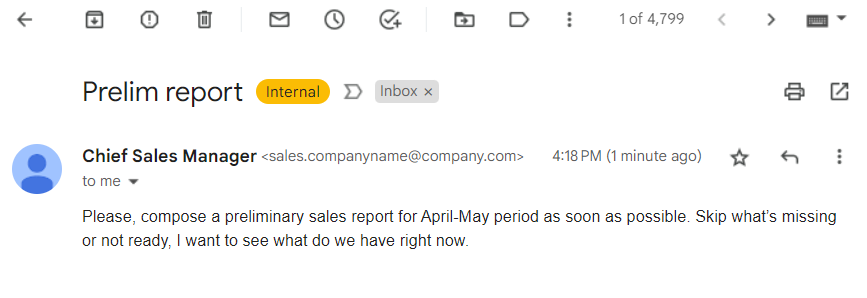
For Microsoft 365 environments, Ghost-Sender is a current example of how a business email compromise lure can appear to come from a trusted internal sender.
FAQ
Is business email compromise the same as phishing?
BEC is a targeted form of social engineering that often uses phishing techniques, but it is usually more specific. The attacker imitates a trusted business relationship and tries to make the victim send money, data, or access.
What should I do first after a BEC wire transfer?
Call the sending bank immediately and ask for a wire recall or fraud hold. Then contact the real business partner through a known number, preserve evidence, report to IC3, and secure the email account and device used for the transaction.
Can BEC happen without malware?
Yes. BEC can use spoofed addresses, look-alike domains, stolen passwords, malicious forwarding rules, or social engineering alone. Malware and infostealers increase the risk because they can give attackers mailbox access, session cookies, and contact history.
Why did the email look completely legitimate?
Many BEC attacks reuse real invoice threads, signatures, writing style, and timing. If a mailbox was compromised, the attacker may be replying from the actual account, so payment changes must be verified outside the email thread.
Should small businesses worry about BEC?
Yes. Small businesses may have fewer payment controls and may rely heavily on email trust. A simple callback rule for changed payment details can prevent a loss that would be difficult to recover.
References
- Federal Bureau of Investigation, Internet Crime Complaint Center. “2025 IC3 Annual Report.” FBI, 2026, accessed June 7, 2026. https://www.fbi.gov/file-repository/2025_ic3report.pdf
- Microsoft Security. “Email threat landscape: Q1 2026 trends and insights.” Microsoft Security Blog, April 30, 2026, accessed June 7, 2026. https://www.microsoft.com/en-us/security/blog/2026/04/30/email-threat-landscape-q1-2026-trends-and-insights/
- Consumer Financial Protection Bureau. “Beware of mortgage closing scams.” CFPB, updated December 13, 2023, accessed June 7, 2026. https://www.consumerfinance.gov/owning-a-home/beware-mortgage-closing-scams/