Whaling phishing is a targeted scam aimed at executives, owners, finance leaders, HR staff, administrators, and other people who can approve money, payroll, access, or sensitive data requests. It is not just a badly written email from a stranger. Modern whaling often looks polished, uses real business context, and may arrive as an email, Teams message, text, phone call, or fake meeting request.
Before you approve an executive request:
- Pause when the message asks for money, gift cards, payroll changes, tax data, credentials, or a new payment account.
- Verify through a separate trusted channel: a known phone number, internal chat profile, or in-person confirmation.
- Do not use phone numbers, links, or reply-to addresses from the suspicious message.
- Require a second approver for wire transfers, vendor bank changes, and emergency payments.
- If you already replied, entered credentials, or sent money, act quickly: contact the bank, reset accounts, revoke sessions, and report the incident.
What is whaling phishing?
Whaling phishing, sometimes called a whaling attack or CEO fraud, is a form of spear phishing that targets a high-value person or someone who can act on behalf of that person. The attacker may impersonate a CEO, CFO, founder, board member, lawyer, vendor, title company, payroll employee, Microsoft 365 administrator, or trusted partner.
The goal is usually practical: make the target send money, approve a fake invoice, change vendor bank details, share payroll or tax records, reveal credentials, or open a malicious attachment. In business cases, whaling often overlaps with business email compromise because the request abuses trust inside normal payment and approval workflows.
The financial risk is not theoretical. The FBI IC3 2025 Annual Report lists business email compromise among the top cyber-enabled fraud categories by loss, with reported BEC losses of more than $3 billion in 2025. That broader BEC category includes many whaling-style requests because the scam depends on trusted business communication and transfer-of-funds authority.
Why whaling is harder to spot now
Old phishing advice focused on spelling mistakes, strange greetings, and clumsy design. Those clues still matter, but they are no longer enough. Attackers can copy an executive’s writing style from public posts, breached mailboxes, old email threads, press releases, and social media. AI-written messages may have clean grammar and realistic formatting, while compromised accounts can make the sender address look legitimate.
That is why the safest test is not “does this email look professional?” The safer question is: does this request change money, access, data, or normal approval rules? If it does, verify it outside the message before acting.
- Phishing
-
Main target: Broad group of users
Typical request: Login page, card details, malware link
Best first defense: Do not click; open the service directly - Spear phishing
-
Main target: Specific person or team
Typical request: Targeted login, file, or document lure
Best first defense: Verify sender and context - Whaling
-
Main target: Executives and privileged users
Typical request: Payment, payroll, tax data, approval, access
Best first defense: Out-of-band approval check - BEC
-
Main target: Finance, operations, vendors, real estate, payroll
Typical request: Invoice, wire transfer, bank-detail change
Best first defense: Two-person payment control
Common whaling phishing examples
CEO wire-transfer request
A finance employee receives a message that appears to come from the CEO: “I need this handled today. Send the attached wire to the new account and keep it confidential until I am out of meetings.” The language uses authority, urgency, and secrecy to bypass normal checks.
Worked example: the approval chain is fabricated
On September 10, 2026, Microsoft described an August 3–5 campaign that impersonated executives and requested ACH payments of nearly $50,000. A fake ServiceNow subscription invoice appeared inside a forwarded conversation, followed by invented exchanges suggesting that the CEO had already approved it. Microsoft did not report a compromise of ServiceNow. The vendor’s name was used as a pretext for the payment request.[4]
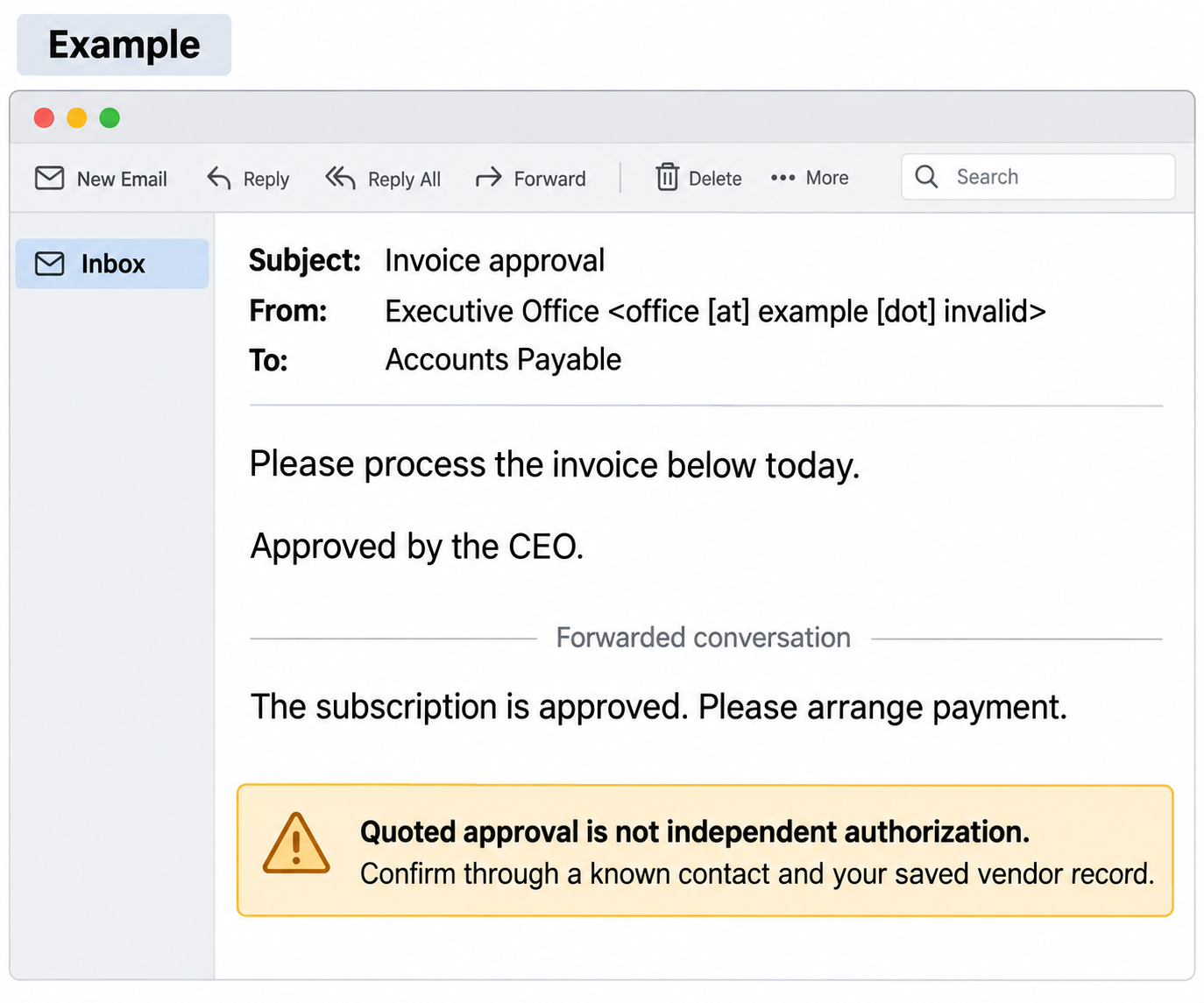
In this example: the apparent executive sender tells Accounts Payable to process an invoice today. The quoted conversation says the CEO approved the subscription. Those are two claims inside the same message, not two independent approvals. A familiar display name, polished invoice, and realistic conversation history do not prove that the executive authorized the payment.
- Compare the sender and reply path. Expand the actual From and Reply-To addresses. Compare them with your company’s directory and the vendor contact in saved records. A mismatch needs investigation; a match still does not authenticate the payment instruction.
- Compare the invoice with existing records. Check the purchase order, subscription, amount, payee, and bank details through your normal finance system. A forwarded approval paragraph cannot substitute for the approval record.
- Confirm independently before release. Call the executive and, where needed, the vendor using known contact details. Keep the second approver and bank-change checks even when the message says approval is complete. Replying to that email only asks the same unverified sender to confirm its own story.
Microsoft’s examples included inconsistencies between displayed and actual sender information and in the supposed forwarded history. Such clues can expose this particular attempt, but their absence is not a reason to skip independent verification. If payment has already been sent, use the urgent bank-contact steps below.
Vendor bank-detail change
An attacker impersonates a supplier or uses a compromised vendor mailbox to say the company has changed bank accounts. This is especially dangerous because the invoice, names, timing, and email thread may look familiar.
Payroll or direct-deposit redirect
HR or payroll receives a request to update an executive’s direct deposit, tax form, or employee record. The attacker may attach a fake form or ask for a “quick update” before payroll closes.
Legal or board pressure
A fake lawyer, board member, or executive assistant asks for confidential documents under deadline pressure. The message may mention an acquisition, audit, lawsuit, or private board matter to discourage questions.
Microsoft 365 or admin-access lure
An executive or administrator is pushed to a fake login page to “restore access,” “approve a shared document,” or “review a security alert.” If the attacker gets credentials or session tokens, they may read real threads and launch more convincing BEC attacks.
Voice, meeting, or chat impersonation
Whaling is no longer email-only. A fake urgent request may arrive through text, collaboration chat, a voicemail, or a meeting invite. Treat a voice note or meeting message as untrusted when it asks for money, credentials, gift cards, secrecy, or a process exception.
Warning signs of a whaling attack
- Urgent secrecy: the message says not to discuss the request with anyone else.
- Payment or bank-detail change: the request changes where money will be sent.
- Gift cards or crypto: executives do not normally need gift-card codes or crypto transfers by email.
- Unusual approval path: the sender asks you to skip a normal control, second signature, or vendor-verification step.
- New domain or reply path: the display name is familiar, but the domain, reply-to address, or linked login page is different.
- Perfect but strange tone: the wording looks polished but does not match the person’s normal timing, process, or business context.
- Attachment or QR code pressure: the message pushes you to open a document, scan a code, or sign in quickly.
- Calendar-aware timing: the request arrives when the real executive is traveling, in meetings, or publicly busy.
How to verify a suspicious executive request
- Do not reply first. Replying may confirm the mailbox is active and keep you inside the attacker’s controlled thread.
- Use a known channel. Call a saved number, message the person through an internal profile, or ask in person. Do not use contact details from the suspicious message.
- Check the payment record. For vendors, compare the request with saved vendor data and require a callback to a verified contact.
- Ask for a second approver. Any wire transfer, vendor bank change, payroll update, or confidential-data release should survive a two-person check.
- Inspect the sender path. Look for lookalike domains, changed reply-to headers, forwarded threads, and unusual mailbox rules.
- Report it internally. Other employees may have received the same request, or the attacker may be testing who will respond.
What to do if you responded to a whaling email
If money was sent, contact your financial institution immediately and ask for a recall or fraud hold. Time matters because funds can move through multiple accounts quickly. Then report the incident to IC3 or the relevant local cybercrime authority.
If you entered credentials, change the password from the official website, revoke active sessions, reset MFA methods, and check for mailbox forwarding rules or unknown inbox filters. If you opened an attachment or downloaded a file, disconnect from sensitive accounts and scan the device before continuing normal work.
If tax records, payroll files, customer data, contracts, or internal documents were shared, write down exactly what was sent and who may be affected. Legal, compliance, HR, finance, and security teams may need that list to contain the damage.
Scan the device and review browser, email, and startup activity before using it for sensitive accounts again.
How to prevent whaling attacks
- Require two-person approval for wire transfers, vendor bank-detail changes, payroll edits, and emergency payments.
- Use callback verification for payment changes. The callback number should come from saved records, not the email.
- Protect executive and finance accounts with MFA, and prefer phishing-resistant methods where possible.
- Review mailbox forwarding rules and alert on suspicious auto-forwarding, new inbox rules, and unusual logins.
- Limit public executive details such as travel, direct email addresses, org charts, assistants, and vendor relationships.
- Train executives and assistants together. Attackers often target the assistant, finance manager, or payroll employee rather than the CEO directly.
- Keep payment exceptions rare. A real urgent request should still follow a documented emergency approval path.
FAQ
What is the difference between spear phishing and whaling?
Spear phishing targets a specific person or team. Whaling is a type of spear phishing focused on executives, owners, administrators, finance leaders, HR staff, or other high-value people with authority or privileged access.
Is whaling the same as business email compromise?
Not exactly. Whaling describes the high-value target. Business email compromise describes the broader fraud pattern, usually involving trusted business communications, invoices, wire transfers, payroll, vendor changes, or account takeover. Many whaling attacks become BEC incidents when money or business data is involved.
Can MFA stop whaling?
MFA helps when the attack tries to steal credentials, but it does not stop a person from approving a fake payment. Payment verification, callback rules, and two-person approval are still necessary.
What should I do first when a whaling email arrives?
Verify the request through a separate trusted channel before clicking, replying, sending money, changing payroll, approving access, or opening attachments.
References
- Federal Bureau of Investigation. “Business Email Compromise.” FBI, accessed June 7, 2026. https://www.fbi.gov/how-we-can-help-you/common-frauds-and-scams/business-email-compromise
- Federal Bureau of Investigation Internet Crime Complaint Center. “2025 IC3 Annual Report.” IC3, 2026. https://www.ic3.gov/AnnualReport/Reports/2025_IC3Report.pdf
- Federal Trade Commission. “Small business? Know how to stop a would-be business impersonator.” 2025. Business impersonation safeguards
- Microsoft Threat Intelligence. “Protecting organizations from AI-assisted executive impersonation and invoice fraud.” September 10, 2026. Microsoft campaign analysis