WARDEN Stealer is the name used for a Windows x64 stealer, cryptocurrency-address clipper, and loader advertised by an actor called WardenStealer. KrakenLabs observed and documented the advertisement on July 24, 2026. The important limit is that the capabilities are seller claims, not sample-verified findings: no public sample, stable IOC set, delivery chain, or confirmed victim campaign was available in the checked source trail.[1]
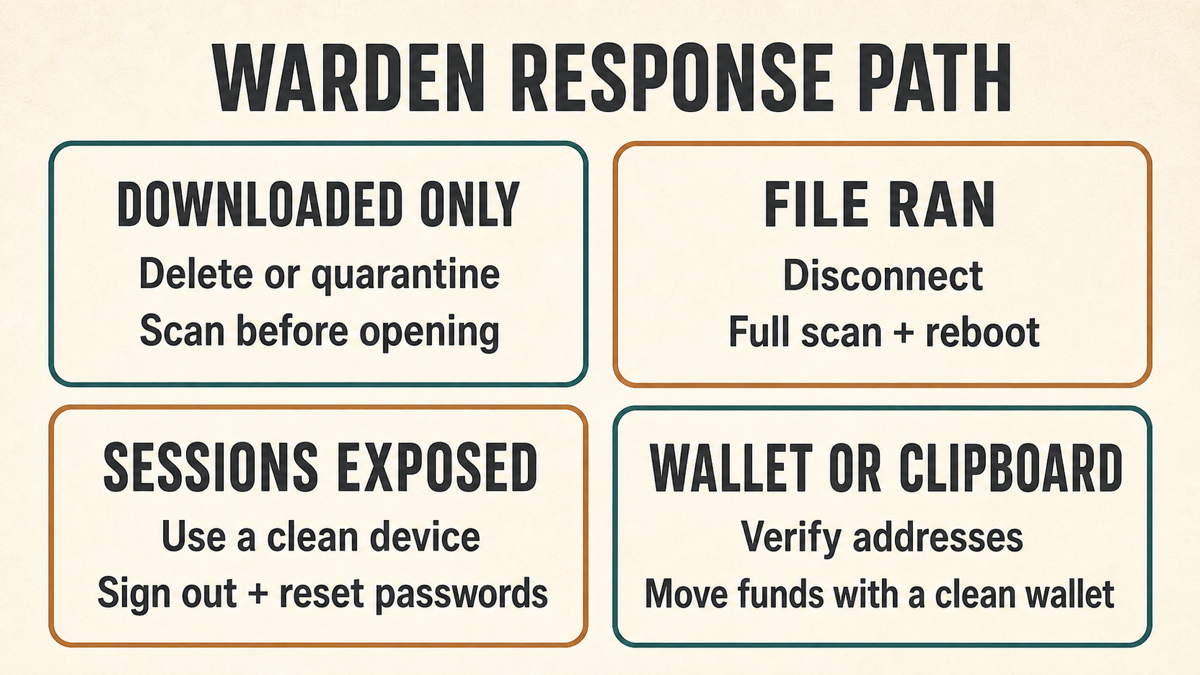
If an unknown file only downloaded, remove or quarantine it and scan before opening anything else. If it ran, disconnect the Windows computer, keep useful evidence, scan the endpoint, and recover browser sessions, passwords, payment accounts, and cryptocurrency assets from a separate clean device. The name alone does not prove that WARDEN executed or that any data was stolen.
What is actually known about WARDEN Stealer?
KrakenLabs reported seeing the WARDEN offer promoted as one compact platform with three roles: information stealing, clipboard address replacement, and delivery of additional payloads. The advertisement described support for Chromium- and Gecko-based browsers, saved passwords, cookies, payment data, wallet extensions, and many desktop applications. It also claimed anti-analysis checks, process injection, a custom encrypted protocol, remotely changed configurations, and a browser App-Bound Encryption bypass.
Those details define what the seller wanted buyers to believe. They do not establish that every feature works, that the figures shown in a panel represent real victims, or that the platform has been used successfully. Keep the evidence levels separate:
| Evidence level | What it supports |
|---|---|
| Observed | A WardenStealer actor advertised WARDEN as a Windows x64 stealer, clipper, and loader available through one panel. |
| Seller claimed | Collection from more than 330 applications and 200 wallet extensions, browser-cookie and password theft, payment-data theft, clipboard replacement, payload loading, App-Bound Encryption bypass, injection, and anti-analysis behavior. |
| Not established | A working public sample, file hashes, domains, delivery method, persistence artifacts, verified victim totals, successful theft, or an active infection campaign. |
This boundary changes how cleanup should work. There is no responsible list of “WARDEN files” or registry entries to delete. A security team should investigate the exact executable, path, parent process, download source, execution time, security alerts, startup changes, tasks, services, browser changes, and network activity found on the affected computer.
WARDEN Stealer is not every product named Warden
Search results for “Warden” also contain unrelated blockchain projects, security products, academic watermarking research, games, and ordinary job titles. Those results are not evidence of WARDEN Stealer activity. Keep the full phrase WARDEN Stealer together when researching an alert or report.
Likewise, a generic stealer detection does not automatically identify this family. Record the complete detection name and file hash and check the file’s origin. Our EXE safety checklist explains how path, signer, parent application, reputation, and behavior work together; no single filename or missing signature is a verdict.
What could be at risk if the advertised capabilities work?
MITRE ATT&CK documents browser credential theft as a common credential-access technique: attackers may read browser-specific stores and reuse credentials across systems or accounts.[3] Google introduced App-Bound Encryption to make certain Chrome cookie secrets harder to extract outside the browser’s privileged service, but Google also noted that cookie-theft malware remains a threat. WARDEN’s claim that it bypasses this protection is not independently verified.[2]
- Passwords and autofill data: saved credentials may enable account takeover, especially when passwords are reused.
- Session cookies: a stolen authenticated session can sometimes remain useful until the service revokes it, even after a password is changed.
- Payment and billing data: stored details and signed-in shopping or financial sessions may expose transactions or personal information.
- Wallet extensions and secrets: browser wallet data becomes especially serious if a seed phrase, private key, recovery file, or unlocked session was accessible.
- Clipboard addresses: a clipper can replace a copied cryptocurrency destination before a transaction is sent.
- Additional malware: a loader can introduce another family, so finding one executable may not explain the complete incident.
These are exposure categories, not proof about a specific machine. The response should match what happened: downloaded only, executed, account activity observed, or cryptocurrency data potentially exposed. For a broader recovery model, see our password-stealer and session-theft guide.
If the suspected file downloaded but did not run
- Do not open it to “see what it does.” Keep the browser or security tool’s block in place.
- Delete or quarantine the file. Preserve its name, source URL, and hash only when that information is useful for a security report.
- Run a security scan. Check the download folder and the full system if the source was deceptive, bundled other files, or triggered additional warnings.
- Review browser activity. Confirm that no extension, profile, installer, or secondary download was approved.
A file that was saved but never launched normally cannot steal local browser data by itself. Do not reset every account solely because a download completed. Escalate if the file opened automatically, an installer or script ran, browser settings changed, security controls were disabled, or you cannot tell whether execution occurred.
If the file ran on Windows
- Disconnect the suspected computer. Turn off Wi-Fi and unplug Ethernet. Avoid signing in to important accounts from that host.
- Preserve context. Record the exact file path, hash, download URL, time, parent process, alert text, and any unexpected startup item, scheduled task, service, extension, security exclusion, or remote-access program.
- Keep detections quarantined. Do not restore the file because a forum calls it a false positive or because the filename differs from an online guide.
- Run full and offline-capable scans. Check the entire system, then reboot and scan again. Recurring alerts or recreated persistence mean the computer is not yet trusted.
- Review installed applications and security changes. Remove only clearly unauthorized software and changes tied to the incident. Do not delete broad Windows components from a generic list.
- Consider a clean reinstall. Rebuild from trusted installation media when administrative control may have been lost, protections keep changing, unknown remote access occurred, or the system state cannot be explained.
Remove WARDEN Stealer and check for leftovers
Deleting or quarantining the visible download does not prove cleanup after execution. A loader, scheduled task, startup entry, service, browser change, security exclusion, or secondary payload may remain and recreate the warning. Gridinsoft Anti-Malware can scan for malicious files and common persistence traces after the manual containment checklist. It cannot revoke stolen sessions, restore transferred funds, or prove that no information left the device.
If a token stealer ran here, logging back in can hand the attacker your new Discord session, email cookie, Steam token, or wallet access. Scan this Windows PC first, then reset passwords from a clean device.
Scan the PC before account recoveryReboot after remediation and run another scan. Confirm that security settings stay enabled, all startup entries and tasks are explained, browser extensions are expected, and unexplained network connections do not return. Our infostealer overview provides additional context for common stealer exposure and clean-device recovery.
Recover browser sessions, passwords, and payment accounts
Use a separate known-clean phone or computer. Cleaning the endpoint and recovering accounts are different tasks:
- Secure the primary email and password manager first. Change unique passwords, review recovery methods, and revoke active sessions.
- Sign out other browser sessions. Use each important service’s session or device page. Password changes do not always invalidate every existing token immediately.
- Rotate reused passwords. Prioritize work, banking, shopping, social, cloud, developer, and messaging accounts used on the suspected host.
- Replace exposed tokens and recovery material. Review app passwords, OAuth grants, API tokens, backup codes, forwarding rules, and unknown trusted devices.
- Check payment activity. Contact the bank or card issuer about unauthorized charges and follow its fraud process. Do not rely on a malware scan to settle account risk.
If Microsoft or browser sessions were present, our post-malware Microsoft account recovery guide covers sign-in history, devices, aliases, rules, and tokens in more detail.
Handle clipboard and cryptocurrency-wallet risk
Always compare a cryptocurrency destination on the sending screen with the address supplied by the recipient or your own receiving wallet. Check the beginning, middle, and end; matching only the first and last few characters can miss a crafted replacement. Our guide to verifying a wallet address before sending explains the final confirmation checks in more detail.
- If no transaction was sent, cancel it, clean the device, and rebuild the transaction from a trusted system.
- If an exchange account was open, revoke sessions and API keys, review withdrawal addresses, and contact the exchange through its official support channel.
- If a seed phrase or private key may have been exposed, create a new wallet on a clean system or hardware wallet and move assets. Changing an app password does not make an exposed seed secret again.
- If funds went to the wrong address, preserve the transaction ID and contact the sending service immediately. Blockchain transfers are generally not reversible, so avoid anyone promising guaranteed recovery for an upfront fee.
How to verify recovery
No public WARDEN IOC set means there is no single filename that proves cleanup. Build confidence from independent checks:
- full and post-reboot scans are clean;
- security tools, firewall, and updates remain enabled;
- startup items, tasks, services, local administrators, extensions, and remote tools are explained;
- important passwords, sessions, tokens, and recovery codes were changed from a clean device;
- payment and exchange accounts show no new unauthorized activity;
- wallet secrets were replaced when exposure could not be ruled out;
- no unexplained alerts, settings changes, or network activity return.
For a business endpoint, keep it isolated and coordinate with incident response before wiping it. Rebuilding too early can erase evidence needed to find other affected accounts or computers.
FAQ
Is WARDEN Stealer confirmed malware?
KrakenLabs confirmed that an actor advertised WARDEN as a Windows stealer, clipper, and loader. The advertised capabilities are not independently verified, and no public sample, IOC set, delivery chain, or victim campaign was available in the checked source trail.
Does seeing the word Warden mean my PC is infected?
No. Many unrelated products, research projects, games, and services use that word. Identify the exact file, path, hash, detection name, source, and behavior before connecting an alert to WARDEN Stealer.
Should I change passwords if the file only downloaded?
Not solely because a file was saved. Delete or quarantine it and scan. Reset accounts if it ran, another component or extension was approved, suspicious account activity appeared, or you cannot determine whether execution occurred.
Can a malware scan recover stolen sessions or crypto funds?
No. A scan can find malicious files and persistence, but sessions must be revoked and account secrets replaced from a clean device. A scan cannot reverse a blockchain transfer or make an exposed seed phrase private again.
References
- KrakenLabs. “New stealer platform advertised: WARDEN.” X, July 24, 2026. Accessed August 4, 2026. https://x.com/KrakenLabs_Team/status/2080575730321178696
- Will Harris, Chrome Security Team. “Improving the security of Chrome cookies on Windows.” Google Online Security Blog, July 30, 2024. Accessed August 4, 2026. https://security.googleblog.com/2024/07/improving-security-of-chrome-cookies-on.html
- MITRE ATT&CK. “Credentials from Web Browsers (T1555.003).” MITRE, last modified May 12, 2026. Accessed August 4, 2026. https://attack.mitre.org/techniques/T1555/003/