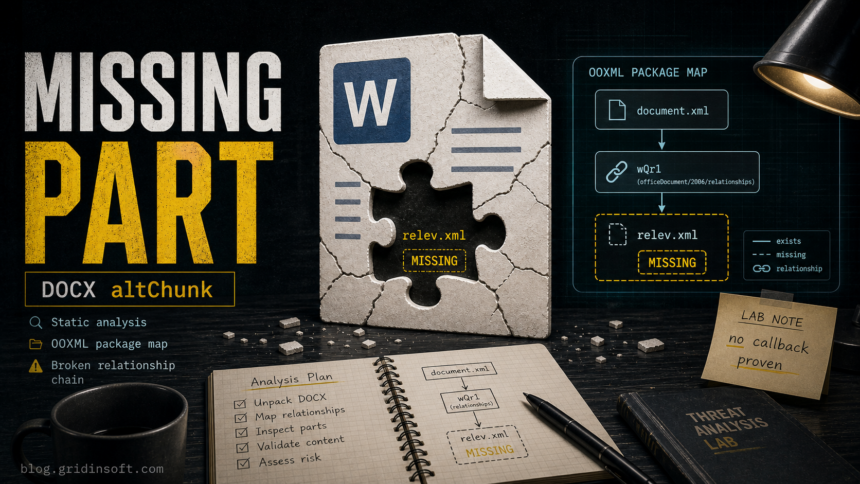
The attached PAYMENT TO BANK DETAILS (CONFIRM BANK DETAILS).docx is a suspicious Word document, but this copy does not contain a proven payload or callback URL. Static analysis found a broken OOXML w:altChunk import chain: the document body points to /word/relev.xml, the package marks default .xml content as application/rtf, and the referenced part is missing. That makes the file a useful malware-analysis case, not a clean “it called this server” incident.
Verdict From Static Analysis
- Lure: a finance-themed reply asking the recipient to confirm bank details through an attached transfer request form.
- Attachment:
PAYMENT TO BANK DETAILS (CONFIRM BANK DETAILS).docx, declared asapplication/octet-stream. - Confirmed suspicious feature:
w:altChunk/aFChunkrelationship to a missing/word/relev.xmlpart. - Not found in this copy: VBA macros,
vbaProject.bin, OLE object parts, ActiveX parts, external relationships, hyperlinks, UNC paths, PowerShell strings, or embedded URLs. - Network IoCs: none proven from the DOCX. The referenced alternate-format part is absent, so there is no callback destination to report from this sample.
| File name | PAYMENT TO BANK DETAILS (CONFIRM BANK DETAILS).docx |
| Size | 10,029 bytes |
| MD5 | f0f606e7d2e62d715adf9c5577044c24 |
| SHA1 | e70daabd584fca31f6c817c1a33e1f53882ef0cd |
| SHA256 | 4e85a39e3ce2406508d39f80188ac6c0ee0824ae737b686a81fd456d9b235b71 |
| Primary finding | Broken internal altChunk relationship to missing RTF-like part |
The Email Lure
The message uses a familiar business-email-compromise pretext: payment supposedly failed twice, the invoice bank name does not match, and the recipient is asked to complete a bank-detail form “ASAP.” That pressure is useful to the attacker even if the attachment is malformed, because the recipient may reply, call the wrong contact, or open the document in a less protected environment.
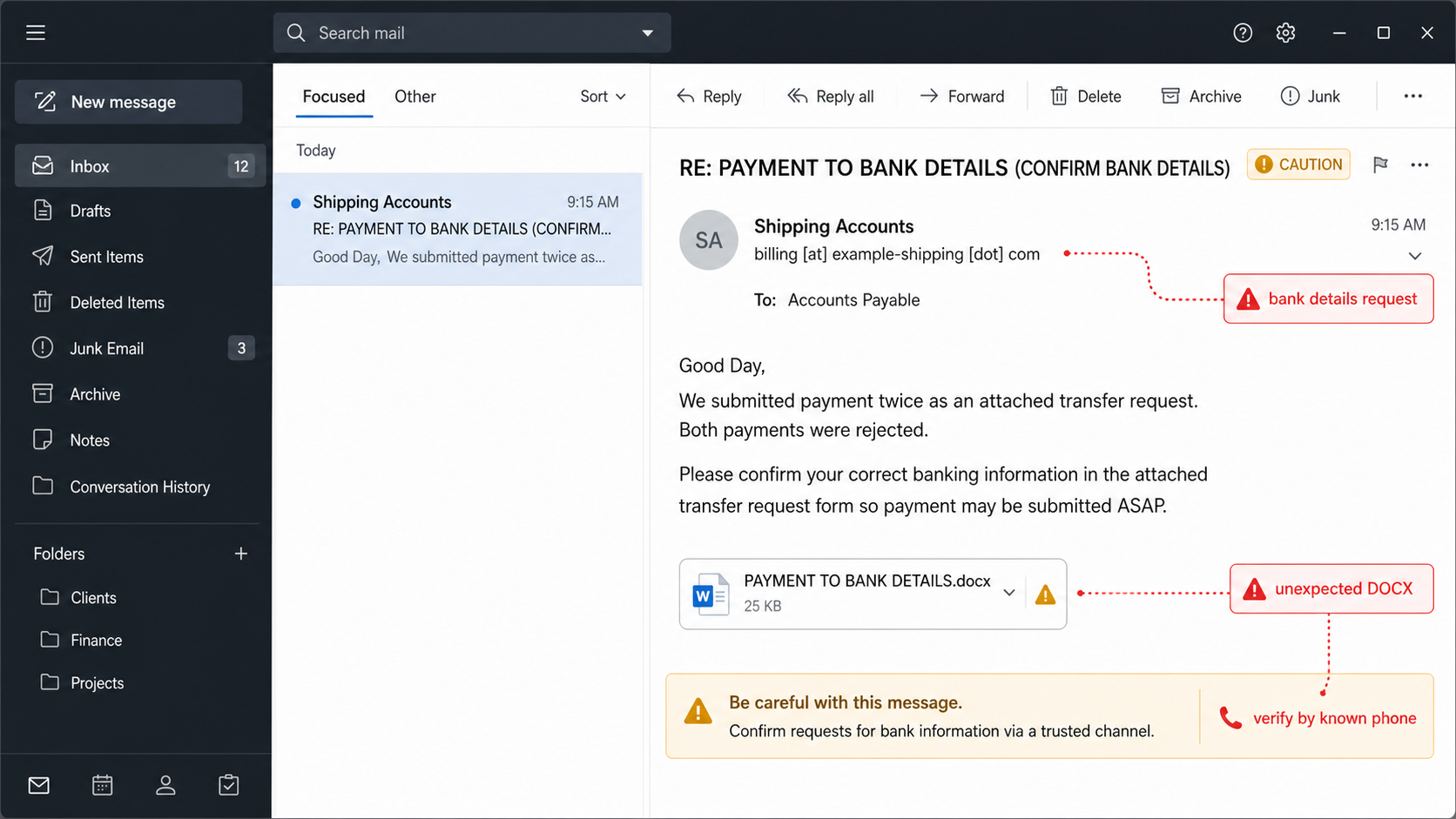
For user-facing advice about this social-engineering pattern, use the broader bank details email scam guide and the business email compromise explainer. The rest of this article focuses on the attachment internals.
DOCX Package Structure
A modern DOCX file is a ZIP package. In this sample, the local ZIP headers match the central directory, and there are no trailing bytes after the end-of-central-directory record. That matters because it reduces the chance that the missing payload is simply hidden after the ZIP or present only in local headers.
| Part | Why it matters |
|---|---|
[Content_Types].xml |
Defines part MIME types. This sample maps default .xml parts to application/rtf. |
word/document.xml |
Main body. It contains almost no visible document text and anchors one w:altChunk. |
word/_rels/document.xml.rels |
Maps relationship IDs to target parts. The key relationship points to missing /word/relev.xml. |
word/styles.xml, settings.xml, fontTable.xml |
Normal Word scaffolding; no macro, OLE, or ActiveX payload was found there. |
docProps/core.xml |
Metadata lists Microsoft as creator and John as last modifier, but metadata alone is not attribution. |
The Broken altChunk Chain
Microsoft’s Open XML documentation describes w:altChunk as an anchor that imports alternate content into a WordprocessingML document. The relationship that matches the r:id tells Word which internal part to import, and the relationship must be an afChunk-type internal target for a conforming document [1].
In this sample, the chain is short and suspicious:
word/document.xml
  <w:body>
    <w:altChunk r:id="wQr1"/>
  </w:body>

word/_rels/document.xml.rels
  Id="wQr1"
  Type=".../relationships/aFChunk"
  Target="/word/relev.xml"
  TargetMode="Internal" (implicit)

ZIP package
  word/relev.xml  -> missing
The content-type table makes the missing target more interesting:
<Default Extension="xml" ContentType="application/rtf"/>All present XML files have explicit override content types. A missing /word/relev.xml part, if it existed, would inherit the default and be treated as RTF-like alternate content rather than ordinary XML. That is why the sample looks like a broken wrapper for an RTF import, not just a random empty document.
What Was Not Found
The most important part of this analysis is the negative evidence. It prevents overclaiming.
| Check | Result in this sample |
|---|---|
VBA macros / vbaProject.bin |
Not present. |
| OLE object or ActiveX package parts | Not present. |
| External relationship targets | No TargetMode="External" relationships. |
| Hyperlinks or UNC paths | None recovered from package strings. |
| Command strings | No powershell, cmd.exe, mshta, rundll32, regsvr32, bitsadmin, or certutil strings. |
| Hidden ZIP payload after EOCD | None; no trailing bytes after EOCD. |
| Referenced payload part | word/relev.xml is missing from local headers and the central directory. |
Where Does It Call Home?
Nowhere that can be proven from this copy. The DOCX package contains no URL, IP address, UNC path, external template, hyperlink target, or external relationship. Because the referenced /word/relev.xml part is missing, the analysis cannot identify a payload server, second-stage URL, or command-and-control host.
The correct conclusion is narrower: this is a suspicious finance-themed DOCX with a broken alternate-format import chain. A complete variant could behave differently if the missing part were present, but the current attachment does not justify publishing callback IoCs.
Why altChunk Matters In Malware Triage
OOXML malware analysis often starts with relationships and embedded content rather than only macro checks. Mandiant has described detection and clustering approaches for Office Open XML documents that focus on embedded content and package structure, because many malicious Office files hide behavior in parts and relationships rather than plain visible text [2].
In real malicious chains, DOCX wrappers can import RTF content and then let Word’s parser process OLE objects or exploit primitives inside that imported part. Unit 42’s analysis of a 2023 exploit chain, for example, describes a DOCX lure where an RTF file named afchunk.rtf contained malicious OLE objects and update behavior [3]. This sample does not contain those objects, but its shape points analysts toward the same inspection path: resolve altChunk, extract the target part, then recurse into RTF/OLE content if it exists.
Likely Explanations For This Sample
- Gateway-stripped payload: an email security gateway, transfer process, or sample collection step may have removed the alternate-format part.
- Broken builder output: the actor’s document builder may have produced a malformed package.
- Decoy-only BEC lure: the attachment may be intended to make the bank-detail request look legitimate, while the real loss path is a reply with sensitive banking information.
- Incomplete collection: another recipient or mail copy may include the missing part and should be treated as a separate sample.
Analysis Roadmap For A Complete Variant
- Preserve the original EML. Keep headers, attachment bytes, quarantine metadata, and mail-gateway logs. Do not forward the email in a way that rewrites or strips the attachment.
- Hash every layer. Hash the EML, decoded attachment, and any extracted parts before opening them.
- Validate the ZIP package. Compare local headers with the central directory, check EOCD trailing bytes, and list every part with size, CRC, and path.
- Resolve every relationship. Flag external targets, missing internal targets, alternate-format imports, templates, OLE, ActiveX, hyperlinks, media, and embedded packages.
- Recurse into the altChunk target. If
word/relev.xmlor another imported part is recovered, parse it as RTF because the package content type saysapplication/rtf. - Inspect RTF/OLE objects. Look for
\objdata,\objupdate, Equation Editor objects, monikers, URLs, CLSIDs, embedded PE data, and shellcode-like hex streams. - Detonate only in isolation. Use a disposable VM with no real mailbox, no shared clipboard, no production network shares, and network capture enabled.
- Watch Word behavior. Monitor child processes, file writes, registry changes, DNS, HTTP/S, SMB/UNC traffic, Office repair dialogs, and Protected View prompts.
Defender And SOC Checklist
- Search mail logs for the same subject, attachment name, SHA256, sender display name, and reply-chain wording.
- Hunt for Office process events where
WINWORD.EXEspawns script interpreters, command shells, archive tools, browser processes, or unexpected child processes. - Check network telemetry for Office-originated DNS, HTTP/S, or SMB connections around the open time.
- Look for new files in user-writable locations after the attachment was opened, especially temporary Office extraction folders and download directories.
- Review bank-detail, invoice, and vendor-payment conversations in the mailbox if the user replied to the lure.
- Submit the attachment hash or file to a controlled malware-analysis workflow. Gridinsoft Online Virus Scanner can be used as a quick file-reputation check, but a broken wrapper still needs manual OOXML triage before calling it clean.
Possible Consequences
If the user only received the email and did not open the attachment, the main risk is social engineering. Block the sender, preserve evidence, and verify payment requests through a known phone number or a trusted vendor portal.
If the user opened this exact DOCX, the static evidence does not prove execution. Still, the user should keep the file closed, avoid enabling editing, scan the endpoint, and report the event so mail/security teams can check whether a complete variant reached other inboxes. Microsoft’s Protected View guidance is relevant here: Office opens files from unsafe locations or email attachments in a restricted mode to reduce risk, and suspicious files should not be edited or trusted [4].
If the user entered or sent banking information, treat the incident as business email compromise rather than only malware. Contact the bank or payment partner through a known channel, freeze pending transfers when possible, review mailbox rules and forwarding, and preserve the conversation for fraud reporting.
Detection Ideas
For similar samples, defenders can build static rules around relationships and content types. Keep rules conservative so they do not flag normal document merge workflows by themselves.
Suspicious when all are true:
- word/document.xml contains <w:altChunk r:id="...">
- matching relationship Type ends in /relationships/afChunk or /relationships/aFChunk
- target part content type is application/rtf or inherits application/rtf
- target part is missing, malformed, or contains RTF OLE/object primitives
- document has little or no visible text but is delivered as a finance/invoice/payment attachment
A stronger alert requires payload evidence: an RTF part with OLE objects, object update control words, exploit primitives, embedded executable data, or a confirmed network/action chain. In this copy, only the wrapper pattern is present.
FAQ
Is this DOCX confirmed malware?
It is confirmed suspicious, but this copy is not enough to prove execution. The suspicious feature is a broken altChunk import chain that appears designed to load an RTF-like part. The referenced part is missing, so no payload or callback was recovered.
Can a DOCX be dangerous without macros?
Yes. Macros are only one Office attack path. Malicious documents can abuse external templates, embedded objects, OLE, RTF parser vulnerabilities, HTML/URL tricks, or package relationships. This sample does not contain those payloads, but its relationship chain is still worth investigating.
What should I do if I opened the attachment?
Close it, do not enable editing or trust the document, preserve the email, run an endpoint scan, and report the event to your security or IT team. If you replied with banking details or changed payment instructions, treat it as a payment-fraud incident immediately.
Why is the missing relev.xml important?
The Word body points to that part through w:altChunk. Because the package maps default .xml parts to application/rtf, the missing part looks like the intended RTF import target. Without it, the document cannot show what payload or exploit logic was meant to run.
Should this be blocked at the mail gateway?
Yes, as suspicious. A finance-themed email requesting bank details through a DOCX attachment is risky on its own, and the malformed OOXML relationship adds a technical reason to quarantine or review it.
References
- Microsoft. “AltChunk Class.” Microsoft Learn, accessed July 6, 2026. https://learn.microsoft.com/en-us/dotnet/api/documentformat.openxml.wordprocessing.altchunk?view=openxml-3.0.1
- Aaron Stephens, Mandiant. “Detecting Embedded Content in OOXML Documents.” Google Cloud Blog, April 13, 2021, accessed July 6, 2026. https://cloud.google.com/blog/topics/threat-intelligence/detecting-embedded-content-in-ooxml-documents
- Unit 42. “In-Depth Analysis of July 2023 Exploit Chain Featuring CVE-2023-36884 and CVE-2023-36584.” Palo Alto Networks, December 13, 2023, accessed July 6, 2026. https://unit42.paloaltonetworks.com/new-cve-2023-36584-discovered-in-attack-chain-used-by-russian-apt/
- Microsoft. “What is Protected View?” Microsoft Support, accessed July 6, 2026. https://support.microsoft.com/en-US/Office/collab-files/what-is-protected-view