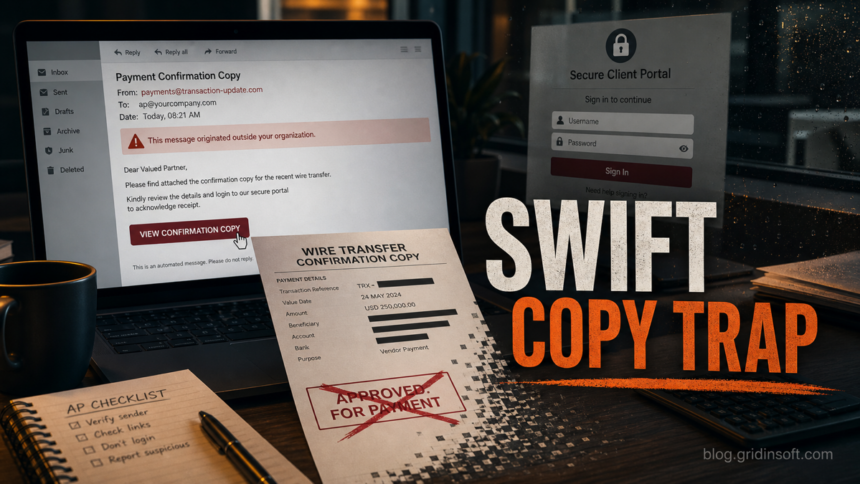
A SWIFT Confirmation Copy email scam pretends to show proof of a wire transfer, payment slip, or MT103-style bank confirmation. The dangerous part is usually not the word SWIFT itself; it is the pressure to open an attachment, click a “view confirmation” button, or sign in to a fake mail or client portal. Treat the message as suspicious until the payment is verified through your bank, accounting system, or a known contact outside the email thread.
The scam targets people who handle invoices, vendor payments, purchase orders, freight documents, or international transfers. A real business may legitimately request proof that a wire was sent, but a real verification process should not require you to enter your email password on a page opened from the message.
Examples of SWIFT Confirmation Copy Scam Emails
The examples below are safe reconstructions of the patterns seen in current search results. They are not meant to be copied into a reply; use them to recognize the wording, attachment bait, and login-page trap.
Example 1: mailbox warning subject, payment body
Subject: Final reminder: mailbox closure notice
Dear user, please find attached the SWIFT confirmation copy for your wire transfer payment. Open the secure document below to review the official bank payment slip from our Accounts Department.
Buttons: Download PDF / View PDF
Attachment name: Wire Payment Slip Monday.pdf
Why it is suspicious: the subject is about mailbox closure, but the body suddenly discusses a wire transfer. That mismatch is a common sign that the attacker reused a generic phishing template and changed only the payment wording.
Example 2: vendor payment settled message
Subject: SWIFT copy for settled invoice
Hello, the payment for your invoice has been completed. Kindly review the SWIFT confirmation copy and advise if the funds have arrived at your bank.
Button: Open Secure Document
Trap: the button opens a webmail-style sign-in page instead of a bank or accounting portal.
Why it is suspicious: a proof-of-payment file should not ask for your email password. If a vendor really sent transfer proof, verify it through the vendor contact and your accounting records, not through the email button.
Example 3: payment slip attachment with fake login
Subject: Wire transfer confirmation copy
Please see the attached payment slip for the completed international transfer. For security reasons, sign in with your email account to view the document.
Attachment or link: SWIFT_Copy.html, PaymentSlip.shtml, PDF.zip, or a cloud-hosted “secure document” page.
Why it is suspicious: HTML/SHTML files and archive attachments can display fake login pages or redirect you to credential theft. A legitimate SWIFT or bank confirmation should be verified through the bank, treasury system, or known vendor channel.
What the Fake SWIFT Confirmation Copy Email Looks Like
Most versions use finance-friendly wording so the email feels routine. Common subject lines and body text include:
- SWIFT Confirmation Copy, Payment Confirmation Copy, Wire Payment Slip, or Wire Transfer Confirmation in the subject line or attachment name.
- A short note saying a recent transfer, vendor payment, invoice settlement, or purchase order payment has been completed.
- An attachment named like a PDF, HTML file, SHTML file, ZIP archive, JavaScript file, or payment slip.
- A button such as View Confirmation Copy, Download PDF, Review Payment Slip, or Open Secure Document.
- A login page that asks for your email, Microsoft 365, Gmail, Yahoo, Outlook, webmail, or “client portal” password.
- A long link parameter that includes your email address or company domain, making the fake sign-in page look pre-filled and familiar.
The wording may be generic because the attacker does not know your real transaction history. In targeted attempts, the email may reuse a vendor name, purchase order number, or amount stolen from an earlier mailbox compromise. That is why finance teams should verify the payment path, not only the formatting of the email.
For another bank-branded payment lure with a fake receipt button and webmail login trap, see our HSBC Money Transfer Completed email scam checklist.
Can a SWIFT Confirmation Copy Be Real?
Yes, a bank or payment provider can provide a legitimate transfer confirmation or SWIFT message copy for a completed international payment. The safe route is to request or confirm it inside the bank portal, accounting platform, or through a known finance contact. Do not use a login link, phone number, QR code, or attachment from an unexpected email as the starting point.
A useful rule is simple: if the email asks you to sign in before you can view the “copy,” verify the message somewhere else first. If the sender is a vendor, call the vendor using a number from your records. If the message claims to come from a bank, open the bank website from a bookmark or typed address, not from the email.
Red Flags Before You Click
- The sender address does not match the bank, vendor, or company domain you normally use.
- The subject line and message body do not match, such as a mailbox warning that suddenly discusses a wire transfer.
- The message says a transfer is urgent, overdue, reversed, pending approval, or waiting for login confirmation.
- The attachment is an HTML/SHTML file, ZIP file, script-like file, JavaScript file, or a PDF that opens another sign-in page.
- The link goes through a URL shortener, cloud file host, random domain, CDN-like domain, or newly registered site.
- The email asks for your email password, MFA code, mailbox re-authentication, or payment approval from the same message.
- The payment amount, beneficiary name, invoice number, UETR, IBAN, routing number, or bank details do not match internal records.
For broader inbox checks, compare the message with our phishing email red flags and email security checklist.
How to Verify a SWIFT Confirmation Copy Safely
- Do not reply to the email thread. A compromised mailbox can keep the attacker in the conversation.
- Check your accounting records. Match the invoice, amount, beneficiary, payment date, UETR or payment reference, and expected sender.
- Use vendor master data. Call a known contact from your records, not the number in the email signature or attachment.
- Open portals manually. Type the bank or accounting portal URL yourself, or use a saved bookmark.
- Inspect the link before opening. On desktop, hover first; on mobile, long-press carefully without opening. Do not trust display text alone.
- Scan downloaded files. If you downloaded an attachment, scan it before opening. You can also check suspicious files with Gridinsoft tools before trusting them.
- Escalate changed bank details. Any new beneficiary, routing number, IBAN, or last-minute payment instruction should require a second approval.
- Preserve evidence. Save headers, URLs, attachment names, and screenshots if a payment or credential incident may need investigation.
This is close to a business email compromise workflow: the attacker wants the finance process to feel normal until credentials or payment approval are already gone.
What to Do If You Opened the Attachment or Signed In
If you only opened the email, delete it and report it as phishing. If you clicked, downloaded a file, or entered credentials, act quickly:
- Change the affected password from a clean device. Start with the mailbox account used on the fake page.
- Revoke active sessions and reset MFA. Check recent sign-ins, connected apps, app passwords, and recovery options.
- Inspect mailbox rules. Attackers often create forwarding, delete, or hide rules to keep payment conversations out of sight.
- Warn finance and IT. Tell them the message involved a wire-transfer or confirmation-copy theme so they can watch related threads.
- Scan the device. If an attachment ran, especially an HTML, SHTML, ZIP, JAR, JS, or executable file, scan the endpoint for malware and persistence.
- Call the bank immediately if money moved. Ask for a wire recall or fraud hold and preserve the email, headers, URLs, attachments, and transaction IDs.
- Compare generic payment notices. If the message says we have processed your payment and asks you to view a statement, treat it as a credential-phishing variant even when no SWIFT copy is attached.
\n
How Finance Teams Can Reduce This Scam
- Require out-of-band verification for new or changed payment instructions.
- Use vendor master data instead of phone numbers or links inside incoming emails.
- Train AP staff to distrust attachment-first payment confirmations and email-password prompts.
- Block or sandbox risky attachment types such as HTML, SHTML, script, archive, and Java files when they arrive from outside the organization.
- Keep MFA enabled, but treat unexpected MFA prompts as a warning rather than a routine approval.
- Document an emergency wire-recall process before a real incident happens.
FAQ
Is every SWIFT Confirmation Copy email fake?
No. Legitimate transfer confirmations exist, but unexpected emails with attachments or login links should be verified through a separate trusted channel before anyone opens the file or signs in.
I only opened the email. Is my computer infected?
Usually no. Reading an email is not the same as running an attachment or entering credentials. The risk increases if you clicked a link, downloaded a file, enabled content, or signed in on a page opened from the message.
Why does the scam ask for my email password?
The attacker wants mailbox access. Once inside, they can steal invoices, reset other accounts, watch payment conversations, and send more convincing messages from your real address.
Should I open the attached payment slip?
Do not open it until you verify the sender and transaction through your bank, accounting platform, or known vendor contact. If you already downloaded it, scan the file first and avoid enabling macros, scripts, browser prompts, or embedded login forms.
What if a real vendor says they sent it?
Ask them to confirm the transfer details over a known phone number or secure vendor portal. If the email thread itself is compromised, replies in that thread may still be controlled by the attacker.
References
- SWIFT. “Protect Your Personal Data Against Email Phishing Scams.” SWIFT, accessed June 12, 2026. https://www.swift.com/news-events/news/protect-your-personal-data-email-phishing-scams
- SWIFT. “Finastra CMS-SWIFT Confirmation Copy Service.” SWIFT MySwift ordering page, accessed June 12, 2026. https://www.swift.com/myswift/ordering/order-products-services/finastra-cms-swift-confirmation-copy-service
- Federal Trade Commission. “How To Recognize and Avoid Phishing Scams.” FTC Consumer Advice, accessed June 12, 2026. https://consumer.ftc.gov/articles/how-recognize-and-avoid-phishing-scams