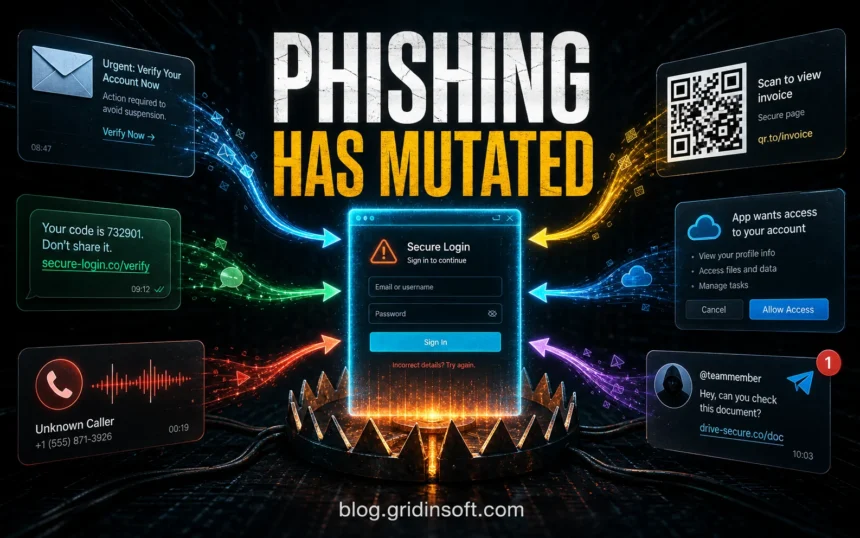
Phishing is no longer just a fake email with bad grammar. Modern phishing can arrive as an email, text message, phone call, QR code, social media DM, fake cloud-app permission prompt, search ad, or shared-document invitation. The goal is usually the same: steal passwords, 2FA codes, payment data, crypto wallets, business funds, or make you install malware.
If you are trying to identify a suspicious message, start with the channel and the request. An email that asks you to sign in is classic phishing. A text with a delivery/payment link is smishing. A call asking for a code is vishing. A QR code that hides the destination is quishing. A cloud-app screen asking for mailbox or file access is often OAuth phishing.
Not every fake message uses the same trick. If the sender name, phone number, or domain is being impersonated, compare it with phishing vs spoofing before trusting the display name alone.
| Primary query | Types of phishing attacks and how to recognize them |
| Most dangerous requests | Password, 2FA code, payment details, remote access, OAuth permissions, gift cards, crypto transfer |
| Safest habit | Do not use the message link. Open the real site or app manually and check the account there. |
| If you already clicked | Change the exposed password, revoke sessions, enable MFA, scan the device, and report the message. |
Main Types of Phishing Attacks
The useful way to classify phishing is not by the attacker’s label, but by what the victim sees and what the attacker wants. Use this table as a quick routing guide.
| Type | What it looks like | What to do first |
|---|---|---|
| Email phishing | Fake login warning, invoice, delivery notice, HR/payroll message, file share, or attachment. | Check sender domain and link destination. For details, use the phishing email red-flags guide. |
| Spear phishing | Personalized message aimed at one person, team, customer, vendor, or job role. | Verify the request through a known channel. See spear phishing examples. |
| Whaling | Executive or finance-targeted request for payment, payroll, tax, contract, or confidential data. | Require out-of-band approval before any wire, payroll, or vendor-account change. See the whaling phishing guide. |
| Smishing | SMS or messaging-app link about a package, bank alert, toll, tax, refund, or account lock. | Do not tap the link. Open the real app or official website manually. |
| Vishing | Phone call or voicemail asking for a code, transfer, remote support, or urgent account action. | Hang up and call the organization using a number you found yourself. |
| Quishing | QR code on an email, sign, invoice, parking notice, restaurant menu, or package insert. | Inspect the destination before signing in. Read QR code phishing if the page asks for credentials or payment. |
| OAuth consent phishing | A real-looking cloud permission screen asks for mailbox, files, contacts, or account access. | Cancel unexpected permission prompts and review connected apps in the real account settings. |
| Clone phishing | A copied legitimate email is resent with a changed link, attachment, or payment detail. | Compare it with the original thread and verify the changed link or file with the sender. |
| Pharming | You type a real-looking address but land on a fake page because DNS/router/browser settings were tampered with. | Check the certificate, domain spelling, router DNS, and read phishing vs pharming. |
| Tech support phishing | Fake virus alert, browser pop-up, phone number, remote-access request, or refund-support script. | Close the page, do not call the number, remove notification permissions, and scan if a tool was installed. |
Why These Attacks Work
Good phishing reduces the time you have to think. It uses urgency, familiar branding, a realistic workflow, and a request that feels normal in the moment. The message may say your account will close, a package is stuck, a payment failed, an invoice is overdue, a coworker shared a file, or a security team needs you to approve a sign-in.
Grammar is no longer a reliable filter. Current scams can be polished, localized, and highly specific. A better test is whether the message asks you to move trust outside the normal path: use this link, scan this code, approve this prompt, install this tool, read this attachment, or tell me the code you just received.
What Victims Usually Search For
People often search after something already feels wrong. These searches are practical, not academic:
- “I clicked a phishing link” – the reader needs immediate containment steps. Use the clicked phishing link checklist.
- “Is this email real or fake?” – the reader needs sender, domain, link, and attachment checks.
- “I entered my password on a phishing page” – the reader needs password reset, session revocation, MFA, and account-recovery steps.
- “SMS delivery/bank/toll scam” – the reader needs to avoid the link and check the real service manually.
- “QR code phishing” – the reader needs to understand that the QR code hides the destination until scanned.
- “Smishing vs vishing” – the reader wants the difference between text-message and phone-call scams. See smishing vs vishing.
What To Do If You Clicked or Entered Data
- If you only opened the page: close it, do not enter anything, and clear suspicious notification permissions if the site asked to show alerts.
- If you entered a password: change that password from the real website, sign out other sessions, and change the same password anywhere else it was reused.
- If you entered a 2FA code or approved a prompt: revoke active sessions, review recent sign-ins, remove unknown devices, and replace weak MFA with an authenticator app, passkey, or hardware key where possible.
- If you entered card or bank data: contact the bank or card issuer, watch transactions, and follow their fraud process.
- If you installed software or allowed remote access: disconnect from the session, uninstall the tool, update security software, and scan the device. You can also check suspicious files or URLs with the Gridinsoft Online Virus Scanner.
- If it was a work account: report it to IT/security immediately, especially if the message involved mailbox access, invoices, OAuth permissions, or shared files.
Red Flags That Matter More Than the Logo
- The message creates urgency: suspension, missed payment, payroll issue, delivery failure, security alert, or legal threat.
- The link destination does not match the organization’s real domain.
- The sender asks for a password, recovery phrase, one-time code, remote access, gift card, crypto, or payment-app transfer.
- The message pushes you away from the official website or app.
- A QR code, shortened URL, redirect chain, or attachment hides the destination.
- A cloud permission prompt asks for broad access to email, files, contacts, or profile data without a clear reason.
How To Report Phishing
For suspicious email, forward the message to the Anti-Phishing Working Group. If you lost money, gave personal information, or gave someone access to a device, report the incident to the FTC and follow the recovery steps for the type of loss. For workplace accounts, also report internally so security teams can block the domain, revoke sessions, and warn other users.
FAQ
What is the most common type of phishing?
Email phishing is still the most familiar form, but text-message, voice, QR-code, and cloud-app permission scams are common enough that users should check the channel and request, not only the email design.
Can a phishing message have perfect grammar?
Yes. Polished writing does not make a message safe. Verify the domain, request, payment path, app permission, and account activity from the official website or app.
Is a QR code safer than a link?
No. A QR code can hide the destination until you scan it. Treat QR login and payment pages like links: inspect the domain and avoid signing in from an unexpected code.
What if I only clicked a phishing link?
If you did not enter data, approve prompts, download files, or install anything, the risk is usually lower. Close the page, do not allow notifications, and scan the device if anything downloaded or the browser started behaving strangely.
References
- Cybersecurity and Infrastructure Security Agency. “Phishing Guidance: Stopping the Attack Cycle at Phase One.” CISA, March 2025, accessed June 7, 2026. https://www.cisa.gov/sites/default/files/2025-03/Phishing%20Guidance%20-%20Stopping%20the%20Attack%20Cycle%20at%20Phase%20One%20508.pdf
- Federal Trade Commission. “Protect yourself from phishing scams.” FTC Consumer Advice, April 2025, accessed June 7, 2026. https://consumer.ftc.gov/consumer-alerts/2025/04/protect-yourself-phishing-scams
- Anti-Phishing Working Group. “Report Phishing Emails.” APWG, accessed June 7, 2026. https://apwg.org/reportphishing