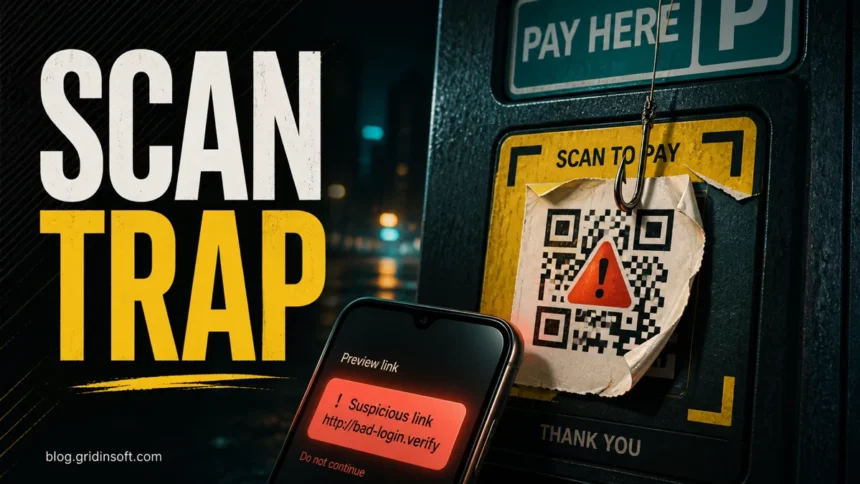
QR code phishing, also called quishing, hides a malicious destination behind a code that looks harmless. The QR image is not the usual danger by itself. The risk starts when the scan opens a fake login page, payment form, app download, browser permission, or file. If you scanned a suspicious QR code but closed the page without entering anything, the risk is usually lower. If you typed a password, card number, one-time code, or installed something, treat it as an active phishing incident and act quickly.
Fast safety rule: preview the URL, check the domain, and open payments or account pages from the official app or website instead of trusting a QR sticker, email attachment, or urgent message.
What is QR code phishing?
QR code phishing is a phishing attack where the destination link is encoded inside a QR code. Attackers use it because the link is not visible on the page, poster, invoice, email, or package notice until the victim scans it. This delay makes people more likely to trust the code, especially when it appears on a parking sign, restaurant table, delivery notice, PDF invoice, or work email.
The term quishing means QR phishing. It is the same social-engineering idea as ordinary phishing, but the lure moves the click from a visible link to a scan. That matters because a protected desktop email system may block or rewrite suspicious links, while the phone that scans the QR code may open the page outside the company’s normal email protection.
How a QR phishing attack works
A QR phishing attack usually follows a simple path: the user sees a code, scans it, lands on a page that looks familiar, and is asked to enter something valuable. The fake page may ask for a Microsoft 365 password, a payment card, a delivery address, a bank login, a cryptocurrency wallet action, or permission to install an app or browser profile.
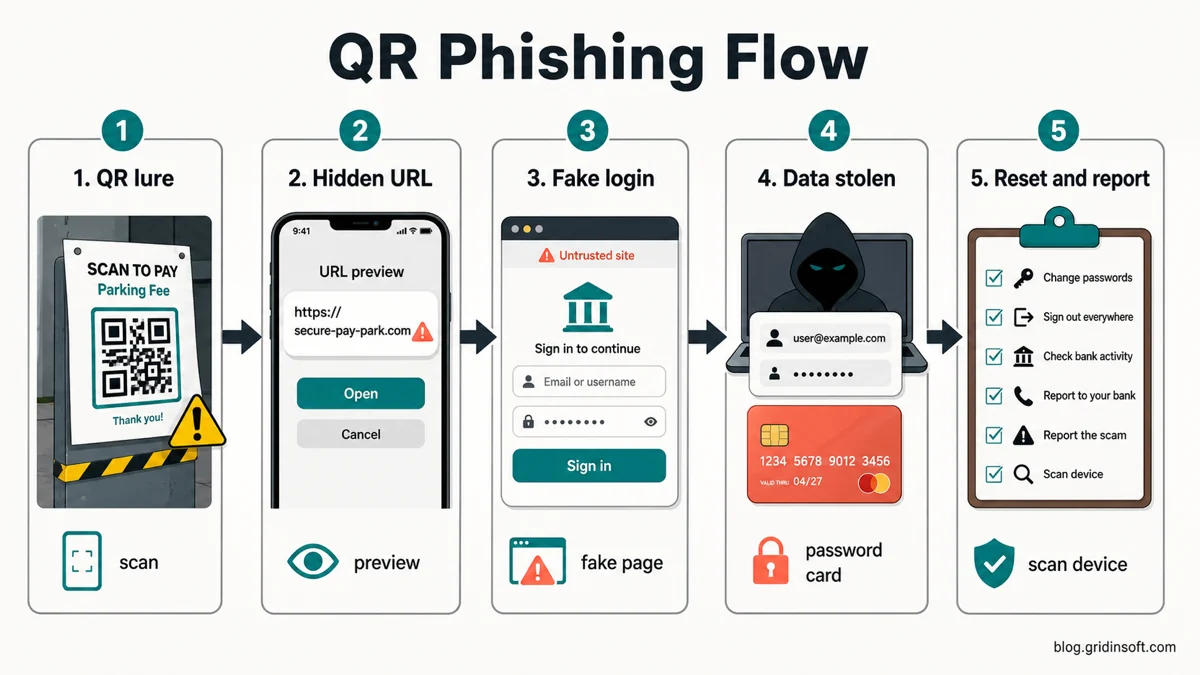
The strongest defense is to slow down at the URL preview. A real QR code for a restaurant menu, parking meter, event ticket, or delivery update should lead to a domain you can recognize and verify. If the preview shows a shortened link, misspelled brand, strange country domain, unrelated subdomain, or a long random address, do not continue.
Where QR code scams appear
QR scams work best when the victim expects a quick mobile action. That is why attackers place fake codes in situations where people are hurried, distracted, or already holding a phone.
| QR lure | Likely risk and what to check |
| Microsoft 365 or secure email QR | Credential theft. Check the domain before entering a password or one-time code. |
| Parking, toll, or ticket payment QR | Card theft. Open the official city, parking, or toll website manually. |
| Delivery or package notice QR | Address, phone, email, or payment collection. Verify through the carrier app or official tracking page. |
| Restaurant menu or table sticker | Redirects, fake payment pages, or unwanted notifications. Look for stickers placed over the original code. |
| Crypto wallet or giveaway QR | Wallet-drainer pages or attacker-controlled payment addresses. Do not approve wallet prompts from a scan. |
Common quishing examples
Fake parking or toll payment
A sticker on a meter, sign, or windshield notice asks you to scan a code and pay a small fee. The page looks like a payment portal but uses a suspicious domain. The attacker wants card details, billing information, or a small “verification” payment that confirms the card is active.
Fake Microsoft 365 secure message
An email says that a protected document, voicemail, invoice, or HR file can be opened only by scanning a QR code. The phone opens a fake Microsoft login page. This is dangerous because the victim may enter both a password and a one-time code, giving the attacker a path into the account.
Package, refund, or delivery QR code
A text message, email, or printed card says a package needs address confirmation or a small redelivery payment. Instead of trusting the QR code, open the carrier’s official app or type the tracking number into the official site. The same caution applies to fake USPS-style delivery messages and refund notices.
Restaurant or public-place sticker swap
Some QR scams rely on physical tampering. A fake sticker is placed over a real menu, payment, Wi-Fi, or feedback code. If the sticker looks raised, crooked, newer than the sign, or placed over another code, ask staff or use the official website.
How to check a QR code safely before opening it
- Use the phone’s preview first. Most modern camera apps show the destination before opening it. Read the domain, not only the page title.
- Look for brand mismatch. A parking code should not open an unrelated domain, a random shortener, or a page with extra words around a brand name.
- Avoid shortened links for payments and logins. Short links hide the real destination and are poor choices for sensitive actions.
- Open the official route manually. For banking, parking, shipping, tax, tolls, and account warnings, use a bookmark, official app, or typed address.
- Check suspicious domains before entering data. If a QR page looks questionable, verify the domain with the Gridinsoft Website Reputation Checker before you submit anything.
- Do not install apps from a QR code unless you expected it. Use the official app store or vendor website instead.
What to do if you scanned a suspicious QR code
Your next step depends on what happened after the scan. Opening a page is different from entering a password or installing an app. Use the most serious matching case below.
| What happened | What to do now |
| You only opened the page | Close the tab. Do not enter data. Clear the browser tab history if the page keeps reopening. |
| You entered a password or one-time code | Change the password from the official site, sign out of other sessions, and enable or reset two-factor authentication. |
| You entered card or bank details | Contact the bank or card issuer, monitor transactions, and replace the card if advised. |
| You installed an app, profile, extension, or file | On Windows, follow the scan-and-cleanup steps below. On a phone or Mac, remove the unwanted app, profile, extension, or file, review permissions, and use security tools appropriate for that device. |
| You scanned from a work email or work device | Report it to IT or security, especially if you entered credentials or saw a fake company login page. |
If you entered a password
Go to the real service by typing the address or using the official app. Change the password there, not through any link on the QR page. If the same password was used elsewhere, change it on those accounts too. Review recent sign-ins, connected devices, recovery email addresses, forwarding rules, and app passwords. For Microsoft 365, Google, Apple, banking, and social accounts, sign out of other sessions after changing the password.
If the QR page asked for a one-time code, assume the attacker may have tried to sign in immediately. Do not approve unexpected push prompts. If this came from an email, see our guide on how to spot a phishing email and report the message in your mail client.
If you entered card or payment details
Contact the bank or payment provider through the number on the card or the official app. Tell them the card details may have been entered on a phishing page. Watch for small test charges, subscription attempts, and unfamiliar merchants. If the QR code claimed to be for parking, tolls, tax, shipping, or a fine, open the official agency or company website manually and confirm whether any real payment is due.
Payment QR scams can also lead to identity theft if the page asked for your name, address, phone, date of birth, or document number. If personal data was submitted, review the warning signs in our identity theft response guide.
If the QR code installed an app, profile, extension, or file
On a phone, remove anything the QR page asked you to install and review newly installed apps, device management profiles, VPN profiles, notification permissions, and browser permissions. On a Mac, check downloads, browser extensions, startup items, and recent security warnings; remove unwanted items and use a security tool made for macOS.
On Windows, start with a scan if the QR page led to a suspicious download, an installation, or recurring browser pop-ups. Do not open a downloaded file just to test it. If it already ran, deleting the visible file may leave a bundled component, startup entry, or browser change behind.
- Download and install Gridinsoft Anti-Malware using the download button below, then update its detection database.
- Run a Full Scan. Let it finish so the check covers more than the file you noticed.
- Review the detections and apply the cleanup actions for detected threats. Keep suspicious files quarantined rather than reopening them.
- Restart Windows and check the original symptom. If pop-ups or security warnings continue, use targeted follow-up checks for the specific download, browser extension, startup item, or permission involved. Manual investigation is optional when the scan resolves the problem.
This Windows scan can check hidden folders, startup entries, browser changes, and bundled files; it does not clean a phone or Mac, recover a stolen account, or reverse a payment. If you entered passwords or payment details, also follow the separate recovery steps above. If you only opened the page and closed it without downloading anything or entering data, this Windows cleanup route is usually unnecessary.
If the page or email made you download an invoice, coupon, tracking app, browser extension, or support tool, scan the PC before opening it again or logging into sensitive accounts.
Scan downloads from this scamHow businesses can reduce QR phishing risk
For businesses, QR phishing is both a user-training and control problem. Employees need a simple rule: a QR code in an email, PDF, chat message, or printed notice is not safer than a link. If it asks for credentials, payment details, or a file download, it deserves the same suspicion as any other phishing link.
- Train staff to read the destination domain before opening a QR link.
- Warn users that QR codes can move the attack from a protected desktop to a less protected phone.
- Inspect physical QR stickers on payment signs, reception desks, event posters, and public notices.
- Publish official payment or login domains near public QR codes so users can compare them.
- Use email and security tools that can detect QR-code lures in images where possible.
- Create an easy reporting path for suspicious QR emails and physical sticker swaps.
FAQ
Can a QR code infect my phone just by scanning it?
Usually no. The common risk is the website, login form, payment page, app, file, or permission request that opens after the scan. The danger rises if you enter information, approve a prompt, or install something.
What should I do first if I scanned a suspicious QR code?
Close the page and do not enter data. If you already entered a password, change it from the official site and sign out of other sessions. If you entered card details, contact your bank.
How do I tell if a QR code payment page is fake?
Check whether the domain matches the official parking, toll, restaurant, city, or payment provider website. Be suspicious of shortened links, misspellings, random subdomains, urgent fees, and stickers placed over older codes.
Why do phishing emails use QR codes instead of links?
QR codes can hide the destination inside an image and push the victim from a protected work computer to a phone. That can bypass some email link checks and make the fake page feel more natural on mobile.
Are restaurant and parking QR codes safe?
Many are safe, but check the physical code and the domain before entering payment details. A sticker that covers another code or sends you to an unrelated domain is a warning sign.
Should I scan my phone or computer after a QR phishing page?
Scan if the page downloaded a file, installed an app, added a browser extension, requested notification permissions, or caused pop-ups. If you only opened a page and closed it, account and payment recovery steps are usually more important.
Event posters can carry a replaced QR code
A copied design can retain genuine event details while changing only the registration destination. Talos’s October 8 investigation of fake event invitations and Google phishing documents that distinction: the poster looked familiar, but the substituted code led into an attacker-controlled sign-in flow.
References
- Federal Trade Commission. “Scammers hide harmful links in QR codes to steal your information.” FTC Consumer Advice, December 6, 2023, accessed June 11, 2026. https://consumer.ftc.gov/consumer-alerts/2023/12/scammers-hide-harmful-links-qr-codes-steal-your-information
- National Cyber Security Centre. “QR Codes – what’s the real risk?” NCSC, accessed June 11, 2026. https://www.ncsc.gov.uk/blog-post/qr-codes-whats-real-risk