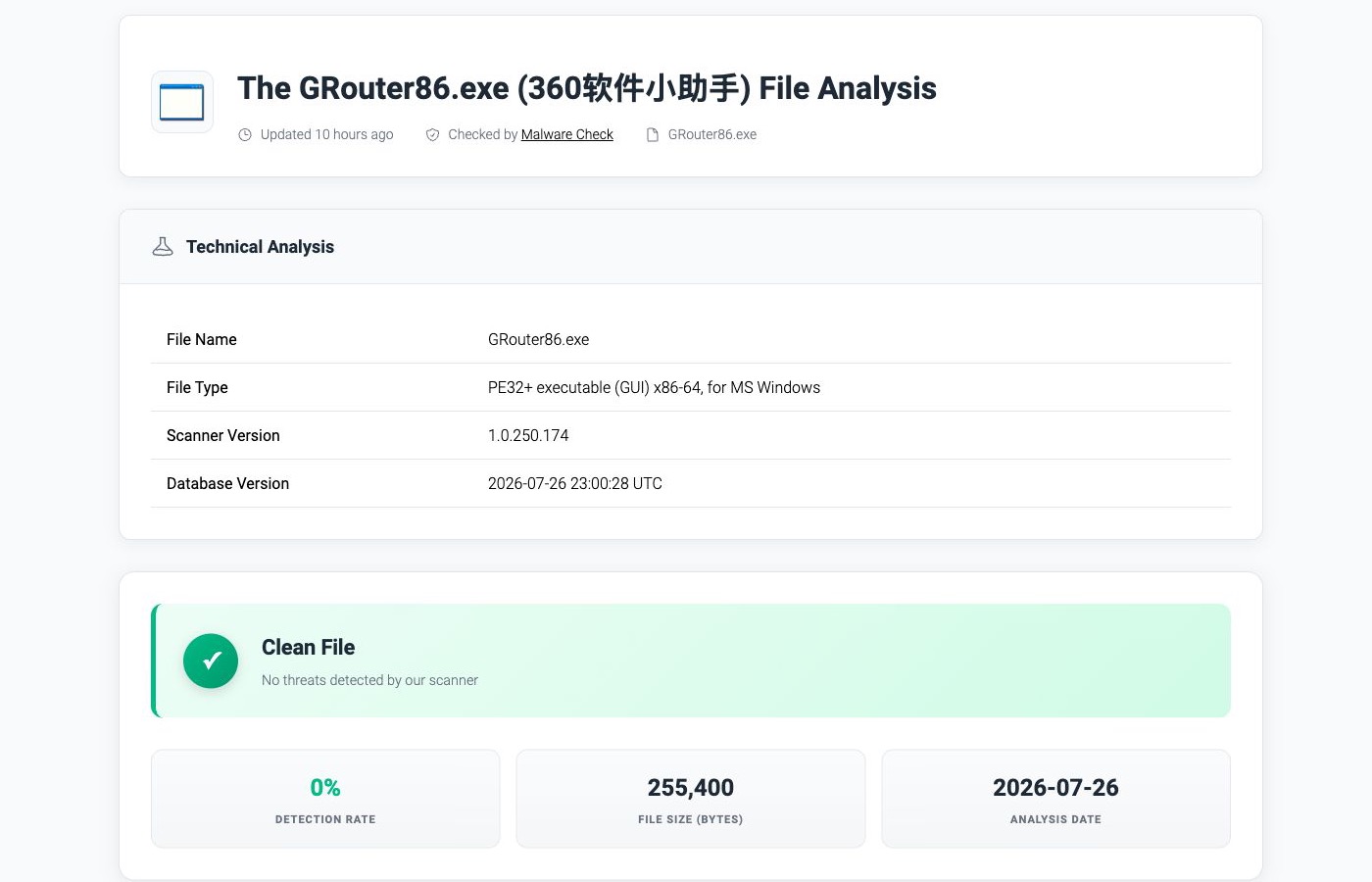
GRouter86.exe is not automatically a virus. The exact sample with SHA-256 d2995b2ec2e1da5925fb2f6458e7837ce68de8953a131df89cf2d89a08a47f65 is currently reported clean and carries a Qihoo 360 digital signature. Its internal name is SMLProxy64.exe. That verdict applies only to those exact bytes—not to every file that uses the same name. Check your copy’s path, signer, hash, and parent software before you keep or remove it.
If GRouter86.exe returns after deletion, that does not by itself prove a rootkit. A still-installed 360 component, updater, scheduled task, service, or another parent process may simply recreate or reinstall the helper. The correct fix is to identify and remove the parent, not repeatedly delete one child executable.
| Known clean sample | SHA-256 d2995b2ec2e1da5925fb2f6458e7837ce68de8953a131df89cf2d89a08a47f65 |
| Verified publisher | Qihoo 360 Software (Beijing) Company Limited |
| Internal name | SMLProxy64.exe |
| File version and size | 2.0.0.1030; 255,400 bytes |
| Suspicious signs | Different hash, missing/invalid signer, unexpected writable path, unknown parent, or other compromise symptoms |
| Best action | Verify first; uninstall the parent 360 app if unwanted; quarantine and scan a mismatched copy |
What is GRouter86.exe?
The verified sample is a 64-bit Windows executable signed by Qihoo 360 Software. Its version information identifies the product as 360软件小助手 (a 360 software helper), with the original and internal filename SMLProxy64.exe. The Gridinsoft Malware Check report for the exact submitted hash shows a clean result and a verified certificate chain.
This explains why a user may see the file on a PC that has—or previously had—360 Total Security or another 360 software component. It also explains why deleting the file while the parent software remains installed may not last. An updater or helper can put back a required component on the next launch, sign-in, or reboot.
It does not make the filename a safety certificate. Attackers and unwanted installers can rename files, and two executables with the same filename can contain completely different bytes. For a broader checklist, use our guide to check whether an EXE file is safe before running it.
Is your GRouter86.exe safe or suspicious?
| What you find | Risk and what to do |
|---|---|
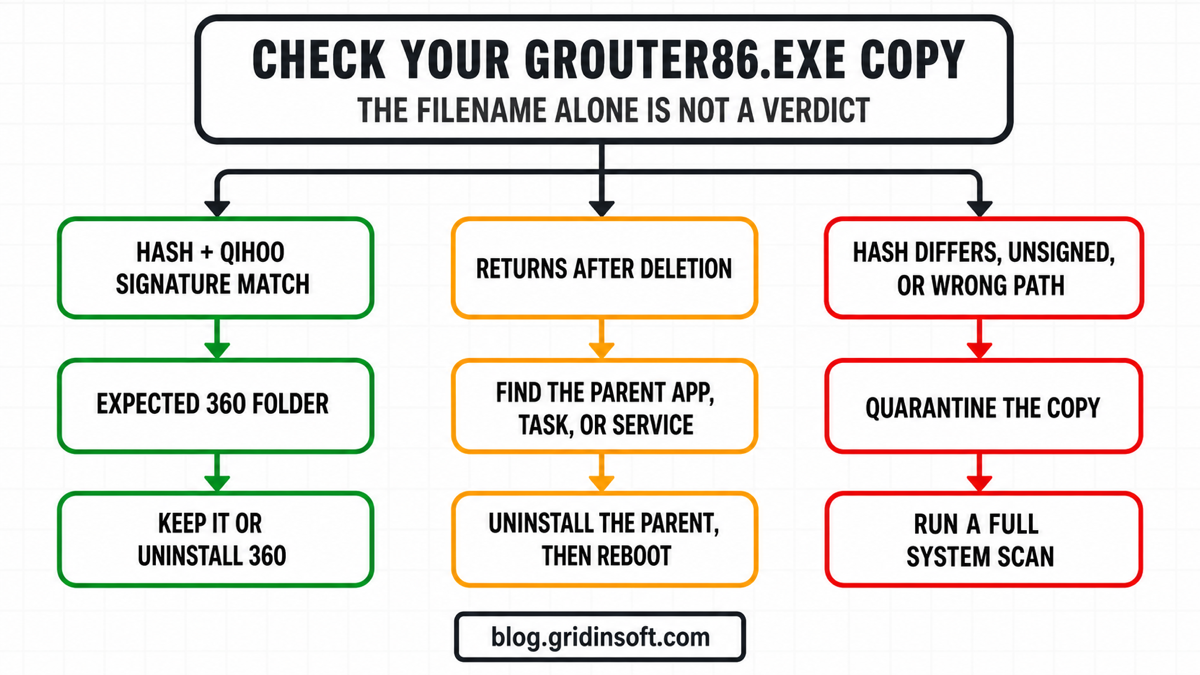
| The SHA-256 matches the known sample, the signature status is valid, the signer is Qihoo 360, and a 360 product is installed | The copy is consistent with the verified helper. Keep it if you use the parent software, or uninstall the parent product if you do not want it. |
| The file is validly signed by Qihoo 360 but you do not want or recognize the 360 software | Treat it as an unwanted legitimate component. Use the normal app uninstaller, reboot, and then check whether the helper returns. |
The file sits directly in C:\ProgramData, %APPDATA%, %LOCALAPPDATA%\Temp, Startup, Downloads, a crack folder, or another unexpected writable location |
Do not trust the name. Quarantine it, identify the parent process and persistence entry, and run a full system scan. |
| The hash differs, the signature is missing or invalid, or the signer is not Qihoo 360 | It is not the verified sample described here. Keep it blocked or quarantined and investigate the source before allowing it. |
| It appeared after a game crack, repack, fake update, remote-support install, or account-theft incident | Assume the PC may have more than one component. Disconnect from sensitive accounts, scan the full system, and use a clean device for password changes if compromise is confirmed. |
What if XPFix.exe appears with GRouter86.exe?
XPFix.exe appearing beside GRouter86.exe is a reason to investigate the installation context, not a reason to assign a malware family from the filename alone. CYFIRMA documented one DeerStealer chain that dropped a validly signed XPFix.exe sample with SHA-256 5ec174af8a18a5516b8a6e11d8a27481d70df14d1edb67c48b5458ff44df9146 into unexpected AppData and ProgramData folders and used scheduled tasks for persistence.4 That is a separate sample from the clean GRouter86 hash at the top of this article. It does not mean every file named XPFix.exe or GRouter86.exe is DeerStealer.
A valid Qihoo 360 signature can identify where an executable originated, but it cannot prove that the surrounding folder, DLLs, installer, parent process, or scheduled task is safe. Threat actors can package a legitimate signed component with malicious files or use it as a decoy. Judge the whole execution chain.
When the XPFix and GRouter86 combination is suspicious
- Unexpected writable path: the files run from a random or service-like folder under
%APPDATA%\Roaming,%LOCALAPPDATA%,%PROGRAMDATA%, orTempinstead of a recognized installed application’s directory. - Unfamiliar sibling files:
GeneratorDelta32.exe, a reader or update lookalike, unknown DLLs, or changing filenames appear in the same folder. These names are investigation clues, not enough to identify DeerStealer by themselves. - Recurring execution: deleting one executable only makes it return after sign-in or reboot, or another process recreates the directory. Check the parent process and Task Scheduler instead of deleting the child repeatedly.
- Suspicious source event: the activity began after a fake installer, crack, script, archive, fake update, or pasted command ran.
- Account evidence: browser, email, Discord, gaming, or financial sessions were accessed without permission. Treat this as a device incident plus an account incident, even if the visible files are later quarantined.
What to do if the files keep returning
- If unauthorized sessions or active theft is continuing, disconnect the affected PC from the network. Do not sign in to sensitive accounts from it.
- Record the full paths, SHA-256 hashes, signature details, parent process, sibling filenames, security detections, and related scheduled-task names before removing anything. Do not run or upload the files from a work or sensitive device merely to identify them.
- Keep suspicious copies blocked or quarantined and run a full system scan. Review Startup apps, Task Scheduler, services, and the original folder after a reboot; remove only entries that are confirmed as part of the unwanted chain.
- From a known-clean device, secure the primary email account first, sign out other sessions, change unique passwords, replace exposed recovery codes, and enable MFA. Password changes on an infected PC can be captured again.
- If the same unknown parent, task, or executable chain survives repeated verified cleanup, back up documents and photos only, then consider a clean Windows reinstall from trusted media. Do not carry unknown executables, scripts, or installer folders into the new system.
How to check your exact copy
1. Find the full file path and parent process
- Open Task Manager with Ctrl + Shift + Esc.
- Open Details, right-click
GRouter86.exe, and select Open file location. - In Task Manager, enable the Command line and Publisher columns when available.
- Note which application, service, updater, or scheduled task starts the process.
An expected 360 installation context is reassuring only when it agrees with the signer and hash. A copy in a generic writable folder is a different case even if its filename looks familiar.
2. Check the digital signature
Right-click the file, select Properties, and open Digital Signatures. Select the signature and choose Details. For the known sample, the signer should identify Qihoo 360 Software (Beijing) Company Limited. A missing tab, an invalid status, or another publisher is a warning.
You can also inspect the signature in PowerShell.2
$path = 'C:\full\path\GRouter86.exe'
Get-AuthenticodeSignature -LiteralPath $path |
  Select-Object Status, StatusMessage,
    @{Name='Signer';Expression={$_.SignerCertificate.Subject}}
A valid signature shows who signed the bytes and whether Windows accepts that signature. It does not prove that the whole installation is wanted, that the file came from a safe download, or that no other malware is present.
3. Calculate the SHA-256 hash
PowerShell’s Get-FileHash uses SHA-256 by default.1 Run:
$path = 'C:\full\path\GRouter86.exe'
Get-FileHash -LiteralPath $path -Algorithm SHA256
Compare the result carefully with:
d2995b2ec2e1da5925fb2f6458e7837ce68de8953a131df89cf2d89a08a47f65
A match means the file content is the same as the submitted sample. A mismatch does not automatically prove malware—different legitimate versions can have different hashes—but it means the clean verdict for this specific sample cannot be reused. Check the publisher, version, path, source, and behavior, or scan the different file directly.
4. Check the installed parent software
Open Settings → Apps → Installed apps and look for 360 Total Security or another clearly related 360 component. Also check Task Scheduler and Services for entries that name the same product or installation folder. Do not delete unrelated tasks or services just because they start at boot.
Why does GRouter86.exe keep coming back?
Windows software is rarely one standalone EXE. A parent application can include an updater, service, scheduled task, startup entry, installer cache, and several helpers. If you delete only GRouter86.exe, the parent may detect a missing component and restore it. Security software can also restore a quarantined file when the user allows it or when an installer repairs itself.
Use this order:
- Record the path, hash, signer, and parent process.
- Decide whether the parent 360 software is expected and wanted.
- If it is unwanted, uninstall the parent application through Windows or its own uninstaller.
- Restart the PC.
- Check Task Manager, the original folder, Startup apps, scheduled tasks, and services again.
- If the file returns with no legitimate parent or appears in a different path, quarantine the new copy and scan the full system.
A recurring file after a normal parent-program uninstall deserves more attention than a helper restored while its parent is still installed. That is when the launcher or persistence source—not only the filename—becomes the main evidence.
How to remove GRouter86.exe safely
If it belongs to wanted 360 software
Do not remove the helper alone. Leave it in place and use the parent program’s update or repair function if it is damaged. Downloading a replacement GRouter86.exe or SMLProxy64.exe from an EXE library is not a safe repair method.
If it belongs to unwanted 360 software
- Close the 360 application and related tray processes.
- Open Settings → Apps → Installed apps, find the 360 product, and choose Uninstall.
- Follow the product uninstaller and choose permanent removal when prompted.
- Restart Windows.
- Remove only clearly related leftover 360 folders after confirming that the application is gone.
- Check whether
GRouter86.exereturns.
This follows the vendor’s supported uninstall sequence: remove the parent application, confirm permanent removal, restart, and then check for clearly related leftovers.3
If the unwanted component is tied to 360 browser software, follow the more specific 360 Extreme Browser removal and leftover-check sequence instead of deleting broad 360 Registry branches.
When GRouter86.exe is suspicious
Keep the copy blocked or quarantined when the hash differs and the path, signer, source, or behavior does not make sense. A security tool may remove the visible executable while a downloader, service, scheduled task, remote-access component, browser change, or bundled module remains and recreates it. A full Gridinsoft Anti-Malware scan can check the rest of the device for detections, hidden files, startup entries, scheduled tasks, services, bundled apps, and other persistence.
If the file appeared during a wider compromise and the browser, Discord, email, gaming, or financial accounts may have been exposed, do not change passwords on the possibly infected PC first. Use a known-clean device, secure the primary email account, sign out active sessions, rotate unique passwords, and enable MFA. Our account-hacked response checklist explains the order.
FAQ
Is GRouter86.exe malware?
The filename alone cannot answer that. One exact SHA-256 is a clean, Qihoo-signed 360 helper. A different, unsigned, wrong-path, or behaviorally suspicious copy needs its own verdict.
Why does GRouter86.exe return after I delete it?
The parent 360 application, updater, service, task, or another process may restore the missing helper. Uninstall or disable the verified parent component instead of repeatedly deleting the child file.
Does a valid Qihoo 360 signature prove the file is safe?
No. It is useful evidence that the bytes were signed by the named publisher, but you still need the expected path, hash or version, source, parent software, and behavior. A signed application can also be unwanted.
Should I reinstall Windows?
Not as the first step. Verify the file, uninstall the parent software if appropriate, reboot, and run a full scan when the copy is mismatched or returns unexpectedly. Consider a clean Windows reinstall only when a serious compromise remains unresolved or trusted incident-response guidance supports it.
Can I download a replacement GRouter86.exe?
Do not download standalone EXE replacements from file libraries. Repair or reinstall the legitimate parent application from its official source, or remove the unwanted parent software completely.
References
- Microsoft. “Get-FileHash (Microsoft.PowerShell.Utility).” Microsoft Learn, accessed July 26, 2026. https://learn.microsoft.com/en-us/powershell/module/microsoft.powershell.utility/get-filehash
- Microsoft. “Get-AuthenticodeSignature (Microsoft.PowerShell.Security).” Microsoft Learn, accessed July 26, 2026. https://learn.microsoft.com/en-us/powershell/module/microsoft.powershell.security/get-authenticodesignature
- 360 Total Security. “How To Uninstall 360 Total Security on Windows.” 360 Total Security, accessed July 26, 2026. https://www.360totalsecurity.com/en/support/how-to/uninstall/
- CYFIRMA. “DeerStealer Malware Campaign: Stealth, Persistence, and Rootkit-Like Capabilities.” CYFIRMA, published September 19, 2025; accessed August 8, 2026. https://www.cyfirma.com/research/deerstealer-malware-campaign-stealth-persistence-and-rootkit-like-capabilities/