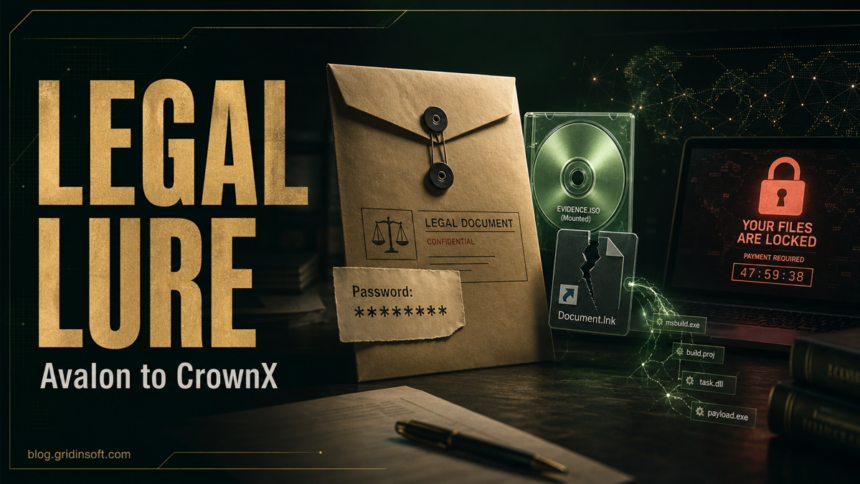
Blackpoint Cyber says it analyzed a new malware framework called Avalon that begins with a spoofed legal-document email and can end with CrownX ransomware. The chain matters because it does not start as an obvious executable attachment. The lure sends the recipient to a password-protected archive, hides the malicious content inside an ISO disk image, and uses a shortcut plus trusted Windows tools to move into the malware stage.
The practical risk is familiar: a legal notice, contract, or protected document can feel urgent enough that someone downloads the archive, mounts the ISO, and clicks the “PDF” shortcut inside. If that happened on a Windows PC, treat the device as exposed even if no ransom note has appeared yet. Avalon was described with credential theft, remote access, recovery disruption, anti-forensic cleanup, and a CrownX ransomware component.
Why This Legal-Document Chain Is Different
In the Blackpoint case, the original message pointed to a protected archive hosted outside email. The archive contained an ISO image named like a secure document package. Inside the mounted image, a fake PDF shortcut launched commands that copied a hidden MSBuild project into a temporary path and ran it with MSBuild.exe.
That chain reduces the number of obvious red flags in the first email. A mail gateway may see a link and password rather than a direct malware attachment. Windows may show a mounted disk image and a shortcut that looks like a document. The visible file name is not enough; the action behind the shortcut is what matters.
Example Of The Email Lure
A real campaign can change subjects, file names, senders, and download hosts.
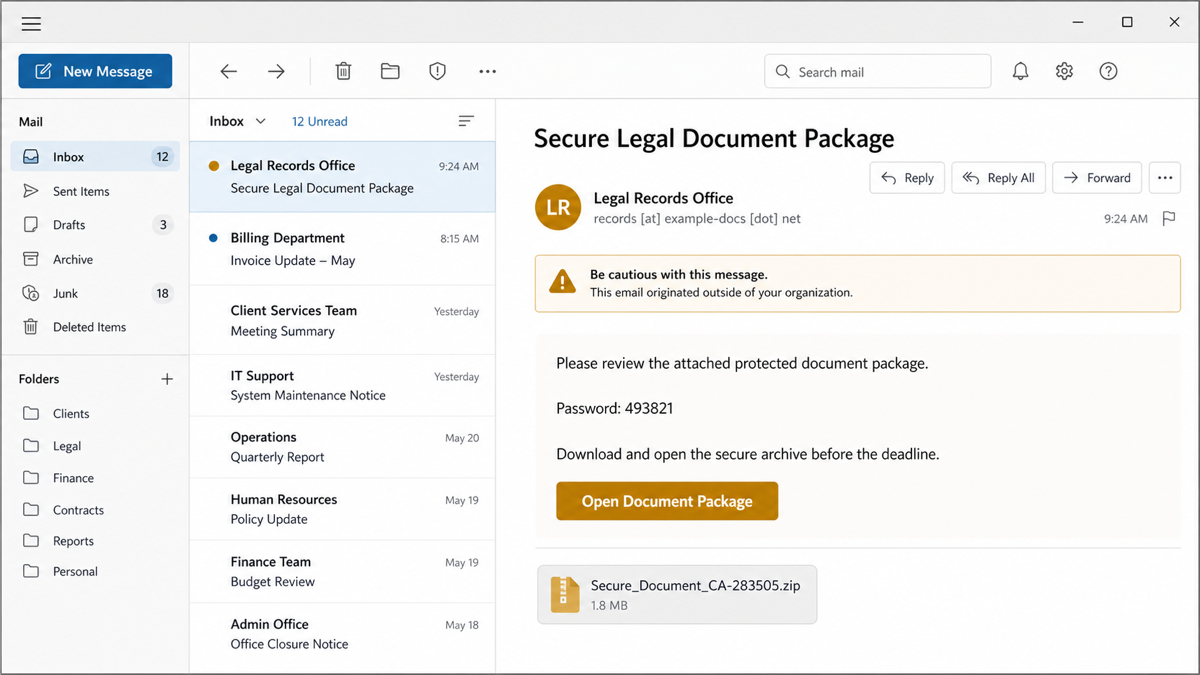
Do not rely on the sender display name. Verify legal, finance, HR, or vendor documents through a known portal or a previously trusted contact path. A real document workflow should not require mounting an ISO image or running a shortcut from a downloaded archive.
Avalon And CrownX Indicators To Recognize
| Stage or artifact | Why it matters |
Secure_Document_CA-283505_pdf.iso |
Disk image used as the “secure document” container in the analyzed chain. |
Secure Document CA-283505.pdf.lnk |
Shortcut that looked like a PDF but launched commands. |
Mimecast Secure File Logs\zfighv.tmp |
MSBuild XML project copied from the ISO and executed through a trusted Windows utility. |
%TEMP%\ngen0cc9.dat |
Temporary copy of the project used during execution. |
helloxcherry[.]com |
Reported staging domain contacted by the managed loader. |
.8hn2yc |
File extension associated with CrownX-encrypted files in the report. |
These indicators are useful for triage, but they are not the whole story. The more durable detection logic is behavioral: a downloaded archive, a mounted ISO, a shortcut launching cmd.exe, MSBuild running from user-writable or temporary paths, outbound connections from a loader chain, and attempts to damage Volume Shadow Copy or Windows recovery data.
What To Do If You Opened The Archive Or ISO
- Disconnect the PC from the network if you clicked the shortcut, ran a file from the ISO, or saw a ransom note. Do not keep using the device for email, banking, admin portals, or password managers.
- Preserve the message and downloaded files for an administrator or incident responder. Do not delete every artifact before someone records sender, URL, archive name, file names, timestamps, and security-tool alerts.
- Change passwords from a clean device for accounts used on the exposed PC. Prioritize email, VPN, cloud storage, browser-synced accounts, admin accounts, and finance systems.
- Check for hidden execution and persistence: Startup folders, Task Scheduler, services, Run keys, user Temp folders, mounted ISO history, and recent MSBuild activity.
- Scan the device before signing back in. If the file ran, a visible quarantine is not enough; a loader, scheduled task, copied project file, or browser/session stealer may remain. Run a full Gridinsoft Anti-Malware scan, remove detections, reboot, and rescan if alerts return.
- Validate backups before restoration. Avalon was reported with recovery-disruption capabilities, so do not assume local restore points or shadow copies are intact. Prefer offline or separately protected backups.
If the page or email made you download an invoice, coupon, tracking app, browser extension, or support tool, scan the PC before opening it again or logging into sensitive accounts.
Scan downloads from this scamFor Admins: Signals Worth Hunting
Look for externally hosted protected archives tied to legal or finance wording, ISO mounting by users who do not normally handle disk images, shortcut execution from mounted images, and MSBuild.exe processing project files from user-writable paths. Correlate that with child processes, short-lived project files, outbound HTTPS, admin-share writes, remote task or service creation, and changes to VSS or Windows recovery settings.
Blackpoint also described recovery-targeting behavior around Volume Shadow Copy Service, Windows Recovery Environment files such as C:\Recovery\WindowsRE\Winre.wim, and registry locations under SOFTWARE\Microsoft\Windows\CurrentVersion\ReAgent. If those artifacts changed near the time of a suspicious document lure, treat it as a broader intrusion rather than a single encrypted-host event.
FAQ
Is Avalon the same as CrownX?
No. Blackpoint describes Avalon as the broader malware framework and CrownX as the ransomware/extortion component inside that framework.
Do I need to worry if I only received the email?
Receiving the email is not the same as infection. The higher-risk point is downloading the archive, mounting the ISO, clicking the shortcut, or running anything from the package.
Is every password-protected archive malicious?
No. But unexpected protected archives delivered through external links are risky because the password can help the file bypass some email inspection. Verify the sender and workflow before opening it.
Can a normal Windows tool like MSBuild be malware?
MSBuild.exe is legitimate. It becomes suspicious when an unexpected shortcut or downloaded project file uses it from a user-writable or temporary path.
References
- Nevan Beal and Sam Decker. “Vibe Coded Extortion: Avalon’s Path from Legal Lure to CrownX Ransom Capabilities.” Blackpoint Cyber, published July 2, 2026, accessed July 5, 2026. https://blackpointcyber.com/blog/avalons-path-from-legal-lure-to-crownx-ransom-capabilities/
- Cybersecurity and Infrastructure Security Agency. “#StopRansomware Guide.” CISA, accessed July 5, 2026. https://www.cisa.gov/stopransomware/ransomware-guide
- MITRE ATT&CK. “Trusted Developer Utilities Proxy Execution: MSBuild (T1127.001).” MITRE, accessed July 5, 2026. https://attack.mitre.org/techniques/T1127/001/