Golden Gh0st RAT is a remote-access Trojan loaded through a separate first-stage component that researchers call Golden Gh0st Loader. A suspected hit is an incident-response problem, not a file-deletion problem: disconnect the device, preserve evidence, revoke exposed sessions from a clean system, and investigate how far the access reached. The name refers to a 2026-tracked Gh0st RAT derivative, not every older campaign that used the public Gh0st RAT codebase.
Expel documented the malware while investigating activity associated with a subgroup it tracks as CylindricalCanine, within the broader GoldenEyeDog cybercrime cluster. Its observed delivery included phishing and files submitted through support portals, with finance organizations in the Asia-Pacific region among the targets. That is the reporting scope, not proof that every Golden Gh0st infection starts the same way or targets the same industry.
Golden Gh0st Loader vs. Golden Gh0st RAT
The two names describe different stages of one attack chain. Keeping them separate helps responders understand why removing the visible launcher may leave the real remote-access component or related persistence behind.
| Component | Role and response meaning |
|---|---|
| Golden Gh0st Loader | Starts the chain. Expel observed a legitimate application loading a malicious companion DLL, which then decrypted and launched a payload stored as a data-looking file. A familiar program name or valid signature therefore does not clear the neighboring files. |
| Golden Gh0st RAT | Provides modular remote access. The documented implant could support screen and keyboard monitoring, process discovery, proxying, and operator-directed actions. Treat a confirmed implant as possible account, session, and business-data exposure. |
The family descends from the older Gh0st RAT code lineage, whose source became public years ago. That shared lineage does not make Golden Gh0st interchangeable with every Gh0st-branded loader or campaign. For comparison, our report on a different Gh0st RAT campaign delivered through a fake Chrome page describes another loader and another lure.
How exposure can begin
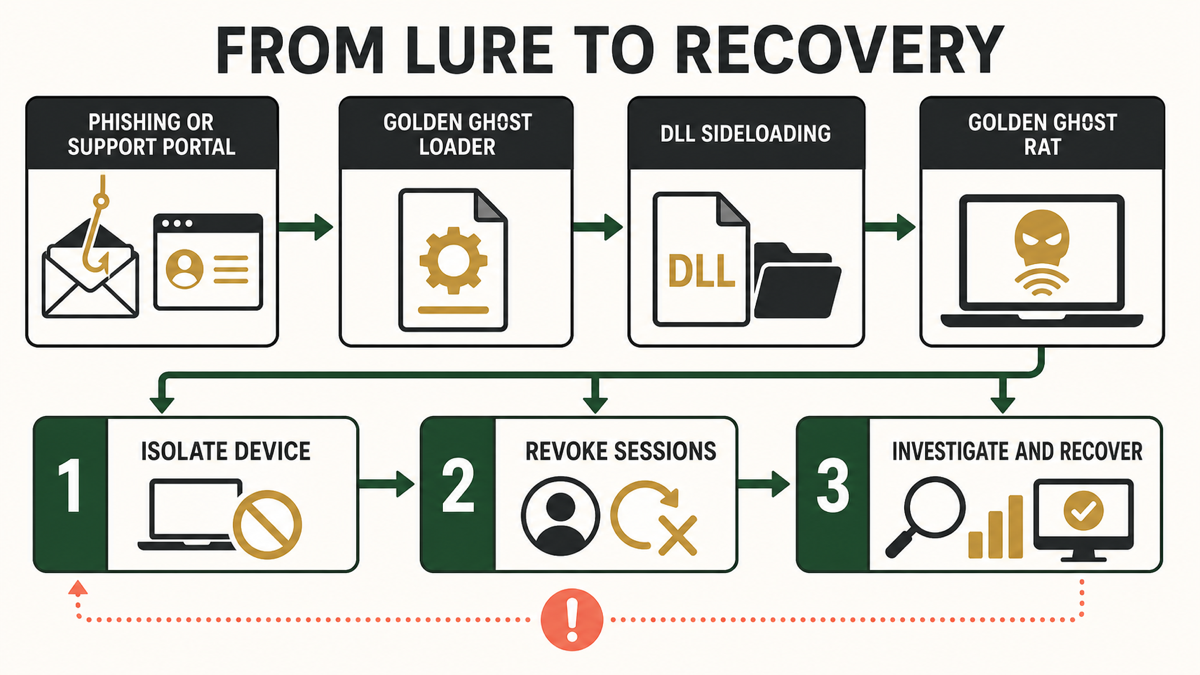
In the incident path described by Expel, the attacker used business-facing channels: phishing messages and submissions that reached support-ticket workflows. A file could look like a screenshot or a routine support attachment. Opening it started a multi-stage chain that used DLL sideloading, where a legitimate executable loads a malicious library placed beside it.
This is why a signed executable is only one signal. Check the publisher, the file source, the complete folder, related process activity, and whether the file arrived through an expected business workflow. The safe-EXE checklist explains how to combine signature, path, source, and behavior rather than trusting one property.
Do not generalize the DigiCert incident into a claim that all DigiCert certificates or all signed files are unsafe. The reported intrusion involved theft and misuse of specific code-signing certificates during a targeted compromise. It demonstrates why certificate trust needs context; it does not invalidate code signing as a whole.
Signals that justify an investigation
Golden Gh0st does not have a single consumer-facing pop-up that proves infection. Investigate the surrounding event when one or more of these conditions are present:
- A user opened an unexpected attachment from a phishing message or support request shortly before an endpoint alert.
- A legitimate-looking executable appeared with an unexpected DLL and encrypted or data-looking companion file in the same folder.
- A security tool reports DLL sideloading, credential access, remote control, screen capture, keylogging, or suspicious proxy behavior.
- New local accounts, changed remote-access settings, unexplained logons, or sessions appear after the file ran.
- The alert returns after the visible file is quarantined, suggesting another stage, scheduled launch, service, or copied component remains.
A file name alone is not proof. Do not download samples or public IOC bundles to “test” a workstation. Preserve the original alert, sender, ticket, process tree, folder listing, and timestamps. If the event began with a message, use the phishing-email checks to identify related recipients without forwarding the attachment.
Golden Gh0st RAT containment and recovery
- Isolate the suspected device. Disconnect Ethernet, Wi-Fi, VPN, and other network paths. In a managed environment, use the endpoint platform’s isolation control so the device remains visible to responders when possible. Do not sign in to sensitive accounts from that machine.
- Preserve evidence before cleanup. Record the alert, file location, hashes already produced by trusted tools, process tree, logged-on users, recent support tickets, and relevant mail headers. If the device belongs to an organization, contact the incident-response or IT security team before deleting files or reimaging it.
- Define the scope. Search endpoint, email, proxy, authentication, and support-platform logs for the same attachment, sender, parent process, and time window. Check whether the account accessed other systems or whether similar files reached coworkers. Do not assume one quarantined endpoint is the full incident.
- Revoke access from a clean system. Terminate active sessions, reset affected credentials, rotate exposed tokens or keys, and review multifactor-authentication changes. Prioritize email, identity-provider, VPN, remote-support, administrator, repository, and financial accounts that were available to the user or device.
- Investigate and eradicate. Use the organization’s EDR and incident-response process first. On a standalone Windows PC, a full Gridinsoft Anti-Malware scan can help identify malicious companions, startup entries, scheduled tasks, services, and other persistence after evidence is saved. Remove confirmed detections, reboot, and scan again; a clean scan cannot prove that no account data was exposed.
- Recover deliberately. Reimage the device when privileged access, uncertain persistence, or incomplete evidence makes cleanup confidence too low. Restore only verified files and settings, patch the system and applications, then monitor authentication and endpoint alerts for recurrence.
Quarantining the visible loader may not remove the RAT, a copied DLL, a scheduled launch, a service, or a secondary tool. Scan only after the evidence needed for an organizational investigation is preserved, and keep account recovery separate from endpoint cleanup.
If the process path is wrong, the name imitates a Windows component, or high CPU started after an unknown installer, scan for hidden miners, services, startup entries, and bundled components.
Scan the isolated Windows PCWhat changes for a home PC and a business endpoint?
A home user who ran a suspicious file should disconnect the PC, use a clean device to secure important accounts, scan the PC, and consider a clean Windows reinstall if remote control or credential theft is confirmed. The post-malware Windows security audit gives a broader checklist for accounts, persistence, backups, and recovery.
A business endpoint needs a wider response because support portals, identity sessions, signing systems, shared drives, administrator tools, and customer data can expand the blast radius. Preserve the machine for investigation, notify the security owner, and review adjacent users and systems. Do not publish or circulate unverified attribution; the CylindricalCanine and GoldenEyeDog labels reflect the researcher’s tracking model and confidence boundaries.
Reduce the chance of another support-channel compromise
- Open untrusted attachments in an isolated analysis workflow rather than on a support agent’s daily workstation.
- Separate support accounts from signing, finance, and administrator privileges.
- Require multifactor authentication and short-lived sessions for remote support and identity platforms.
- Alert on unexpected child processes, DLL loads, and network activity from newly downloaded business attachments.
- Keep endpoint telemetry and support-ticket audit logs long enough to reconstruct a multi-stage event.
- Train staff to verify unusual screenshot, archive, and document submissions through a second channel.
FAQ
Is Golden Gh0st RAT the same as the original Gh0st RAT?
No. It is a newer tracked derivative that shares the Gh0st RAT lineage but has its own loader, communications, modules, and campaign context. Do not use an IOC or cleanup instruction from an unrelated Gh0st campaign without validating it.
Does a valid digital signature prove a Golden Gh0st file is safe?
No. A valid signature confirms who signed that version of a file and whether it changed afterward; it does not prove the signer, certificate, download source, or surrounding files are trustworthy. Combine signature checks with source, path, folder contents, behavior, and reputation.
Is deleting the loader enough?
Not reliably. The loader and RAT are separate stages, and an intrusion may include copied libraries, persistence, operator tools, or stolen sessions. Preserve evidence, investigate the chain, and verify cleanup after a reboot.
Should passwords be changed on the infected PC?
No. Revoke sessions and change credentials from a known-clean device. A remote-access Trojan can observe keyboard input or active sessions, so using the suspected PC can expose the replacement credentials too.
References
- Walton, A. “Introducing CylindricalCanine: The GoldenEyeDog subgroup responsible for the April DigiCert incident.” Expel Threat Intel, July 15, 2026; accessed August 8, 2026. expel.com/blog/introducing-cylindricalcanine/