LastPass has warned users about an active phishing campaign that sends fake security-policy emails from lookalike newsletter and compliance domains. A parallel lure is targeting Bitwarden users. The messages try to move recipients from an urgent “policy review” notice to a fake DocuSign page and a download. LastPass says its systems were not compromised.
If you received the message, do not use its button or download. Check the full sender address and open your password manager from its saved app or known website instead.
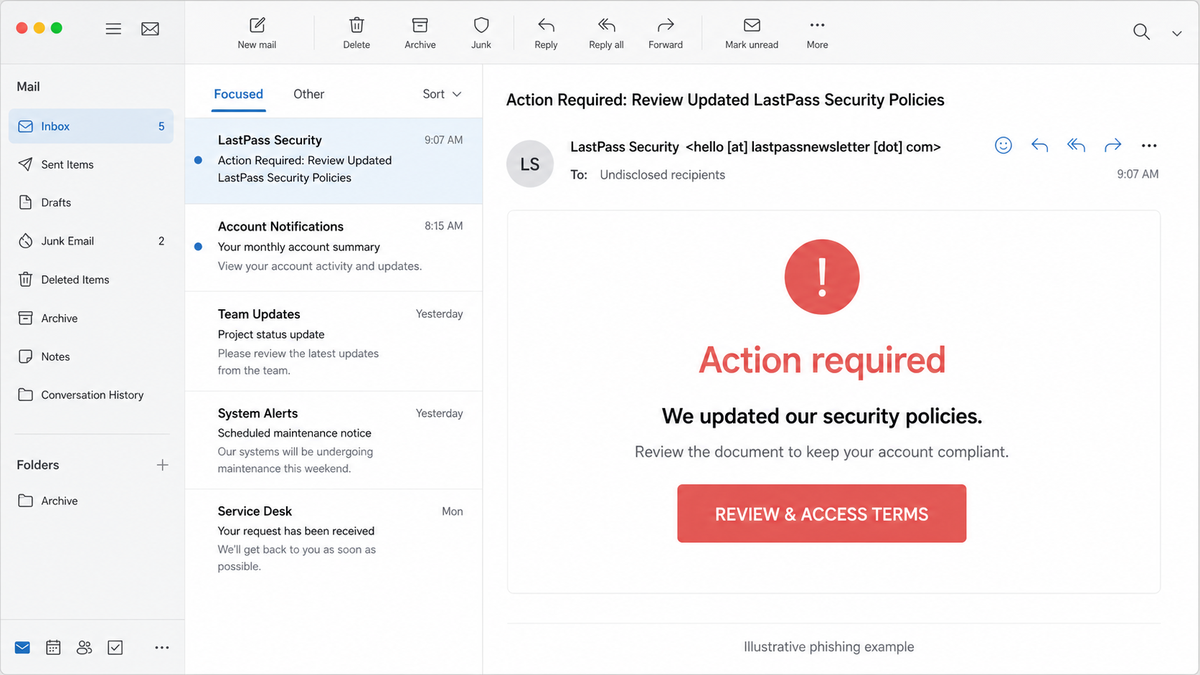
How the fake security-policy email works
The LastPass version was sent as hello@lastpassnewsletter[.]com with the subject Action Required: Review Updated LastPass Security Policies. It used lastpassnewsletter[.]com and lastpasscompliance[.]com, neither of which is an official LastPass domain. The Bitwarden-themed version used hello@bitwardennewsletter[.]com and bitwardencompliance[.]com.
- Urgency: the email claims a security or compliance review is required.
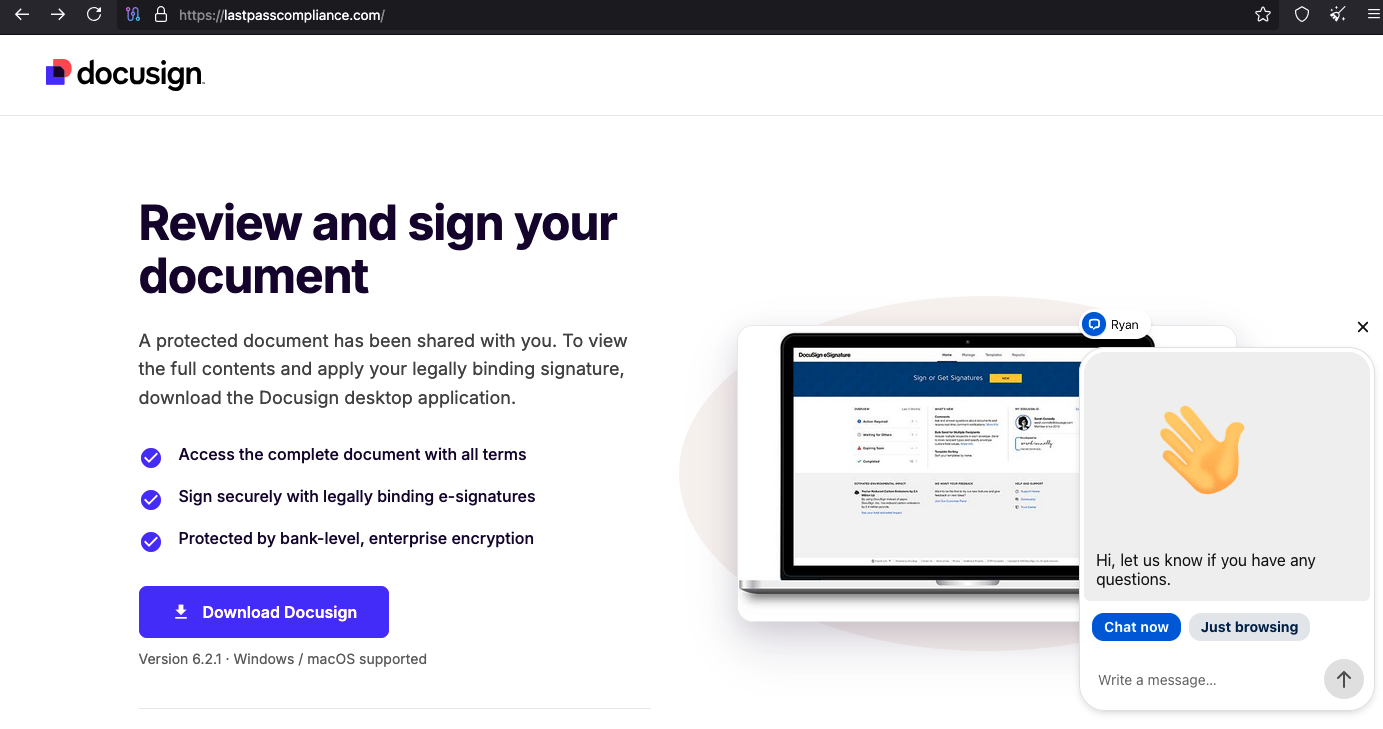
- Brand handoff: a button leads to a password-manager-themed page and then a fake DocuSign screen.
- Download pressure: the page says a desktop application is needed to review or sign the document.
- Credential or malware risk: anything downloaded from that path should be treated as untrusted. A master password entered after following the email should be considered exposed.
Real vs fake LastPass and Bitwarden messages
| Check | What to verify |
|---|---|
| Sender domain | LastPass customer mail should use an official LastPass domain. Bitwarden says automated messages come from [email protected] or [email protected]. A familiar display name does not make a newsletter or compliance domain legitimate. |
| Destination | Do not judge a link by its label. Preview the actual host, or avoid the email link and open the saved app or a known bookmark. |
| Master password | Your password manager should not autofill its master password on a lookalike domain. Never type it into a page reached through an unexpected email. |
| Download request | A policy notice should not require an unknown “DocuSign desktop application.” Stop before downloading or running it. |
The sender name, lock icon, and copied brand graphics are weak signals. The full domain, password-manager autofill behavior, and how you reached the page are stronger checks. Our phishing email checklist covers the same verification steps for other brands.
What to do if you clicked, entered a password, or downloaded a file
- Clicked but entered nothing: close the page, do not allow notifications, and clear any download the page started. Opening a page alone is not proof that the vault was breached.
- Entered your master password: from a trusted device, open the official app or known website, change the master password, revoke other sessions, review recent account activity and MFA, then rotate the highest-value passwords stored in the vault.
- Downloaded but did not run the file: do not open it. Preserve the filename if you need to report the campaign, then delete it and run a security scan.
- Ran the file: disconnect the PC from the network, scan it fully, remove detections, reboot, and scan again. Change passwords only from a clean device. A fake DocuSign download can be a malware delivery step, as explained in our DocuSign email virus guide.
- Report the lure: LastPass asks customers to forward relevant details to
[email protected]. Bitwarden users should use the support route opened from the official site.
If the page or email made you download an invoice, coupon, tracking app, browser extension, or support tool, scan the PC before opening it again or logging into sensitive accounts.
Scan after running the downloaded fileIndicators to block or search for
| Indicator | Observed role |
|---|---|
hello@lastpassnewsletter[.]com |
Sender in the LastPass-themed campaign. |
lastpassnewsletter[.]com |
Lookalike mail domain. |
lastpasscompliance[.]com |
Fake compliance and DocuSign landing domain. |
hello@bitwardennewsletter[.]com |
Sender in the parallel Bitwarden-themed lure. |
bitwardencompliance[.]com |
Lookalike compliance domain. |
These indicators identify this campaign; they do not mean LastPass or Bitwarden infrastructure was breached. At publication time, LastPass had issued a campaign notice, while Bitwarden’s official guidance provided the legitimate sender pattern used for comparison.
References
- LastPass. “LastPass alerts customers to active phishing campaign using lookalike domains; no impact to LastPass systems.” July 13, 2026, accessed July 14, 2026. LastPass campaign notice.
- Bitwarden. “Emails from Bitwarden.” Accessed July 14, 2026. Official Bitwarden sender guide.
- BleepingComputer. “LastPass, Bitwarden users targeted with fake security alerts.” July 14, 2026, accessed July 14, 2026. Campaign corroboration.