If you think an info-stealer is on your PC, treat the computer as untrusted until it is cleaned. Stop signing in from that device, disconnect it from the network if accounts are being accessed right now, and use a clean phone or another trusted computer for password resets. Then remove the malware, revoke active sessions, change passwords, and enable stronger multi-factor authentication for the accounts that matter most.
This guide explains what infostealers steal, how to recognize warning signs, how to remove the malware from Windows, and how to recover accounts after browser passwords, cookies, wallets, or tokens may have been exposed.
I Think an Info-Stealer Is on My PC: First Steps
- Stop using the suspected PC for account recovery. Do not reset passwords, open your password manager, or approve MFA prompts on the same device until it has been scanned and cleaned.
- Use a clean device for emergency accounts. Secure email first, then password manager, banking, crypto wallets, Microsoft/Google/Apple accounts, gaming platforms, social accounts, and work logins.
- Remove the malware before trusting the device again. Check recent downloads, cracked apps, fake update prompts, browser extensions, startup entries, scheduled tasks, and unknown processes.
- Revoke sessions, not only passwords. Infostealers often copy browser cookies and access tokens, so use each service’s security page to sign out of unfamiliar devices and end active sessions where possible.
- Watch for follow-up abuse. Expect phishing, account recovery attempts, payment changes, crypto-wallet theft, Discord/Steam/social spam, and fake support messages after stolen logs are sold.
If the incident started after a game, mod, crack, or fake installer, use the dedicated infostealer after downloading a game or mod checklist after reading the cleanup order below.
What is an Infostealer?
An infostealer is malicious software specifically designed to collect sensitive information from an infected device and transmit it to attackers. These sophisticated programs target high-value data including:
- Saved browser credentials (usernames and passwords)
- Banking information and credit card details
- Cryptocurrency wallet data and private keys
- Browser cookies and session data
- Email account credentials
- Personal documents and identity information
- Cached form data containing personal information
- System information and installed software details
The attack cycle typically follows a standard pattern: after infection, the infostealer silently collects data and stores it in a designated directory. Once collection is complete, it packages this information and sends it to command-and-control (C2) servers operated by threat actors. The most valuable targets for attackers are financial credentials, cryptocurrency wallet information, and authentication data that can be either monetized directly or sold on dark web markets.
Infostealers became a common entry point for account takeover because stolen logs can include passwords, browser cookies, session tokens, wallet data, device details, and screenshots. RedLine, Raccoon, Vidar, Lumma, and newer families change often, but the user response is the same: clean the device first, then rotate credentials and invalidate sessions from a trusted device.
Major Infostealer Families: Technical Analysis
RedLine Stealer
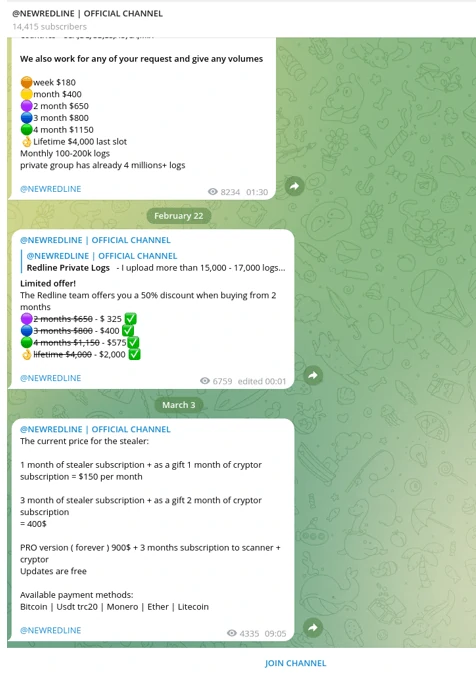
RedLine emerged on Russian cybercrime forums in March 2020 and quickly became the most profitable credential-stealing malware in the logs marketplace. This sophisticated infostealer is specifically engineered to extract sensitive information from web browsers, including:
- Saved login credentials across all major browsers
- Autocomplete form data containing personal information
- Stored credit card information and payment details
- Cryptocurrency wallet credentials and access information
Upon infection, RedLine conducts a comprehensive system inventory, collecting usernames, geographic location data, hardware configurations, and installed security software. This information helps attackers profile victims and evade detection. Distribution occurs through multiple vectors, including malicious advertisements, cracked software, phishing campaigns, and compromised application downloads.
Raccoon Stealer
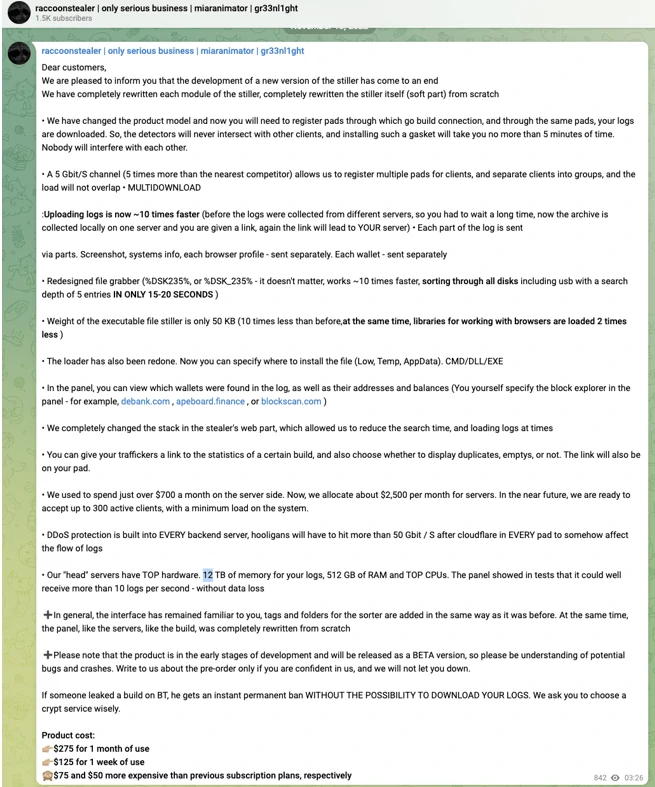
First appearing in 2019, Raccoon Stealer pioneered the malware-as-a-service (MaaS) model for infostealers, initially marketed on underground forums before transitioning to Telegram distribution channels. The malware received a significant update in 2022 that enhanced its detection evasion capabilities and expanded its functionality.
What makes Raccoon particularly dangerous is its ability to steal data from:
- More than 60 different web browsers
- Cryptocurrency browser extensions
- Cryptocurrency desktop wallets
- Authentication cookies enabling session hijacking
- Discord tokens and Telegram session data
Interestingly, Raccoon has a controversial reputation within hacker communities, with many users claiming its operators intercept the most valuable stolen logs before providing them to customers. Despite these allegations, Raccoon remains one of the most widely used infostealers, with its data appearing in numerous credential harvesting operations and follow-up attacks.
Vidar Stealer
Vidar represents the “hit-and-run” category of infostealers, designed for maximum data extraction with minimal footprint. First detected in 2019 during a malvertising campaign, Vidar was distributed alongside GandCrab ransomware using the Fallout exploit kit.
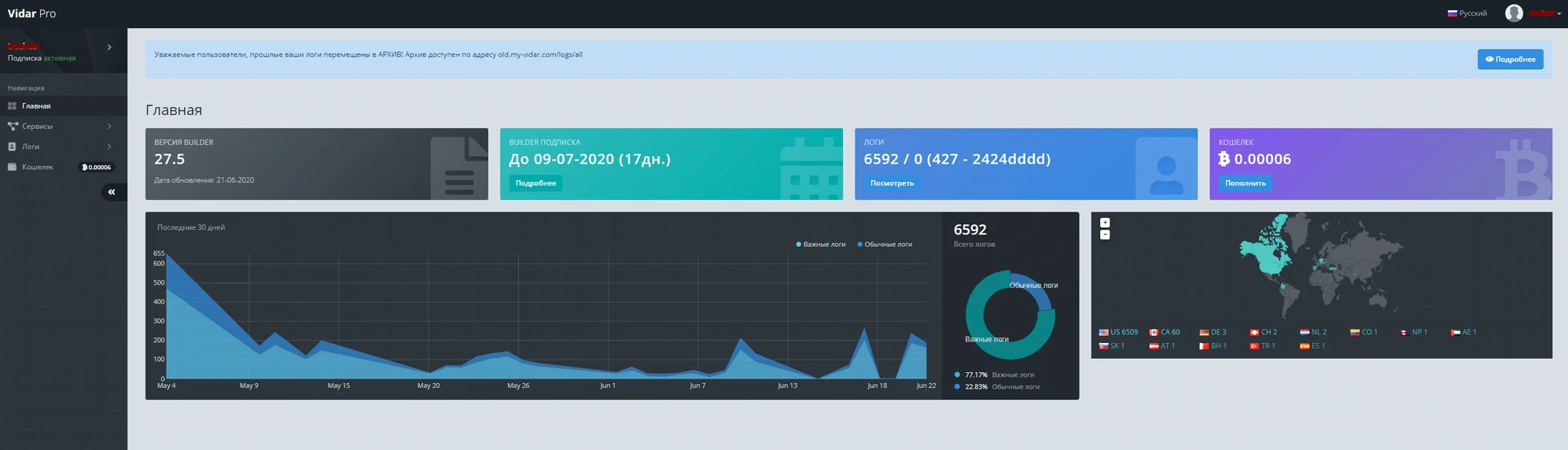
Built using C++ and derived from the earlier Arkei stealer, Vidar is commercially available on underground forums and Telegram channels. Its distinguishing feature is a comprehensive admin panel that allows customers to configure targeting parameters and monitor their botnet of infected systems.
Vidar’s data harvesting capabilities include:
- Browser artifacts (history, cookies, saved passwords)
- Cryptocurrency wallet files and credentials
- PayPal and banking service information
- Two-factor authentication backup codes
- Session tokens for various online services
- Screenshots of the victim’s desktop and active windows
After completing data collection, Vidar executes a “meltdown” procedure, effectively removing itself from the infected system to avoid detection and forensic analysis. This self-deletion capability makes Vidar particularly challenging to detect and analyze after an attack has occurred.
How Infostealers Spread: Common Infection Vectors
Cybercriminals employ various sophisticated distribution methods to deploy infostealers on target systems. Understanding these attack vectors is crucial for effective prevention:
-
Pirated Software and Cracked Applications
Threat actors frequently bundle infostealers with pirated software downloads. These modified applications appear to function normally while silently installing malware in the background. The increased sophistication of modern infostealers makes them particularly difficult to detect in compromised software packages.
-
Malvertising Campaigns
Exploit kits deployed through malicious online advertisements remain one of the most prevalent distribution methods. When users click on these ads, they may unknowingly trigger an infostealer download, or be redirected to phishing sites that deploy the malware. In advanced attacks, even simply viewing the advertisement can initiate a drive-by download through browser exploits.
-
System Compromises and Supply Chain Attacks
Once attackers gain initial access to a system through other means, they often deploy infostealers as secondary payloads. This approach is particularly common in supply chain attacks where legitimate software update mechanisms are compromised to distribute malware to thousands of systems simultaneously.
-
Phishing and Social Engineering
Sophisticated phishing campaigns remain highly effective at delivering infostealers. Attackers impersonate legitimate organizations in emails containing malicious attachments or links to compromised websites. These communications may be sent to large groups (mass phishing) or carefully tailored for specific individuals or organizations (spear phishing).
Technical Methods Used by Infostealers to Extract Data
Modern infostealers employ several sophisticated techniques to extract sensitive information from infected systems:
-
Browser Database Extraction
Infostealers specifically target browser data storage files such as
Login Data,Web Data, andCookiesin Chrome-based browsers, orlogins.jsonandcookies.sqlitein Firefox. These files contain encrypted credentials that the malware decrypts using built-in browser functions or by extracting encryption keys from the system. -
Memory Scraping
Advanced infostealers scan process memory for patterns matching passwords, credit card numbers, and other sensitive data. This technique captures information that might only exist temporarily in memory during browser sessions, bypassing disk encryption and other security measures.
-
Form Grabbing and Web Injection
By hooking into browser processes, infostealers can intercept data as it’s being entered into web forms before encryption or transmission. This approach captures credentials even when they aren’t stored locally, making it effective against security-conscious users who disable password saving features.
-
API Hooking and DLL Hijacking
Infostealers often modify system functions through API hooking or DLL hijacking to intercept cryptographic operations, redirect network traffic, or capture authentication data as it’s processed by the operating system.
How to Protect Your System from Infostealers
Implementing these essential security practices will significantly reduce your risk of infostealer infections:
-
Keep Software Updated
Infostealers frequently exploit known browser vulnerabilities and security flaws in operating systems. Install updates for your OS, browsers, and applications immediately when available to patch these vulnerabilities before they can be exploited.
-
Practice Safe Browsing Habits
Exercise caution when opening email attachments or clicking links, especially from unknown sources. Infostealers commonly spread through malicious email attachments and compromised websites. Be particularly suspicious of emails that don’t address you by name or contain generic urgency messages. Always verify URLs before clicking and ensure you’re visiting legitimate websites.
-
Implement Multi-Factor Authentication
Multi-factor authentication (MFA) provides critical protection against credential theft. Even if an infostealer successfully captures your passwords, MFA requires an additional verification method, significantly reducing the risk of account compromise. Whenever possible, use hardware security keys or authenticator apps rather than SMS-based verification.
-
Avoid Pirated Software
Pirated software frequently contains malware, providing a revenue stream for the cracking groups distributing them. Use only legitimate applications from official sources. Today’s software ecosystem offers numerous free, freemium, and open-source alternatives for most applications, eliminating the need to risk using pirated software.
-
Use Dedicated Security Software
Deploy comprehensive anti-malware protection that includes real-time monitoring and behavioral detection capabilities. GridinSoft Anti-Malware provides specialized detection for infostealers and other advanced threats, offering protection against even the newest variants through its heuristic analysis engine.
How to Detect and Remove Infostealers
Many infostealer infections do not show a dramatic ransom note or fake alert. Treat these signs as suspicious, especially if they appeared after a download, sponsored search result, cracked app, fake browser update, or unexpected email attachment:
- New login alerts, password-reset emails, or security prompts from Google, Microsoft, Steam, Discord, social networks, or banking services.
- Accounts staying compromised after a password change, which can mean cookies or active sessions were stolen.
- Unexpected browser crashes, changed homepage/search settings, strange extensions, or repeated sign-in prompts.
- Unknown processes in Task Manager, new startup entries, scheduled tasks, or recently dropped files in Downloads, Temp, AppData, or browser profile folders.
- Security tools disabled, exclusions added, or warnings after running a crack, mod loader, fake utility, or sponsored download.
Clean the PC before you recover accounts
- Disconnect if abuse is active. If money, crypto, email, or social accounts are being accessed right now, disconnect the PC from Wi-Fi/Ethernet and move account recovery to a clean device.
- Remove the visible cause. Uninstall the suspicious app, delete the fake installer or archive, disable unknown extensions, and check Startup Apps, Task Scheduler, and browser notification permissions.
- Run a full malware scan. Infostealers often arrive with loaders or persistence that can re-create browser changes or download a second payload.
- Reboot and scan again if symptoms return. Repeated alerts, new startup entries, or recurring account prompts after cleanup mean the device should not yet be trusted.
GridinSoft Anti-Malware can check the system for stealer detections, hidden files, startup entries, scheduled tasks, browser changes, and bundled payloads left after the visible download is removed.
If a token stealer ran here, logging back in can hand the attacker your new Discord session, email cookie, Steam token, or wallet access. Scan this Windows PC first, then reset passwords from a clean device.
Scan for info-stealer leftoversRecover accounts in the right order
After the PC is clean, use a trusted device to secure accounts. Start with the inbox and password manager because attackers can use them to reset everything else.
- Email and password manager: change the master password, review recovery email/phone settings, remove forwarding rules, and sign out unfamiliar devices.
- High-value accounts: rotate banking, crypto, Microsoft, Google, Apple, Steam, Discord, social, hosting, and work credentials that were saved or typed on the infected PC.
- Sessions and tokens: use each service’s security page to revoke sessions, remove unknown devices, and disconnect suspicious OAuth apps or browser extensions.
- MFA: enable authenticator-app, passkey, or hardware-key MFA where possible. SMS is better than no MFA, but it should not be the only protection for important accounts.
- Monitoring: watch login history, payment methods, recovery settings, marketplace listings, and messages sent from your accounts for at least several weeks.
If Google shows its malware-related protection warning, use the Google “signed out for your protection” cleanup and account-recovery sequence before signing back in on the suspected PC. For deeper account-specific steps, see the password stealer recovery guide, Microsoft account hacked after malware checklist, and secure password storage guide. If you are still deciding whether a downloaded file is safe, check it before running with the EXE file safety checklist.
Frequently Asked Questions About Infostealers
How do I know if my computer is infected with an infostealer?
Common signs of infostealer infection include unexpected browser behavior, modified settings, unusual network activity, repeated authentication requests from websites, unauthorized account activities, and new unknown processes in Task Manager. However, modern infostealers are designed to operate discreetly, so regular security scans are recommended even without obvious symptoms.
What types of information do infostealers typically target?
Infostealers primarily target high-value data including saved browser passwords, banking credentials, credit card details, cryptocurrency wallet information, authentication cookies, email account credentials, personal documents, and system information. The most valuable targets are financial credentials and cryptocurrency wallets that can be immediately monetized.
Can antivirus software detect and remove infostealers?
While traditional antivirus programs can detect known infostealer signatures, modern variants use advanced evasion techniques that may bypass conventional security. Specialized anti-malware software like GridinSoft Anti-Malware employs behavioral analysis and heuristic detection to identify even new or modified infostealer variants that signature-based detection might miss.
What should I do if my passwords were stolen by an infostealer?
If you suspect your passwords were stolen by an infostealer, first clean or isolate the infected PC, then use a different trusted device to change passwords. Prioritize email, password manager, banking, crypto, Microsoft/Google/Apple accounts, gaming platforms, and social accounts. Revoke active sessions and unfamiliar devices, then enable stronger MFA so a stolen password alone is not enough.
How do infostealers extract passwords from browsers?
Infostealers extract browser passwords through several methods: accessing browser database files where credentials are stored (like Chrome’s Login Data or Firefox’s logins.json), utilizing the browser’s built-in decryption functions to decrypt saved passwords, implementing memory scraping to capture credentials as they’re being processed, and using form grabbing techniques to intercept data before it’s encrypted and sent.
References
- Google Account. “Security Checkup.” Google, accessed July 7, 2026. https://myaccount.google.com/security-checkup
- Microsoft Support. “How to recover a hacked or compromised Microsoft account.” Microsoft, accessed July 7, 2026. https://support.microsoft.com/en-us/accounts-billing/manage/how-to-recover-a-hacked-or-compromised-microsoft-account
- Microsoft Support. “How to sign out of your Microsoft account everywhere.” Microsoft, accessed July 7, 2026. https://support.microsoft.com/en-us/accounts-billing/manage/how-to-sign-out-of-your-microsoft-account-everywhere
Conclusion
Infostealers represent one of the most significant threats to personal and financial security in today’s digital landscape. Their sophisticated data extraction capabilities and continuous evolution make them challenging adversaries. By understanding how these threats operate and implementing the recommended security practices, you can significantly reduce your risk of infection and data compromise.
Remember that infostealer cleanup is both a device problem and an account problem. Regular software updates, cautious downloads, password-manager hygiene, session reviews, and periodic security scans are essential defenses against stolen-log abuse and follow-up account takeover attempts.
Related news: CloudZ highlights why infostealer cleanup should include synced phone data and SMS-based OTP exposure. Read the CloudZ Phone Link OTP theft news.
Trusted software downloads can also become an infostealer risk when a distribution link is hijacked. Our CPU-Z and HWMonitor malware download cleanup guide explains the CPUID case and the credential-rotation steps to take after running a poisoned utility installer.