Dark web malware is no longer just a few hackers swapping samples on hidden forums. In 2026, the bigger risk is an underground service economy: infostealer logs, stolen browser cookies, rented malware builders, initial-access listings, and ransomware affiliate programs. If you only browse a dark web page, infection is not automatic. The real danger starts when you download a file, run a “tool,” log in with real accounts, reuse passwords, or ignore signs that your device has already been compromised.
For ordinary users, the practical question is not “which darknet forum sells which malware?” It is “could my passwords, browser sessions, wallet data, or device access be packaged and sold?” That is the angle this guide focuses on: how dark web malware markets work, how victims usually get pulled in, and what to do if you suspect your data or computer is involved.
What Dark Web Malware Means Today
Dark web malware is an umbrella term for malicious tools, stolen access, and stolen data traded through underground forums, leak sites, private shops, Telegram channels, and invite-only communities. The “dark web” part matters because these spaces make it easier for criminals to advertise, vet buyers, hide identities, and monetize stolen information.
The most important shift is that cybercrime has become modular. A person does not need to write malware from scratch to become dangerous. They can buy a loader, rent an infostealer panel, purchase stolen credentials, hire a spammer, or buy access to an already-compromised company account. Fortinet’s 2026 threat landscape reporting describes this as an industrialized system, with stealer logs dominating advertised dark web database activity and credential-stealer malware feeding the wider attack chain.
That is why the old “malware samples on forums” framing is too narrow. Modern dark web malware markets are less like a file dump and more like a supply chain.
What Criminals Actually Buy and Sell
The listings change constantly, but most dark web malware trade falls into a few practical categories:
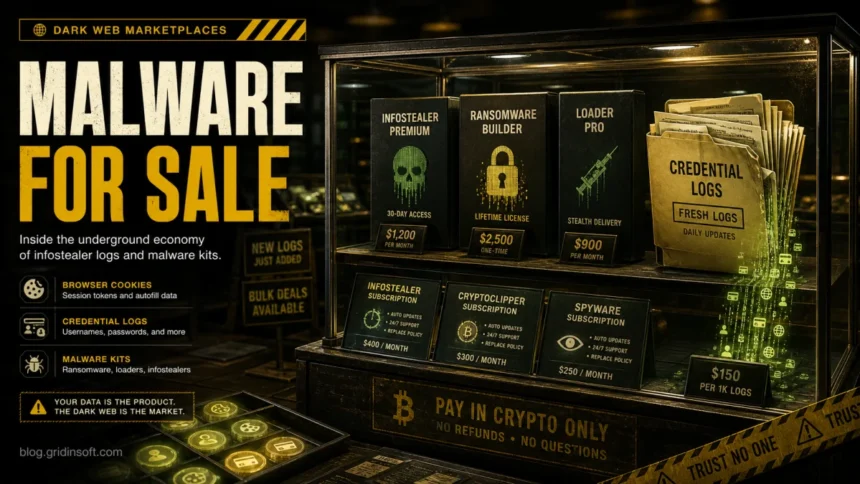
- Infostealer logs: packages of data stolen from infected devices, often including browser passwords, session cookies, autofill data, wallet files, screenshots, and system details.
- Malware-as-a-Service: subscription access to stealers, loaders, botnets, crypters, spam tools, and panels that make deployment easier for low-skill operators.
- Initial access: VPN, RDP, cloud, email, or admin credentials sold to ransomware crews and fraud operators.
- Ransomware affiliate access: programs where affiliates break into victims and share ransom revenue with the ransomware developer.
- Stolen databases and combolists: old breach records, password dumps, and merged credential lists used for credential stuffing.
- Scam and phishing kits: ready-made pages, fake login panels, and templates that steal account credentials or payment data.
For a home user, an infostealer log is often the most serious item. A password leak from an old breach is bad, but a stealer log can include fresh browser cookies and session tokens. Those may let attackers bypass a password prompt until the session is revoked or expires.
How Victims Get Pulled Into the Market
Most victims are not infected because they intentionally visited a hidden forum. They are infected because malware operators use ordinary lures that point back into the underground economy.
- Cracked software, game cheats, fake installers, and “free” tools often carry loaders or stealers. This is one reason downloads from unofficial sources are still a high-risk behavior.
- Fake browser updates and ClickFix-style prompts trick users into running commands or scripts that install malware. If the prompt asked you to paste a command into Terminal or PowerShell, compare it with our ClickFix evolution notes.
- Phishing attachments deliver stealers, loaders, or remote-access malware disguised as invoices, shared documents, shipping notices, or account confirmations.
- Malicious ads and poisoned search results send users to fake download pages that look more polished than old malware sites.
- Telegram, Discord, and forum links are used to distribute password-protected archives, “private builds,” or supposed security tools.
The underground market then monetizes whatever the malware collects. A stolen gaming account may become spam infrastructure. A browser cookie may become account takeover. A work VPN login may become initial access for a ransomware affiliate. CISA’s ransomware guidance treats compromised credentials, phishing, and precursor malware infections as major access paths because one small infection can turn into a larger compromise.
Signs Your Data or Device May Be Involved
You may not see a dramatic warning when an infostealer runs. Many stealers collect data quickly and then remove themselves or go quiet. Watch for these clues:
- your email, Google, Microsoft, Discord, Steam, Telegram, or social accounts show unfamiliar sessions;
- friends receive spam or scam messages from your account;
- password reset emails arrive for services you did not touch;
- a bank, credit-card provider, Google, or monitoring service says your information appeared on the dark web;
- browser passwords, cookies, or crypto-wallet data were stored on a device where you ran suspicious software;
- antivirus or security software reports a stealer, loader, trojan, suspicious script, or unknown outbound connection;
- new startup items, browser extensions, scheduled tasks, or unknown processes appear after a download.
A dark web alert does not always mean your current computer is infected. It may come from an old data breach. But if the alert appears after you installed a suspicious file, ran a cracked tool, followed a fake fix, or entered credentials on an unknown page, treat the device as potentially compromised until checked.
If You Downloaded Something From the Dark Web
If you downloaded and ran a file from a dark web source, do not keep using the same device for banking, email, password changes, or crypto accounts until you check it.
- Disconnect the device from the internet if you see active suspicious behavior, account takeovers, or security alerts.
- Use a clean device to change the passwords for email first, then banking, cloud storage, social accounts, gaming accounts, and password managers.
- Revoke active sessions where services provide that option. This matters because stolen cookies can keep an attacker logged in.
- Enable MFA, preferably with an authenticator app or hardware key for important accounts.
- Scan the suspicious device with trusted anti-malware software. Gridinsoft Anti-Malware can help check Windows systems for stealers, loaders, trojans, and persistence items.
- Check suspicious files before opening them with a file scanner when possible. The Gridinsoft Online Virus Scanner is useful for a second look at a file or URL.
- Back up only personal documents if you decide to reinstall Windows. Do not back up unknown executables, cracked installers, browser profiles, or suspicious archives.
If cryptocurrency wallets, banking credentials, business accounts, or work VPN credentials were present on the device, assume the impact is higher. Notify the relevant provider or administrator quickly.
If Your Information Was Found on the Dark Web
Dark web monitoring alerts are often vague, so first verify the alert without clicking message links. The FTC recommends contacting the company through a website or phone number you know is real if you believe the alert came from a legitimate monitoring service.
Then triage by data type:
- Email only: expect phishing and spam; secure the email account, review recovery options, and enable MFA.
- Password exposed: change it everywhere it was reused; prioritize email and financial accounts.
- Phone or address exposed: watch for targeted scam calls, delivery scams, and fake support attempts.
- Card number exposed: contact the card issuer and watch transactions.
- SSN, date of birth, or identity documents exposed: consider a fraud alert, credit freeze, and an IdentityTheft.gov recovery plan.
- Browser cookies or stealer-log indicators exposed: log out of active sessions, rotate passwords from a clean device, and scan the original device.
How to Reduce the Risk
The safest dark web malware advice is boring but effective: do not download unknown files, do not run “verification” commands, and do not use real-life accounts in untrusted places. If you need to research dark web material for legitimate reasons, start with a safer browsing setup and the cautions in our dark web safety guide, then use a dedicated environment, avoid personal credentials, keep Tor Browser current, and separate research activity from everyday browsing.
For everyday users, focus on controls that break the resale value of stolen data:
- use unique passwords with a password manager;
- turn on MFA for email, banking, cloud, social, gaming, and work accounts;
- keep Windows, browsers, Tor Browser, and security software updated;
- avoid cracked apps, fake “activators,” cheats, and unknown archives;
- review browser extensions and remove anything you do not recognize;
- use official download pages, not forum mirrors or shortened links;
- scan suspicious files and URLs before opening them;
- watch for unusual sign-in alerts and revoke sessions after any suspected infection.
Organizations should also monitor for exposed credentials, restrict remote access, enforce phishing-resistant MFA where possible, and treat precursor malware seriously. A stealer infection on one endpoint can become the entry point for broader access, data theft, or ransomware.
FAQ
Can you get malware just by visiting the dark web?
Simply opening a page does not automatically infect a well-updated browser, but dark web browsing is riskier when you click unknown links, enable unsafe scripts, download files, or log in with real accounts. Most serious infections start with running a file or command.
What are infostealer logs?
Infostealer logs are bundles of data stolen from infected devices. They may include saved browser passwords, cookies, autofill data, wallet files, screenshots, and system details. Attackers sell these logs because they can lead directly to account takeover.
Is a dark web alert proof that my computer has malware?
No. A dark web alert may come from an old data breach. It becomes more suspicious if it follows a recent download, phishing attachment, fake update, cracked software, or signs of account takeover. In that case, scan the device and rotate passwords from a clean device.
Can I remove my data from the dark web?
Usually you cannot fully remove data once criminals have copied it. The realistic goal is damage control: change reused passwords, revoke sessions, enable MFA, replace exposed cards, freeze or monitor credit when sensitive identity data is involved, and watch for targeted scams.
Should I pay someone who claims they can erase my dark web data?
Be careful. Many “dark web removal” offers overpromise. A legitimate service may help monitor exposure or reduce data-broker visibility, but it cannot guarantee deletion from criminal forums, private chats, or copied databases.
References
- Fortinet. “Fortinet 2026 Global Threat Landscape Report Reveals a Surge in AI-Enabled Cybercrime.” Fortinet / FortiGuard Labs, accessed June 7, 2026. https://www.fortinet.com/corporate/about-us/newsroom/press-releases/2026/fortinet-2026-global-threat-landscape-report-reveals-surge-in-ai-enabled-cybercrime-increase-ransomware-victims-year-over-year
- Cybersecurity and Infrastructure Security Agency. “#StopRansomware Guide.” CISA, revision date October 19, 2023, accessed June 7, 2026. https://www.cisa.gov/stopransomware/ransomware-guide
- Federal Trade Commission. “Did you get an email saying your personal info is for sale on the dark web?” FTC Consumer Advice, accessed June 7, 2026. https://consumer.ftc.gov/node/79693