The safest way to store passwords is to use a reputable password manager, protect it with one long master password, turn on multi-factor authentication, and keep recovery codes offline. Do not keep passwords in notes, screenshots, email drafts, spreadsheets, chat messages, or plain text files. If a site supports passkeys, use a passkey first and keep the password manager as your fallback for accounts that still require passwords.
For a broader breakdown of phishing, credential stuffing, spraying, and infostealer routes, see the Gridinsoft guide to password attacks.
How should I store passwords securely?
- Use one password manager vault for everyday logins.
- Generate a unique password for every account instead of reusing patterns.
- Protect the vault with a long master password or passphrase that is not used anywhere else.
- Enable MFA on the password manager, email, banking, cloud, work, and social accounts.
- Print or write recovery codes and store them somewhere private and offline.
- Scan the device before changing passwords if you suspect malware, browser hijacking, or credential theft.
Best place to store passwords
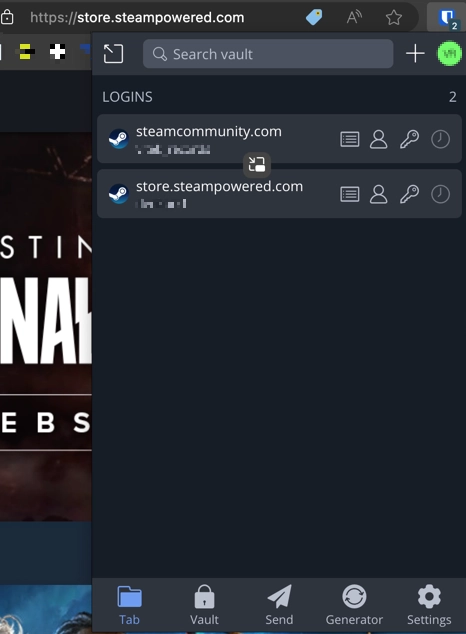
For most people, the best place to store passwords is a dedicated password manager. It stores logins in an encrypted vault, generates strong unique passwords, and fills them only on the matching website or app. That matters because the biggest password failure is reuse: when one website leaks a password, attackers try the same email and password on banking, email, cloud storage, shopping, and social accounts.
A browser password manager is better than a notes app or spreadsheet, but it depends heavily on the security of your device, browser profile, sync account, and operating system login. A dedicated password manager is usually stronger for important accounts because it gives you clearer vault security, recovery options, cross-device controls, and password health checks.
| Storage method | Good for | Main risk | Recommendation |
| Password manager | Everyday logins, passkeys, secure notes, recovery records | Weak master password, missing MFA, infected device | Best everyday option |
| Browser password manager | Low-risk personal accounts on a well-protected device | Compromised browser profile, sync account, or device | Acceptable with strong device security and MFA |
| Paper emergency sheet | Recovery codes, vault recovery key, backup email details | Physical loss, theft, photos, shared spaces | Good for offline recovery only |
| Encrypted local file | Advanced users who can maintain backups | Lost key, weak encryption, cloud sync mistakes | Use only if you understand the tradeoffs |
| Notes, screenshots, documents | Convenience | Easy to leak, sync, search, or steal | Avoid |
| Reused password pattern | Nothing important | Credential stuffing after any breach | Never use for important accounts |
Password manager checklist
Choose a password manager that you will actually use every day. Security features are useful only if the app works reliably on your phone, computer, browser, and any work device you are allowed to use.
- Strong vault protection: long master password support, MFA, and clear recovery options.
- Unique password generation: default passwords should be long, random, and different for each account.
- Password health checks: warnings for reused, weak, or known-compromised passwords.
- Passkey support: useful because more services are moving away from passwords where possible.
- Secure sharing: share access through the manager instead of sending passwords in chat or email.
- Export and backup plan: know how to recover or move your vault before you need it.
- Transparent security model: prefer providers that explain encryption, account recovery, and incident response clearly.
Create a strong master password
Your master password protects every login in the vault, so it must be long, unique, and memorable. A passphrase made of several unrelated words is usually easier to remember than a short “complex” password. Do not reuse your master password anywhere else, do not store it inside the same vault as the only copy, and do not type it on a device you suspect is infected.
A good master password can be a sentence-like phrase with spaces and unusual words. Avoid quotes, song lyrics, birthdays, pet names, keyboard walks, and small variations of old passwords. If your password manager supports a recovery key, print or write it down and store it separately from your daily devices.
MFA and recovery codes
MFA does not make passwords unnecessary, but it gives attackers another barrier when a password is phished, leaked, guessed, or stolen by malware. Use MFA on your password manager first, then on your email account, banking, cloud storage, social media, and work accounts.
Recovery codes deserve special handling. Do not keep the only copy of recovery codes inside the same password manager account they are meant to recover. Print them, write them down, or store them on an encrypted offline drive kept in a safe place. For high-value accounts, keep a short emergency sheet that lists:
- password manager name;
- account email used for the vault;
- recovery key or recovery code location;
- backup MFA method location;
- trusted contact or family access instructions, if needed.
Use passkeys where they are available
Passkeys are a passwordless login method supported by many modern devices and services. They are harder to phish because there is no reusable password to type into a fake website. When an account offers a passkey, add it and keep your password manager updated with any remaining password or recovery information.
Passkeys are not a reason to ignore recovery planning. You can still lose access if you lose a device, reset an account badly, or forget which platform stores the passkey. Keep backup sign-in methods documented in your emergency sheet.
Password storage mistakes to avoid
- Do not save passwords in a file named “passwords”, “logins”, or “accounts”.
- Do not keep passwords in email drafts, chat messages, screenshots, or synced notes.
- Do not store recovery codes in the same account they are meant to recover.
- Do not reuse the same password with small changes such as a number or year at the end.
- Do not share passwords by copying them into unencrypted messages.
- Do not disable MFA because it feels inconvenient.
- Do not enter your master password on a device showing malware symptoms, fake browser extensions, or suspicious pop-ups.
What to do if a password was leaked
If a password was leaked, act in the right order. Changing passwords from an infected device can hand the new passwords to the same attacker, especially after an infostealer infection or suspicious browser extension.
- Use a clean device if you suspect malware or phishing.
- Change the leaked password immediately.
- Change it everywhere it was reused.
- Enable MFA on the affected account.
- Review recent sign-ins, active sessions, forwarding rules, recovery email, phone number, and connected apps.
- Run a security scan if the leak may have come from malware, a fake login page, or a suspicious download.
- Check related accounts after a data breach or data leak.
After uninstalling the suspicious app or deleting the visible threat, use Gridinsoft Anti-Malware to check hidden files, startup entries, scheduled tasks, bundled apps, browser changes, and other persistence points that can restore malware.
Download Anti-MalwareAre browser password managers safe?
Browser password managers are convenient and can be safe enough for many low-risk accounts when your device is locked, updated, and protected with MFA. They become risky when the browser profile is shared, the operating system account has a weak password, sync is exposed, or the browser has malicious extensions.
For banking, email, cloud storage, work systems, crypto wallets, and admin accounts, use a dedicated password manager or passkey where possible. If your browser starts opening unwanted tabs, installing unknown extensions, or redirecting searches, review our guide to browser extensions that keep reinstalling themselves before trusting saved credentials on that device.
If you run a website or app
This guide is mainly about storing your own passwords. If you run a website or app, the rule is different: never store user passwords in plain text, reversible encryption, logs, analytics, support tickets, or backups that can be casually searched. Store only salted password hashes produced by a modern password hashing function, and follow a current password storage standard such as OWASP guidance.
For new systems, use a memory-hard password hashing algorithm such as Argon2id where your platform supports it. If you use bcrypt or PBKDF2 for compatibility, use current work factors, unique salts, and a migration plan. Let users paste passwords so they can use password managers, and do not force arbitrary periodic password resets unless there is evidence of compromise.
FAQ
What is the most secure way to store passwords?
For everyday use, the most secure practical method is a dedicated password manager protected by a long master password and MFA, with recovery codes stored offline. Use passkeys where websites support them.
Is it safe to store passwords in a browser?
It can be acceptable for low-risk accounts if the device, browser account, and operating system are protected. A dedicated password manager with MFA is usually better for important accounts.
Should I write passwords on paper?
Paper can be useful for recovery codes or an emergency sheet because malware cannot search it remotely. Store it privately, keep it away from cameras and shared spaces, and avoid using paper as your everyday password system.
What is the safest password?
A safe password is long, unique, randomly generated where possible, and protected by MFA. Length and uniqueness matter more than replacing letters with symbols.
Can malware steal passwords from a password manager?
Malware can still capture keystrokes, browser sessions, clipboard data, screenshots, or unlocked vault contents. Clean the device before changing passwords and avoid unlocking the vault on a system you do not trust.
Should I store MFA codes in my password manager?
It is convenient, but it puts passwords and one-time codes in the same place. For high-value accounts, keep MFA in a separate authenticator app or hardware key and store backup codes offline.
References
- CISA, “Cyb3R_Sm@rT!: Use a Password Manager to Create and ‘Remember’ Strong Passwords,” Cybersecurity and Infrastructure Security Agency, accessed June 6, 2026. https://www.cisa.gov/resources-tools/training/cyb3rsmrt-use-password-manager-create-and-remember-strong-passwords
- National Cyber Security Centre, “Managing your passwords,” reviewed May 21, 2026, accessed June 6, 2026. https://www.ncsc.gov.uk/collection/top-tips-for-staying-secure-online/password-managers
- NIST, “SP 800-63B: Authentication and Lifecycle Management,” National Institute of Standards and Technology, accessed June 6, 2026. https://pages.nist.gov/800-63-3/sp800-63b.html
- OWASP, “Password Storage Cheat Sheet,” OWASP Cheat Sheet Series, accessed June 6, 2026. https://cheatsheetseries.owasp.org/cheatsheets/Password_Storage_Cheat_Sheet.html