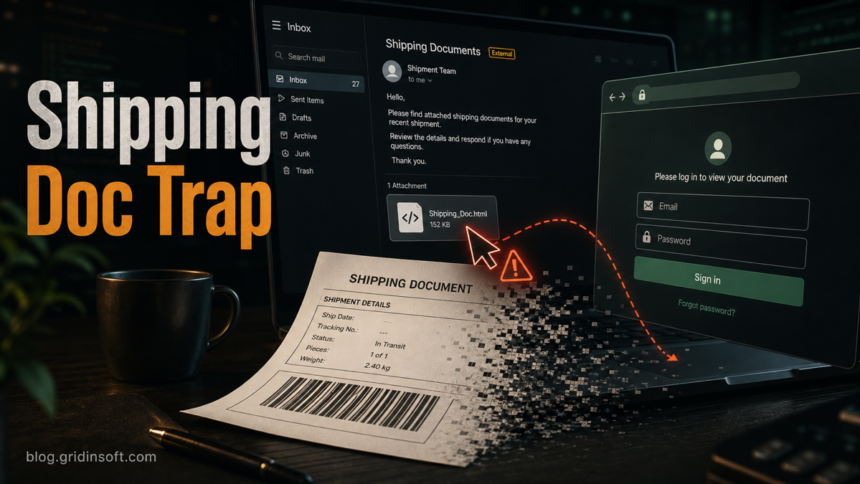
The FedEx Shipping Labels/Documents In PDF Format email scam is a phishing lure, not a real shipment notice. It usually claims that shipping labels, invoices, or delivery documents are attached as a PDF, but the attachment or link leads to an HTML login page that can steal email, FedEx, DHL, or payment credentials. A similar DHL Express Commerce version uses the same shipping-document pressure: open the document now, sign in, and review the delivery. A newer DHL link can add a fake parcel OTP or waybill-confirmation step before asking for an email password. Another DHL Express Shipment Update version shows a tracking number and a “Processed at Sort Facility” status before its Track Shipment button opens a non-DHL sign-in form hosted through Amazon S3. Another DHL parcel-document message promises a DOC or tracking file but opens a non-DHL login form. A separate Damaged Package complaint pretends to come from a customer, then hides an executable download behind alleged unboxing evidence.
If you were not expecting the shipment, do not open the attachment and do not sign in through the message. Verify the shipment from a known FedEx or DHL website, not from the email link. If you already opened the file or entered a password, change that password from a clean device, revoke active sessions, enable multi-factor authentication, and scan the computer for downloaded files or browser changes.
What The Fake Shipping Email Is Trying To Do
This lure works because shipping emails feel routine. The FedEx version commonly frames the message as Shipping Labels/Documents In PDF Format and may use an HTML attachment with a name such as FedEx~Shipping invoice.html. The DHL copycat may mention shared documents, invoice payment, or a status update and push the reader toward a document page that asks for login details.
For a deeper same-family courier lure, our SF Express e-invoice HTML phishing analysis shows how a local HTML attachment can send credentials to Telegram and EmailJS before a decoy redirect.
The key trick is the mismatch between the promise and the file. A message says PDF or document, but the user receives an HTML file, a browser login form, or a page hosted away from the real courier. FedEx and DHL both publish fraud guidance telling users to inspect suspicious links, attachments, sender addresses, and unexpected payment or account requests instead of trusting the brand name alone [1] [2].
Example
The exact sender, tracking number, and attachment name can change, but these fake shipping-document emails usually use short wording that pushes you to open a document or sign in quickly. The screenshots below are illustrative mockups so you can recognize the pattern without opening a real suspicious attachment.
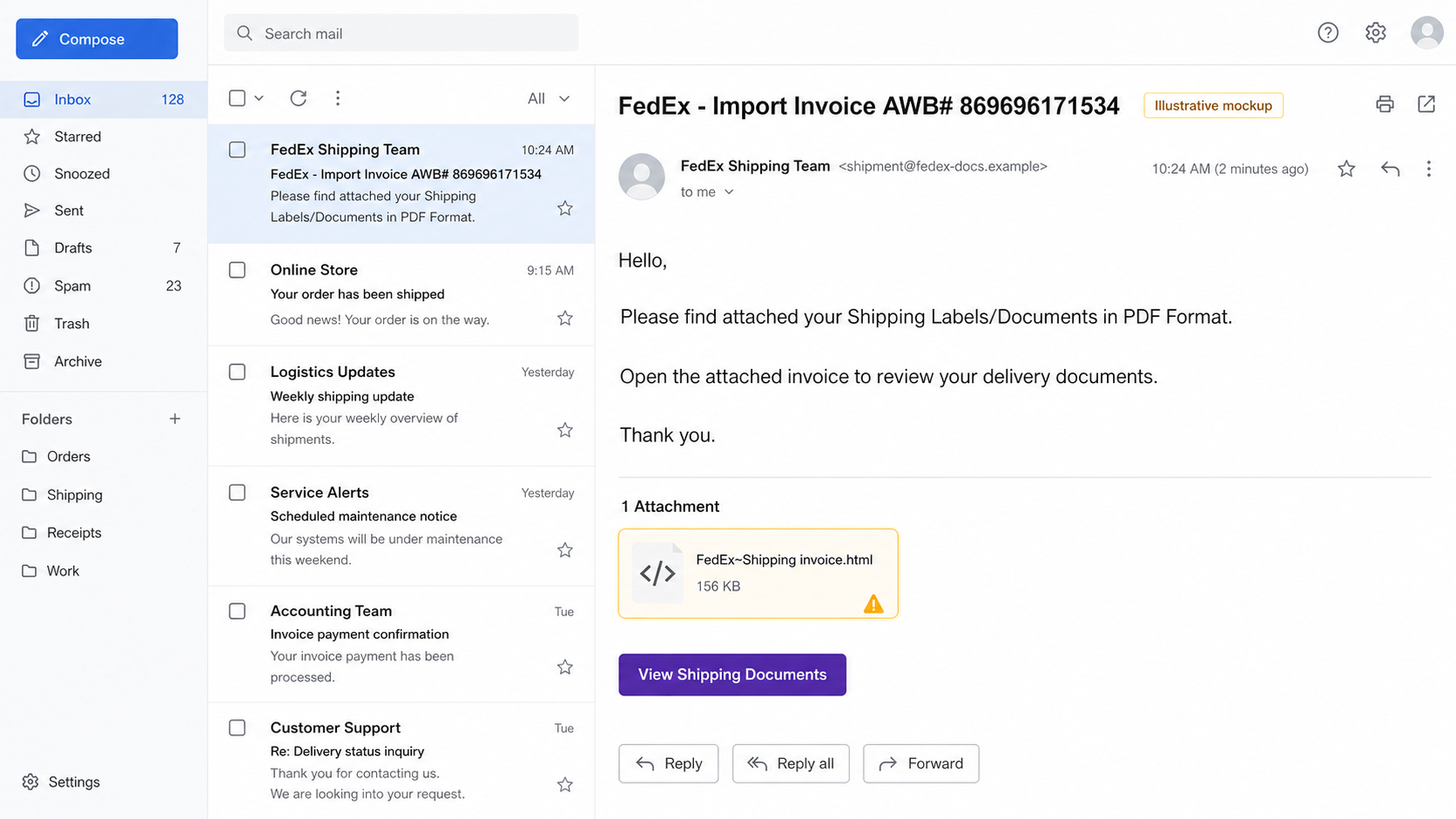
Example:
Subject: FedEx – Import Invoice AWB# 869696171534
From: FedEx Shipping Team — shipment [at] fedex-docs [dot] example
Hello,
Please find attached your Shipping Labels/Documents in PDF Format.
Open the attached invoice to review your delivery documents.
Thank you.
Attachment: FedEx~Shipping invoice.html
Button: View Shipping Documents
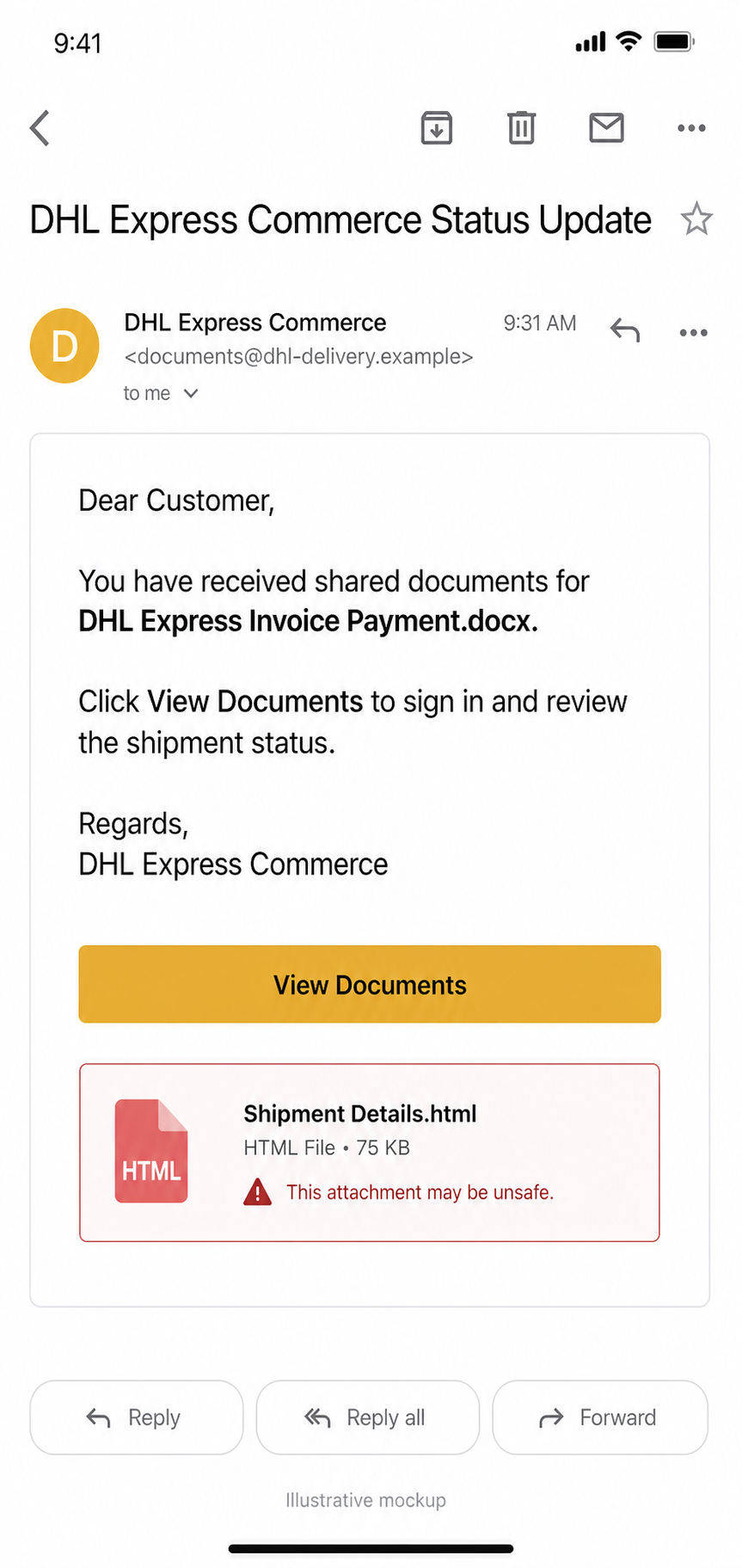
A DHL-themed version may use wording like this:
Subject: DHL Express Commerce Status Update
From: DHL Express Commerce — documents [at] dhl-delivery [dot] example
Dear Customer,
You have received shared documents for DHL Express Invoice Payment.docx.
Click View Documents to sign in and review the shipment status.
Regards,
DHL Express Commerce
Button: View Documents
Do not treat the exact words as the only warning sign. Scammers often rotate airway bill numbers, filenames, sender domains, and button text. The stronger clue is the behavior: an unexpected shipping document asks you to open an HTML file, sign in through a link, or review a document from a domain you did not choose yourself.
Damaged Package Customer Complaint Email
A different shipping lure targets a business or customer-service team instead of a shopper waiting for a parcel. The sender calls herself Monica Barnes, says the package interior arrived heavily damaged, and asks whether an exchange or refund is appropriate. She claims that an unboxing video and damage photos were too large to attach, so the recipient must open an external link to review them.
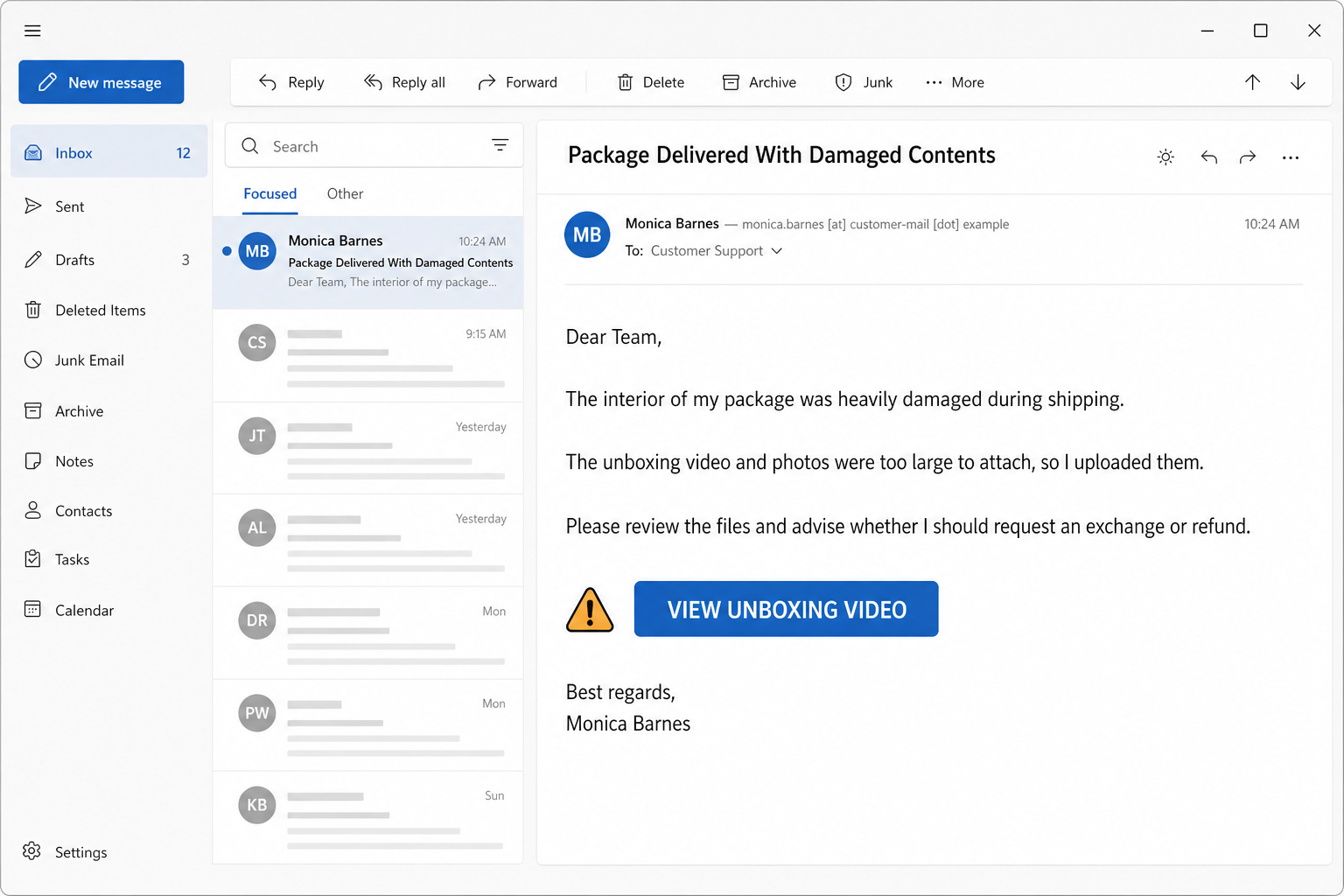
Example:
Subject: Package Delivered With Damaged Contents
From: Monica Barnes — monica.barnes [at] example [dot] com
Dear Team,
The interior of my package was heavily damaged during shipping.
The unboxing video and photos were too large to attach, so I uploaded them.
Please review the files and advise whether I should request an exchange or refund.
Button: VIEW UNBOXING VIDEO
Best regards,
Monica Barnes
In the observed chain, the link opened a fake video page that said the video could not be previewed and offered a Download button. The download was named Delivery_Unboxing_Verification.zip; extracting it exposed an executable installer. The payload family was not identified. A zero-detection result recorded at one point in time did not prove the executable was safe, because a new or short-lived file can be unknown to scanners before analysts and vendors classify it.
What To Do At Each Exposure Stage
- You only read the email: do not use its link, report it through your company’s normal phishing channel, and delete it after any required evidence is preserved. Reading the message alone is not a reason to assume malware ran.
- You clicked but no file downloaded: close the page, do not press the Download button, and check the browser’s Downloads list. If nothing was saved and you entered no data, a full malware-removal workflow is usually unnecessary; still report the link so it can be blocked.
- You downloaded the ZIP but did not open it: do not extract or run it. Delete or quarantine the archive, then use the downloaded-but-not-opened checklist if your security team needs to preserve and inspect the sample.
- You extracted or ran the executable: treat the device as potentially compromised even if an earlier scan showed zero detections. Run a full security scan, remove detections, reboot, and scan again. Use the EXE safety checklist for path, signature, and hash evidence, and rotate exposed passwords from a clean device if the browser or account session may have been reached.
DHL Express Shipment Update Tracking Scam
One phishing version uses the subject DHL Express Shipment Update: JD00070132026. It shows a tracking number, a processed date, and a Processed at Sort Facility status to make the message look like a routine automated notification. The Track Shipment button opens a DHL imitation hosted under an Amazon S3 amazonaws.com address, where an email-and-password form appears immediately.
Amazon S3 is a legitimate cloud-storage service, but an Amazon hosting address is not a DHL login domain. Do not sign in there. Type the official DHL address yourself or use the official app, then enter the tracking number independently. If DHL tracking cannot find the shipment, or your real order account shows no matching parcel, treat the message as phishing and follow the credential and download recovery steps below.
Example:
Subject: DHL Express Shipment Update: JD00070132026
DHL Express
Shipment Update
Your package is currently in transit.
Tracking Number: JD00070132026
Proccesed Date: 7/13/2026 9:27:04 p.m.
Status: Processed at Sort Facility
Button: Track Shipment
The misspelled Proccesed Date is one clue in this sample, but spelling alone is not a reliable test. The decisive check is whether the tracking number exists in a DHL system you opened independently and whether any login stays on a verified DHL-owned domain.
DHL Parcel Document Fake Login Scam
A separate variant uses the subject DHL Express — Parcel Sent To Your Home Address and says a shipment notification or tracking document is available. Its button promises a DOC or shipping document, but the destination is a DHL lookalike that asks for email or account credentials. The document label is only bait; a courier notice does not need your mailbox password.
If you received it, open DHL tracking from a typed address, saved bookmark, or official app and check the shipment there. If you clicked but entered nothing and downloaded nothing, close the page and verify independently. If you submitted a password, follow the credential-recovery steps below: change it from a clean device, revoke sessions, inspect mailbox rules and connected apps, and enable MFA. If the page downloaded a file, do not open it; use the existing file-response path.
DHL Fake OTP And Password Verification Scam
A current DHL phishing chain may begin with a message such as “DHL EXPRESS WAYBILL CONFIRMATION REQUIRED.” After the click, the page displays a six-digit parcel code and asks the visitor to repeat that same number. This is not a real one-time password: the number is generated and shown by the page itself, so it verifies neither the recipient nor the shipment. The next screen uses DHL branding to ask for an email address and password. Forcepoint X-Labs documented this trust-building sequence in April 2026 [3].
| What the page does | What it means |
|---|---|
| Shows a six-digit code and asks you to enter the same code | The page is manufacturing a verification step. A number already displayed in the browser is not proof that DHL sent it. |
| Pauses, then opens a DHL-branded login form | The delay and extra screen make the workflow feel official before the page asks for a mailbox or account password. |
| Pre-fills your email address | The address may have been placed in the phishing link. Personalization is not proof that the page belongs to DHL. |
| Redirects to a real DHL page after submission | A final legitimate page does not make the earlier password form safe; redirects can be used to hide the theft. |
Not every DHL OTP is fake. DHL says some customs-duty and tax payment flows use a code sent to the consignee’s registered contact [2]. The safe distinction is who started the process and where it happens: open your order or DHL tracking page independently, confirm the shipment there, and enter a code only on a verified DHL domain after you requested the action. Never enter your email password just to open a waybill or delivery document.
Red Flags In The FedEx And DHL Document Lures
| What you see | Why it is risky |
|---|---|
A shipping document is promised as a PDF, but the attachment ends in .html, .htm, .js, or a macro document type. |
Courier documents do not need a local HTML login trap. Opening it can launch a phishing page in your browser. |
| The message asks you to sign in before viewing a label, invoice, or delivery document. | The fake page is usually built to capture email, courier-account, or business-login credentials. |
| The sender display name says FedEx or DHL, but the actual address uses a free mailbox, unrelated domain, or misspelled company name. | Display names are easy to spoof. The real sending domain matters more than the visible name. |
The link points to Amazon S3 or another amazonaws.com address, a file-sharing page, Firebase-style hosted app, URL shortener, or any domain that is not FedEx, DHL, or a known merchant you ordered from. |
Legitimate cloud hosting does not make the page a courier login. Scammers use neutral hosting to hide fake forms and rotate them quickly. |
An unexpected DHL message promises a tracking .doc or shipping document, then asks you to sign in. |
A document label does not prove the destination belongs to DHL. Verify the shipment independently and keep mailbox credentials on the verified account domain. |
| The email threatens return-to-sender, customs delay, or account suspension unless you act immediately. | Urgency is used to stop you from checking the shipment through a trusted website. |
| The “OTP” is already printed on the web page and the page asks you to type it back. | That is a fake trust step, not a code delivered to your registered phone or email after an action you initiated. |
How To Verify A Real Shipment Safely
- Do not use the button or attachment in the email. Open a browser and type the official courier website yourself.
- Check the tracking number or airway bill from your order page, seller account, receipt, or the courier app. DHL says payment-related messages should contain a real airway bill number that can be checked through Track & Trace [2].
- If the email claims a missed delivery, compare it with the order status at the store where you bought the item. Do not submit personal, payment, or login data when the order account shows no matching delivery problem.
- For a business shipment, ask the sender through a separate known channel whether they sent documents. Do not reply to the suspicious email.
- Report the message to the courier using its official fraud-reporting instructions, then delete it after preserving a copy if your workplace needs it for security review.
What To Do If You Clicked, Opened A File, Or Entered Credentials
If you only previewed the email, or clicked the link but entered nothing and downloaded nothing, close the page and verify the shipment independently. A page visit alone does not prove the device is infected. Take stronger steps if you opened an HTML file, approved a browser prompt, downloaded a document, typed a password or MFA code, or submitted payment details.
- Close the fake page and verify the delivery elsewhere. Do not test the login again. Open the retailer, order account, or DHL tracking page from a saved bookmark or typed address. Report the lure to DHL and, for a work account, to IT or security.
- Change entered credentials from a clean device. Start with the email account or business login you entered. If you also typed a one-time code or approved an MFA prompt, assume the attacker may have reached the session and revoke it. Change reused passwords too.
- Sign out active sessions and revoke app access. Check account security pages for unknown sessions, forwarding rules, inbox filters, OAuth apps, and recovery-email changes.
- Turn on multi-factor authentication. Use an authenticator app or hardware key when available. SMS is better than no MFA, but it is not the strongest option.
- Call the bank or card issuer if payment data was entered. Treat even a tiny delivery fee as a card-theft risk.
- Scan the computer if a file was opened. HTML phishing files often only steal credentials, but document lures can also download scripts, extensions, or bundled malware. Download Gridinsoft Anti-Malware from gridinsoft.com/antimalware, run a full scan, remove detections, reboot, and rescan if browser pop-ups, redirects, or security warnings return.
A phishing attachment can leave more than a stolen password if it launched a browser prompt, script, extension, or secondary download. Scan when the fake document opened from Downloads, Temp, a mail client cache, or a browser profile folder, especially if you later see redirects, new extensions, or repeated security-tool alerts.
If the page or email made you download an invoice, coupon, tracking app, browser extension, or support tool, scan the PC before opening it again or logging into sensitive accounts.
Scan after opening a fake shipping documentHow This Differs From The FedEx e-Order XLS Virus
This article covers a fake shipping-document login lure: the main risk is credential theft, session theft, and possible secondary downloads after opening a fake HTML or document page. Gridinsoft already covers the separate FedEx e-Order Notification email virus, which is a malicious Excel attachment lane. If your email mentions fedex_awb, an XLS/XLSM file, or enabling spreadsheet content, read that guide instead.
For a broader checklist of sender, link, attachment, and urgency clues, use the Gridinsoft guide on how to spot a phishing email. If the scam collected identity details, not just a password, follow the identity theft response checklist as well.
How To Reduce Repeat Shipping-Scam Emails
- Use separate aliases for shopping accounts and business shipping workflows so suspicious delivery emails are easier to spot.
- Keep courier apps and merchant accounts bookmarked instead of searching or clicking email buttons under pressure.
- Disable automatic HTML attachment opening in mail clients where possible.
- Train staff to verify unexpected invoice, label, and shared-document messages through a separate channel.
- Use a password manager so fake login pages stand out: the manager should not autofill credentials on unrelated domains.
FAQ
Is the FedEx Shipping Labels/Documents In PDF Format email real?
Treat it as suspicious unless you can verify the shipment through FedEx, the merchant, or a known sender. A promised PDF that arrives as an HTML attachment or opens a login page is a strong phishing sign.
Can opening the HTML attachment infect my computer?
Many HTML attachments are built to steal credentials rather than install malware, but you should not assume it is harmless. If the page triggered a download, browser prompt, extension install, or security alert, scan the device and check browser settings.
What if I entered my work email password?
Change it from a clean device, notify IT or the mailbox owner, sign out other sessions, remove suspicious forwarding rules or OAuth apps, and enable MFA. Business mailboxes are often used for invoice fraud after compromise.
Does DHL really send document or payment emails?
DHL can send legitimate shipment and payment notifications, but suspicious links, unknown attachments, missing or invalid airway bill numbers, and non-DHL sender domains are warning signs. Verify through DHL tracking or official support instead of the email link.
Is a DHL tracking page on Amazon S3 legitimate?
No Amazon S3 or amazonaws.com address should be treated as a DHL login domain. Cloud storage can host ordinary files, but a DHL-branded page there that asks for your email password is a phishing warning. Verify the tracking number from a DHL site or app you opened independently.
Is the “DHL Express — Parcel Sent To Your Home Address” email real?
Do not trust it from the subject alone. Open DHL tracking independently and confirm that the shipment exists. A button that promises a DOC or tracking document but opens a non-DHL page asking for your email password is a phishing sign.
Should I call FedEx or DHL?
If you are expecting a package and the email might relate to it, contact the courier or merchant through a phone number or website you already trust. Do not use phone numbers, links, or reply addresses from the suspicious message.
References
- FedEx. “Report Fraud.” FedEx, accessed June 18, 2026. https://www.fedex.com/en-us/report-fraud.html
- DHL. “Fraud Awareness.” DHL, accessed July 10, 2026. https://www.dhl.com/us-en/home/footer/fraud-awareness.html
- Syed Hassan Faizan. “Inside a Fake DHL Campaign Built to Steal Credentials.” Forcepoint X-Labs, April 28, 2026; accessed July 10, 2026. https://www.forcepoint.com/blog/x-labs/fake-dhl-phishing-campaign-credential-theft