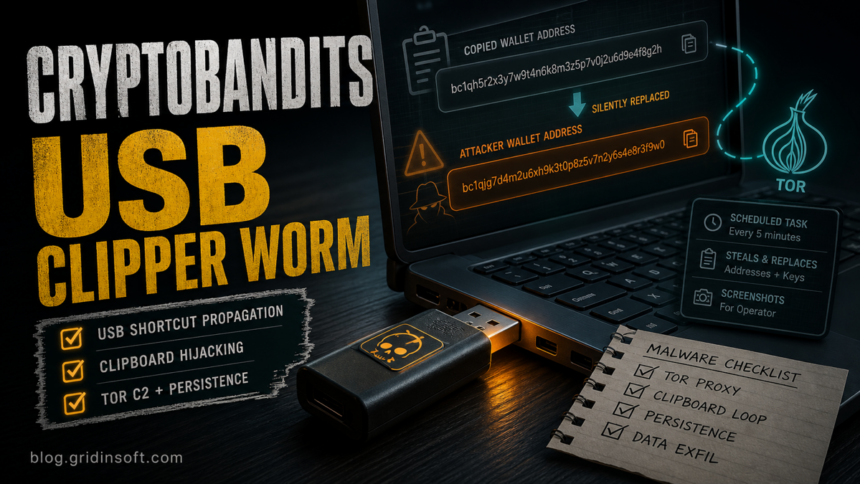
Microsoft says Trojan:Win32/CryptoBandits.A is part of a Windows crypto-clipper campaign that has been active since February 2026 and spreads through malicious USB shortcut files. The practical risk is direct: a user opens what looks like a normal document shortcut, the malware stages a worm and stealer, then monitors the clipboard for wallet addresses, seed phrases, and private keys while routing traffic through Tor.
This is not only a cryptocurrency-theft story. Microsoft describes persistence through scheduled tasks, JavaScript payloads dropped under C:\Users\Public\Documents, a renamed Tor binary called ugate.exe, local SOCKS5 traffic on localhost:9050, screenshot capture through PowerShell, and runtime code execution from a hidden-service command server. That combination makes cleanup more important than simply deleting one suspicious shortcut.
Who Is Affected
The highest-risk users are Windows users who opened files from an unknown USB drive, removable disk, shared office drive, kiosk device, crypto-tool package, or copied document shortcut and then handled cryptocurrency wallets on the same PC. The infection chain is especially deceptive because the malware hides original documents and creates new .lnk shortcuts with familiar filenames.
If Microsoft Defender reports Trojan:Win32/CryptoBandits.A, Trojan:Win32/CryptoBandits.B, Trojan:JS/CryptoBandits.A, or Trojan:JS/CryptoBandits.B, treat the alert as an active malware incident unless you have strong evidence of a lab-only sample or a contained test machine.
What CryptoBandits Does
| Signal | Why it matters |
|---|---|
Malicious .lnk files on USB media |
The shortcut may launch the worm payload while pretending to open a document. |
C:\Users\Public\Documents\ with random five-character folders |
Microsoft observed decrypted JavaScript payloads being dropped there after exclusions were added. |
ugate.exe and localhost:9050 |
The campaign uses a bundled Tor client and a local SOCKS5 proxy to hide command-and-control traffic. |
| Scheduled tasks running script payloads | Persistence can survive a reboot and can re-run the worm or stealer components. |
| Wallet address changes after copy/paste | The clipper can replace a copied crypto address with an attacker-controlled one before payment. |
What To Check First
- Do not send cryptocurrency from the affected PC until the wallet address has been verified on a clean device.
- Disconnect unknown USB drives and stop using shared removable media until it is scanned and cleaned.
- Open Task Scheduler and review recently created tasks that run JavaScript, WScript, PowerShell,
cmd.exe, or files from public user folders. - Check for unexpected
ugate.exe, Tor-related folders, hidden JavaScript files, and random subfolders underC:\Users\Public\Documents. - Look for local proxy activity on
127.0.0.1:9050orlocalhost:9050, especially when no Tor Browser or approved Tor service is installed. If the port is unfamiliar, identify what the localhost port belongs to before stopping or removing anything. - If a USB drive suddenly contains document-like shortcuts instead of the original files, compare it with our USB shortcut virus cleanup guide before opening anything from it.
Cleanup Steps After A CryptoBandits Alert
Let Microsoft Defender quarantine what it detects, but do not assume the incident is over if the PC has already opened the shortcut. A visible detection can remove one component while a scheduled task, script payload, Defender exclusion, hidden Tor binary, or infected USB shortcut recreates the activity after reboot.
- Keep the suspicious USB drive disconnected until the Windows system is clean.
- Run a full Microsoft Defender scan and review protection history for CryptoBandits, JavaScript, curl, PowerShell, or exclusion-related detections.
- Run a full Gridinsoft Anti-Malware scan to check for hidden files, scheduled tasks, startup entries, bundled modules, browser changes, and persistence that may remain after the visible alert.
- Reboot, scan again if the alert returns, and only then reconnect removable media for inspection.
- Use a clean device to change wallet, exchange, email, and password-manager passwords. Revoke active sessions and API keys where available.
- For any crypto transfer attempted during the infection window, compare the intended address with the final transaction address in the wallet or exchange history.
If the process path is wrong, the name imitates a Windows component, or high CPU started after an unknown installer, scan for hidden miners, services, startup entries, and bundled components.
Scan for CryptoBandits leftoversA newer related campaign, Silent Swap, shows the same wallet-address replacement risk through a fake Google Notes Chromium extension rather than USB shortcut propagation.
Why This Is Not The Same As A Normal Clipper
Classic clipboard hijackers usually focus on replacing copied wallet strings. CryptoBandits adds worm-like USB propagation, scheduled-task persistence, Tor-routed command traffic, screenshot collection, and remote code execution. If you need background on related cryptocurrency theft patterns, see our coverage of MassJacker malware and the older Clipminer clipboard-hijacking campaign.
Prevention
- Disable AutoPlay for removable drives and show file extensions in File Explorer.
- Do not open document-like shortcuts from USB media unless you trust the source and can verify the original file exists.
- Keep Defender and other security tools updated, and do not restore exclusions created by unknown scripts.
- Verify cryptocurrency addresses on a second trusted screen before sending funds.
- Use hardware wallets or transaction-confirmation workflows that display the destination address independently from the infected PC.
FAQ
Is Trojan:Win32/CryptoBandits.A a false positive?
There is no current public signal that this campaign is a broad false positive. Microsoft describes it as a Windows crypto clipper with USB propagation, Tor command traffic, and wallet-address theft. Treat the alert seriously unless it came from an isolated test file you intentionally handled.
Can CryptoBandits steal funds without my wallet password?
Yes. A clipper does not need to unlock the wallet if it can replace the destination address after you copy it. It can also target seed phrases, private keys, and screenshots, so password changes alone are not enough after exposure.
Should I wipe the USB drive?
If it contains malicious shortcuts or hidden originals, recover only personal documents from a clean machine, scan the media, and reformat it after backup. Do not copy shortcuts, scripts, executables, archives, or unknown folders back to the cleaned PC.
If the warning signs started after a fake predictor, trading bot, or wallet tool download, see the Aviator Predictor malware guide for fake-reputation and clipboard-swap checks before sending more crypto.
References
- Microsoft Defender Security Research Team and Microsoft Defender Experts. “Crypto Clipper uses Tor and worm-like propagation for persistence and control.” Microsoft Security Blog, June 17, 2026, accessed June 18, 2026. https://www.microsoft.com/en-us/security/blog/2026/06/17/crypto-clipper-uses-tor-worm-like-propagation-for-persistence-control/