Is TikTroid safe? Do not trust TikTroid with a TikTok password, verification code, session cookie, payment, download, or browser permission. Its public page asks for a username and advertises access to another user’s drafts, watch history, liked videos, and analytics, but those statements are claims made by the site—not proof that it can reach private TikTok data.
If you only opened the page or entered a public username, that alone does not prove your TikTok account was hacked. The right response depends on what happened next: entering credentials, sharing a one-time code, installing something, enabling notifications, or paying creates a very different risk from simply viewing the page.
Quick verdict: treat TikTroid as an unverified third-party viewer. Public profile details may already be visible to anyone, but private drafts and watch history should not be treated as accessible because a site says so. Do not test the claim with a real account.
What TikTroid Claims to Show
During a passive check on August 13, 2026, the TikTroid page displayed a username field and described itself as a profile viewer. The same page claimed access to drafts, watch history, liked videos, and engagement data. It also said it was not affiliated with TikTok or ByteDance. No real username, password, code, or account was submitted during this check.
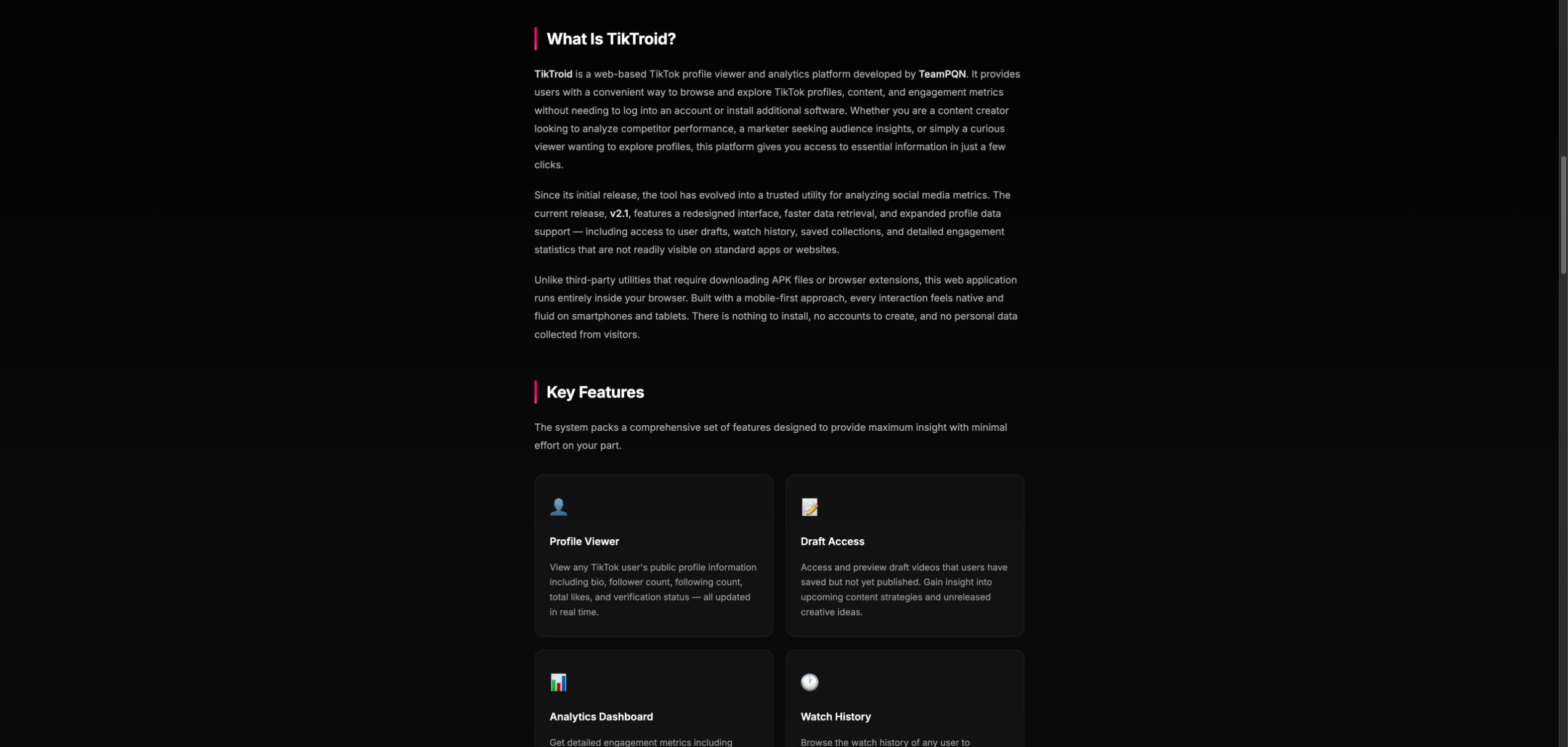
The important distinction is between public information and private account data. A public username, bio, follower count, or public post may be visible without special access. Drafts and a person’s watch history are different: TikTok documents the account owner’s data-download path inside TikTok settings. A third-party page’s marketing text does not establish that it has permission or a technical path to retrieve those private records.
Can TikTroid See Private Drafts or Watch History?
There is no evidence from the public page that TikTroid can retrieve another person’s private drafts or watch history. In fact, the page also says that private accounts expose only basic public profile details, which conflicts with its broader promise of draft and history access.
| Claim or data type | What you can safely conclude |
|---|---|
| Public username, bio, follower counts | These may already be visible on a public profile. Seeing them does not prove special access. |
| Private drafts | A claim on a third-party page is not proof that unpublished videos can be retrieved. |
| Another user’s watch history | TikTok provides data access to the account owner through account settings; the viewer page does not demonstrate authorized access. |
| Liked videos | Visibility depends on the account’s privacy settings. Do not assume a third-party viewer can bypass them. |
| “Real-time analytics” | Public engagement counts may be summarized, but that does not validate private-data claims. |
What to Do Based on What You Shared
| What happened | Likely exposure | What to do now |
|---|---|---|
| You only opened the page | No account access is established by a visit alone. | Close it. Do not return through ads or copied links. |
| You entered only a public TikTok username | The handle is already public; this alone does not prove compromise. | Stop there. Watch for follow-up redirects, permission prompts, or unusual messages. |
| You entered a TikTok or email password | The credential should be treated as exposed, especially if reused. | Change it from the official app/site, secure the email account first, and sign out unknown sessions. |
| You shared a one-time code, recovery code, QR login, or session data | An attacker may be able to complete or retain a login. | Change the password immediately, remove unknown devices, review recovery details, and enable stronger two-step verification. |
| You installed an app, extension, APK, or file | The risk extends to the device and other accounts. | Remove it, review permissions/extensions, scan the device, then reset passwords from a trusted device. |
| You allowed browser notifications | The site may be able to send misleading alerts through the browser. | Remove its notification permission and ignore “virus,” prize, or account-warning pop-ups. |
| You paid or completed a survey | Card data, subscription enrollment, or personal details may be exposed. | Contact the card issuer, check recurring charges, save evidence, and dispute unauthorized transactions. |
Secure Your TikTok Account Through the Official App
- Open TikTok directly. Do not use a login button or recovery link from the viewer page.
- Run Security checkup. In TikTok, open Settings and privacy → Security & permissions → Security checkup.
- Review devices and activity. Remove phones, browsers, or locations you do not recognize.
- Change exposed passwords. Use a unique password. If the same password protects your email, change the email password first.
- Enable two-step verification or a passkey. Never share a one-time code with a website or person.
- Check recovery details. Confirm that the linked email address and phone number still belong to you.
For a broader account-lockdown checklist, use our guide to social media security mistakes and recovery checks. For other TikTok-specific lures, the common TikTok scams guide covers fake giveaways, copied accounts, phishing links, and promoted apps.
If TikTroid Led to a Download, Extension, or App
A download changes the response. Remove the app or extension, review browser permissions, and check recent downloads before changing passwords. If the file ran or browser behavior changed, scan for unwanted extensions, stealers, startup items, and other persistence before signing back into important accounts. A clean scan cannot prove that no data was exposed, so password and session recovery still matter.
If the page only redirected or opened a suspicious tab, use the lighter steps in our what to do after clicking a suspicious link guide. You can also check the domain with the Gridinsoft Website Reputation Checker without submitting a social-media password or verification code.
Why HTTPS and a Clean Design Are Not Proof
An HTTPS connection protects traffic between your browser and the site. It does not verify that a site’s private-data claims are true, that it has a relationship with TikTok, or that later redirects are safe. A polished page can still make unsupported promises. The useful checks are the exact domain, who operates it, what data it asks for, whether it sends you to another site, and whether the claimed access matches the platform’s official controls.
How to Avoid Private-Viewer Traps
- Assume private drafts, histories, messages, and saved items stay private unless the account owner shares them through an official feature.
- Do not sign into TikTok through an unrelated viewer, generator, analytics page, or verification tool.
- Never provide a one-time code, recovery code, QR login, cookie, or copied session value.
- Do not install an extension or APK to “unlock” a profile.
- Leave when the flow switches to surveys, payments, notification prompts, or repeated redirects.
- Use TikTok’s official app and support pages for privacy settings, account activity, and your own data request.
FAQ
Does TikTroid work?
It may display information that is already public, but the public page does not prove that it can retrieve another user’s private drafts or watch history. Do not use a real account to test those claims.
Can someone hack my TikTok account with only my username?
A public username alone is not a password or login token and does not prove an account takeover. Risk rises if you also provide a password, one-time code, recovery information, session data, or install software.
What if I entered my password after clicking Continue?
Change the TikTok password through the official app or site, secure the linked email account, remove unknown devices, and enable two-step verification. If the password was reused, change it everywhere else it was used.
Can a third-party site view my TikTok drafts?
Treat that promise as unverified. TikTok’s official data-request process is available to the account owner inside account settings; a marketing claim from an unrelated viewer does not demonstrate access to unpublished drafts.
References
- TikTroid. “TikTroid — Premium TikTok Profile Viewer & Analytics Platform.” TikTroid, accessed August 13, 2026. https://tiktroid.net/
- TikTok. “Account safety.” TikTok Help Center, accessed August 13, 2026. https://support.tiktok.com/en/safety-hc/account-and-user-safety/account-safety
- TikTok. “Requesting your data.” TikTok Help Center, accessed August 13, 2026. https://support.tiktok.com/en/account-and-privacy/personalized-ads-and-data/requesting-your-data