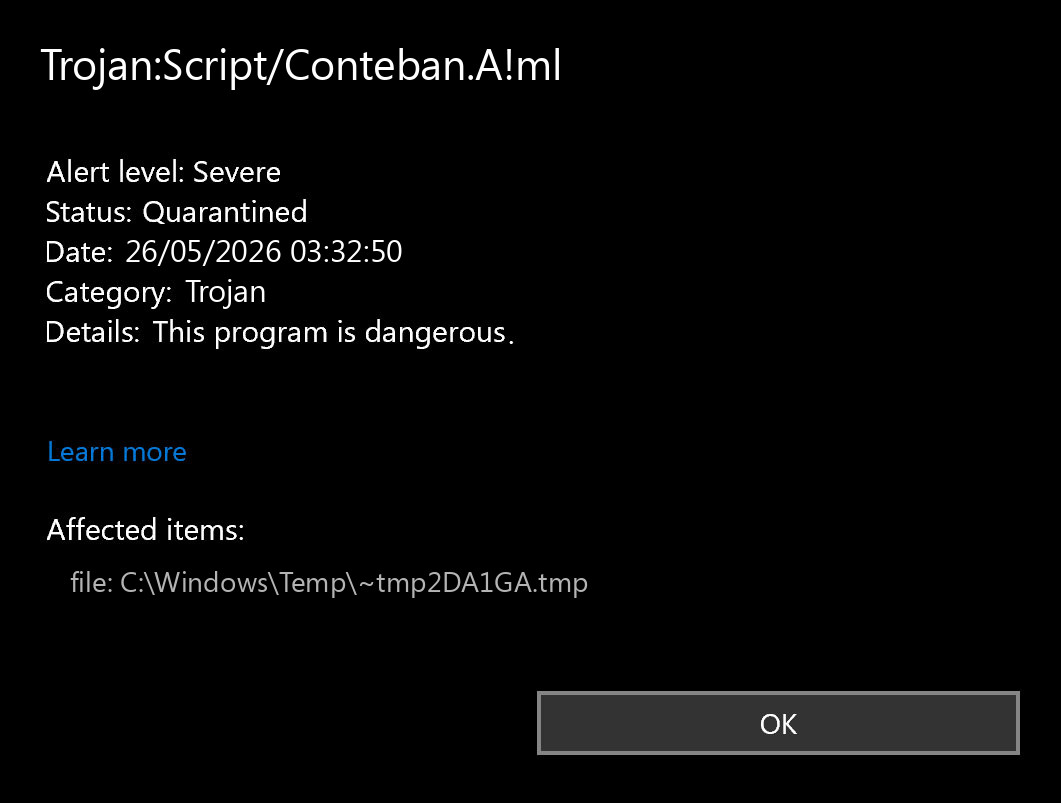
Trojan:Script/Conteban.A!ml is a Microsoft Defender detection for a suspicious script-related item. If Defender quarantined it during an archive extraction, browser download, ROM/mod installer, email attachment, or software bundle, do not restore the file just to “check.” Keep it quarantined, note the affected path, delete the source download if it came from an untrusted place, update Defender, and run a full scan.
The name alone does not prove that your whole PC is infected. It tells you Defender matched a suspicious item. The right response depends on where the file came from, whether it was executed, and whether the alert returns after cleanup. If you want a second-opinion cleanup check after Defender quarantines the item, run Gridinsoft Anti-Malware to look for leftover startup entries, bundled apps, hidden scripts, and browser changes.
If your Defender alert is Trojan:Win32/Skeeyah.A!rfn and the affected item is in a browser cache or download path, use the separate Skeeyah.A!rfn removal guide; it focuses on quarantine, cache cleanup, and when reinstall is unnecessary.
Quick verdict
Microsoft lists Trojan:Script/Conteban.A!ml in its Security Intelligence encyclopedia and says Microsoft Defender Antivirus detects and removes it. Microsoft also notes that detailed threat behavior is not currently available for this detection, so avoid guides that claim exact persistence keys, payloads, or command-and-control details without evidence.
In practical terms, treat the alert as real until you have a reason not to. A cracked installer, emulator pack, ROM archive, random ZIP/RAR, email attachment, or file from a forum should stay removed. A clean file you created yourself, a signed vendor file, or a repeat alert in Defender history may need false-positive handling, but still should not be restored blindly.
Threat summary
| Detection name | Trojan:Script/Conteban.A!ml |
| Detected by | Microsoft Defender Antivirus |
| Category | Trojan / suspicious script-related item |
| Common user scenarios | Archive extraction, browser cache, email attachments, bundled installers, game mods, ROM-related downloads, older local archives |
| Best first action | Keep quarantine/removal, update Defender, run a full scan, and verify the affected file path |
| Possible false positive? | Possible, especially when only one product detects a file from a trusted source, but it needs file/path/source verification first |
Why it appears during archive extraction
Many users see this detection when 7-Zip, WinRAR, Windows Explorer, or another tool starts unpacking an archive. That timing matters. Defender may not inspect every compressed inner file until the archive is opened, extracted, copied, or written to a temporary folder. When the suspicious item becomes visible on disk, Defender can block it before it runs.
If the alert appeared while extracting a ROM pack, repack, mod, password-protected RAR, or installer that also showed an offer prompt, assume the download is unsafe unless you can prove otherwise. Delete the original archive too, not only the quarantined temporary file. If you need the legitimate content, obtain it again from an official source.
Is Trojan:Script/Conteban.A!ml a false positive?
It can be, but the safe answer is conditional. Microsoft Q&A threads for this detection include cases involving email clients, Word documents, archives, and repeat alerts after remediation. Those examples show why the file path and repeat behavior matter more than the detection name alone.
| Situation | Likely risk | What to do |
| The file came from a crack, keygen, torrent, ROM site, mod pack, fake update, unknown Discord/Telegram link, or bundled installer. | High | Do not restore it. Remove the file and source archive, then run full and second-opinion scans. |
The affected item is in Downloads, Temp, browser cache, or an archive extraction folder. | Medium to high | Delete the source download and rescan. If the alert does not return, it may have been blocked before execution. |
| You created the document/archive yourself and multiple reputable scanners show clean results. | Ambiguous | Do not restore immediately. Submit the file to Microsoft as a possible incorrect detection and wait for updated definitions. |
| The alert returns after reboot or after opening the same app/email client/browser profile. | Medium to high | Check the application, extension, mailbox item, cache, startup entries, and scheduled tasks. |
| Defender says the item was removed, but Protection History keeps showing old entries. | Lower, if scans are clean | Run a fresh full scan and check dates carefully before assuming a new infection. |
Why Trojan:Script/Conteban.A!ml keeps popping up
If Trojan:Script/Conteban.A!ml keeps popping up after Defender removes it, use the affected path as the clue. A repeat alert from the same ZIP, RAR, ROM pack, browser cache, or email attachment usually means the source file is still being opened, synced, restored, or extracted again. Delete the source archive or message, clear the browser/download cache if that is the path, then run a fresh full scan.
If the detection returns after reboot in a new folder, check startup apps, scheduled tasks, browser extensions, and recently installed bundled software. That pattern matters more than the name alone, because it can mean another program is restoring the script-related item.
Safe removal and verification steps
- Open Windows Security > Virus & threat protection > Protection history.
- Record the exact detection name, affected item path, action taken, and timestamp.
- Choose Remove or keep the item quarantined. Avoid Restore unless you have confirmed the file is clean.
- Delete the original download, archive, installer, email attachment, or extracted folder that triggered the alert.
- Update Microsoft Defender security intelligence, then run a Full scan.
- If the alert returns or Defender reports remediation incomplete, run Microsoft Defender Offline, then use Gridinsoft Anti-Malware for a second-opinion cleanup scan.
- Check startup locations: Startup apps, Task Scheduler, Services, browser extensions, and suspicious folders under
AppData,Temp, andDownloads. - Review the scan report for leftover startup tasks, bundled apps, browser changes, suspicious scripts, and hidden files in user folders.
- If you ran a suspicious installer or crack, change important passwords from a clean device and watch for account alerts.
What not to do after the alert
- Do not restore the file because a forum comment says every
!mldetection is a false positive. - Do not keep testing the same archive by extracting it repeatedly on your main PC.
- Do not upload private documents, password archives, or sensitive files to public multi-scanner sites.
- Do not install several real-time antivirus products at once. Use one real-time product and separate on-demand scans when needed.
- Do not trust detailed behavior claims unless they come from Microsoft, a reputable researcher, or your own forensic evidence.
How to submit a suspected false positive
If the file is from a trusted source and you have a reproducible reason to believe Defender is wrong, submit it to Microsoft Security Intelligence rather than restoring it immediately. Include the exact detection name, Defender definition version, file source, and why you believe the detection is incorrect. Microsoft provides a submission portal for files that may be malware or may have been incorrectly classified.
If the file contains private data, avoid sending it unless you understand the privacy impact. For sensitive business files, use the appropriate Microsoft enterprise submission route or ask the vendor to submit the file.
Related Defender detections
If you are comparing this alert with another Microsoft Defender name, start with the Gridinsoft guide to Microsoft Defender detection names. Related script and trojan guides include Trojan:Script/Wacatac.B!ml, Trojan:Script/Ulthar.A!ml, Trojan:Script/Sabsik.FL.A!ml, Trojan:Win32/Suschil!rfn, Trojan:Win32/Egairtigado!rfn, and Trojan:Win32/Agent. The cleanup workflow overlaps, but the affected file path and source should drive your final decision.
Prevention tips
- Download installers, emulators, mods, and tools only from official project or vendor pages.
- Avoid archives that require disabling Defender, adding exclusions, or running a “setup helper” first.
- Keep Windows, browsers, archive tools, and Microsoft Defender definitions updated.
- Use a standard Windows account for daily work when possible.
- Keep backups that are disconnected or protected from normal user write access.
Archive-triggered Defender alerts are also a reminder to keep archive tools patched. For the latest 7-Zip NTFS handler issue, see the 7-Zip CVE-2026-48095 update guide before opening suspicious archives again.
FAQ
Is Trojan:Script/Conteban.A!ml definitely malware?
It is a real Microsoft Defender detection, but your specific alert still needs context. A file from a risky archive or installer should be treated as malicious. A trusted, self-created, or signed file may need false-positive review.
Can I restore the quarantined file?
Only restore it after verifying the source, path, signature, and scan results. If the file came from a crack, repack, torrent, ROM archive, unknown link, or bundled offer installer, do not restore it.
Why did Defender detect it only when I extracted a ZIP or RAR?
Compressed files may be scanned more deeply when their contents are unpacked or written to a temporary folder. The alert can mean Defender blocked a suspicious item before it had a chance to run.
What if Defender removed it and full scans are clean?
That usually means the immediate item was handled. Still delete the original source archive or installer, check Protection History dates, and watch whether the alert returns after reboot or after opening the same app.
Should I use a second-opinion scanner?
Yes, when the file source is suspicious, the alert returns, or you ran the file before it was blocked. A second-opinion scan can help find leftover malware, unwanted apps, browser changes, and persistence entries.
Related Defender alert: If the warning name is TrojanDownloader:JS/Nemucod, use our Nemucod Defender removal guide to separate active script/downloader risk from browser-cache or stale Protection History alerts.
Another exact Defender label: If the warning name is Trojan:Win32/VMProtect, follow this VMProtect Defender triage guide to separate a likely false positive from a risky packed executable.