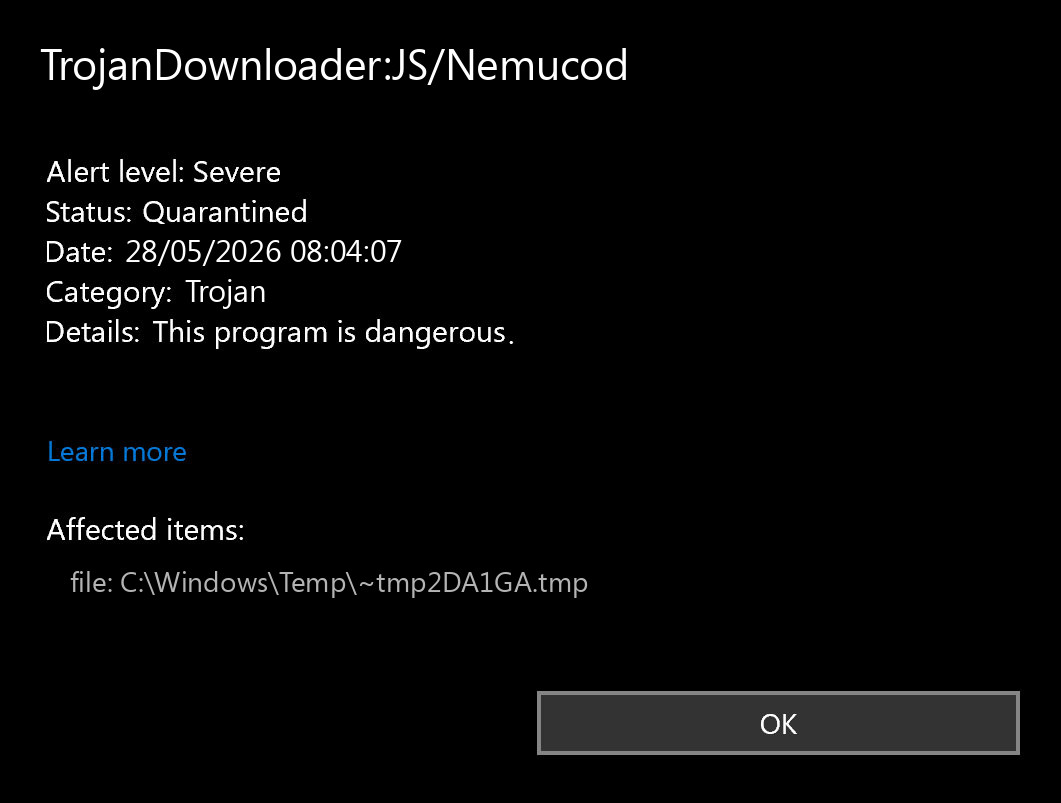
The alert label is TrojanDownloader:JS/Nemucod. It is a Microsoft Defender detection for a JavaScript downloader that can pull ransomware, password stealers, or other malware onto Windows. Treat the alert as serious first, but judge the next step by the affected path. A file in Downloads, Temp, an email attachment, or a script you opened is higher risk than a quarantined browser, Discord, Teams, or Roblox WebView2 cache item that never ran.
Do not restore the item to test it. Save the detection name and path from Protection History, let Defender quarantine or remove it, update security intelligence, and run a full second-opinion scan. If the alert returns after reboot or the file was executed, check startup entries, scheduled tasks, browsers, and recent downloads before clearing Defender history.
Quick Verdict
| Detection | TrojanDownloader:JS/Nemucod |
| Typical risk | Downloader script that may fetch ransomware, stealers, or other malware. |
| First action | Leave it quarantined, note the path, update Defender, and scan the whole system. |
| False-positive/cache lane | Possible when the path is only a browser/app cache and no file was opened or executed. |
| Do not do | Do not restore, exclude, or run the detected script to “see what it does.” |
What TrojanDownloader:JS/Nemucod Means
Microsoft classifies TrojanDownloader:JS/Nemucod as a severe downloader detection. The important word is downloader: the detected script may not be the final payload. Its job is to contact remote infrastructure, download another program, and launch it without your consent. Microsoft’s threat description ties Nemucod variants to ransomware and other malware families [1].
That does not mean every alert proves a full infection. Defender can catch a malicious script before it runs, inside a compressed attachment, inside a browser cache, or inside an app cache. Your cleanup decision should start with the affected path.
For a related browser-cache redirect label, our Trojan:HTML/Redirector!MTB cleanup guide explains how to separate a cached HTML redirect from a persistent browser or malware problem.
Read the Affected Path First
Open Windows Security → Virus & threat protection → Protection history, then expand the Nemucod event. Copy the affected item path before deleting caches or clearing history.
| Path shown by Defender | What it usually means |
C:\Users\...\Downloads\, %TEMP%, email attachment, extracted archive |
Higher risk. Remove the source file and scan before reopening the same archive or installer. |
| Browser cache, Edge/Chrome/Firefox cache, Discord cache, Teams cache, Roblox WebView2 cache | Often a cached script or ad/resource. Still scan, but do not assume the PC is compromised if Defender quarantined it and follow-up scans are clean. |
Startup folder, Task Scheduler, Run registry key, unknown script path |
Possible persistence. Treat as active malware until removed and verified. |
| Defender history or deleted temp file only | May be a stale Protection History entry. Confirm the file no longer exists before clearing history. |
How to Remove TrojanDownloader:JS/Nemucod Safely
- Disconnect if the script ran. If you opened a suspicious
.js,.vbs, archive, fake invoice, crack, mod, or installer before the alert, disconnect the PC from the network while you scan. - Keep the item quarantined. Choose remove or quarantine in Defender. Do not restore it and do not add an exclusion.
- Update protection. In Windows Security, update Microsoft Defender security intelligence, then run a full scan.
- Scan with Gridinsoft Anti-Malware. A second-opinion scan can catch the payload or persistence that a downloader attempted to install, especially startup items, suspicious scripts, unwanted apps, and browser changes.
- Delete the source, not only the detected cache. Remove the original archive, email attachment, installer, game mod, or fake update that led to the alert.
- Check persistence. Review Startup Apps, Task Scheduler, browser extensions, recently installed apps, and suspicious scripts in
AppDataorTemp. - Reboot and rescan. If TrojanDownloader:JS/Nemucod returns after reboot, treat it as unfinished cleanup rather than a harmless one-time cache hit.
After uninstalling the suspicious app or deleting the visible threat, use Gridinsoft Anti-Malware to check hidden files, startup entries, scheduled tasks, bundled apps, browser changes, and other persistence points that can restore malware.
Download Anti-MalwareWhen It Is Probably a Cache or Stale Alert
Recent user reports around TrojanDownloader:JS/Nemucod.HD often mention Roblox WebView2 or browser cache paths, with no file intentionally downloaded and clean follow-up scans [3]. In that case, the safer interpretation is: Defender saw a cached script/resource and quarantined it before it became an installed program.
That is not the same as “ignore it.” Clear the affected app or browser cache only after saving the path, update Defender, run a full scan, and watch whether the alert comes back. If the path points only to a cache file that no longer exists and both Defender and Gridinsoft scans are clean, a factory reset is usually excessive.
Do Not Clear Defender History Too Early
Some users get stuck because Windows Security still shows the old Nemucod event after the file was removed, or the action button no longer works [2]. Clear Protection History only after you confirm the affected file path is gone and scans are clean. Clearing history first can hide the path you need for cleanup.
If the alert points to C:\ProgramData\Microsoft\Windows Defender\Scans\History or only an old history entry, the problem may be a stale record rather than a live file. Still, verify with a scan before deleting history files.
What to Check After Cleanup
- Startup Apps and Task Manager for unknown scripts or recently added entries.
- Task Scheduler for commands that launch
wscript.exe,cscript.exe, PowerShell, or files inTemp/AppData. - Recent downloads, email attachments, game mods, cracked installers, and fake update prompts.
- Browser extensions and notification permissions if the alert came after a suspicious site or ad.
- Accounts and saved sessions if you ran the file before Defender blocked it.
For related Defender naming rules, see our Microsoft Defender detection-name guide. If the alert is a different script family, compare the response with Trojan:Script/Conteban.A!ml and Trojan:Script/Wacatac.B!ml. If you ran a suspicious file and nothing happened right away, read whether malware can activate later before assuming the system is safe.
FAQ
Is TrojanDownloader:JS/Nemucod always malware?
It is a serious Defender detection and should be treated as malicious until you verify the path and source. A cache-path alert can still be a blocked malicious script, but it may not mean the malware installed successfully.
What about TrojanDownloader:JS/Nemucod.HD or Nemucod.RH?
Those are variant suffixes. Use the same workflow: preserve the path, quarantine/remove, scan, and decide whether the path suggests an active file, a downloaded archive, or only browser/app cache.
Should I reset Windows after a Nemucod alert?
Usually not if the item was quarantined, the path was only cache, and multiple scans are clean. Consider a deeper recovery plan if the script ran, accounts were compromised, startup entries keep returning, or scanners keep finding payloads.
Can I restore the file if I think it is a false positive?
Do not restore a Nemucod detection casually. If the file came from a trusted source and you have a business reason to contest it, submit the file to the vendor from a controlled environment instead of running it on your main PC.
References
- Microsoft Security Intelligence. “TrojanDownloader:JS/Nemucod threat description.” Microsoft, updated July 24, 2019, accessed May 28, 2026. https://www.microsoft.com/en-us/wdsi/threats/malware-encyclopedia-description?Name=TrojanDownloader%3AJS%2FNemucod
- Microsoft Q&A. “Windows Defender Reported TrojanDownloader:JS/Nemucod but Can’t Action it.” Microsoft Learn, accessed May 28, 2026. https://learn.microsoft.com/en-us/answers/questions/3749438/windows-defender-reported-trojandownloader-js-nemu
- Reddit r/antivirus. “Found Trojan, is it safe?” Reddit, accessed May 28, 2026. https://www.reddit.com/r/antivirus/comments/1s5shuz/found_trojan_is_it_safe/