PUA:Win32/Presenoker is a Microsoft Defender detection for a potentially unwanted application, not a single fixed virus family. Treat it as unsafe unless you clearly recognize the app, downloaded it from the official source, and accept the behavior. In most cases, the safer action is to remove the detected file, uninstall the related app, and run a full scan.
Should I remove PUA:Win32/Presenoker?
- Remove it if it came with a cracked app, torrent client, miner, driver updater, downloader, or unknown installer.
- Do not restore it from quarantine just to make a bundled installer work.
- Check the file path before deciding: source, publisher, signature, and repeat detections matter.
- Run a full scan if Defender says the threat was allowed, active, or remediation is incomplete.
What Is PUA:Win32/Presenoker?
PUA:Win32/Presenoker is a Defender name for software that falls into the “potentially unwanted application” category. Microsoft says Defender detects and removes this threat, and lists possible symptoms such as slow performance, added or modified files, desktop-setting changes, freezes or crashes, and reduced storage space.
The key point is that Presenoker is a detection label. It does not always describe one identical program. Defender may apply the name to bundled installers, adware-like components, download clients, miners, cracked software packages, or tools that behave in a way Microsoft considers unwanted for normal users.
| Detection | PUA:Win32/Presenoker |
|---|---|
| Detected by | Microsoft Defender Antivirus |
| Category | Potentially unwanted application |
| Common sources | Bundled installers, downloaders, cracked apps, torrent-related tools, miners, driver/tweaker utilities |
| Best first action | Quarantine or remove it, then inspect the related app and file path |
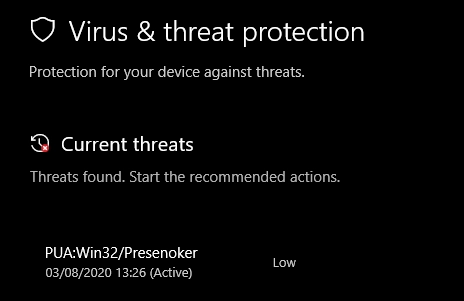
Is Presenoker a Virus?
Not in the narrow sense. Microsoft names it as a PUA, which means the software may not be a self-spreading virus, but it can still be risky or unwanted. The practical question is not “is the label scary?” but “what file was detected, where did it come from, and what behavior did it show?”
If the file came from a crack, unofficial installer, fake updater, bundled download, or miner package, remove it. If it belongs to a legitimate app you intentionally installed, verify the publisher and source first. Do not allow the detection unless you understand why Defender flagged it and you accept the risk.
Why Defender Flags Presenoker
Defender can flag a Presenoker-related file when an installer or app shows unwanted behavior. That can include bundled offers, ad injection, unexpected browser or desktop changes, unclear installation flow, network behavior, or a package that brings additional software the user did not clearly choose.
In our sample analysis, the detected file showed advertising and redirect behavior connected with epoolsoft domains. That sample is useful evidence, but it does not mean every Presenoker alert is the exact same executable or campaign.
How to Decide: Allow or Remove?
| What you see | Recommended action |
|---|---|
| Detected file is in Downloads, Temp, AppData, or a crack/keygen folder | Remove it and delete the source package |
| Detected app changed browser search, homepage, shortcuts, or notifications | Remove the app and reset browser settings |
| Detection belongs to a torrent client, miner, or bundled installer | Remove unless you intentionally accept the behavior and source |
| Defender says remediation incomplete | Run a full scan, check startup entries, and use a second-opinion scanner |
| You believe it is a false positive from an official app | Verify digital signature, download source, and submit the file to Microsoft if needed |
Safe File Check
- Open Windows Security → Protection history and note the exact file path.
- Check whether the file is in a normal program folder or a suspicious location such as
Downloads,Temp,AppData, or a crack folder. - Right-click the file, open Properties, and check the digital signature if the file still exists.
- Compare the app source with the official vendor website. Avoid repacked installers from download portals.
- If you need a second opinion, scan the file or URL before restoring anything.
Second opinion scan
Still not sure whether the Presenoker alert is safe?
Keep the file quarantined, then scan the system for bundled apps, adware, browser changes, and startup entries that a one-file detection can miss.
How to Remove PUA:Win32/Presenoker
- In Windows Security, choose Remove or Quarantine. Do not choose Allow unless you have verified the source.
- Uninstall the related app from Settings → Apps, especially if it is a downloader, crack, miner, driver updater, or unknown utility.
- Delete the original installer archive from Downloads or the folder where it was launched.
- Open Task Manager → Startup apps and disable unfamiliar entries.
- Open Task Scheduler and check for new or suspicious tasks.
- Review Chrome, Edge, and Firefox extensions, notification permissions, homepage, and search engine settings.
- Run a full Microsoft Defender scan. If alerts return, run GridinSoft Anti-Malware as a second-opinion cleanup scan and check browser/startup persistence.
When Presenoker Keeps Coming Back
If the detection returns after removal, the source is usually still present. Common causes include a leftover installer, a startup task, a browser extension, a bundled updater, or an app that keeps reinstalling the component. Remove the parent app, not only the single detected file.
Related Defender and PUA Guides
For naming patterns, see our Microsoft Defender detection reference. For related PUA cases, check PUA:Win32/GameHack, PUA:Win32/Vigua.A, PUA:Win32/Softcnapp, PUA:Win32/Packunwan, PUADlManager:Win32/OfferCore, and the PUA and browser hijacker removal guide.
FAQ
Is PUA:Win32/Presenoker dangerous?
It can be. It is a potentially unwanted application detection, not always a classic virus, but the related app may show ads, change settings, install bundled software, or reduce system trust.
Should I allow Presenoker in Defender?
Usually no. Only allow it if you intentionally installed the app from an official source, verified the publisher, and accept the behavior Defender is warning about.
Why does Presenoker appear with uTorrent or miners?
Download clients, miners, and bundled installers often trigger PUA detections because they may include unwanted offers, risky behavior, or components most users did not clearly choose.
Can Presenoker steal passwords?
Presenoker is a PUA label, so behavior depends on the detected file. Do not assume it is a password stealer by name alone, but scan the system and remove suspicious bundled software.
What if I think it is a false positive?
Keep the file quarantined, verify the source and signature, then submit the file to Microsoft for review instead of blindly restoring it.
References
- Microsoft Security Intelligence. “PUA:Win32/Presenoker.” Microsoft, accessed June 2, 2026. https://www.microsoft.com/en-us/wdsi/threats/malware-encyclopedia-description?name=PUA%3AWin32%2FPresenoker
- Microsoft Security Intelligence. “Submit files for malware analysis.” Microsoft, accessed June 2, 2026. https://www.microsoft.com/en-us/wdsi/filesubmission