


PUADlManager:Win32/OfferCore is a Microsoft Defender alert for a potentially unwanted installer or downloader bundle. Windows may also show the close spelling PUADIManager:Win32/OfferCore. Treat the alert as a removal case if it came from a download portal, fake update, repack, cracked installer, Cheat Engine wrapper, %USERPROFILE%\Downloads, %TEMP%, or another ad-driven installer. An official download source and a valid signature help identify the publisher, but they do not establish that the installer is bundle-free. Keep it quarantined while you verify the exact file and look for a bundle-free version.
Should you remove PUADlManager:Win32/OfferCore?
- Remove it on a normal PC. OfferCore-style installers can add extra apps, browser changes, notification spam, startup entries, or scheduled tasks.
- Do not restore it from quarantine just to finish a free-app installation or a crack/repack setup.
- Check the affected item path first: Downloads, Temp, Desktop archives, and unknown app folders are strong removal signals.
- If the installer ran: scan for bundled components. The cleanup section below includes a Full Scan route and optional checks for apps, browsers, startup entries, and Task Scheduler.
| Detection name | PUADlManager:Win32/OfferCore |
| Also seen as | PUADIManager:Win32/OfferCore |
| Category | Potentially unwanted application / download manager / bundler |
| Common source | Freeware installers, download portals, fake update pages, cracks, repacks |
| Best action | Remove the installer and bundled apps, then scan for leftovers |
What is PUADlManager:Win32/OfferCore?
Microsoft Security Intelligence lists PUADlManager:Win32/OfferCore as a Microsoft Defender Antivirus detection. In practice, this alert usually points to the wrapper around a download rather than the clean app the user wanted. The visible program may be legitimate, while the installer around it adds offers, telemetry, browser changes, companion apps, or additional downloaders.
That is why the affected item path matters. Downloading from the developer’s own site reduces the risk of an unrelated repack, but an official installer can still include optional offers. Check the detected installer separately from the application you intended to install, especially if the setup added more software than you expected.
What the affected item path tells you
| Downloads, Desktop, Temp, archive extraction | Remove it. These are common places for bundled installers, repacks, and fake update downloads. |
| Official vendor folder with a valid publisher | Pause and verify the exact installer and its bundled offers. Prefer a bundle-free package from the publisher; a valid signature alone is not a reason to restore the detected wrapper. |
| AppData, ProgramData, startup folder, or unknown updater task | Treat it as a persistence clue. Remove the source app and scan for leftovers. |
| Browser profile, extension folder, or notification-related path | Check extensions, notification permissions, homepage/search settings, and managed policies. |
One common follow-up is a security product, browser add-on, driver updater, or optimizer that the user did not intentionally choose. If the bundle added ReasonLabs software, use the RAV Endpoint Protection and rsEngineSvc.exe cleanup guide to remove the product and check for leftover services or browser extensions.
If you ran a CheatEngine75 setup, follow the Cheat Engine and bundled-app removal steps to distinguish the downloaded installer from the installed program and any companion apps. Removing one does not necessarily remove the others.
Is OfferCore a virus or a false positive?
OfferCore is usually classified as a potentially unwanted application, not as a destructive virus. That still does not make it safe to allow. Bundlers can change browser settings, install companion apps, create scheduled tasks, or introduce adware. A valid signature or official download can support an exact-file review, but neither rules out a correct PUA detection: Microsoft includes software bundling in its PUA criteria. If the publisher disputes the detection, seek a review of that exact file before restoring it, rather than treating the source or signature as a verdict.
If the file came from a crack, keygen, mod installer, game trainer, fake browser update, or “recommended download” page, do not treat the detection as a harmless false positive. Remove the item and replace the app with a clean installer from the vendor’s own site.
How to remove PUADlManager:Win32/OfferCore
Keep the detected installer quarantined. If it ran or unwanted apps or browser changes appeared, use the download button below to install Gridinsoft Anti-Malware, update its database, run a Full Scan, review and remove detected threats, then restart. Check whether the original symptom returns; the scan does not prove that no compromise occurred.
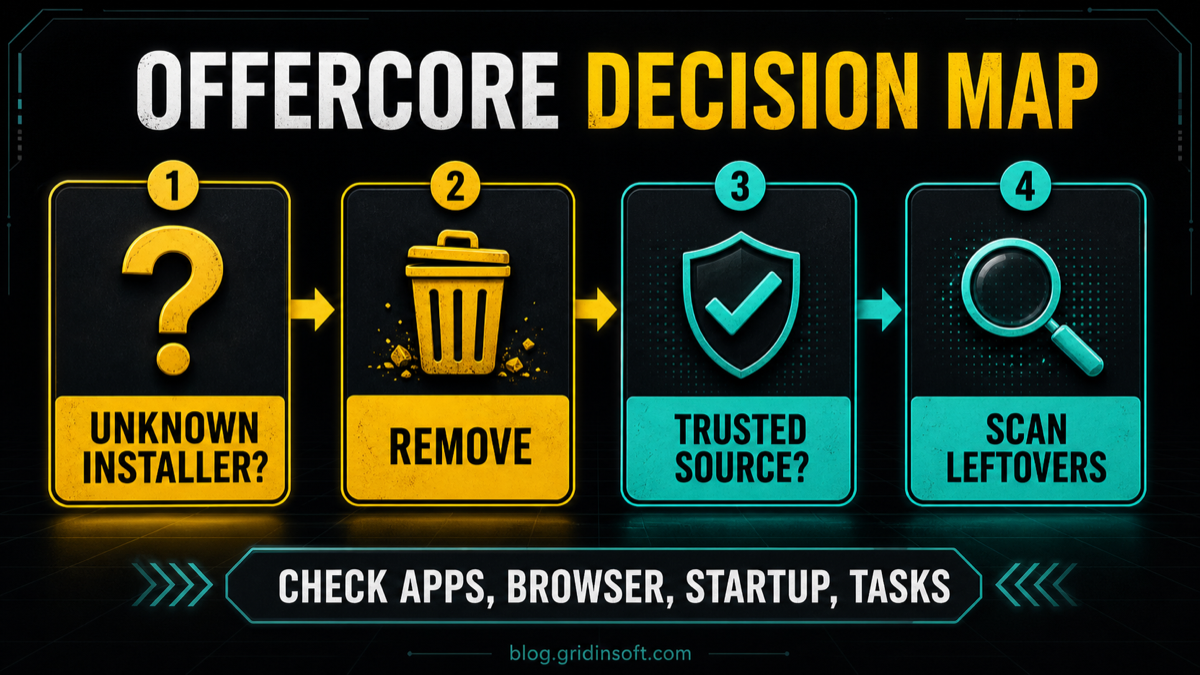
If you prefer manual cleanup, or symptoms remain after scanning, use the affected path and installation time to guide these checks:
- Keep the Defender action as Remove or Quarantine.
- Delete the original installer, ZIP, or extracted folder from
%USERPROFILE%\Downloads, Desktop,%TEMP%, or the browser download folder. - Open Apps and uninstall programs added at the same time, especially browser tools, driver updaters, optimizers, VPN trials, or “security” apps you did not choose.
- Remove unknown Chrome, Edge, Firefox, or Opera extensions.
- Check notification permissions and reset homepage/search provider changes.
- Open Task Scheduler and disable unknown updater, installer, or browser-related tasks created at the same time as the alert.
- Reboot and run a full system scan.
If the alert came from a bundle, fake update, repack, Temp, Downloads, or returns after reboot, quarantine may remove the visible file while a bundled app, browser change, startup entry, or scheduled task remains. Gridinsoft Anti-Malware can check detections, hidden files, startup entries, scheduled tasks, bundled apps, browser changes, and other persistence points that can recreate the symptoms.
Defender can quarantine the visible file, but repeated alerts may mean a loader, scheduled task, service, browser change, or bundled component is recreating it. Scan the PC before trusting the cleanup.
Scan for OfferCore leftoversWhat if Windows Security cannot delete it?
If Windows Security shows the alert but the Remove button loops, glitches, or only clears the visible history, do not keep clicking Allow. Reboot once, update Microsoft Defender intelligence, and run a full scan. Then remove the original download source manually and check recently installed apps. If the affected item path still points to a file that exists on disk, delete that source file from a normal account or Safe Mode.
A card still visible after reboot may be an old record. Expand it in Protection History and compare its detection time, status, and affected path with the previous event. A Threat blocked entry records removal; Threat quarantined records an isolated file; Remediation incomplete needs attention to the details in that card. If a follow-up scan finds a new event or the file reappears at the same path, investigate the installer or component recreating it. If only the old record remains and fresh scans find nothing at that path, do not restore a file or delete unrelated Defender data merely to clear the card.
Why does OfferCore keep coming back?
Once you have confirmed a new detection, possible sources include the original installer or extracted files still on disk and a companion updater that downloads the bundle again. Use the new event’s path to identify that source, then remove the unwanted app or use the cleanup scan above. Clearing Protection History changes the visible record; it does not remove a source that is recreating the file.
If the symptoms are mostly redirects, search changes, pop-ups, or browser notifications, follow the PUA/browser hijacker removal guide after removing the installer. For nearby Microsoft Defender PUA names, see the Microsoft Defender detection names guide, PUADIManager:Win32/OnePlatform removal, and PUADlManager:Win32/InstallCore guide.
FAQ
Can I allow PUADlManager:Win32/OfferCore?
Keep it quarantined while you review the exact file. An official source and valid signature do not exclude unwanted bundles. Prefer a bundle-free installer; if you believe the detection is mistaken, obtain an exact-file review before choosing Allow.
Is PUADIManager the same as PUADlManager?
Users and some tools may show the close spelling PUADIManager. Treat it as the same OfferCore-style PUA/downloader decision: verify the affected file path and source before restoring anything.
Will removing the alert uninstall the app I wanted?
It may remove the wrapper installer, not the clean app. If you still need the app, download it again from the official developer instead of a download portal or repack site.
Does clearing Protection History remove OfferCore?
No. Clearing history only removes the visible record. If the installer, updater task, bundled app, or browser change remains, the alert or symptoms can return.
References
- Microsoft Security Intelligence. “PUADlManager:Win32/OfferCore threat description.” Microsoft, published October 11, 2021, accessed July 2, 2026. https://www.microsoft.com/en-us/wdsi/threats/malware-encyclopedia-description?Name=PUADlManager%3AWin32%2FOfferCore
- Microsoft. “How Microsoft identifies malware and potentially unwanted applications.” Microsoft Learn, accessed October 7, 2026. PUA classification criteria.
- Microsoft. “Protection History in the Windows Security App.” Microsoft Support, accessed October 7, 2026. Protection History event states.



not sure what happened, I’ve been seeing PUADlManager
/OfferCore appears in my Windows Security check. I want to completely remove it from my Windows, not just delete the history, as that would only remove the record in Microsoft Defender but not the actual malware. It shows up in quarantine, but every time I try to delete files, the process glitches and doesn’t work. I will try to use your tool now.